About the Migration Utility
Oracle Exadata Cloud Infrastructure Migration Utility
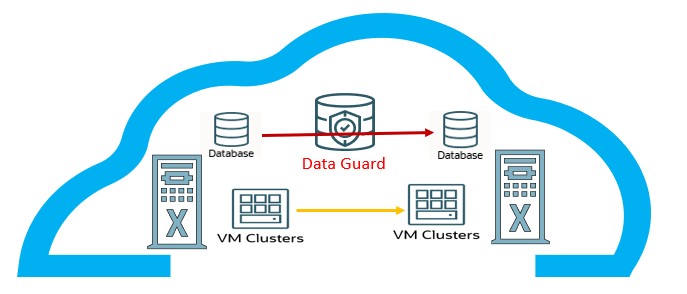
Oracle Exadata Cloud Infrastructure Migration Utility is a lightweight tool that can be installed on any Linux client machine with access to the OCI Control Plane.
Using the specified source Infrastructure OCID, the utility will discover and capture the configuration of the current environment and create input templates for the Infrastructure, VM Cluster(s),databases, and PDBs. These templates can be modified as required to accommodate the intended migration target. The utility will validate the template checking for any potential problems in the setup and configuration. Upon successful validation, the utility will provision a new Exadata Infrastructure, create desired VM Cluster(s) and migrate the databases. Databases are migrated with no downtime by instantiating standby databases on the target infrastructure and switching over to the standby on the target infrastructure. Additionally, the utility provides an option to migrate PDBs from a source CDB to a target CDB. Additionally, the utility provides an option to migrate PDBs from a source CDB to a target CDB.
When to Use the Utility
This utility is particularly useful in scenarios such as:
- Performing hardware refreshes
- Migrating fixed-shape systems to elastic systems (for example, X7 to X11MV, X8 to X11MV, or Base System to X11MV)
- Migrating between elastic systems
- Migrating between fixed-shape Base Systems
- Redistributing databases across clusters
- Relocating PDBs across container databases
- Retiring old systems
Key Capabilities
- Oracle Exadata Cloud Infrastructure Migration Utility supports:
Migration between ExaDB-D systems
- Migration between ExaDB-C@C systems
- Migration from ExaDB-C@C to ExaDB-D systems
- Supported Target Exadata Infrastructure models:
- For ExaDB-D : Base system, X8M, X9M, X11M, and X11MV
- For ExaDB-C@C: X8M, X9M, X10M, X11M, and X11MV
Key Benefits
- Validates configurations before execution to prevent migration errors
- Simplifies migration of multiple VM clusters and hundreds of databases with end-to-end automation
- Supports parallel migrations, significantly reducing the time to move large database fleets
- Provides fine-grained control to migrate entire infrastructures or selected components
- Uses standard OCI APIs for all actions, ensuring full auditing within OCI
- Enables monitoring of progress for all migration operations
Functionality of Oracle Exadata Cloud Infrastructure Migration Utility
| Functionality Description | Migration from ExaDB-D to ExaDB-D | Migration from ExaDB-C@C to ExaDB-C@C | Migration from ExaDB-C@C to ExaDB-D |
|---|---|---|---|
| Generates and validates the input templates and database wallet file required for migrating the Infrastructure, VM cluster(s), and database(s). | Yes | Yes
| Yes |
| Migrates the Exadata Infrastructure to a target region or compartment using the specified source infrastructure details. This includes creating the Infrastructure, VM cluster(s), Application VIPs, and Database Homes (dbHomes). | Yes | No | Yes
|
| Migrates VM cluster(s) to the target infrastructure using the specified source VM cluster details. This includes creating the VM cluster(s), Application VIPs, and Database Homes (dbHomes). | Yes | Yes | Yes
|
| Migrates Database Homes (dbHomes) from the source VM cluster to the specified target VM cluster. | Yes | Yes | Yes |
| Migrates database(s) from the source VM cluster to the specified target VM cluster. The process includes enabling Data Guard association between the source and target databases and provides the option to perform a switchover or failover operation. | Yes | Yes | No |
| Creates Exadata Infrastructure in the target region or compartment from the specified source infrastructure details. | Yes | No | Yes |
| Creates VM cluster(s) in the target infrastructure from the specified source VM cluster(s) details. | Yes | Yes | Yes |
| Creates Database Homes (dbHomes) software image(s) for the specified database(s). | Yes | Yes | Yes |
| Reinstates the standby database. | Yes | Yes | No |
| Deletes the standby database. | Yes | Yes | No |
| Lists all Data Guard associations. | Yes | Yes | No |
| Lists and fetches migration job status and details. | Yes | Yes | Yes |
| Creates database(s) from the existing database backup(s). | Yes | No | No |
| Collect diagnostic information and logs. | Yes | Yes | Yes |
| Create pluggable databases (PDBs) from a source CDB to target CDB | Yes | Yes | No |
For more information on supported systems, shape configuration options, database editions and versions for Exadata Cloud Infrastructure, see:
- ExaDB-D: System and Shape Configuration Options
ExaDB-C@C: System and Shape Configuration Options
Supported Database Edition and Versions for Exadata Cloud Infrastructure
ExaDB-D and ExaDB-C@C:
- Exadata Database Service Software Versions ( Doc ID 2333222.1 )
- Exadata Database Machine and Exadata Storage Server Supported Versions ( Doc ID 888828.1 )
- ExaDB-D: Scaling Options
- ExaDB-D: Overview of X8M, X9M, X11M, and X11MV Scalable Exadata Infrastructure
ExaDB-C@C: Overview of Elastic Storage Expansion
For more information on managing ExaDB-D and ExaDB-C@C, see: