Evaluating and Comparing Oracle Database Appliance Performance
Technical Brief
Updated for Oracle Database Appliance X11-HA
November 2026, Version 1.08
Copyright © 2026, Oracle and/or its affiliates
Public
Disclaimer
The performance results in this paper are intended to give an estimate of the overall performance of the Oracle Database Appliance X11-HA system. The results are not a benchmark and cannot be used to characterize the relative performance of Oracle Database Appliance systems from one generation to another, as the workload characteristics and other environmental factors including firmware, Oracle Linux, and database patches will vary over time. For an accurate comparison with another platform, you should run the same tests, with the same OS (if applicable) and database versions, patch levels, etc. Do not rely on older tests or benchmark runs, as changes made to the underlying platform in the interim may substantially impact results.
Introduction and Executive Summary
Oracle Database Appliance X11 is Oracle's popular entry-level Engineered System. Oracle Database Appliance (ODA) has been adopted worldwide and in all industries by many customers, especially small and medium-sized organizations and business units and those with distributed locations. It allows them to run Oracle Database and applications on economical, easy-to-deploy/manage systems.
Oracle Database Appliance X11 High-Availability (HA) system includes hardware, software, networking, and storage in an integrated, pre-built, pre-tuned, packaged database solution with a modest 8-rack unit (RU) footprint. Oracle Database Appliance X11-HA's hardware and software combination offers redundancy and protects against single points of failure in the system.
Oracle Database Appliance X11-HA is a two-node cluster based on the most recent AMD EPYC™ processors with direct attached SAS storage that includes Solid State Disk Drives (SSDs – high-performance model) or a combination of Hard Disk Drives and SSDs (high-capacity model) depending on the customer’s preference. Oracle Linux 8 Operating System (OS), Oracle Relational Database Management System (RDBMS), Oracle Real Application Clusters software (RAC), Oracle Grid Infrastructure (GI), and Oracle Automatic Storage Management (ASM) are among the common, tried-and-true software components that run on Oracle Database Appliance. It can be quickly and easily installed, thanks to the pre-built, pre-tested, and pre-tuned configuration, which eliminates the need for manual configuration and tuning procedures.
There is a customer demand to get to know the platform's performance characteristics before purchasing a new platform. This technical brief's goal is to illustrate and document the performance of a simulated workload running on an Oracle Database Appliance X11-HA system using Swingbench, which is a free performance testing tool. The performance of such a standardized workload running on the Oracle Database Appliance could be assessed and compared to the performance of the same workload running in their legacy environment by system architects and database administrators. This document provides information on the maximum IOPs and MBPS of the Oracle Database Appliance X11-HA high-performance model but does not detail the testing steps.
Oracle Database Appliance X11-HA is an extremely powerful, highly available database server despite its compact size. During performance testing and benchmark procedures, the Oracle Database Appliance X11-HA high-performance model exhibited scalable performance for high-volume database workloads, sustaining in excess of 108,000 concurrent Swingbench transactions per second while utilizing all 64 CPU cores per node.
Audience
Database architects, CTOs, CIOs, heads of IT departments, and IT purchase managers who may be interested in comprehending and analyzing Oracle Database Appliance's performance capabilities will find this technical brief helpful. This information could be also useful for Oracle System Administrators, Storage Administrators, and Oracle Database Administrators when performance testing is done in their own setups. They will also be familiar with the best practices that can help get the most performance of different workload types running on an Oracle Database Appliance.
Objective
A quick glance at Oracle Database Appliance's hardware setup reveals that the system's architecture is designed for high availability and solid performance right out of the box. Customers frequently and correctly request baseline comparison performance statistics for different types of standard workloads due to the presence of numerous components in any system and due to the contrasting nature of distinct workloads. When they move their database(s) to a new environment, this helps them project their own performance experience and expectations.
This technical brief's main goal is to quantify Oracle Database Appliance performance under what can be regarded as a normal database workload. Number of users, transactions per second, and transaction execution time are just a few of the simple measures used to describe how well the workload performed. Data processing rates and resource utilization are used to describe the system performance.
The workload tested during this benchmark is Swingbench Order Entry (OE) workload which is TPC-C like.
The secondary objective of this document is to outline the process for executing the same test workload in non-ODA environments or on earlier ODA models and comparing the results against those captured and presented in this technical brief. This objective is facilitated by documenting the process of Swingbench setup and test results from multiple Swingbench Order Entry workload runs on ODA X11-HA performance models.
This study was conducted by using Swingbench workloads on an Oracle Database Appliance X11-HA that was running 19.25.0.0 ODA software release version which includes the Speculative Return Stack Overflow mitigation.
User and transaction volumes varied along with CPU configurations. Tests were performed using Swingbench’s SOE schema generated by Swingbench’s Order Entry wizard. Swingbench tests can be run locally or remotely. Remote execution requires a client machine, and the test result can be affected by the capacity of the client machine and the network latency between the client and the database server – in our case between the client machine and the ODA. To keep the setup simple, and easily reproducible and to eliminate external factors that can impact performance tests, this document focuses only on local Swingbench tests, when the database and Swingbench are running on Oracle Database Appliance. Customers can run the identical Swingbench workloads on their legacy systems and compare the results with the ones documented in the paper.
The best way to measure the capabilities of ODA X11-HA and compare it to the non-X11 ODA or a Do-It-Yourself (DIY) system is to capture the workload on the non-X11 ODA or a DIY system environment using Real Application Testing (RAT) and replay it on the ODA. RAT also provides various options to speed up the number of replayed transactions, which can help to determine if the environment is indeed future-proof and could support future growth in transaction numbers. RAT requires a license. Please refer to https://www.oracle.com/a/otn/docs/enterprise-manager/wp-19c-rat-em.pdf
Oracle Database Appliance supports databases on bare metal and inside KVM-based DB Systems. All tests in this technical brief were executed on ODA bare metal.
If you want to use a different test workload or have a different Oracle Database Appliance model, you may still use the approach outlined in this technical brief and run any given workload on both the Oracle Database Appliance environment and your legacy non-Oracle Database Appliance environments and compare the results.
Architecture and Configuration Templates
Oracle Database Appliance Deployment Architecture
For system details refer to Oracle Database Appliance X11-HA Data Sheet available at https://www.oracle.com/engineered-systems/database-appliance/
Oracle Database Appliance Configuration Templates
For building databases of various sizes and shapes, Oracle Database Appliance offers and employs number of common database setup templates. Oracle best practices for an Oracle database implementation, such as the most ideal database parameter settings and best practices-based storage setup, are automatically inherited by databases using these templates.
The sort of workload you want to run on your Oracle Database Appliance determines the database shapes that will be used to configure your databases. Different workload types can use different database shapes, including OLTP, DSS, and in-memory. On an ODA, you can easily select the most suitable database shape for your workload.
Even if a database is deployed using a given template, users are not restricted from altering the database parameters based on their requirements.
Refer to Oracle Database Appliance X11-HA Deployment and User’s Guide (Appendix D Database Shapes for Oracle Database Appliance) for a list of database creation templates (for OLTP workloads in this case) available for creating databases of different shapes and sizes on Oracle Database Appliance.
The configuration of the database operating on the Oracle Database Appliance and the database running in the non-Oracle Database Appliance environment should be quite similar to perform a meaningful performance comparison.
Oracle Database Appliance X11-HA's high-performance model with a fully populated shelf with SSDs offers significant IO capacity for users to deploy demanding OLTP, DSS, Mixed, and In-memory workloads. It offers up to 3,478,991 IOPS and throughput of up to 32,245 MBPS with a fully occupied, twin storage shelf configuration, compared to 1,666,231 IOPS and 15,870 MBPS with a single storage shelf. The tests for IOPS and MBPS were performed with 8K and 1M random reads, respectively. Depending on the workload mix (READ/WRITE ratios), some variances were seen.
Table 1 presents the measured raw IOPS and bandwidth using both nodes, based on the number of disks in disk shelf on the Oracle Database Appliance X11-HA system.
| Number of drives | Six | Twelve | Eighteen | One shelf (24 drives) | Two shelves (48 drives) |
|---|---|---|---|---|---|
| IOPS | 1,090,398 | 1,464,467 | 1,546,061 | 1,666,231 | 3,478,991 |
| MBPS | 10,619 | 14,194 | 15,286 | 15,870 | 32,245 |
Table 1: IOPS and MBPS capacity for different number of disks on Oracle Database Appliance X11-HA
Since this technical brief focuses on performance, only high-performance configuration (SSDs) is covered, though high-capacity model (SSDs+HDDs) is also available for Oracle Database Appliance X11-HA.
Swingbench and System Configuration
What is Swingbench?
Swingbench is a simple to use, free, Java based tool to generate database workload and perform stress testing using different benchmarks in Oracle database environments. The tool can be downloaded from https://www.dominicgiles.com/downloads/
Swingbench version 2.7 was used to perform the tests documented in this technical brief. For more information about Swingbench, please refer to Swingbench documentation available at https://www.dominicgiles.com/index.html Swingbench provides six separate benchmarks, namely, OrderEntry, SalesHistory, TPC-DS Like, JSON, CallingCircle and StressTest.
For all benchmarks described in this paper, Swingbench Order Entry (OE) V2 benchmark was used for OLTP workload testing.
Swingbench Download and Setup
Swingbench can be setup on a client machine or on the same machine where the database runs. Setting it up a client machine might provide better results and higher TPS numbers, but results depend on many factors like latency between the client and the database server, CPU capacity of the client machine.
To keep the setup simple and to document steps that don’t depend on any external factors, Swingbench tests were executed on server side in this paper.
To install Swingbench, perform the following steps.
1. Download Swingbench software
The Swingbench software can be downloaded from the following site: https://www.dominicgiles.com/downloads/
At the time of writing of this technical brief, the latest Swingbench version was 2.7 (release 2.7.0.1511).
2. Create SWB1 and SWB2 folders under on both nodes to host 2 Swingbench homes on each node
3. Unzip the downloaded file under SWB1 and SWB2 folders and replace Swingbench configuration files supplied in Appendix A of this technical brief.
unzip -d SWB1 swingbenchlatest.zip
unzip -d SWB2 swingbenchlatest.zip
Configuring Oracle Database Appliance for Testing
The configuration of the Oracle Database Appliance system for the purposes of conducting this performance benchmark is described in this section.
Configuring Oracle Database Appliance System for Testing
Oracle Database Appliance X11-HA system with a single storage shelf, fully populated with SSDs was used to perform the tests documented in this technical brief. All 128 CPU cores were enabled initially on the ODA.
X11-HA had 1.5TB of memory. Custom database shape defines 512 GB SGA and 256 GB PGA.
Note: Regardless the number of active CPUs enabled, Oracle Database Appliance systems can always access all physical memory installed.
From a software stack perspective, the system was deployed with Oracle Database Appliance 19.25.0.0 software and the database version used for testing was Oracle Database 19.25.0.0.241015 (Oct 2024 DB/GI RU). Disk Groups were configured with Flex redundancy and databases were created with normal redundancy.
While there was no system-level modification performed, a few database related configuration adjustments were made, as described in a later section of this technical brief.
Benchmark and Database Setup
Benchmark Setup
The procedure for setting up the OE schema to perform the Order Entry (OE) OLTP type workload is described in this section. Similar steps can be used to build up the SH schema which is needed if DSS-type benchmark is required.
Swingbench benchmark preparation requires a deployed ODA, a database, a database schema, and the workload itself. Note that the default database parameter settings for Oracle databases on Oracle Database Appliance, when database was created via the command-line interface (odacli) or the BUI, are optimized and fits for most use-cases. Certain workloads need adjustments to init.ora parameters though. The Database Setup section below goes over these modifications that were made for tests documented in this technical brief.
Database Setup
You can create both single-instance and clustered (RAC) databases on Oracle Database Appliance. A RAC database was used for all tests documented in this paper. Database was created using the Odb64 shape (64 CPU cores a node).
During database deployment, the database workload type should be specified using the --dbclass argument in ‘odacli’ command or it can be set in the BUI. If not specified, then the default workload type is ONLINE TRANSACTION PROCESSING (OLTP).
For the OLTP workload type, odb64 database shape defines SGA-PGA ratio 2:1 (SGA: 256GB, PGA:128GB).
# odacli create-database -v 19.25 --dbname mycdb --dbshape odb64 --dbtype RAC --cdb --dbstorage ASM --associated-networks Public-network --pdbname oltpdbImplement the following modifications
1. Create a dedicated SOE tablespace in the PDB
sqlplus / as sysdba
SQL> alter session set container=oltpdb;
SQL> create bigfile tablespace soe datafile size 2T autoextend on maxsize unlimited uniform size 20m segment space management auto;
2. Increase tablespace sizes of the CDB
sqlplus / as sysdba
SQL> set linesize 600
SQL> set pagesize 100
SQL> column FILE# Format 999
SQL> column NAME Format a100
SQL> column SIZEINMB Format 9999999
SQL> select file#, name, round(bytes/1024/1024) sizeinMB from v$datafile;
FILE# NAME                                                                                  SIZEINMB
----- ----------------------------------------------------------------------------------------
    1 +DATA/MYCDB/DATAFILE/system.269.1143318723                                                1040
    3 +DATA/MYCDB/DATAFILE/sysaux.270.1143318747                                                1270
    4 +DATA/MYCDB/DATAFILE/undotbs1.271.1143318755                                                90
    5 +DATA/MYCDB/00B11CA841E0A29BE063CF0AF40A2C07/DATAFILE/system.273.1143318831                420
    6 +DATA/MYCDB/00B11CA841E0A29BE063CF0AF40A2C07/DATAFILE/sysaux.274.1143318831                390
    7 +DATA/MYCDB/00B11CA841E0A29BE063CF0AF40A2C07/DATAFILE/undotbs1.275.1143318831               60
    8 +DATA/MYCDB/DATAFILE/undotbs2.277.1143319047                                                25
    9 +DATA/MYCDB/017D5470FFAD60EDE06336715F0AE74E/DATAFILE/system.281.1143319365              10240
   10 +DATA/MYCDB/017D5470FFAD60EDE06336715F0AE74E/DATAFILE/sysaux.280.1143319365              10240
   11 +DATA/MYCDB/017D5470FFAD60EDE06336715F0AE74E/DATAFILE/undotbs1.279.1143319365            30720
   12 +DATA/MYCDB/017D5470FFAD60EDE06336715F0AE74E/DATAFILE/undo_2.283.1143319371              30720
   13 +DATA/MYCDB/017D5470FFAD60EDE06336715F0AE74E/DATAFILE/users.284.1143319371                   5
   14 +DATA/MYCDB/DATAFILE/users.285.1143319691                                                    5
13 rows selected.
SQL> alter database datafile 1 resize 10G;
SQL> alter database datafile 3 resize 10G;
SQL> alter database datafile 4 resize 30G;
SQL> alter database datafile 8 resize 30G;
3. Increase tablespace sizes inside the PDB
sqlplus / as sysdba
SQL> alter session set container=oltpdb;
SQL> set linesize 600
SQL> set pagesize 100
SQL> column FILE# Format 999
SQL> column NAME Format a100
SQL> column SIZEINMB Format 9999999
select file#, name, round(bytes/1024/1024) sizeinMB from v$datafile;
FILE# NAME                                                                                  SIZEINMB
----- ----------------------------------------------------------------------------------------
    9 +DATA/MYCDB/017D5470FFAD60EDE06336715F0AE74E/DATAFILE/system.281.1143319365                420
   10 +DATA/MYCDB/017D5470FFAD60EDE06336715F0AE74E/DATAFILE/sysaux.280.1143319365                470
   11 +DATA/MYCDB/017D5470FFAD60EDE06336715F0AE74E/DATAFILE/undotbs1.279.1143319365               60
   12 +DATA/MYCDB/017D5470FFAD60EDE06336715F0AE74E/DATAFILE/undo_2.283.1143319371                 60
   13 +DATA/MYCDB/017D5470FFAD60EDE06336715F0AE74E/DATAFILE/users.284.1143319371                   5
SQL> alter database datafile 9 resize 10G;
SQL> alter database datafile 10 resize 10G;
SQL> alter database datafile 11 resize 30G;
SQL> alter database datafile 12 resize 30G;
SQL> alter tablespace undotbs1 add datafile size 30g autoextend off;
SQL> alter tablespace undotbs2 add datafile size 30g autoextend off;
SQL> alter tablespace undotbs1 add datafile size 30g autoextend off;
SQL> alter tablespace undotbs2 add datafile size 30g autoextend off;
SQL> alter tablespace undotbs1 add datafile size 30g autoextend off;
SQL> alter tablespace undotbs2 add datafile size 30g autoextend off;
4. Add tempfiles to PDB
sqlplus / as sysdba
SQL> alter session set container=oltpdb;
SQL> alter tablespace temp add tempfile '+DATA' size 16g autoextend on next 1g maxsize 32767m;
SQL> alter tablespace temp add tempfile '+DATA' size 16g autoextend on next 1g maxsize 32767m;
SQL> alter tablespace temp add tempfile '+DATA' size 16g autoextend on next 1g maxsize 32767m;
SQL> alter tablespace temp add tempfile '+DATA' size 16g autoextend on next 1g maxsize 32767m;
5. Recreate redo logs using 32GB size for each log and drop the ones that database initially created
sqlplus / as sysdba
SQL> alter database add logfile thread 1 size 32G;
SQL> alter database add logfile thread 1 size 32G;
SQL> alter database add logfile thread 1 size 32G;
SQL> alter database add logfile thread 1 size 32G;
SQL> alter database add logfile thread 2 size 32G;
SQL> alter database add logfile thread 2 size 32G;
SQL> alter database add logfile thread 2 size 32G;
SQL> alter database add logfile thread 2 size 32G;
SQL> alter database add logfile thread 1 size 32G;
SQL> alter database add logfile thread 1 size 32G;
SQL> alter database add logfile thread 1 size 32G;
SQL> alter database add logfile thread 1 size 32G;
SQL> alter database add logfile thread 2 size 32G;
SQL> alter database add logfile thread 2 size 32G;
SQL> alter database add logfile thread 2 size 32G;
SQL> alter database add logfile thread 2 size 32G;
SQL> select thread#, group# from v$log;
SQL> alter system switch logfile;
SQL> alter system switch logfile;
SQL> alter system checkpoint;
SQL> alter system archive log all;
SQL> alter database drop logfile group 1;
SQL> alter database drop logfile group 2;
SQL> alter database drop logfile group 3;
SQL> alter database drop logfile group 4;
6. The following database configuration setting changes were made before executing the OLTP benchmark.
sqlplus / as sysdba
alter system set fast_start_mttr_target='900' scope=spfile;
alter system set db_recovery_file_dest_size='16T' scope=both;
alter system set resource_manager_plan = '' scope=spfile;
alter system set "_lm_res_hash_bucket"=262144 scope=spfile;
alter system set target_pdbs=5 scope=spfile;
alter system set max_pdbs=4 scope=both;
alter system set “_optimizer_adaptive_cursor_sharing”=FALSE scope=spfile;
alter system sey “_optimizer_extended_cursor_sharing_rel”='NONE' scope=spfile;
alter system set “_optimizer_use_feedback”=FALSE scope=spfile;
alter system set optimizer_adaptive_reporting_only=TRUE scope=spfile;
alter system set shared_pool_size=30G scope=spfile;
alter system set sga_max_size=512G scope=spfile;
alter system set sga_target=512G scope=spfile;
alter system set pga_aggregate_limit=256G scope=spfile;
alter system set pga_aggregate_target=128G scope=spfile;
alter system set use_dedicated_broker=TRUE scope=spfile;
alter system set connection_brokers =
"((TYPE=DEDICATED)(BROKERS=2)(CONNECTIONS=512))","((TYPE=EMON)(BROKERS=2)(CONNECTIONS=16))"
scope=spfile;
alter system set "_numa_bind_mode"='HARD' scope=spfile;
alter system set "_numa_float_spawner"=TRUE scope=spfile;
alter system set "_numa_shift_enabled"=FALSE scope=spfile;
alter system set "_proc_grp_enabled"=0 scope=spfile;
7. Append the following to /u01/app/19.25.0.0/grid/network/admin/listener.ora on both nodes and restart the listener
dedicated_through_broker_listener=on8. Restart the database
srvctl stop database -d mycdb
srvctl start database -d mycdb
DO NOT copy and paste the commands provided above when setting up your own benchmark environment because it may include control characters.
Note: Database archiving was enabled during all performance tests.
Prerequisites and Schema Setup
Prerequisites
1. Install oracle instant-client using yum install <pkg name>
Install the following packages:
# rpm -qa|grep instant
oracle-instantclient-devel-21.16.0.0.0-1.el8.x86_64
oracle-instantclient-release-el8-1.0-2.el8.x86_64
oracle-instantclient-sqlplus-21.16.0.0.0-1.el8.x86_64
oracle-instantclient-basic-21.16.0.0.0-1.el8.x86_64
2. Download and install java
https://www.oracle.com/uk/java/technologies/downloads/
# yum install /root/jdk-21-21.0.5-9.x86_64 .rpm3. Set GI’s perl as default in the shell:
export PATH=/u01/app/19.25.0.0/grid/perl/bin:$PATH
# which perl
/u01/app/19.25.0.0/grid/perl/bin/perl
# perl -version
This is perl 5, version 38, subversion 0 (v5.38.2) built for x86_64-linux-thread-multi
4. Downloaded xml/simple.pm
Set http/https proxy if needed
export http_proxy=www-example.domain.com:80
export https_proxy=www-example.domain.com:80
export PATH=/u01/app/19.25.0.0/grid/perl/bin:$PATH
perl -MCPAN -e 'install XML::Simple'
Press enter each time it asks for username/password. It will ask for it many times.
Schema Setup
The procedure for building up the OE schema to run the Order Entry OLTP workload is described in this section.
It should be highlighted that Order Entry workload generates and alters data within the SOE schema and is intended to cause database contention. If you conduct numerous workload test cycles, it is advised to flashback your database SOE database schemas to prevent inconsistent results caused by the expansion and fragmentation of objects. You could also leverage on flashback database feature.
Simply create a guaranteed restore point after creating the SOE schema and duplicating the PDB containing it. Flashback the database to the restore point after each test cycle.
The following screenshots describe the procedure to configure SOE schema using oewizard GUI.
Log in to the ODA to start the schema setup procedure. Start a vncserver on ODA as root user and connect to the VNC terminal from your laptop or desktop to start use oewizard’s GUI.
$ cd /tmp/swingbench/bin
$./oewizard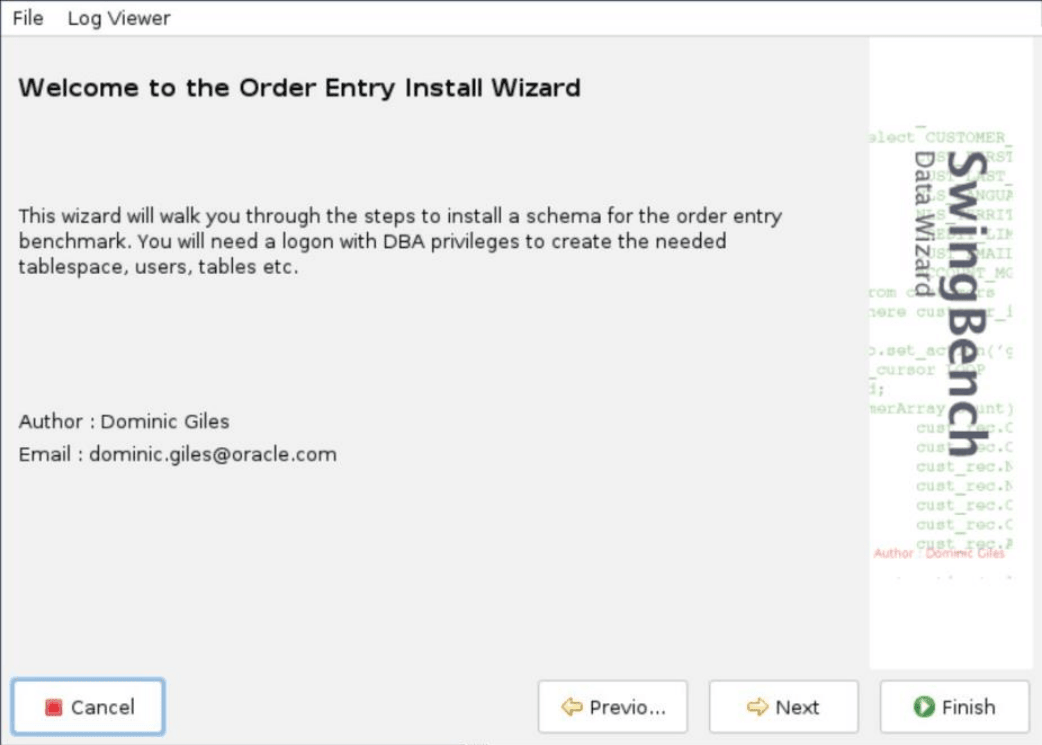
Description of the illustration mcp-14544f517a6f0b7d721ad4de04c5eee6.png
Illustration 1: Swingbench Workload Setup: Starting Order Entry Install Wizard
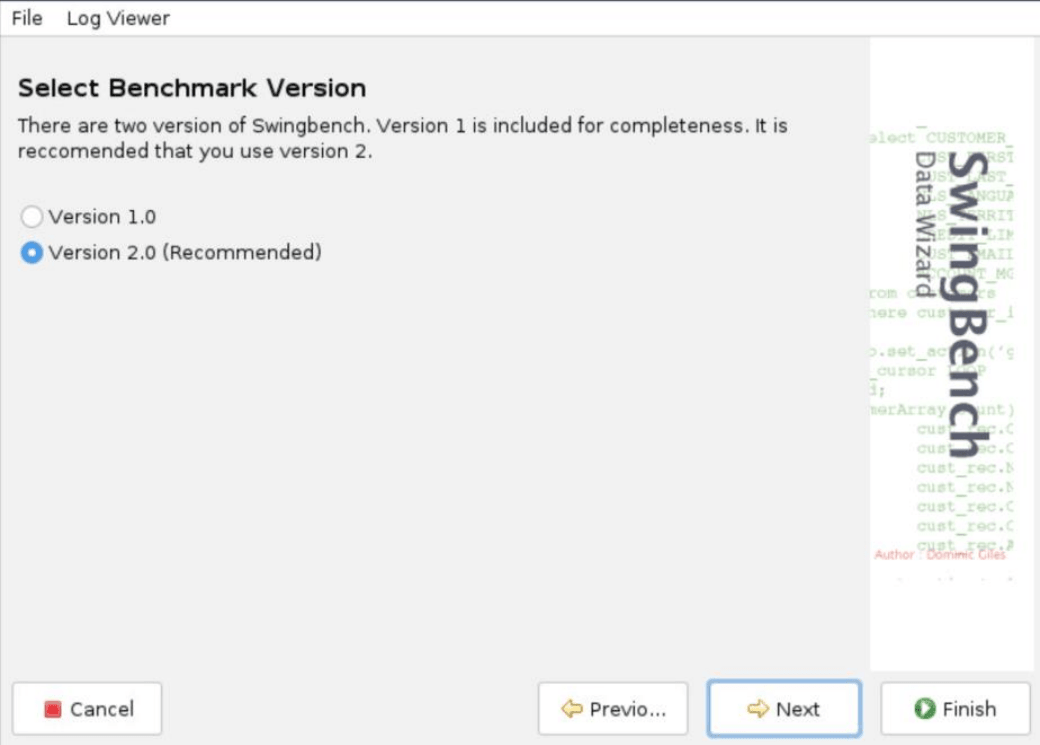
Description of the illustration mcp-aff4ab6bfab55f50fc0ee321cf3afae1.png
Illustration 2: Swingbench Workload Setup: Order Entry Install Wizard Benchmark Version Selection
Use the PDB’s service name in the connect string
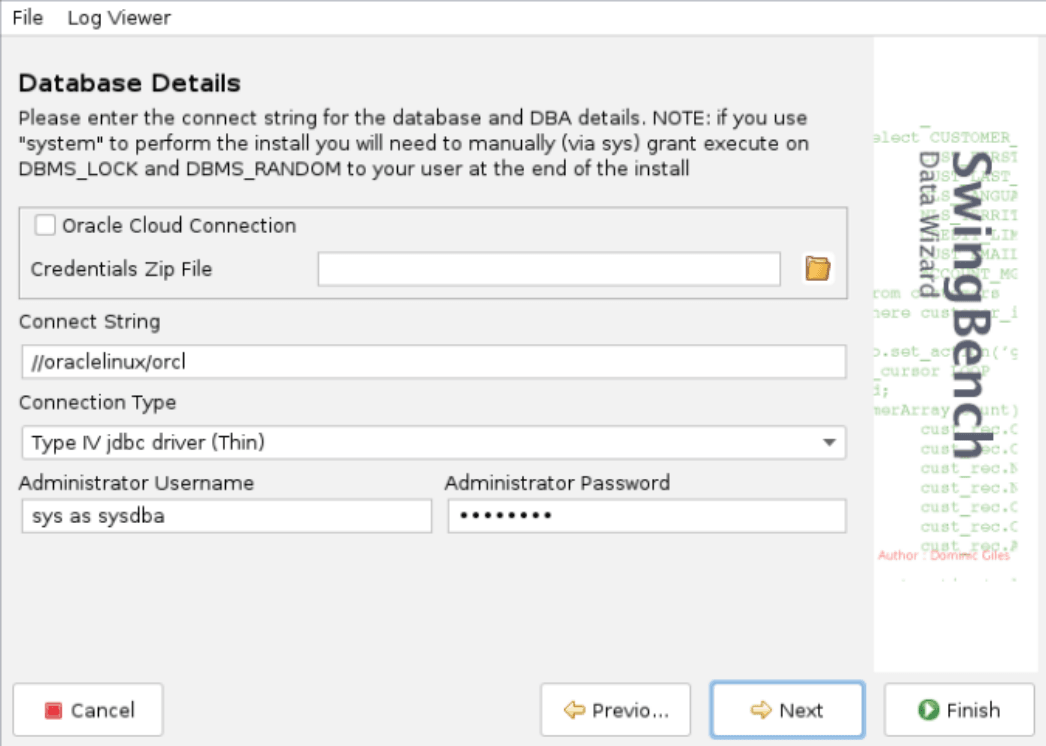
Description of the illustration mcp-851736abff79d1f1650138735b565fc1.png
Illustration 3: Swingbench Workload Setup: Order Entry Install Wizard Database Details
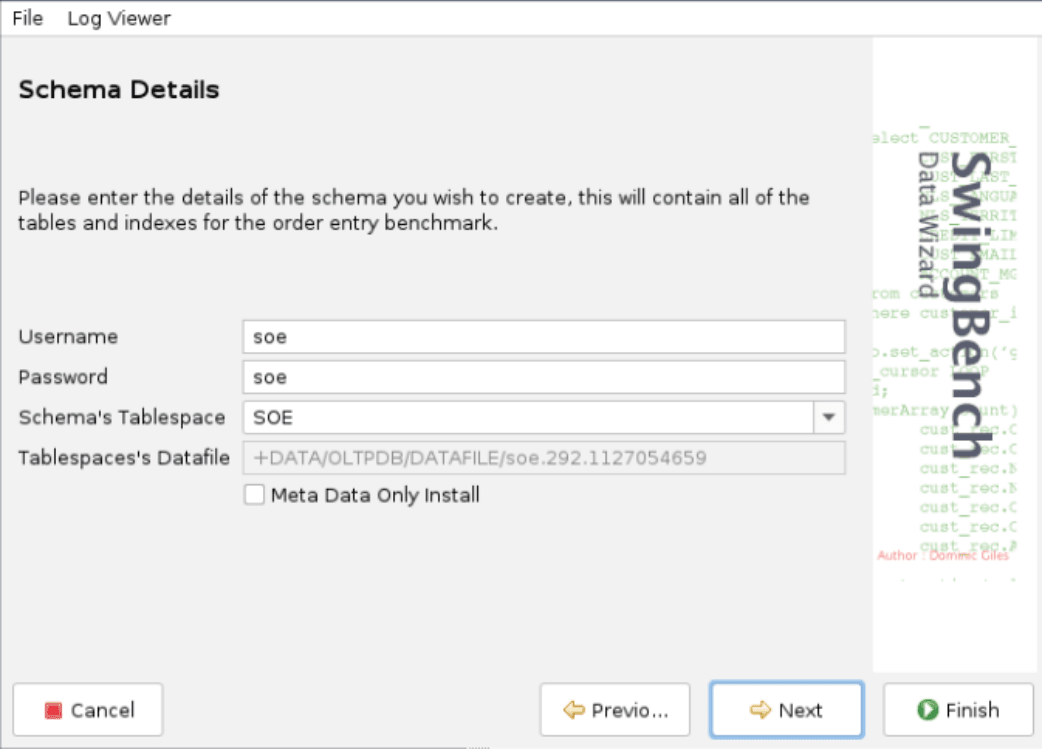
Description of the illustration mcp-a66cfba27ab7a550fb3380fa5ca42a44.png
Illustration 4: Swingbench Workload Setup: Provide Schema Details in Order Entry Install Wizard
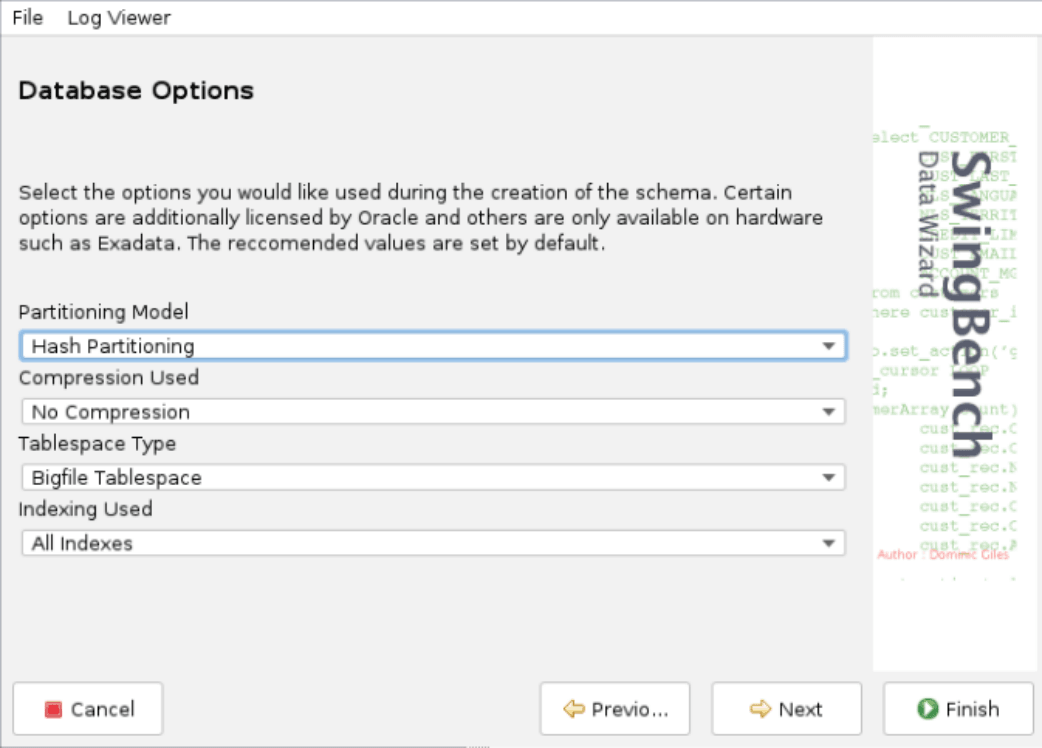
Description of the illustration mcp-d231143126a1b7fe12358708fa5b1abc.png
Illustration 5: Swingbench Workload Setup: Select Database Options in Order Entry Install Wizard
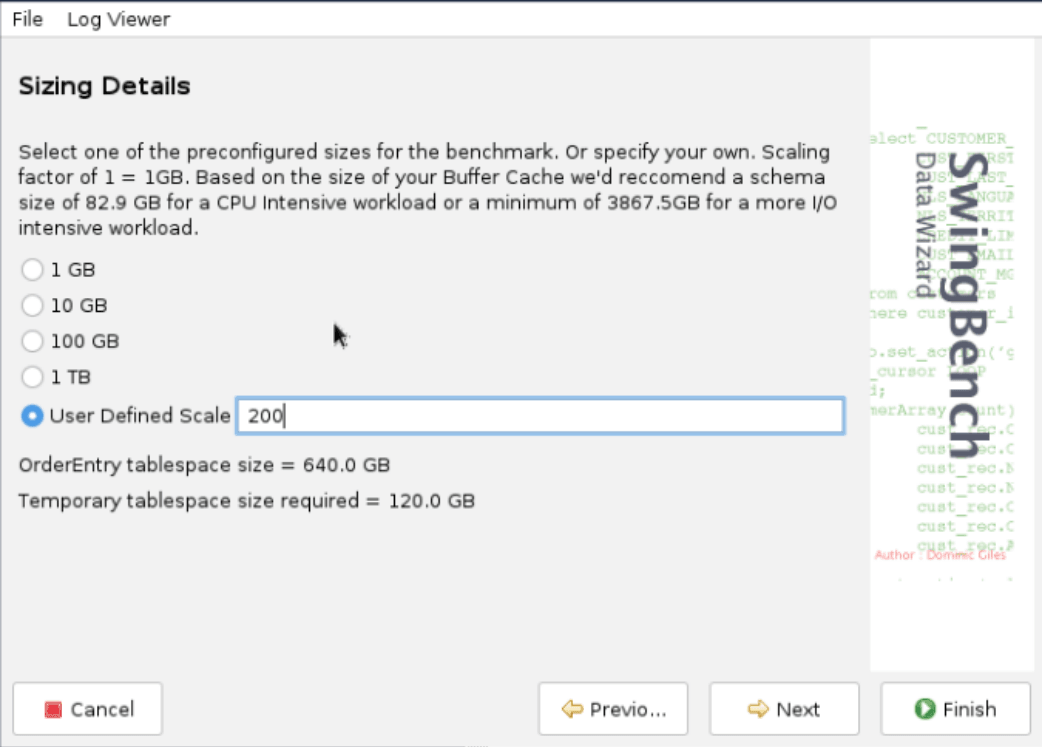
Description of the illustration mcp-649f3efe31f76b4614fd7b69ebcca53a.png
Illustration 6: Swingbench Workload Setup: Select Schema Size for Benchmark (Note: size chosen for final runs was 200GB)
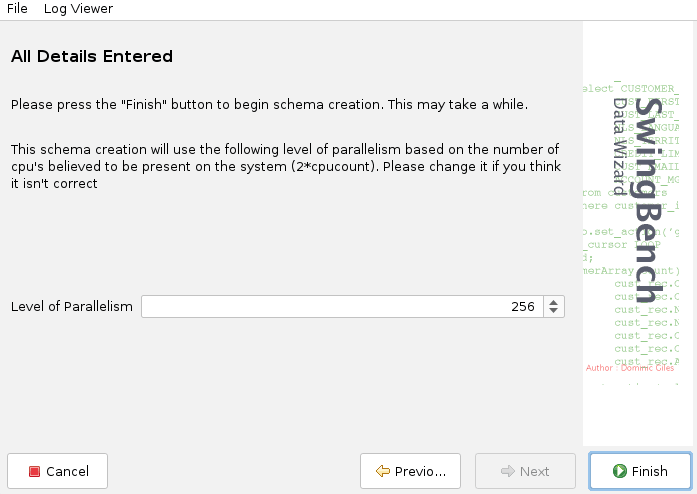
Description of the illustration mcp-5335aa723db78b8d4615d480f3783308.png
Illustration 7: Swingbench Workload Setup: Select Schema Creation Parallelism for Benchmark in Order Entry Install Wizard
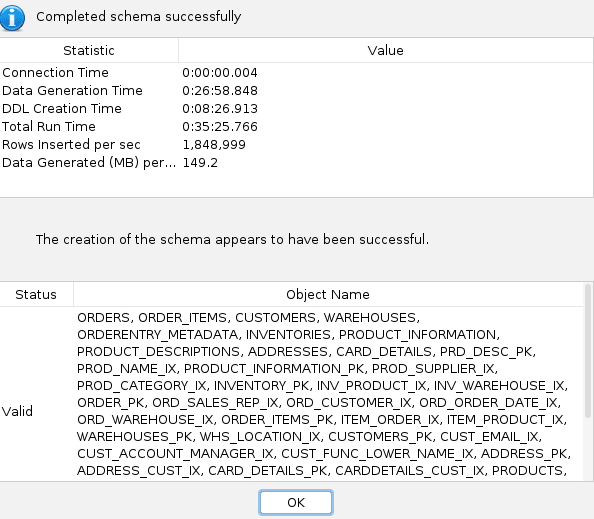
Description of the illustration mcp-9d5455774311e1b3200a322cad0c887f.png
Illustration 8: Swingbench Workload Setup: Schema Created Successfully on X11-HA
Once the schema is ready, drop the indexes that benchmark doesn’t use and recreate carddetails_cust_ix index.
sqlplus / as sysdba
sql> alter session set container=oltpdb;
sql> drop index soe.cust_account_manager_ix;
sql> drop index soe.cust_dob_ix;
sql> drop index soe.cust_email_ix;
sql> drop index soe.item_product_ix;
sql> drop index soe.ord_order_date_ix;
sql> drop index soe.ord_sales_rep_ix;
sql> drop index soe.prod_name_ix;
sql> drop index soe.prod_supplier_ix;
sql> drop index soe.whs_location_ix;
sql> drop index soe.carddetails_cust_ix;
sql> create index "soe"."carddetails_cust_ix" on "soe"."card_details" ("customer_id") global partition by hash ("customer_id") partitions 200
pctfree 50 initrans 100 maxtrans 255 compute statistics nologging
storage(initial 1048576 next 1048576 minextents 1 maxextents 2147483645
pctincrease 0 freelists 1 freelist groups 1
buffer_pool default flash_cache default cell_flash_cache default)
tablespace "soe"
parallel 256;
Finally duplicate the PDB including the SOE as the test uses 2 PDBs. Refer to Appendix D.
As mentioned earlier, test database for this benchmark was created using database shape odb64. All database init parameters like SGA, PGA were left untouched when database cores got reduced. Changes across test cycles are limited to CPU configuration only to ensure that the measurements obtained are fair for users.
Oracle Database Appliance systems allow for the pay-as-you-grow approach to software licensing. You have complete access to the hardware in terms of memory, storage, network regardless the number of active cores.
As part of this testing, seven different CPU configurations were tested by enabling only a given total number of cores (8, 16, 32, 48, 64, 96 and 128) at a time on the Oracle Database Appliance system.
Workload Setup and Execution
Swingbench’s Sales History benchmark is a DSS-type workload, whereas Order Entry (OE) is an OLTP type workload. The latter one was used for performance testing in this document.
You can generate the workload by connecting to the ODA and launching loadgen.pl utility.
$ export SB_HOME=<path of Swingbench>
$ perl loadgen.pl -u <#users>
Swingbench provides options to set various parameters for the benchmark including setting the amount of time to run the workload.
Configuration of the benchmark will be covered later in this document.
Run Swingbench on both nodes using the same number of user connections to simulate workload. Swingbench on the first node should use oltpdb and oltp2db pluggable databases and open connections to the local pluggable database instances only. Swingbench on the second node should use oltp3db, oltp4db pluggable databases and open connections to its local pluggable databases instance only.
To make the workload more realistic, the workload simulates numerous concurrent users and include "think time" between transactions. The following attributes were used to replicate the workload throughout our testing.
- User Count: 200, 400, 800, 1200, 1600, 2400, 3200
- Active CPU Core Count: 8, 16, 32, 48, 64, 96, 128
- Think Time: 0/30 (sleep time in milliseconds between transactions to emulate real-world workload)
- Workload Run Time: 50 minutes
- Performance Statistics Collection Window: 30 minutes (steady state)
- Transactions Per Second (TPS) Count: 7848, 15388, 30500, 45124, 58390, 86132, 108167
Performance numbers may not be directly comparable to previous performance studies due to variations in software versions, differences in Swingbench setups, and updates to the database releases.
Benchmark Results
In this section, the results of Swingbench OLTP (OE) workload testing on Oracle Database Appliance X11-HA is discussed.
Workload Performance
Performance metrics gathered from running the Swingbench Order Entry (OLTP) workload on an Oracle Database Appliance system are summarized in the following tables.
Benchmark 1
2 Swingbench are running on both ODA nodes, but each Swingbench benchmark runs against a dedicated PDB which is only available on the local node. Each PDB has its own SOE schema. Refer to Appendix E.
| Active CPU cores per node: user count | Workload element | Total transactions | Average response time (ms) | Average TPS |
|---|---|---|---|---|
| 4 cores: 200 users | 7,913,996 | 7,848 | ||
| Customer Registration | 1,695,548 | 13.39 | ||
| Process Orders | 564,397 | 10.20 | ||
| Browse Products | 5,654,051 | 3.82 | ||
| 8 cores: 400 users | 15,516,333 | 15,388 | ||
| Customer Registration | 3,325,107 | 16.22 | ||
| Process Orders | 1109785 | 11.96 | ||
| Browse Products | 11081441 | 3.76 | ||
| 16 cores: 800 users | 30,749,406 | 30,500 | ||
| Customer Registration | 6,592,208 | 15.20 | ||
| Process Orders | 2,194,505 | 13.43 | ||
| Browse Products | 21,962,693 | 3.75 | ||
| 24 cores: 1200 users | 45,478,179 | 45,484 | ||
| Customer Registration | 9,744,609 | 15.14 | ||
| Process Orders | 3,248,846 | 14.00 | ||
| Browse Products | 32,484,724 | 3.70 | ||
| 32 cores: 1600 users | 58,858,584 | 58,390 | ||
| Customer Registration | 12,608,857 | 16.22 | ||
| Process Orders | 4,208,420 | 14.95 | ||
| Browse Products | 42,041,307 | 3.88 | ||
| 48 cores: 2400 users | 86,832,038 | 86,132 | ||
| Customer Registration | 18,605,378 | 17.04 | ||
| Process Orders | 6,206,009 | 13.19 | ||
| Browse Products | 62,020,651 | 3.82 | ||
| 64 cores:3200 users | 109,037,684 | 108,167 | ||
| Customer Registration | 23,368,878 | 19.91 | ||
| Process Orders | 7,792,137 | 18.68 | ||
| Browse Products | 77,876,669 | 3.95 |
Table 2: Swingbench OE (OLTP) Workload – RAC multitenant DB, 4 PDBs, 2-2 PDBs are available on each node
The above data illustrates the following:
- 108,167 transactions per second (TPS) workload delivering an average of 19.91ms transaction response for Customer Registration, 18.68ms for Process Orders, and 3.95ms or Browse Products on a fully provisioned (128 CPU cores and 1.5TB memory) Oracle Database Appliance X11-HA system.
- In a fully provisioned state, during a 3,200-user workload, it delivered a sustained transaction rate of 108,167 transactions per second (TPS).
- The maximum average transaction response time did not exceed 19.91ms during any of the workload test runs.
- The number of transactions scaled almost linearly with the number of CPU cores.
Database and Operating System Statistics
In this section, database and OS statistics-related observations are described based on the test executed using Swingbench.
On Oracle Database Appliance X11-HA machine, 128 CPU cores are available (64 CPU cores on each host). The system's active CPU core count is dynamically expandable from 8 to 128. As shown in Table 2, a total of seven configurations were examined during the benchmark, and the total number of active CPU cores were steadily raised between 8 and 128.
A few of the major findings about database and operating system statistics gathered during the OLTP benchmark:
- Average user CPU usage on each DB host was around 84%
- With the configured OLTP workload, transaction rates increased with user volumes as expected.
- The volume of redo read and write operations grew along with the volume of transactions.
Average User CPU Busy %
Each test cycle's average User CPU usage across the two hosts of the Oracle Database Appliance was recorded. A narrow range, between around 93% and 96%, was recorded for the overall User CPU busy%, which fluctuated.
On the following graph Average User CPU % is the average of the data from the ODA node where only the database was running.
System CPU was fluctuating between 8 and 24 percent during the tests.
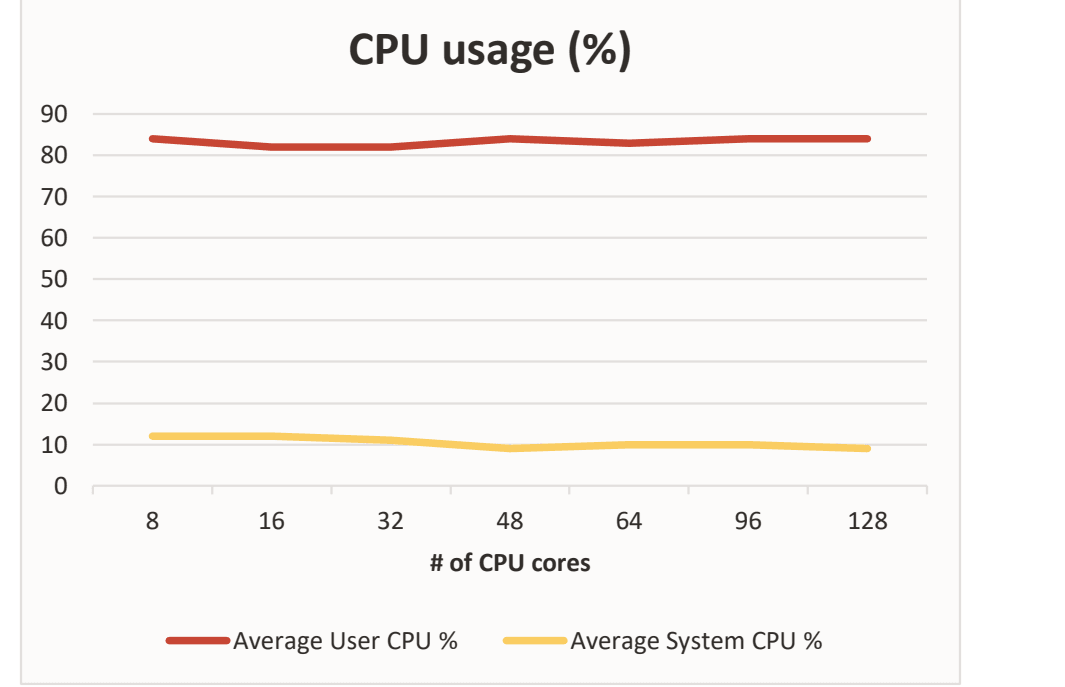
Description of the illustration mcp-084f9a03ed9d8ee576cab24718e7897d.png
Graph 1: Average User CPU Busy
REDO Writes
REDO write rate (MB/Sec) was measured for each test cycle on each node. The graph below illustrates the total REDO volume write-rate across both the nodes of the Oracle Database Appliance system. REDO write-rate increased as number of transactions per second increased in a fairly linear manner.
Note that the REDO write volume is a cumulative metric for the two database nodes.
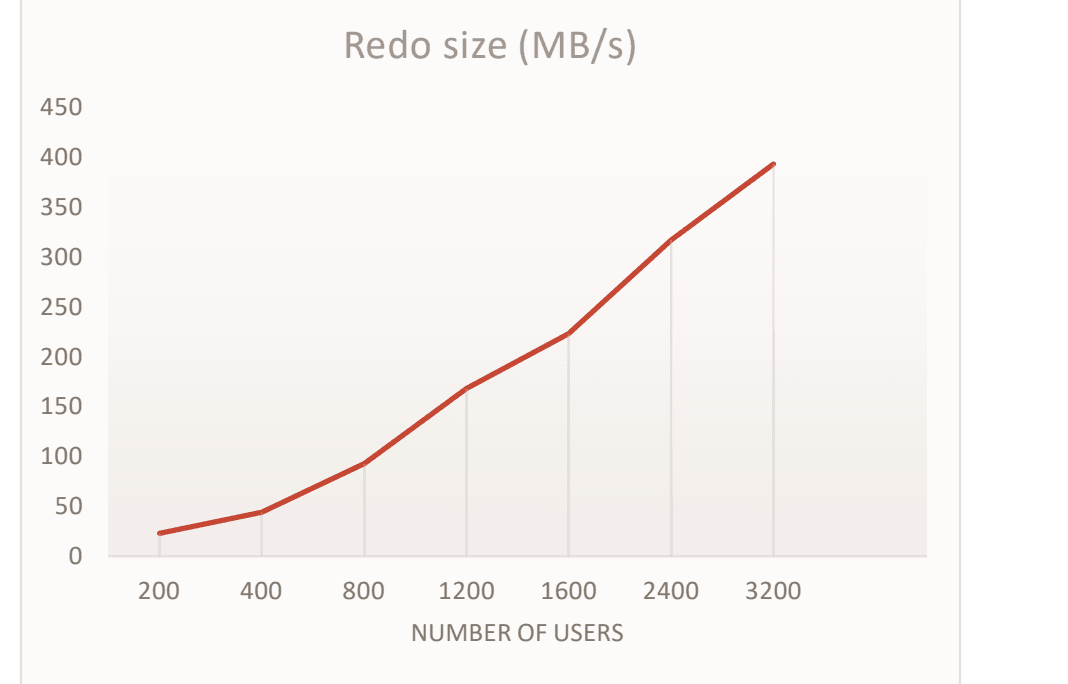
Description of the illustration mcp-7fe78706f34196df34f8c28ed96b2d0f.png
Graph 2: Average REDO Write volume (MB/s)
Transaction Rate
As transaction volume climbed from around 7,848 TPS to approximately 108,167 TPS and the number of active CPU cores increased from 8 to 128 during the test, the transaction rate (average transactions per second) scaled virtually linearly.
Keep in mind that the estimation of the transaction volume is based on data from both database nodes.
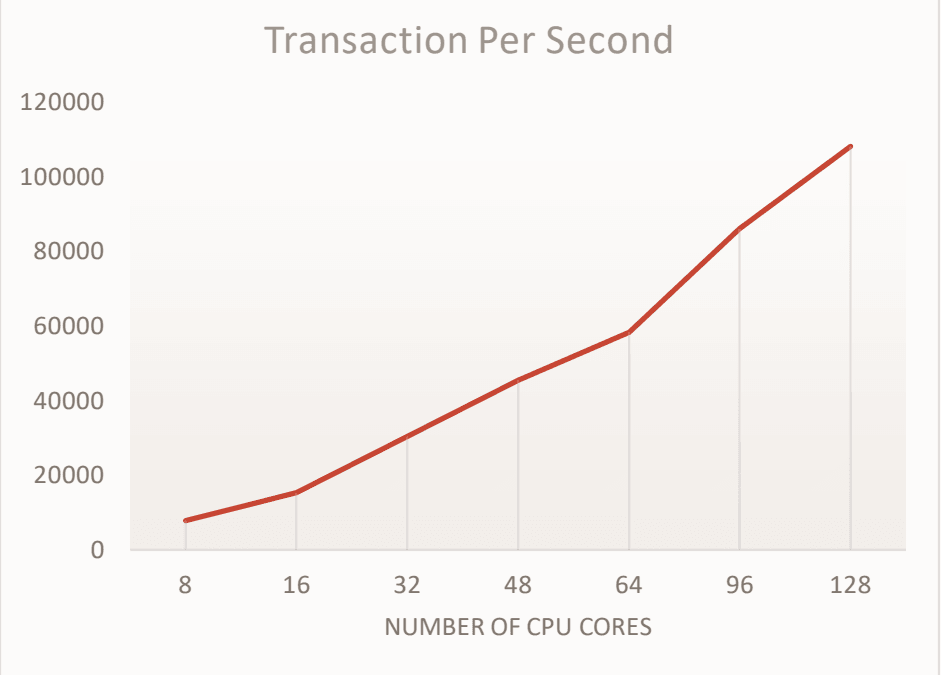
Description of the illustration mcp-b1ee37bb0124999112a2224ce5b831c0.png
Graph 3: Average Transaction Volume (Transactions Per Second)
Benchmark 2
Data generation using oewizard. It installs a simple order entry schema (SOE) that is used to create a heavy write workload. Total run time to setup SOE schema is also a good performance indicator.
X11-HA
Table 3: Swingbench OE wizard screenshot, completion time – X11-HA
Benchmark Considerations and Conclusion
Important Considerations for Performing the Benchmark
High performance storage, networking, CPU, and memory components are used in the construction of Oracle Database Appliance systems. However, there are a few things to keep in mind to get the best performance out of your Oracle Database Appliance installation.
To maintain your Oracle Database Appliance environments at peak performance level, regardless you're doing a benchmark test or not, follow the general instructions in this section.
- Ensure that databases on Oracle Database Appliance are always created using the Browser User Interface (BUI) or odacli command-line interface as both use pre-built templates that provide pre-optimized database parameter settings for required DB shapes and sizes.
- When performing benchmarks for comparison in two different environments ensure that an identical workload is run for apples-to-apples comparison. If you run different workloads (different SQL, different commit rates, or even if you only have different execution plans, etc.) in the legacy system and in the Oracle Database Appliance environment, then platform performance comparisons may be misleading, inaccurate, and hence pointless.
- Keep network latency low. For example, running Swingbench client(s) on the same network (but on a separate host) as your Oracle Database Appliance is on, might help to prevent significant latency in the transaction path.
- Size the Oracle Database Appliance environment appropriately and adequately. When conducting benchmarks, the two environments being compared must be sized similarly.
- Check SQL execution plan of relevant SQL statements in your legacy and Oracle Database Appliance environments. If execution plans differ, try to identify the cause, and address it. For example, the data volumes in the two environments may be different, there may be index differences, or lack of proper optimizer statistics, etc. which may contribute to differences in SQL execution plans and execution timings.
- Whenever it is possible, perform comparisons and benchmarks between systems that run the same software stack (OS version, GI and RDBMS release, etc.) and have similar resource allocations. Hardware differences are naturally expected.
- Do not use performance-inhibiting database parameters. If migrating databases from legacy environments to Oracle Database Appliance, make sure you do not carry over obsolete, un-optimized settings and parameters. Do not modify database parameters blindly to match the database parameters from your legacy environment. You may use “orachk” tool to verify your database configuration running on Oracle Database Appliance and in legacy environments.
- Oracle Database Appliance provides features such as database block checking and verification to protect against data corruption out of the box. These features may consume some, albeit small, amount of CPU capacity, but they are generally desirable to protect the integrity of your data. While these features might be temporarily disabled for testing purposes, it is strongly recommended to use these protective features to mitigate data corruption risks.
Conclusion
According to the performance benchmark used to create this technical brief, Oracle Database Appliance provides good performance for typical database workloads. An Oracle Database Appliance X11-HA system was easily able to manage a Swingbench OLTP workload of 108,167 transactions per second (TPS) with 128 CPU cores enabled. In addition to that, as workload and CPU resources were increased simultaneously, performance scaled essentially linearly.
Appendix A - Swingbench Configuration Files
This section described the changes that have been done in Swingbench configuration file for the benchmarks covered in the document.
The configuration file is: SB_HOME/configs/SOE_Server_Side_V2.xml.
The source PDF highlights changes in red: UserName, Password, ConnectString, InterMinDelay, InterMaxDelay, RunTime, StatsCollectionStart, and StatsCollectionEnd.
<?xml version="1.0" encoding="UTF-8" standalone="yes"?>
<SwingBenchConfiguration xmlns="http://www.dominicgiles.com/swingbench/config">
  <Name>"Order Entry (PLSQL) V2"</Name>
  <Comment>Version 2 of the SOE Benchmark running in the database using PL/SQL</Comment>
  <Connection>
    <UserName>soe</UserName>
    <Password>soe</Password>
    <ConnectString>//myoda-scan/oltpdb.domain.com/mycdb1</ConnectString>
    <DriverType>Oracle jdbc Driver</DriverType>
    <Properties>
      <Property Key="StatementCaching">60<s/Property>
      <Property Key="FetchSize">20</Property>
    </Properties>
  </Connection>
  <Load>
    <NumberOfUsers>16</NumberOfUsers>
    <MinDelay>0</MinDelay>
    <MaxDelay>0</MaxDelay>
    <InterMinDelay>0</InterMinDelay>
    <InterMaxDelay>30</InterMaxDelay>
    <QueryTimeout>120</QueryTimeout>
    <MaxTransactions>-1</MaxTransactions>
    <RunTime>0:50</RunTime>
    <LogonGroupCount>1</LogonGroupCount>
    <LogonDelay>20</LogonDelay>
    <LogOutPostTransaction>false</LogOutPostTransaction>
    <WaitTillAllLogon>true</WaitTillAllLogon>
    <StatsCollectionStart>0:15</StatsCollectionStart>
    <StatsCollectionEnd>0:45</StatsCollectionEnd>
    <ConnectionRefresh>0</ConnectionRefresh>
…
Rest of the file remains untouched.
Use the following connect strings:
Node 1
/root/SW1/swingbench/configs/SOE_Server_Side_V2.xml
<ConnectString>//myoda-scan/oltpdb.domain.com/mycdb1</ConnectString>/root/SW2/swingbench/configs/SOE_Server_Side_V2.xml
<ConnectString>//myoda-scan/oltp2db.domain.com/mycdb1</ConnectString>Node 2
/root/SW1/swingbench/configs/SOE_Server_Side_V2.xml
<ConnectString>//myoda-scan/oltp3db.domain.com/mycdb1</ConnectString>/root/SW2/swingbench/configs/SOE_Server_Side_V2.xml
<ConnectString>//myoda-scan/oltp4db.domain.com/mycdb1</ConnectString>Launcher Memory
Memory size in SB_HOME/launcher/launcher.xml needs to be bumped up. That applies to all four Swingbench homes.
<jvmargset id="base.jvm.args">
  <jvmarg line="-Xmx2048m"/>
  <jvmarg line="-Xms512m"/>
  <!--<jvmarg line="-Djava.util.logging.config.file=log.properties"/>-->
</jvmargset>
…
Rest of the file remains untouched.
Appendix B - loadgen.pl
Note that you may need to update the sample password, SCAN name in the script below.
#!/usr/bin/perl
use strict;
use warnings;
use Getopt::Long;
use Data::Dumper;
use POSIX;
use POSIX qw/ceil/;
use POSIX qw/strftime/;
use threads ( 'yield', 'stack_size' => 64*4096, 'exit' => 'threads_only', 'stringify');
use DBI qw(:sql_types);
use vars qw/ %opt /;
use XML::Simple;
use Data::Dumper;
### Please modify the below variables as needed #######
my $host="myoda-scan.domain.com";
my $cdb_service="mycdb.domain.com";
my $port=1521;
my $dbauser="system";
my $dbapwd="welcome1";
my $config_file_1="SOE_Server_Side_V2.xml";
### Please modify the above variables as needed #######
my $rundate=strftime("%Y%m%d%H%M", localtime);
my $datevar=strftime("%Y_%m_%d", localtime);
my $timevar=strftime("%H_%M_%S", localtime);
my @app_modules = ("Customer Registration","Process Orders","Browse Products","Order Products");
my $cdb_snap_id;
my $pdb_snap_id;
my $dbid;
my $cdb_b_snap;
my $cdb_e_snap;
my %opts;
my $tot_uc;
my $cb_sess;
my $counter;
my $uc=100;
my $max_cb_users=200;
my $min_cb_instances=10;
my $output_dir;
my $awr_interval_in_secs=1800;
my $sb_home;
use Cwd();
my $pwd = Cwd::cwd();
my $sb_output_dir=$pwd."/sb_out/".$datevar."/".$timevar;
print "SB_OUTPUT_DIR : $sb_output_dir"."\n";
my $awr_dir=$sb_output_dir;
sub usage { "Usage: $0 [-u <No_of_Users>]\n" }
sub chk_n_set_env
{
if ($ENV{SB_HOME})
{
$sb_home=$ENV{SB_HOME};
}
else
{
print "The environment variable SB_HOME is not defined. \n";
print "Re-run the program after setting SB_HOME to the swingbenchhome direcotry. \n";
exit 1;
}
}
sub set_cb_parameters
{
if ( ceil($tot_uc/$max_cb_users) <= $min_cb_instances ) {
$cb_sess = $min_cb_instances;
# $uc = int($tot_uc/10);
$uc = ($tot_uc - ($tot_uc %$min_cb_instances))/$min_cb_instances;
}
if ( ceil($tot_uc/$max_cb_users) > $min_cb_instances ) {
$cb_sess = ceil($tot_uc/$max_cb_users);
$uc = $max_cb_users;
}
my $rc=$tot_uc;
print "User count $uc \n";
print "Total SB Sessions $cb_sess\n";
}
sub process
{
my ($l_counter) = @_;
print "User count".$l_counter."\n";
print "Out dir".$sb_output_dir."\n";
print "Run Date ".$rundate."\n";
print ("$sb_home/bin/charbench -uc $uc -c $sb_home/configs/$config_file_1 -r $sb_output_dir/results_"."$uc"."_users_"."$rundate"."$l_counter"."_RAC_".".xml -s");
system ("$sb_home/bin/charbench -uc $uc -c $sb_home/configs/$config_file_1 -r $sb_output_dir/results_"."$uc"."_users_"."$rundate"."$l_counter"."_RAC_".".xml -s");
}
sub create_out_dir {
if ( -d "$_[0]" ) {
print "Direcory "."$_[0]"." Exists\n";
}
else{
system("mkdir -p $_[0]");
}
}
sub generate_awr_snap
{
print "Generating Snapshot at DB level...\n";
my $dbh = DBI->connect("dbi:Oracle://$host:$port/$cdb_service","$dbauser","$dbapwd") || die "Database connection not made";
$dbh->{RowCacheSize} = 100;
my $sql = qq{ begin dbms_workload_repository.create_snapshot; end; };
my $sth = $dbh->prepare( $sql );
$sth->execute();
$sql = qq{ select max(snap_id) from dba_hist_snapshot };
$sth = $dbh->prepare( $sql );
$sth->execute();
$sth->bind_columns( undef,\$cdb_snap_id );
$sth->fetch();
$sth->finish();
$dbh->disconnect();
}
sub process_xml_output {
my $txn_cnt;
my $avg_rt;
my @files;
my $cr_tc=0;
my $cr_to_rt=0;
my $po_tc=0;
my $po_to_rt=0;
my $bp_tc=0;
my $bp_to_rt=0;
my $op_tc=0;
my $op_to_rt=0;
my $num_users=0;
my $avg_tps=0;
my $app_module;
my $file;
my $xml;
my $outfile = 'result.txt';
@files = <$sb_output_dir/\*$rundate*>;foreach $file (@files) {
$xml = new XML::Simple;
my $ResultList = $xml->XMLin($file);
#print "Processing output file $file\n";
#printf "%-22s %10s %8s\n","Application Module","Txn Count","Avg ResTime";
#print "------------------------------------------------------\n";
$num_users = $num_users + $ResultList->{Configuration}->{NumberOfUsers};
$avg_tps = $avg_tps + $ResultList->{Overview}->{AverageTransactionsPerSecond};
foreach $app_module (@app_modules) {
$txn_cnt=$ResultList->{TransactionResults}->{Result}->{"$app_module"}->{TransactionCount};
$avg_rt=$ResultList->{TransactionResults}->{Result}->{"$app_module"}->{AverageResponse};
#printf "%-22s %10s %8s\n",$app_module,$txn_cnt,$avg_rt;
if ($app_module eq "Customer Registration") {
$cr_tc = $cr_tc+$txn_cnt;
$cr_to_rt = $cr_to_rt+($avg_rt*$txn_cnt);
}
elsif ($app_module eq "Process Orders") {
$po_tc = $po_tc+$txn_cnt;
$po_to_rt = $po_to_rt+($avg_rt*$txn_cnt);
}
elsif ($app_module eq "Browse Products") {
$bp_tc = $bp_tc+$txn_cnt;
$bp_to_rt = $bp_to_rt+($avg_rt*$txn_cnt);
}
elsif ($app_module eq "Order Products") {
$op_tc = $op_tc+$txn_cnt;
$op_to_rt = $op_to_rt+($avg_rt*$txn_cnt);
}
}
#printf "\n";
}
open(my $OUTFILE, ">>$sb_output_dir/$outfile") || die "problem opening $file\n";
print $OUTFILE "Total Number of Application Users : ".$num_users."\n";
print $OUTFILE "Average Transactions Per Second : ".$avg_tps."\n";
print $OUTFILE "------------------------------------------------------\n";
printf $OUTFILE "%-22s %16s %8s\n","Application Module","Txn Count","Avg Res Time";
print $OUTFILE "------------------------------------------------------\n";
foreach $app_module (@app_modules)
{
if ($app_module eq "Customer Registration") {
printf $OUTFILE "%-22s %16s %0.2f\n",$app_module,$cr_tc,($cr_to_rt/$cr_tc);
}
elsif ($app_module eq "Process Orders") {
printf $OUTFILE "%-22s %16s %0.2f\n",$app_module,$po_tc,($po_to_rt/$po_tc);
}
elsif ($app_module eq "Browse Products") {
printf $OUTFILE "%-22s %16s %0.2f\n",$app_module,$bp_tc,($bp_to_rt/$bp_tc);
}
elsif ($app_module eq "Order Products") {
printf $OUTFILE "%-22s %16s %0.2f\n",$app_module,$op_tc,($op_to_rt/$op_tc);
}
}
close($OUTFILE);
}
GetOptions(\%opts, 'users|u=i' => \$tot_uc, 'runid|r=i' => \$rundate,) or die usage;
print "Total # of users is $tot_uc \n";
print "Run ID is $rundate \n";
create_out_dir($sb_output_dir);
$awr_dir=$sb_output_dir;
chk_n_set_env;
set_cb_parameters;
my $rc;
my $sleep_time;
$sleep_time=300/$cb_sess;
print "Sleeping for 30 seconds"."\n";
sleep 30;
for($counter = 1; $counter <= $cb_sess; $counter++){
$rc = $tot_uc - ($counter*$uc);
if ( $rc < 0 ) {
$uc = ($rc+$uc);
}
my $thr = threads->create('process',$counter);
print "Charbench "."$counter Starting with usercount $uc for $config_file_1 on inst1"."\n";
$thr->detach();
print "Sleeping for $sleep_time seconds"."\n";
sleep $sleep_time;
}
print "Sleeping for 600 seconds"."\n";
sleep 600;
generate_awr_snap;
$cdb_b_snap=$cdb_snap_id;
print "Start Snap $cdb_b_snap"."\n";
print "Sleeping for $awr_interval_in_secs seconds"."\n";
sleep $awr_interval_in_secs;
generate_awr_snap;
$cdb_e_snap=$cdb_snap_id;
print "End Snap $cdb_e_snap"."\n";
my $running;
while (1) {
# Checking if any charbench session is running
$running = `ps -ef |grep $rundate| grep -v grep |wc -l`;
if ($running == 0)
{
process_xml_output;
print " Exiting Loop.. \n";
last;
}
sleep 10;
}
#print "DB Id $dbid"."\n";
print "Generating AWR Reports....\n";
system ("$pwd/generate_awr.sh", $cdb_b_snap, $cdb_e_snap, $rundate, $awr_dir);
print " Result ... \n";
system ("cat $sb_output_dir/result.txt");
system ("lscpu|grep On-line");
print " Exiting .. \n";
exit 0;
Appendix C - generate_awr.sh
Note that you may need to update the sample password, dbid of the CDB, SCAN name used in the script below.
#!/bin/bash
unset http_proxy
unset https_proxy
export host=myoda-scan.domain.com
l_dbid=2704614255
inst1="mycdb1"
inst2="mycdb2"
export svc="mycdb.domain.com"
export ORACLE_HOME=/u01/app/19.25.0.0/grid
export port=1521
l_start_snapid=$1
#l_end_snapid=`expr $1 + 1`
l_end_snapid=$2;
l_runid=$3;
AWR_DIR=$4;
l_start_snapid=$(sed -e 's/^[[:space:]]*//' <<<"$l_start_snapid");
l_end_snapid=$(sed -e 's/^[[:space:]]*//' <<<"$l_end_snapid");
l_runid=$(sed -e 's/^[[:space:]]*//' <<<"$l_runid");
#l_awr_log_file="${AWR_DIR}/awrrpt_1_${l_start_snapid}_${l_end_snapid}_${l_runid}.log"
l_awr_log_file="${AWR_DIR}/awrrpt_1_${l_start_snapid}_${l_end_snapid}_${l_runid}.log"
echo $l_awr_log_file;
cd ${AWR_DIR}
echo "system/WElcome_12##@$host:$port/$svc1"
$ORACLE_HOME/bin/sqlplus -s system/welcome1@$host:$port/$svc/$inst1 << EOC
set head off
set pages 0
set lines 132
set echo off
set feedback off
spool "awrrpt_1_${l_start_snapid}_${l_end_snapid}_${l_runid}.log"
SELECT
output
FROM
TABLE
(dbms_workload_repository.awr_report_text($l_dbid,1,$l_start_snapid,$l_end_snapid ));
spool off
exit;
EOC
$ORACLE_HOME/bin/sqlplus -s system/welcome1@$host:$port/$svc/$inst2 << EOC
set head off
set pages 0
set lines 132
set echo off
set feedback off
spool "awrrpt_2_${l_start_snapid}_${l_end_snapid}_${l_runid}.log"
SELECT
output
FROM
TABLE
(dbms_workload_repository.awr_report_text($l_dbid,2,$l_start_snapid,$l_end_snapid ));
spool off
exit;
EOC
Appendix D - Duplicate oltpdb Pluggable Database
Use dbca to create 3 additional PDBs using oltpdb PDB as a source. Following steps must be repeated 3 times.
Use PDB names: oltp2db, oltp3db, oltp4db
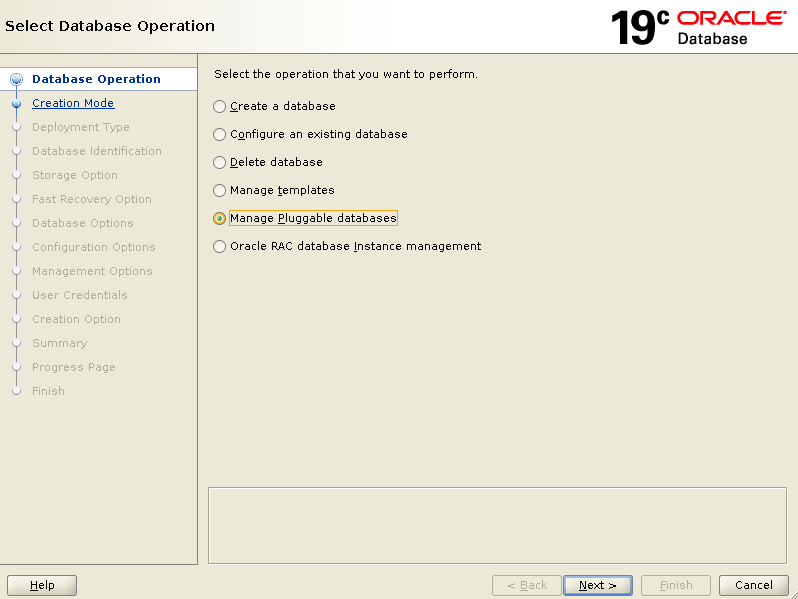
Description of the illustration mcp-1dd1f290f62806af136eb12267079329.png
Illustration 9: Manage Pluggable databases
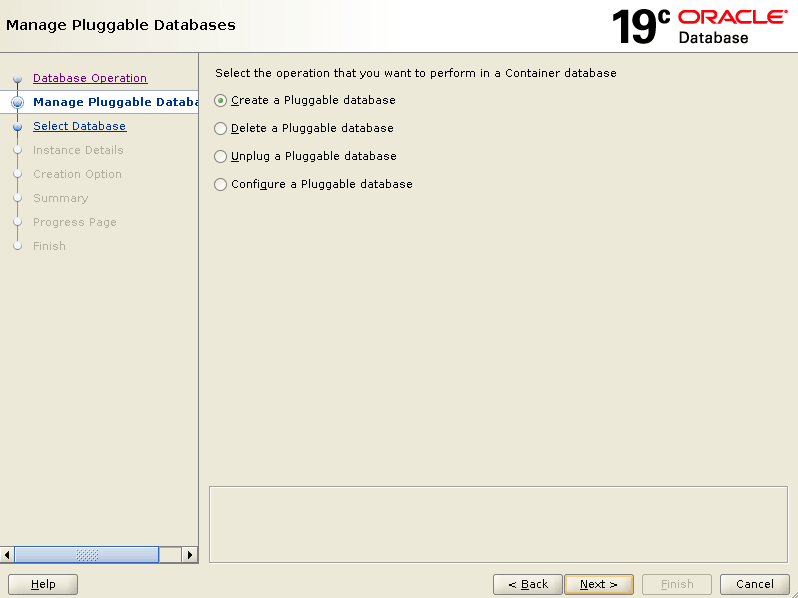
Description of the illustration mcp-e57b551a863f7535d72021c675256a19.png
Illustration 10: Create a Pluggable database
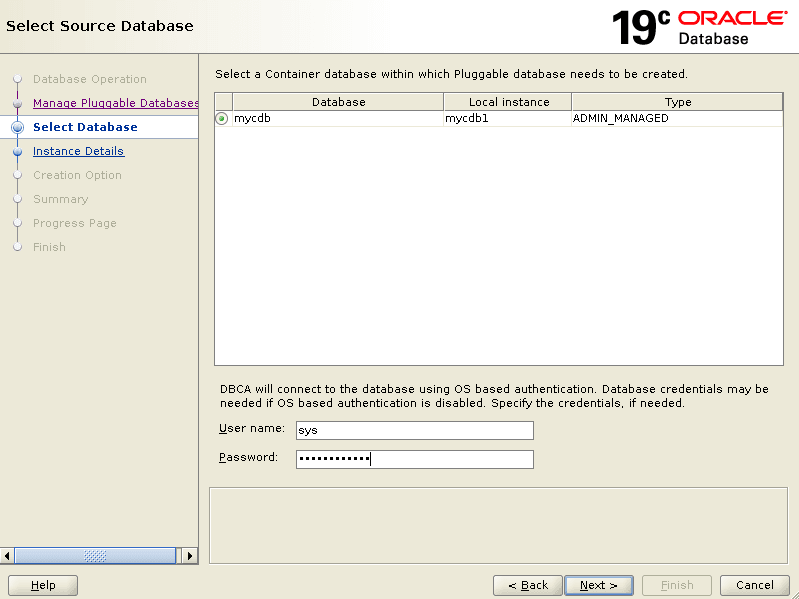
Description of the illustration mcp-cf6569fac260c6519959d5ebf4b060d6.png
Illustration 11: Select Source Database
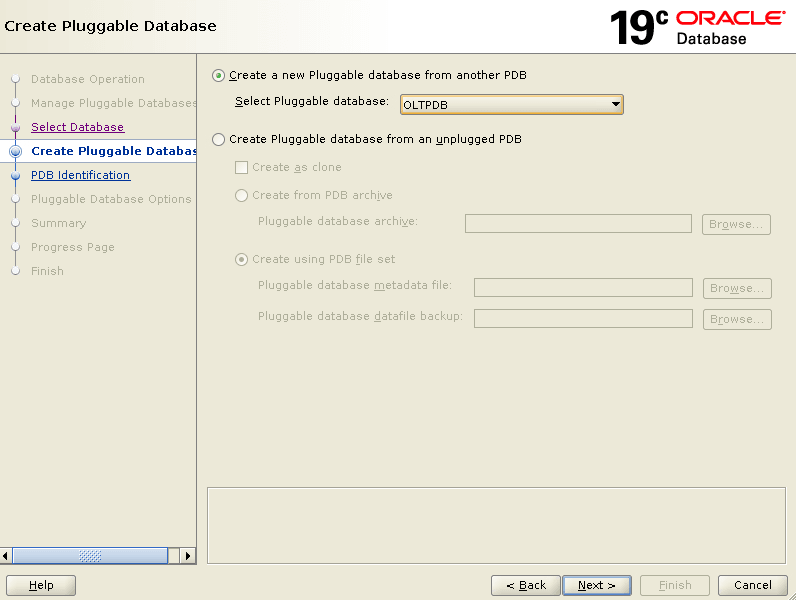
Description of the illustration mcp-c6a18714a5a26ec26c9e2259af39497d.png
Illustration 12: Create a new Pluggable database from another PDB
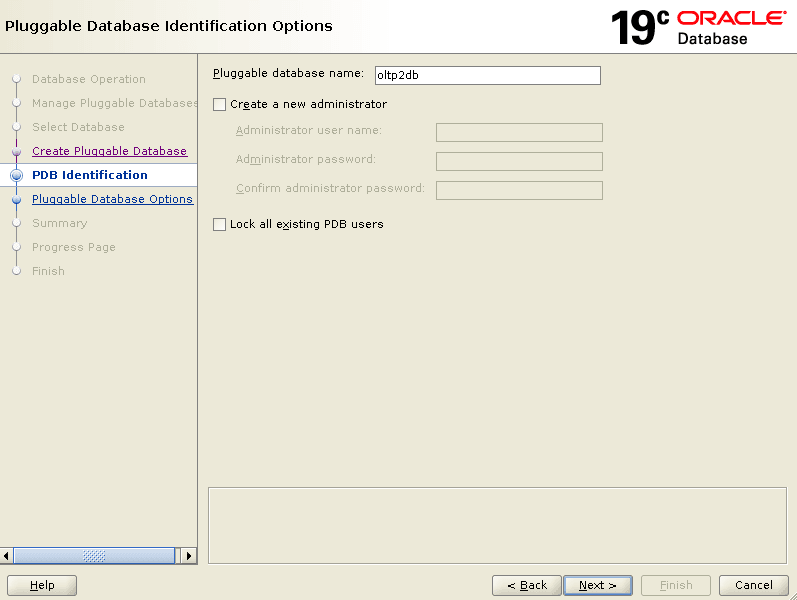
Description of the illustration mcp-77fb95ba1d0d458738c38eaac19f90ba.png
Illustration 13: Set new Pluggable database name
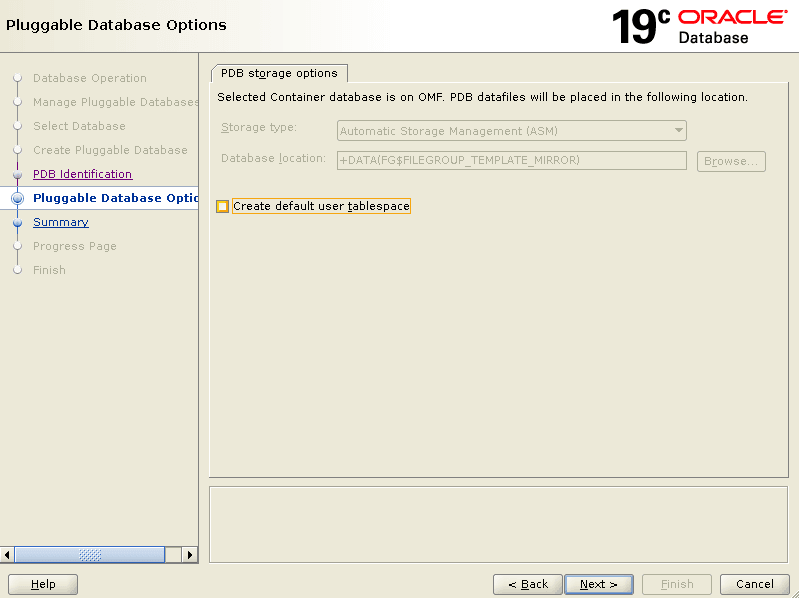
Description of the illustration mcp-72f1eb51a3426f21846aaaad3c767f19.png
Illustration 14: Pluggable Database Options screen
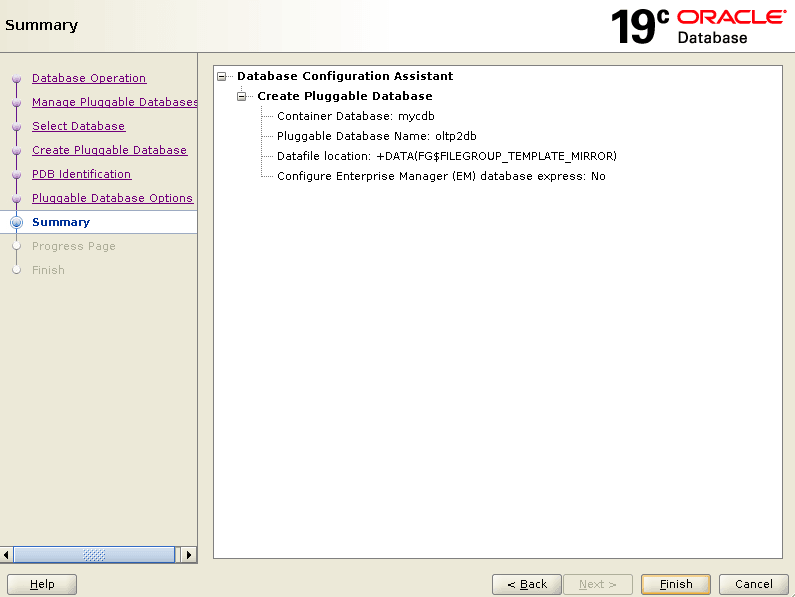
Description of the illustration mcp-4aa60fd78f7ca0401677fbbd7e0f4b1a.png
Illustration 15: Summary screen
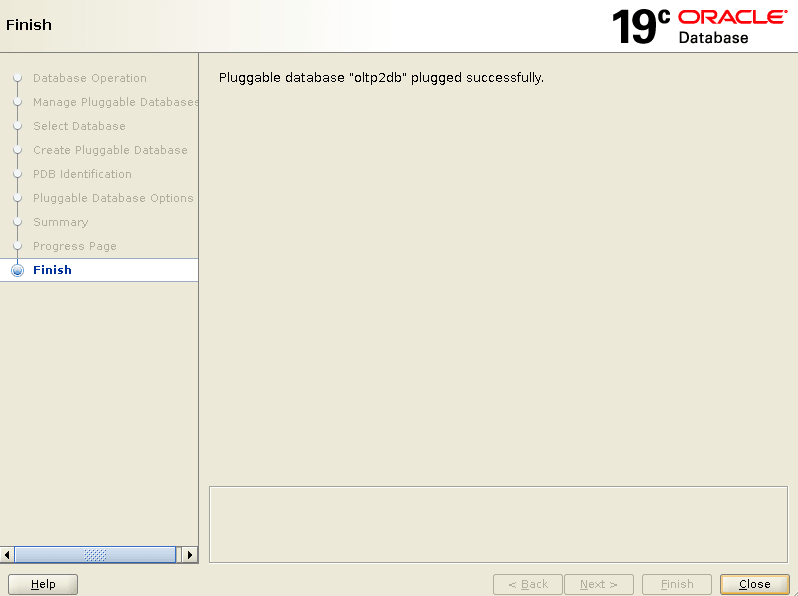
Description of the illustration mcp-7b07070567d6b85d3d06edd9c153ee40.png
Illustration 16: Finish screen
References and Notices
References
Source Credits and Notices
Oracle Corporation, World Headquarters
500 Oracle Parkway
Redwood Shores, CA 94065, USA
Worldwide Inquiries
Phone: +1.650.506.7000
Fax: +1.650.506.7200
Integrated Cloud Applications & Platform Services
Copyright © 2023, Oracle and/or its affiliates. All rights reserved. This document is provided for information purposes only, and the contents hereof are subject to change without notice. This document is not warranted to be error-free, nor subject to any other warranties or conditions, whether expressed orally or implied in law, including implied warranties and conditions of merchantability or fitness for a particular purpose. We specifically disclaim any liability with respect to this document, and no contractual obligations are formed either directly or indirectly by this document. This document may not be reproduced or transmitted in any form or by any means, electronic or mechanical, for any purpose, without our prior written permission.
Oracle and Java are registered trademarks of Oracle and/or its affiliates. Other names may be trademarks of their respective owners.
Intel and Intel Xeon are trademarks or registered trademarks of Intel Corporation. All SPARC trademarks are used under license and are trademarks or registered trademarks of SPARC International, Inc.
AMD, Opteron, the AMD logo, and the AMD Opteron logo are trademarks or registered trademarks of Advanced Micro Devices. UNIX is a registered trademark of The Open Group. 0615
Evaluating and Comparing Oracle Database Appliance Performance
Date: March 2025
Author: RACPack, Cloud Innovation & Solution Engineering Team
Connect with Us
Call +1.800.ORACLE1 or visit oracle.com. Outside North America, find your local office at oracle.com/contact.
Oracle Blogs · Facebook · Twitter
Copyright © 2025, Oracle and/or its affiliates. All rights reserved. This document is provided for information purposes only, and the contents hereof are subject to change without notice. This document is not warranted to be error-free, nor subject to any other warranties or conditions, whether expressed orally or implied in law, including implied warranties and conditions of merchantability or fitness for a particular purpose. We specifically disclaim any liability with respect to this document, and no contractual obligations are formed either directly or indirectly by this document. This document may not be reproduced or transmitted in any form or by any means, electronic or mechanical, for any purpose, without our prior written permission. This device has not been authorized as required by the rules of the Federal Communications Commission. This device is not, and may not be, offered for sale or lease, or sold or leased, until authorization is obtained.
Oracle and Java are registered trademarks of Oracle and/or its affiliates. Other names may be trademarks of their respective owners. Intel and Intel Xeon are trademarks or registered trademarks of Intel Corporation. All SPARC trademarks are used under license and are trademarks or registered trademarks of SPARC International, Inc. AMD, Opteron, the AMD logo, and the AMD Opteron logo are trademarks or registered trademarks of Advanced Micro Devices. UNIX is a registered trademark of The Open Group. 0120
Oracle® Database, Evaluating and Comparing Oracle Database Appliance Performance, Latest
G63935-01
November 2026
Copyright © 2026, Oracle and/or its affiliates.
Primary Author: Jean-Francois.Verrier, Venkat Maddali, Paul Tsien, Krisztian Fekete, Hagen Herbst, Bin Yan
Secondary Author: Prakash Jashnani, Aparna Kamath
Contributors: Khyati Agarwal, Alok Anand