Discovering and Adding OCI Tenancy
Starting with Enterprise Manager 24ai RU06, OCI Tenancy has been added as a new target type.
Prerequisites
Before you add an OCI Tenancy target, complete the following prerequisites.
It's recommended that you create an Oracle Cloud Infrastructure (OCI) Named Credential for use across all your OCI resources. To create one, from the Setup menu, select Security and then Named Credentials. Create a Named Credential using Oracle Cloud Infrastructure as the Authenticating Target Type and Oracle Cloud Infrastructure Credential as the Credential Type.
Ensure that the OCI user configured in the Named Credential is a member of an OCI Identity and Access Management (IAM) group with access to the required OCI resources.
Grant the IAM group the required access by using the following OCI policy statements. These policies apply at the tenancy scope. If the OCI user is already a member of a group with equivalent or broader access, no additional policies are required. In the following statements, replace <group-name> with the name of the IAM group that contains the OCI user configured in the Named Credential:
Allow group <group-name> to inspect compartments in tenancy
Allow group <group-name> to inspect autonomous-container-databases in tenancy
Allow group <group-name> to inspect autonomous-databases in tenancy
Allow group <group-name> to inspect autonomous-vmclusters in tenancy
Allow group <group-name> to inspect cloud-autonomous-vmclusters in tenancy
Allow group <group-name> to inspect cloud-exadata-infrastructures in tenancy
Allow group <group-name> to inspect cloud-vmclusters in tenancy
Allow group <group-name> to inspect databases in tenancy
Allow group <group-name> to inspect exadata-infrastructures in tenancy
Allow group <group-name> to inspect pluggable-databases in tenancy
Allow group <group-name> to inspect vmclusters in tenancy
Allow group <group-name> to inspect db-homes in tenancy
Allow group <group-name> to inspect db-systems in tenancy
Allow group <group-name> to inspect tenancies in tenancy
Adding an OCI Tenancy
To add an OCI Tenancy target:
-
From the Setup menu, select Add Target, then click Add Targets Manually.
- In the Add Targets Manually dialog:
- Select your host.
- From the Target Type list, select Oracle Cloud Infrastructure Tenancy.
- Click Add....
- On the Properties page, enter the Target Name and select the Realm Domain and Tenancy Home Region where your tenancy resides.
Note:
Check the Tenancy Home Region in the login section of the OCI Console. - If you have an OCI Named Credential (recommended), select it from the Copy Credentials From list; otherwise, enter your OCI Credentials. If there are connectivity limitations, such as those caused by a firewall, configure the Proxy Credentials to enable a proxy connection from the Management Agent host.
- Click Test Connection and wait for validation. Click OK, or update the entries and test again.
- Click Next and review the information provided.
- Click Submit. After confirmation that the target has been saved successfully, click Close.
Using the Oracle Cloud Infrastructure Tenancy Dashboard
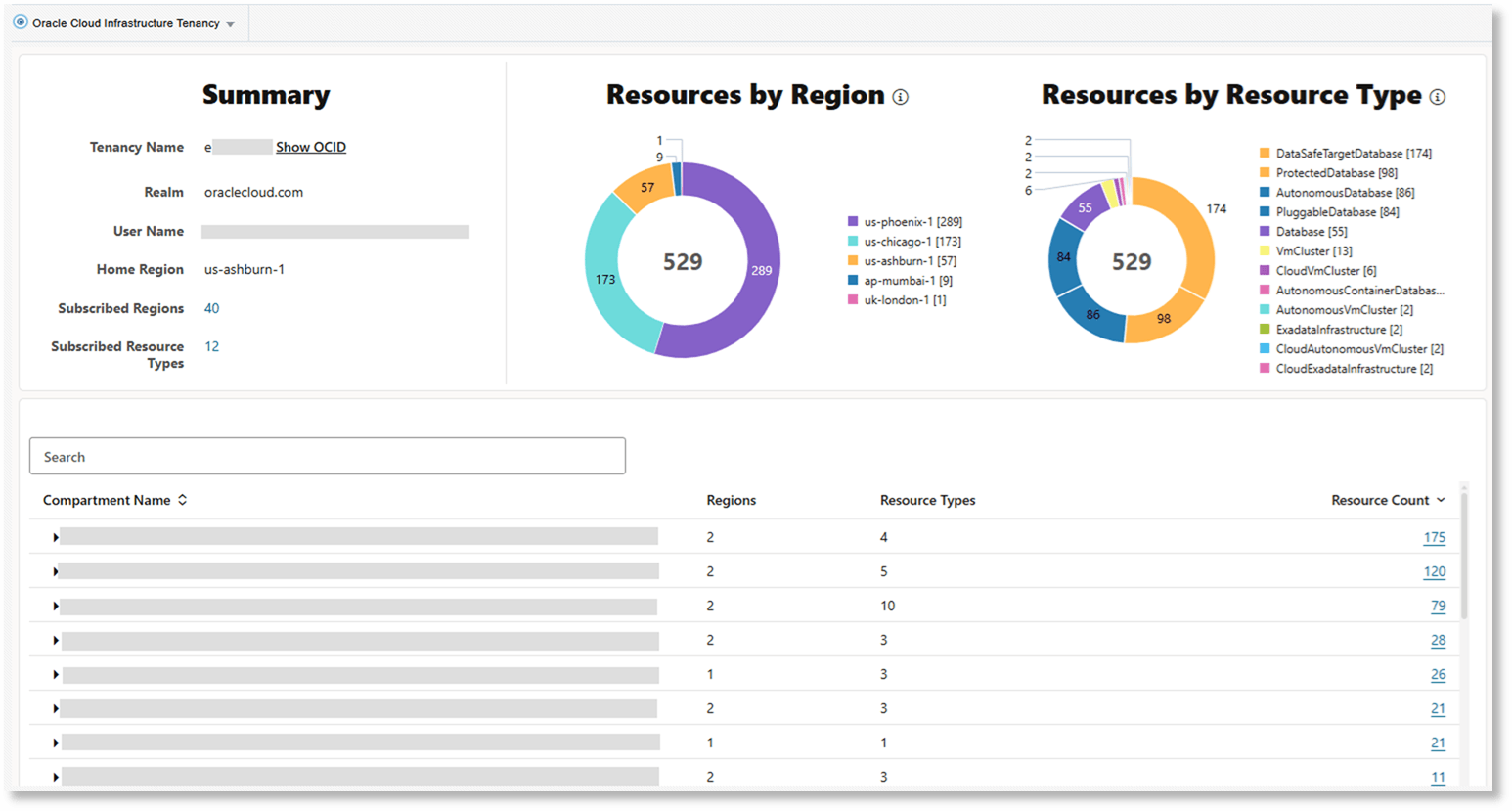
The Oracle Cloud Infrastructure Tenancy dashboard provides a consolidated view of database-related resources across all regions in your OCI tenancy, without leaving the Enterprise Manager console.
The Summary region displays the Home Region for the tenancy and the number of Subscribed Regions and Subscribed Resource Types. Subscribed Resource Types determine which OCI resources are included in the dashboard scope.
The Resources by Region pie chart displays the distribution of resources by region, helping you identify the regions with the most resources. Select a region to view the resources in that region, organized by compartment.
The Resources by Resource Type pie chart groups database-related resources across all regions by resource type, such as Autonomous Databases, Pluggable Databases, VM Clusters, Exadata Infrastructure, Protected Databases, and Data Safe Targets. Select a resource type to view the corresponding resources, organized by compartment.
For each resource in the list, Enterprise Manager indicates whether it is already managed as a target by displaying the corresponding target name. You can click the target name to open its homepage. Resources without a target name may be candidates for discovery through the Enterprise Manager discovery process.