Monitor Messages Per Second
The Converged Application Server allows you to monitor the messages per second (MPS) sent or received by your application to align with your licensed capacity. With a default 12-month historic MPS retention, you can audit usage trends and plan adjustments to your MPS license.
See the "MPS License Metric Definition" section of the License Document for a detailed definition of the MPS metric.
- Messages between SIP Servlet applications deployed in the same Converged Application Server instance (SIP Engine, JVM), regardless of:
- Messages routed via the local network interface
- Messages passed as java objects
- Messages sent to or received from monitoring tools, such as Prometheus or the ELK stack.
- Messages rejected or dropped by the overload protection feature
- MPS—The number of messages per second received from or sent to external servers.
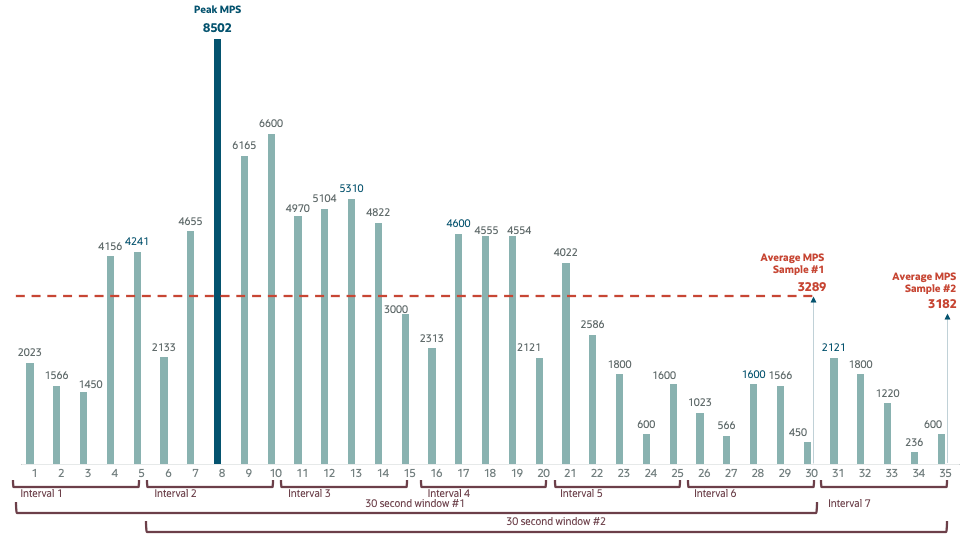
- Peak MPS—The highest Messages Per Second value during a 30-second window.
- Sampling Rate—Interval duration. By default, set to 5 seconds. The cumulative value of the number of messages for an interval duration is stored in an array. The array has six positions, hence creating a 30 second window.
- Average MPS—The average number of messages per second computed over a rolling 30 second window using the ceiling function (rounding to the next whole number).
For example, given the sampling rate of 5 seconds, then the Converged Application Server calculates the average MPS over a 30 second sliding window. The first sample (of average MPS) covers 0 - 30 seconds, the second sample covers 5 - 35 seconds, the third sample covers 10 - 40 seconds, and so on.
The following graph shows the Peak MPS and Average MPS for two consecutive 30 second windows. The Peak MPS is the same for both windows, namely 8502. The Average MPS however is different for each window: 3289 for the first window and 3182 for the second window.
- Retention Window—A 5 minute period during which the average MPS samples are retained in an internal buffer in memory. In total 60 average MPS values are stored in the internal buffer. From these 60 the highest value is stored for long term retention.
- Peak Average MPS—The highest number of
average MPS values over the retention window.
In the following example data set, the peak of the average MPS is 2542 within this 5 minute retention window. (All the other sample values are below 2542.)
Time Sample Average MPS 1 - 30 seconds 1 2534 5 - 35 seconds 2 2530 10 - 40 seconds 3 2515 15 - 45 seconds 4 2519 . . . . . . . . . 4 mins 25 sec - 4 mins 55 sec 59 2540 4 mins 30 sec - 5 mins 60 2542 In this example, the next retention window starts at 5 mins 00 seconds. With the first averaged peak value written at 5 minutes 05 seconds using the before-mentioned array. Hence the values of the 5 previous intervals are used to determine the average peak for the 5 minutes 00 seconds to 5 mins 05 second interval and so on. The array is not emptied at the end or start of a retention window.
- Licensed Peak Average MPS—Your licensed MPS number.
The Converged Application Server checks the retention window every 5 minutes for peak average MPS values that exceed your licensed peak MPS.
If the peak average MPS value exceeds the threshold limit, the Converged Application Server logs the alarm in the console log and updates the MPSConfig descriptor bean attribute BreachInfo with the message "Threshold limit crossed during period <FROMDATE> and <TODATE>".
The directory <DOMAIN_HOME>/servers/logs/MPS contains files called MPS_<MM-dd-YYYY>.csv that contains the start time, end time, and peak average MPS, and whether the Admin Server restarted. This file is rotated daily. Files in this directory that are older than the Historic MPS Persistency value are purged.
Note:
Use the Historic MPS Persistency value to limit how much disk space is devoted to MPS logs.Admin Server Restarts
The MPS application runs on the Admin Server and polls message counters on each managed server every 5 seconds. If the Admin Server is restarted or goes offline, this polling process is temporarily halted.
To maintain the Average MPS calculations, after each successful poll, the Converged Application Server records the current timestamp in the file <DOMAIN_HOME>/servers/logs/MPS/MPS_last_update_time. When the Admin Server comes back online, the MPS application reads the saved timestamp and retrieves the current cumulative message counts from the managed servers. It then calculates the Average MPS for the downtime period by dividing the difference in cumulative message count by the elapsed time between the saved and current timestamps. This approach ensures that MPS activity during the Admin Server restarts is included in the calculation.
Note:
If the Admin Server is down and the MPS_last_update_time file is deleted or contains an invalid timestamp (i.e., not in the expected format EEE MMM d HH:mm:ss z yyyy), the MPS application cannot determine the downtime period. In this case, no MPS records will be generated for the duration the Admin Server was offline.Note:
If the Admin Server remains down for more than a day, no daily MPS CSV files are generated during the offline period. Once the Admin Server is restored, MPS Application writes All accumulated MPS data in one record into the daily MPS CSV file created on the current day. All the data is consolidated into the first file after recovery.Known Issue
The MPS monitoring function currently only records SIP and Diameter messages.