Install the Media Gateway Service Domain

Before installing the Intelligent Media Connector, first install the Converged Application Server.

The hardware requirements:
  • 8GB Memory (16GB recommended)
  • 150GB Storage
  • 8 CPUs (16 recommended)
  • 1Gpbs Ethernet connection
  1. Dowload the occas_generic.jar file.
  2. Start the installation.
    java -jar occas_generic.jar

    Follow the instructions in the Installation Guide to install the Converged Application Server.

  3. Start the Configuration Wizard.
  4. On the Create Domain page, select "Create a new domain" and click Next.
  5. On the Templates page, select "Converged Application Server - Replicated Intelligent Media Connector Domain" and click Next.
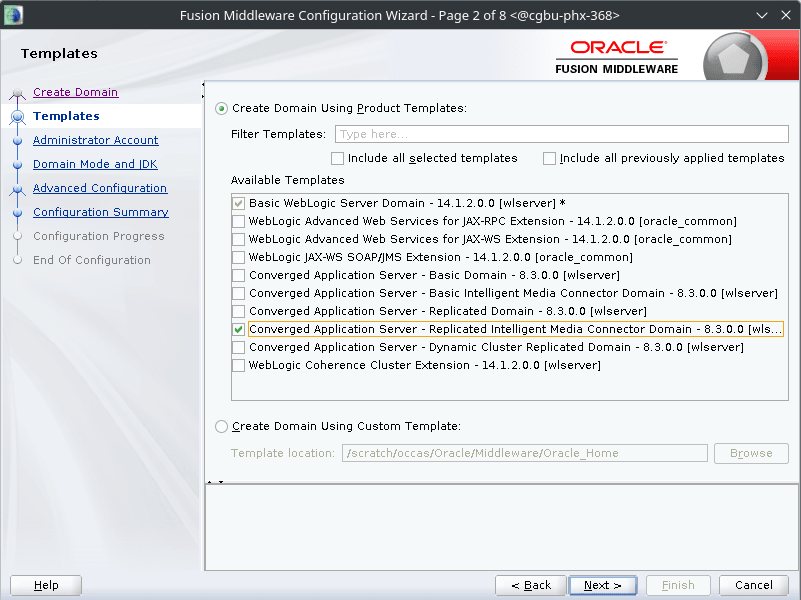
    Replicated Media Gateway Service Domain

  6. On the Administrator Account page, set the passphrase for your Converged Application Server.
  7. On the Domain Mode and JDK page, select the appropriate startup mode.
    If you are deploying the Converged Application Server in a production environment, select Production; otherwise, select Development.

    In the Enable or Disable Default Ports for Your Domains, select whether or not your instance listens on SSL ports. By default, Development mode listens on non-SSL ports and Production listens on SSL ports.

  8. On the Advanced Configuration page, select Next.
  9. On the Configuration Summary page, select Create.
  10. After the domain has been installed, click Finish to close the Configuration Wizard.