1 Intelligent Media Connector
The Intelligent Media Connector allows you to manage media sessions from the Converged Application Server application. The Intelligent Media Connector enables integration between SIP-based telephony environments, speech processing solutions and GenAI services. It facilitates communication between telephony infrastructure (such as Session Border Controllers and SIP trunks) and components like Automatic Speech Recognition (ASR), Speech-to-Text (STT), and Text-to-Speech (TTS). The Intelligent Media Connector provides real-time call media handling and codec transcoding to support AI-powered voice services such as personal assistant for consumers and employees, AI agents for call handling, call overflow and unlimited availability, and enterprise productivity tools like translation, summaries, sentiment analysis, compliance and security.
Enhancing Converged Application Server with media processing allows you to build innovative applications where call services and call control are influenced by AI. You can support complex call scenarios where you chain several services such as caller attestation, voice biometrics, call queue and call transfer with automated self-service and automated calling solutions. You can build personal assistants to act on behalf of the consumer such as screen calls, transcribe voicemails and determine call-back or appointment scheduling, manage "Do Not Disturb," and much more.
The Converged Application Server architecture separates call signaling from audio-media stream processing, enabling seamless scaling, failover, and extensibility to AI-powered use cases (such as live transcription, call summary, and sentiment analysis).
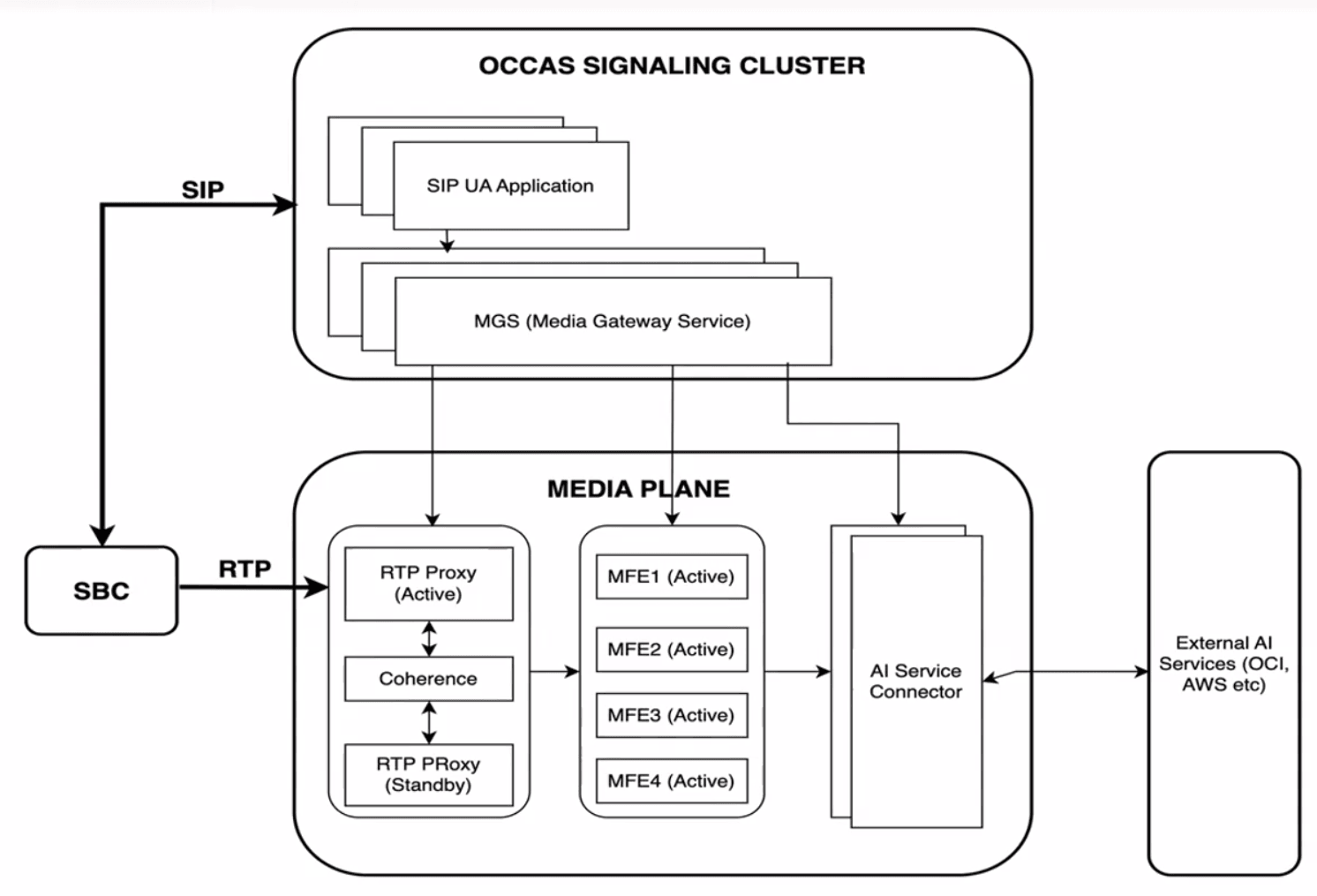
Components
- RTP Proxy – This passes the RTP stream from the SBC to multiple Media Flow Engines. Multiple proxies should be deployed to ensure the RTP streams are delivered to the optimal Media Flow Engine for processing.
- Media Flow Engine – This receives media streams from the RTP proxy, builds media-processing pipelines, and interfaces with Intelligent AI Connector. Because media processing is resource intensive, multiple MFEs can be deployed and scaled to handle the workload.
- Intelligent AI Connector (IAC) – This processes live call audio streams and applies AI-powered services such as speech-to-text transcription. Multiple IACs can be deployed in parallel to support scalability and redundancy, enabling concurrent AI processing across a high volume of active calls.
- AI Gateway Service (AGS) – This is the central orchestrator for AI service session management, responsible for routing live calls to the appropriate AI Connector instances. It handles health monitoring of IACs, load balancing across available IAC nodes, and orchestration of failover procedures. The AGS ensures optimal distribution of call traffic to AIC instances based on capacity and availability. The AGS is part of the Converged Application Server's Replicated Intelligent Media Connector domain.
Install the Latest Patch
To install the whole Intelligent Media Connector architecture, you must first install the latest patches for Converged Application Server.
- Log into My Oracle Support and select Patches.
- Search for patch 39305242.
- Download the file
p39305242_83000_Linux-x86-64.zip. - Extract the zip
file.
unzip p39305242_83000_Linux-x86-64.zipThe archive contains the 38769006.zip file.
Archive: p39305242_83000_Linux-x86-64.zip inflating: 38769006.zip inflating: IMCSampleApp-8.3.0.0.0.zip extracting: IntelligentAIConnector-8.3.0.0.0.tar.gz inflating: media-flow-engine-8.3.0.0.0.tar.gz inflating: README.txt inflating: rtp-proxy-8.3.0.0.0.tar.gz - Copy 38769006.zip file to your Converged Application Server.
- SSH to your Converged Application Server.
- Shutdown the WebLogic
Server.
cd ~/Oracle/Middleware/Oracle_Home/user_projects/domains/base_domain/bin/ ./stopWebLogic.sh - Navigate to the
OPatchdirectory and use theopatchprogram to apply patch 38769006.cd ~/Oracle/Middleware/Oracle_Home/OPatch/ ./opatch apply ~/38769006.zip - Restart the WebLogic
Server.
cd ~/Oracle/Middleware/Oracle_Home/user_projects/domains/base_domain/bin/
./startWebLogic.sh
Next Steps
See the Installing Infrastructure Components chapter in the Installation Guide for instructions on the following steps:
- Install the Media Flow Engine.
- Install the RTP Proxy.
- Install the Intelligent AI Connector.
Once those three components have been installed, you need to connect each component to the Converged Application Server.