5 Using LDAP with DAP
Defining a DAP ASP for LDAP
Introduction
This topic provides additional configuration information related to the definition of a DAP ASP for LDAP.
ASP Configuration screen
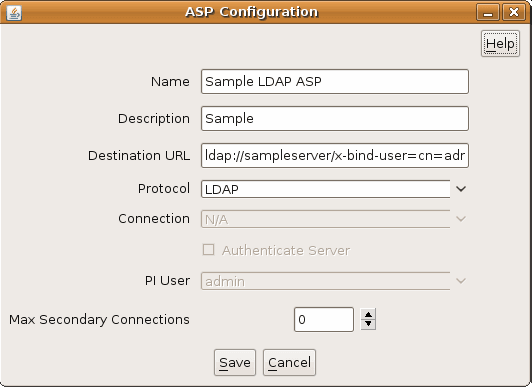
This screen shot shows a typical dialog window to Create or Edit a DAP ASP.
ASP configuration fields
These comments apply specifically to defining an LDAP protocol ASP.
| Field | Notes |
| Name | A unique name for this ASP. |
| Description | An optional description field for this ASP. |
| Destination URL |
This field defines the “LDAP URL” which specifies the location of the server against which LDAP requests should be made. The URL full syntax is specified in RFC2255. The LDAP server for DAP supports a subset of the full field list. The supported syntax is: ldap://<server-name>:<port>/x-auth-method=simple,x-encryption=none,x-version=<LDAP
protocol
version>,x-bind-user=<user-name>,x-bind-password=<password>
Where:
The x-auth-method, x-encryption and x-version parameters are all optional, and if specified, should be set only to the indicated values. |
| Protocol | Choose LDAP for the LDAP Interface for LDAP.
|
| Connection | This field is not applicable to the LDAP protocol. |
| Authenticate Server | This field is not used for the LDAP protocol. Authentication is always used for LDAP. |
| PI User | This field is not applicable to the LDAP protocol. |
| Max Secondary Connections | This field is not used for the LDAP protocol. Only a single connection per ASP is used for LDAP. |
Defining a DAP Operation for LDAP
Introduction
The DAP framework defines the concept of an “Operation”. Operations may be grouped into “Operation Sets”. The following discussion is primarily concerned with only those aspects of operation configuration specifically related to the LDAP Interface for DAP.
The LDAP operation definition is effectively a template which describes how ACS parameters correlate to the LDAP request. Every DAP Request node instance with an ACS control plan must specify the operation it will use.
Specifically the operation defines:
- Which LDAP ASP will receive this request.
- What parameters are included in the LDAP request.
- What are the sources within the ACS control plan call context for these parameters.
- What parameters are expected in the associated LDAP response.
- Where are these parameters copied into the ACS control plan call context.
Basic configuration
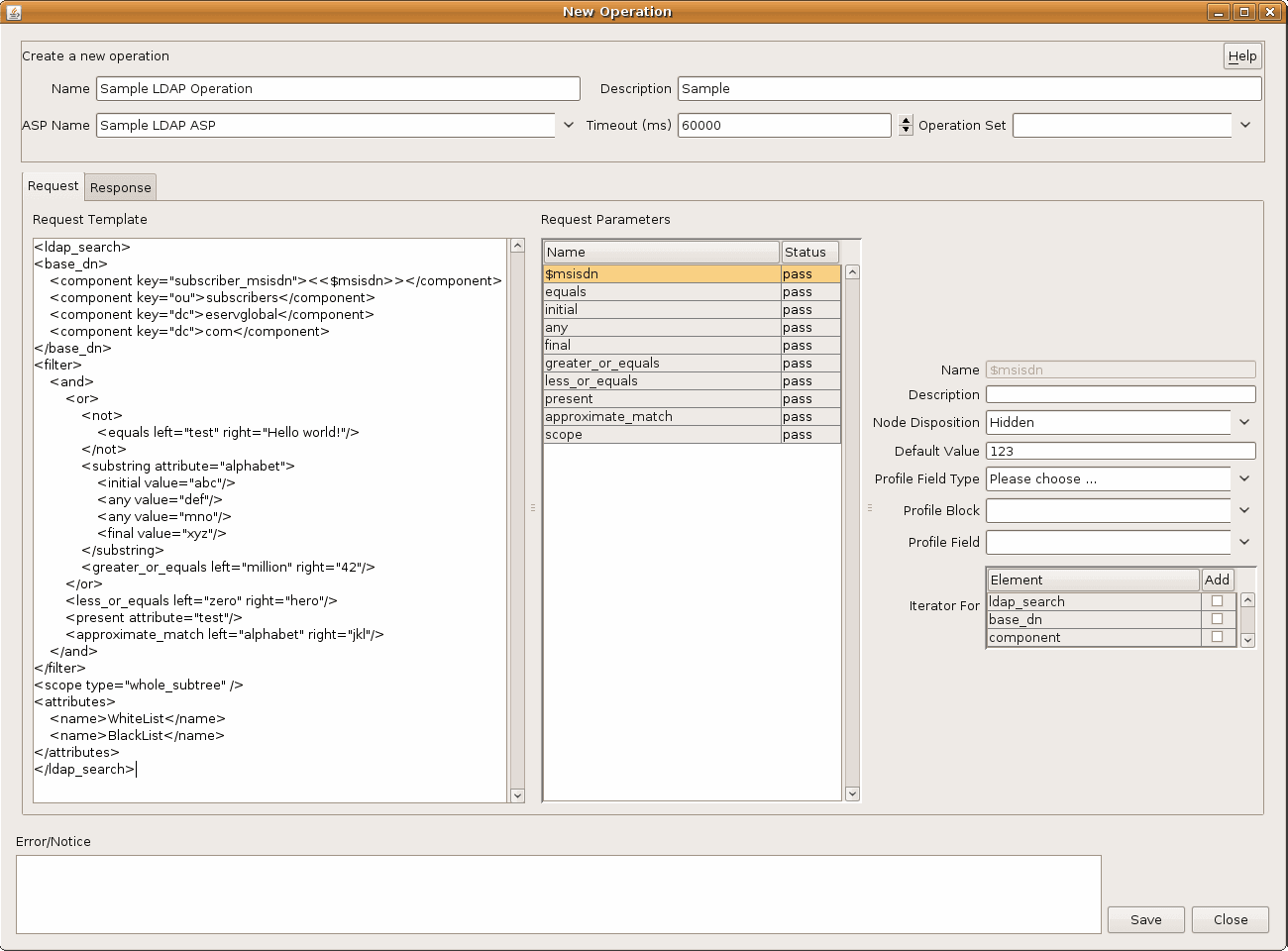
There as some basic configuration settings on the operation screen. In addition there are two tabs - Request and Response which contain more detailed configuration.
| Field | Notes |
| Name | A unique name for this operation. |
| Description | An optional description field for this ASP. |
| ASP Name | Each operation is associated with a specific ASP. Choose your predefined LDAP ASP from the combo box. |
| Timeout | Specify the time-out in milliseconds to use for requests based on this operation. This must be strictly greater than zero. |
| Operation Set | Choose an operation set for this operation to belong to, or an empty operation set. |
Request parameter tab fields
Here are the key fields on the Request parameter tab.
| Field | Notes |
| Request Template |
This is the XML definition of the LDAP request. The DAP framework will determine the appropriate ACS control plan parameters that the LDAP interface needs to insert into the XML template, and will send these parameter values to the LDAP interface for DAP. The LDAP interface will substitute the parameters into the XML request template, and then will translate the complete XML request into LDAP, and finally will send it to the configured ASP. In addition, the LDAP-specific aspects of the Request Template field are discussed in further detail below. |
| Request Parameters |
See descriptions about:
|
Request template
The Request Template fields is (with one exception) a complete, well-formed XML document which must match the LDAP interface for DAP Request Schema file:
/IN/service_packages/DAP/etc/ldap_request_schema.xsd
The exception to the well-formed XML is the use of “<< $var >>” within the XML document. These are special place-holders which denote DAP substitution variables.
A DAP substitution variable is indicated by either:
- An element with empty content, and/or
- An element containing an explicit “<< $var >>” substitution variable.
For example:
<var1 this=”that”></var1><param
me=”you”><< $var2
>></param><param he=”him”
foo=”bar”><< $var3
>></param>
Examining the above, the DAP screen would determine that before sending this request, there are three variable fields in this request which need to be filled from values in this control plan call context. The variables are “var1” (empty content), “var2” and “var3” (explicit named).
LDAP Request template
A request template for an LDAP operation must have a specific syntax, as defined in the ldap_request_schema.xsd schema file. In general, the fields of the LDAP operation are standardised. The only significant area for flexibility is in the definition of the <filter> element, which represents the “filter” attribute of the LDAP SearchRequest as per RFC1777. This is an arbitrary nesting of comparisons, combined with a logical and/or test.
Please refer to RFC1777 and the request XSD file for the definitive definition. However, the following “complete example” shows all possible LDAP schema elements in use.
<ldap_search><base_dn><component
key=”subscriber_msisdn”><<$msisdn>></component><component
key=”ou”>subscribers</component><component
key=”dc”>example</component><component
key=”dc”>com</component></base_dn><filter><or><and><not><equals
left=”vpnlevel”
right=”NoAccess”></not><substring
attribute=”yahooUsername”><initial
value=”ax”><any
value=”hot”><any
value=”l33t”><final
value=”zz”></substring><greater_or_equals
left=“cashBalance”
right=”1000”></or><less_or_equals
left=”yearsToLive”
right=”10”><present
attribute=”royaltyFlag”><approximate_match
left=”formOfAddress”
right=”sir”></or></filter><scope
type=”whole_subtree”><attributes><name>AllowList</name><name>BlockList</name><name>MotherMaidenName</name></attributes></ldap_search>
Elements
Here are the elements in the ldap_search Operation Request template.
| Element | Notes |
| ldap_search | This is the outer level element which denotes the template for an LDAP SearchRequest operation as specified in RFC1777. |
| base_dn | This defines the content of the baseObject parameter in the LDAP SearchRequest. It consists of one or more component sub-elements. |
| component |
This defines the components of the base in sequence from the outermost level to the root of the DN. In the example shown here, the subscriber's MSISDN is included in the DN. Alternatively, you might specify a base DN as a point in the namespace tree further towards the root and request the server to search the whole subtree. The base DN and filter strategy is entirely dependent on the nature of the application and the nature of the LDAP server's data structure. |
| filter |
This element specifies the search filter. Before designing a search filter, it is necessary first that you understand the role and potential of the filter field as defined in RFC1777. Secondly, it is necessary for you to understand the structure of the user data stored in the LDAP server. Once you have designed the LDAP search filter, this Operation Request Template allows you to specify an XML template in a natural fashion with a direct mapping into sub-elements. Recall that the filter matching specified here is actually performed by the LDAP server as part of its process for locating the appropriate user object for which to return the requested attributes. Refer to the documentation for your LDAP server for the authoritative specification of how filter elements will be interpreted. |
| and | This element evaluates to “true” if all contained filter elements evaluate to “true”. |
| or | This element evaluates to “true” if one or more contained filter elements evaluate to “true”. |
| not | This element evaluates to “true” if the single filter element it contains evaluates to “false”. |
| substring |
This elements evaluates to “true” if the attribute with name specified by parameter “attribute” is determined to substring match according to the sub-elements. A substring element must contain at least one “initial”, “any” or “final” attributes. If multiple “initial”, “any” or “final” attributes are present, then all must match. E.g. in the example given, the attribute of name “yahooUserName” must match the pattern “ax*hot*l33t*zz” where * indicates a sequence of zero or more characters. |
| initial | Within a substring element, determines that the element must begin with the specified sequence in order for substring to match. |
| any | Within a substring element, determines that the element must contain within it the specified sequence in order for substring to match. If multiple “any” elements are specified, the order may be significant. |
| final | Within a substring element, determines that the element must end with the specified sequence in order for substring to match. |
| equals | This elements evaluates to “true” if the attributed with name specified by parameter “left” is determined to have value equal to that specified by parameter “right”. |
| greater_or_equals | This elements evaluates to “true” if the attributed with name specified by parameter “left” is determined to have value greater than or equal to that specified by parameter “right”. |
| less_or_equals | This elements evaluates to “true” if the attributed with name specified by parameter “left” is determined to have value less than or equal to that specified by parameter “right”. |
| present | This elements evaluates to “true” if the attributed with name specified by parameter “attribute” is present for the object. |
| approximate_match | This elements evaluates to “true” if the attributed with name specified by parameter “left” is determined by the ASP server to have value “approximately equal” to that specified by parameter “right”. Refer to RFC1777 and the documentation for the LDAP Server. |
| scope | This should specify type=”whole_subtree”. Other values may be supported in the future. |
| attributes |
The attributes element contains the names of all the returned attributes which are to be requested from the LDAP server and which are to copied from the LDAP response into the ACS call context. The configuration on the Response Tab defines where these elements are to be placed within the call context. Some elements may be multi-valued, in which case they may be placed within sub-profiles. Refer to the Data Access Pack User's & Technical Guide for further information on configuring DAP nodes to receive multi-valued fields. |
| name | Each name element specifies one attribute name to be requested from the LDAP server and written into the ACS call context. Again, note that some attributes are multi-valued. Refer to the Data Access Pack User's & Technical Guide. |
Note: The current behaviour in the DAP request template screen is that it treats all elements with empty content as if they were variables. This can result in some element tags (e.g. “present” and “scope”, and others) from always being incorrectly interpreted as variables.
When this occurs, you will need to simply configure this “ghost parameter” as having an empty string default value.
Request parameters
The second and third columns in the Request tab for the Operation screen define the source and default values for the per-invocation variables which are filled from the buffers in the ACS control plan call context at run-time.
The use and interpretation of these fields is the same for LDAP as for other DAP protocols.
Response configuration
The Response tab contains the configuration allowing the operator to define the destination within the ACS control plan call context where user data received in the LDAP response will be placed. When specifying the XPATH for returned LDAP fields, use an XPATH such as:
//name[@key="userFieldName"]/text()
Note that the “text()” refers to the content of the returned value, not the final stored type in the profile. Hence “text()” is used for when the returned value to be written to the call context is a string or an integer.
Note that the double quotes around the returned user field name are required.
Otherwise, the use and interpretation of all configuration fields on this tab is the same for LDAP as for other DAP protocols.