4 Credit Control Requests
Credit Control Request and Response AVPs
AVP List descriptions
This table describes the function of each AVP.
| AVP Name | Action |
|---|---|
| Session-Id | Used to identify the relevant session. |
| Origin-Host | Used to identify sender. |
| Origin-Realm | Used to identify sender. |
| Destination-Realm | Used to identify the realm of the target Credit Control Server (normally expected to be the machine DCA is running on) |
| Auth-Application-Id | Disregarded if not 4 (Diameter Credit-Control) |
| Service-Context-Id | Used as part of the key to look up the service. |
| CC-Request-Type |
Used as part of the key to look up the service. Also used to determine the next state. |
| CC-Request-Number | Used in duplicate detection. |
| Destination-Host | Used to identify the host of the target Credit Control Server (normally expected to be the machine DCA is running on). |
| User-Name | Ignored unless mapped to an IDP extension by the AVP mappings in eserv.config. |
| CC-Sub-Session-Id |
Ignored. We do not support multiple session IDs but some clients may set this anyway. If so this will be ignored. |
| Acct-Multi-Session-Id |
Ignored. We do not support multiple session IDs but some clients may set this anyway. If so this will be ignored. |
| Origin-State-Id | Used to detect a client re-booting and wipe sessions for the host if it has rebooted. |
| Event-Timestamp | For EVENT_REQUEST messages, this gets copied into IDP extension type 504. |
| Subscription-Id | Gets copied to IDP extension type 505. If this is an E 164 number, it also gets copied to CallingPartyNumber, after applying the configured normalization rules. |
| Service-Identifier | Used as part of the key to look up the service. |
| Termination-Cause |
May be traced if tracing is enabled. Otherwise, ignored. |
| Requested-Service-Unit |
The type of the service unit (derived from which sub-AVP is contained within this one) is placed in IDP extension type 502. The value of the sub-AVP is placed in IDP extension type 501. DCA supports the use of multiple unit-types within a single Requested-Service-Unit AVP for both Basic Credit Control and Multiple Services Credit Control (MSCC) upon service initiation. A single Requested-Service-Unit AVP (containing more than 1 unit type) will result in DCA triggering multiple slee_acs calls (1 for each unit type). |
| Requested-Action |
Used as part of the key to look up the service. Also used to determine the next state. |
| Used-Service-Unit | The cumulative total of all the Used-Service-Unit AVPs is multiplied by 10 (to create deci-seconds) and used to identify the total used units for the call. |
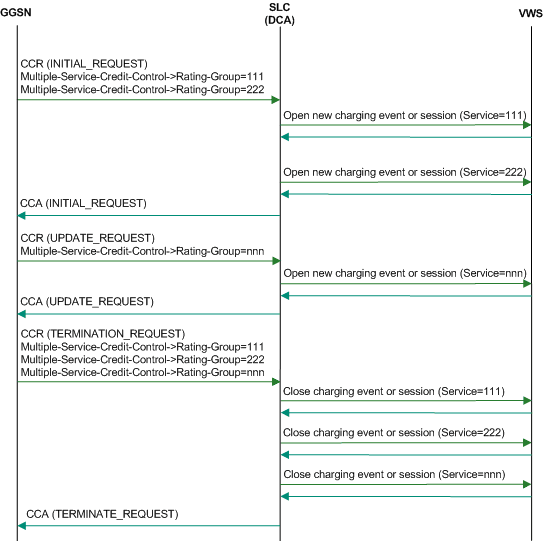
| Multiple-Services-Indicator | DCA fully supports Multiple-Services-Credit Control. The DCA mechanism for supporting multiple service credit-control allows multiple charging sessions with ACS to be associated with one DIAMETER session.So if the received Multiple-Services-Indicator is set to MULTIPLE_SERVICES_SUPPORTED, DCA will accept the incoming message and subsequent Multiple-Services-Credit-Control AVPs if received in CCR/CCA update and CCR/CCA final request messages. All incoming diameter messages and associated MSCC AVPs will be processed and dispatched as separate calls/sessions to ACS. An association will be maintained between these multiple ACS calls/sessions and the single diameter session with responses from ACS aggregated before a single CCA response containing an MSCC AVP is returned. The segregation of the single MSCC session into separate ACS calls is internally managed by DCA and is transparent to the Diameter Client. |
| Multiple-Services-Credit-Control |
Requires that Multiple-Services-Indicator AVP has been received, with value set to MULTIPLE_SERVICES_SUPPORTED. DCA supports the use of multiple unit-types within a single Requested-Service-Unit AVP for both multiple services credit-control (MSCC) and basic credit control. As described above, the mechanism for multiple service credit-control allows multiple ACS charging sessions to be dispatched and associated with one DIAMETER session. If more than one unit type is received within the MSCC AVP, a similar mechanism of segregation and dispatch to ACS will be used (that is, one ACS session/call for each unit type) |
| Service-Parameter-Info | Ignored unless mapped to an IDP extension by the AVP mappings in eserv.config. |
| CC-Correlation-Id | Ignored unless mapped to an IDP extension by the AVP mappings in eserv.config. |
| User-Equipment-Info | Ignored unless mapped to an IDP extension by the AVP mappings in eserv.config. |
| Proxy-Info | Returned unmodified in CCA. |
| Route-Record | Ignored at present, unless mapped to an IDP extension by the AVP mappings in eserv.config. |
AVP Data source
This table describes how each AVP content is set.
Some of these AVPs are for both Credit Control Requests and Credit Control Responses. Some are for one only.
| AVP Name | Set From |
|---|---|
| Session-Id | The Session-Id AVP of the first message in this transaction. |
| Result-Code |
Set to DIAMETER_SUCCESS unless otherwise stated. Note: If quiescing and this is an INITIAL_REQUEST or an EVENT_REQUEST then return CCA(Result-Code=DIAMETER_TOO_BUSY). |
| Origin-Host | Set according to configuration. Normally defaults to host name. |
| Origin-Realm | Set according to configuration. Normally defaults to host name. |
| Auth-Application-Id | Always set to 4 (Diameter Credit-Control) |
| CC-Request-Type | The value of CC-Request-Type from the corresponding request. |
| CC-Request-Number | The value of CC-Request-Number from the corresponding request. |
| User-Name | Set if configured. |
| CC-Session-Failover | Set if configured (which should be treated as FAILOVER-NOT-SUPPORTED according to RFC 4006). |
| CC-Sub-Session-Id | Set to the value from the corresponding request message. |
| Acct-Multi-Session-Id | Set to the value from the corresponding request message, of present. |
| Origin-State-Id | Set to current system time, at time of last DCA restart. |
| Event-Timestamp | Set to the value of the Event-Timestamp AVP from the corresponding request. |
| Granted-Service-Unit |
For session based services, this is ApplyCharging.maxDuration (divided by 10 if the unit type is Time). For Requested-Action type DIRECT_DEBIT, in the success case, this is the same as the Requested-Service-Unit AVP in the corresponding request. Otherwise, not present. |
| Multiple-Services-Credit-Control |
For each incoming MSCC AVP containing a Requested-Service-Unit, DCA will dispatch an individual ACS call. DCA starts the calls by sending an InitialDP (IDP) to ACS and expects a subsequent ApplyCharging (AC) response. DCA aggregates the AC responses and maps the appropriate data into the MSCC AVP in the CCA message that DCA then returns to the Diameter client. DCA will populate the MSCC AVPs in CCA messages with the following sub-AVPs where applicable:
|
| Cost-Information | For Request-Action type PRICE_ENQUIRY, success case, this comes from the value of extension 603 in the INAP Connect. Otherwise, not set. |
| Final-Unit-Indication | Final-Unit-Action is set to REDIRECT or TERMINATE depending on the INAP operations received (from ACS/Prepaid Charging). Redirect-Server is set to the number matched in the redirectNumbers config list or TEL:<Connect destinationRoutingAddress>@<Configured SIP host>. |
| Check-Balance-Result |
This is derived from the type of INAP operation received: Continue ENOUGH_CREDIT ReleaseCall (Reason = 31) NO_CREDIT |
| Credit-Control-Failure-Handling | Set to TERMINATE |
| Direct-Debiting-Failure-Handling | Set if configured. (According to RFC 4006, it will default to TERMINATE_OR_BUFFER). |
| Validity-Time |
Set to the configured validity-time for the service in the graceful termination scenarios only. If Dynamic Quota is enabled, then Validity-Time is taken from the appropriate Dynamic Quota set configuration. For more informaton, see Dynamic Quota Config section in Charging Control Services User's Guide. Validity-Time may get modified if TTC is enabled and an adverse rating boundary is detected. For more information on TTC rating boundary details, see TTC based Rating and Charging section in Charging Control Services User's Guide. |
| Redirect-Host | Set if configured. |
| Redirect-Host-Usage | Set if configured. |
| Redirect-Max-Cache-Time | Set if configured. |
| Proxy-Info | Returned as per CCR. |
| Route-Record | Set if configured. |
| Failed-AVP |
Set in some cases when Result-Code != success, that is: If the incoming message contains unsupported AVPs then return CCA(Result-Code=DIAMETER_AVP_UNSUPPORTED, Failed-AVPs) |
| Custom AVPs |
Determined by DCA mapping configuration:
|
In additional to the functionality described in the table above:
- For AVPs marked "Set if configured", refer to Considerations .
- Outbound AVPs such as Result-Code may have the default data source or value changed by DCA mapping configuration as per "Custom AVPs" above.
- Any inbound AVPs may be mapped to additional target data field(s) by DCA mapping configuration as per "Custom AVPs" above.
Also note that:
- INAP Fields are determined by the INAP Standards (for example, Calling Party Number, Destination Routing Address)
- INAP Extensions when encoded into an ACS Profile Block may be used to carry Grouped AVPs and other more complex structures.
- Literal values are simple data types (for example, a literal string or integer constant)
For a full listing of AVPs and compliance to the standards document, please see the section titled "Compliance to 3GPP TS 32.299" Section 7 .
INAP Extension Mappings
Introduction
As INAP is not designed to contain Diameter AVPs, these will be carried, where necessary, in INAP fields and extensions in the INAP operations.
For a specific Diameter interface, there will be differences in which AVPs will be relevant for rating or which vendor specific AVPs will be used. So, for each service, the configuration allows:
- In the inbound direction, a mapping of AVPs to INAP fields or INAP extensions
- In the outbound direction, a mapping of INAP fields or INAP extensions to AVPs
The extensions that arrive through inbound mapping are available to ACS in the control plan in the incoming extensions block. These are available for manipulation such as in control plan nodes and branching decisions such as to implement tariff override if applicable.
The ACS control plan may also choose to set outgoing extensions that are sent in INAP operations and subsequently mapped into AVPs in the outbound Diameter responses.
The AVP to pass is identified according to AVP code. Multiple AVPs may be identified and passed to:
- Target profile tags, available within the inbound extensions block
- INAP Fields, available within ACS Context fields
Likewise the INAP Fields or Profile Blocks to pass is identified by name or tag code respectively.
Multiple fields may be identified and passed to target AVPs.
In addition it is possible to selectively apply the same or different mapping schemes for specific Diameter request and response messages.
INAP Extensions are possible in the following INAP Operations:
- Initial DP
- Apply Charging Report
- Continue With Argument
- Release Call (See Note)
- Connect
- ApplyCharging
Note: The Release Call does not use INAP Extensions, but instead encodes the extension data within the Cause Diagnostics field of the Cause parameter. This mechanism is transparent to the end-user from a functional viewpoint.
Extensions in the IDP
501 = Requested-Service-Units
502 = Requested service unit type
1 = CC-Time 2 = CC-Money3 = CC-Total-Octets4 = CC-Input-Octets5 = CC-Output-Octets6 = CC-Service-Specific-Units
503 = Requested-action
DIRECT_DEBITING 0REFUND_ACCOUNT 1CHECK_BALANCE 2PRICE_ENQUIRY 3
504 = Event-Timestamp (passed as seconds since the Unix Epoch)
505 = Subscription-Id (E.164 based number representing subscriber)
506 = CC-Money.Currency-Code (if Requested-Service-Unit is type CC-Money)
507 = CC-Money.Unit-Value.Exponent (if Requested-Service-Unit is type CC-Money)
701 = Multiple Encoded AVPs, mapped to Inbound Extension profile block (as per configuration)
Extensions in the Connect operation
601 = Granted service units
602 = Granted service unit type
1 = CC-Time 2 = CC-Money3 = CC-Total-Octets4 = CC-Input-Octets5 = CC-Output-Octets6 = CC-Service-Specific-Units
603 = Cost information (in system currency)
701 = Multiple Encoded AVPs, mapped from the Outbound Extension profile block (as per configuration)
Extensions in the ApplyChargingReport
701 = Multiple Encoded AVPs, mapped from the Inbound Extension profile block (as per configuration)
Extensions in the ApplyCharging operation
701 = Multiple Encoded AVPs, mapped from the Outbound Extension profile block (as per configuration)
INAP Field Mappings
Introduction
Instead of mapping AVPs to or from INAP Extensions, DCA also allows AVPs to be mapped to or from INAP fields.
The supported INAP Fields are:
| INAP Field | Direction (INAP Operation) |
| AdditionalCallingPartyID | Inbound only (IDP) |
| CalledPartyBCDNumber | Inbound only (IDP) |
| CalledParty | Inbound only (IDP) |
| CallingParty | Inbound (IDP), Outbound (Connect) |
| Cause | Outbound only (ReleaseCall) |
| DestinationRoutingAddress | Outbound only (Connect) |
| IMSI | Inbound only (IDP) |
| LocationInformation | Inbound only (IDP) |
| LocationNumber | Outbound only (Connect) |
| MaxCallDuration | Outbound only (ApplyCharging) |
| MscAddress | Inbound only (IDP) |
| OriginalCalledParty | Inbound, Outbound (IDP) |
| RedirectingPartyID | Inbound, Outbound (IDP, Connect) |
Notes:
Unlike INAP Extensions which, depending on configuration, can be typically applied in one or both directions, some INAP Fields can only be applied in a single direction (see table above).
"Direction" is relative to DCA for Diameter messages (that is, "Inbound" refers to an incoming Diameter message)
Abort Session Request (ASR)
Abort Session Request
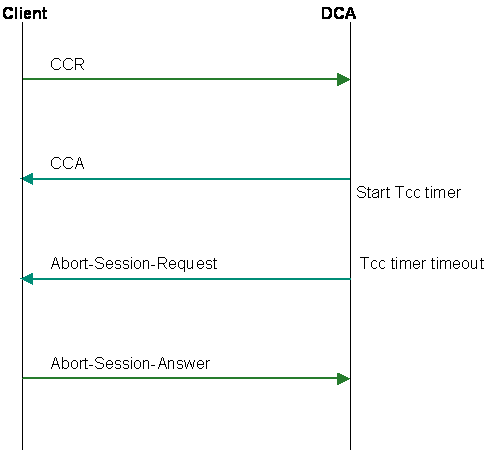
DCA can be configured to send an Abort-Session-Request (ASR) to the diameter client when the Session Supervision Timer (Tcc timer) expires while waiting for the diameter client to send a request to DCA. If a timeout occurs while waiting for a server process (for example, ACS, VWS) an ASR will not be sent. In this scenario, we are processing a CCR, so we manage the error condition in the CCA response.
DCA supports Multiple Services Credit Control, which means that the diameter client can request charging for many services in a single session, which results in DCA managing many charging sessions with ACS per single session with the client.
The ASR message (defined in RFC 6733) does not support the notion of services in MSCC (defined in RFC 4006), so when the Tcc timer expires for any service for a given GGSN session, all ACS charging sessions associated with the GGSN session must be terminated.
Note: Diameter provides the client with the capacity to decline aborting a session, by returning DIAMETER_UNABLE_TO_COMPLY, however DCA does not attempt to keep a session open in this case: it acts the same in all cases, simply logging the response.
The possible fields are as follows:
| Field | AVP Code | Data Type | Comment |
|---|---|---|---|
| Session-Id | 263 | UTF8String | The Session-Id AVP of the first message in this transaction. |
| Origin-Host | 264 | DiameterIdentity | Set according to configuration. Normally defaults to host name. |
| Origin-Realm | 296 | DiameterIdentity | Set according to configuration. Normally defaults to host name. |
| Destination-Host | 293 | DiameterIdentity | The Origin-Host of the first message in this transaction. |
| Destination-Realm | 283 | DiameterIdentity | The Origin-Realm of the first message in this transaction. |
| Auth-Application-Id | 258 | Unsigned32 | Set to the Auth-Application-Id received earlier in the session (in a CCR) from the Diameter credit-control client. |
Re-Auth Request (RAR)
Re-authorization Request
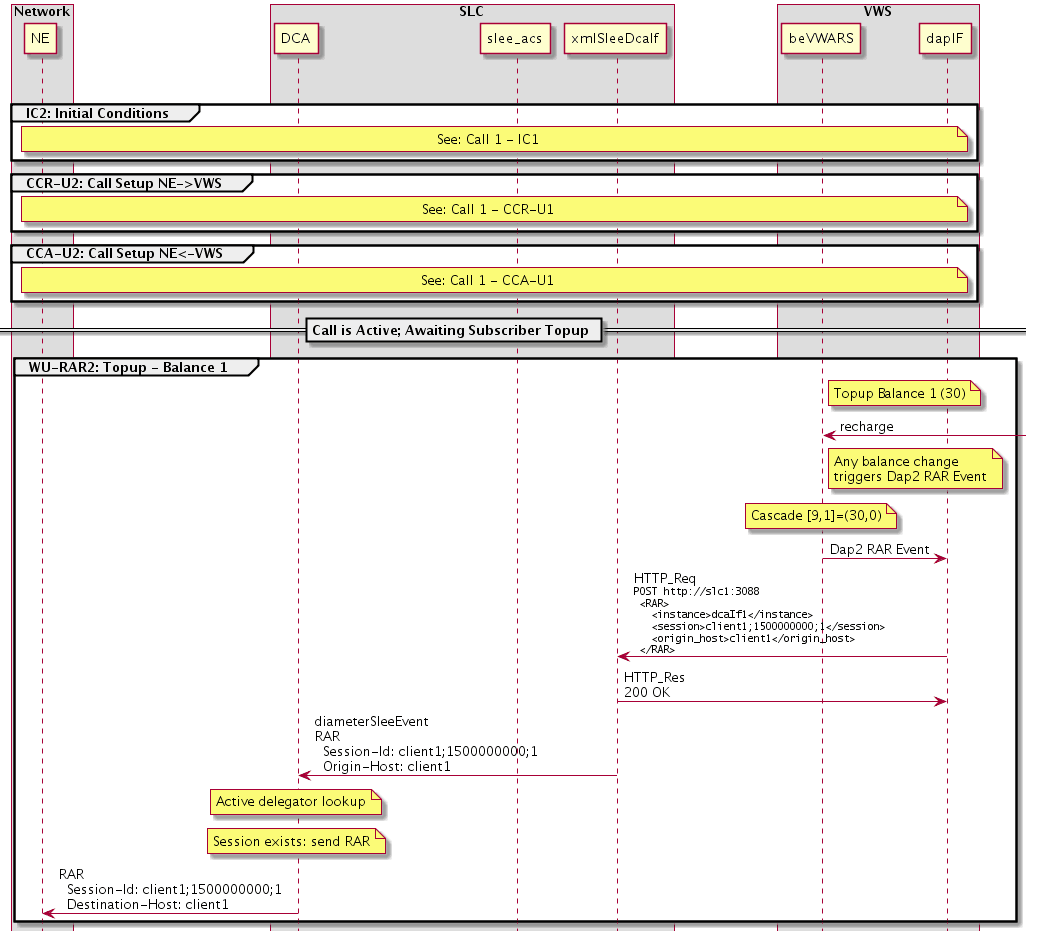
DCA can request session re-authorization to a client.
In the table below, "CC session" refers to an ongoing Credit Control session. In this scenario, DCA acts as a client, initiating the RAR to the network-side.
The possible fields are as follows:
| Field | AVP Code | Data Type | Comment |
|---|---|---|---|
| Session-Id | 263 | UTF8String | Session-Id of CC session |
| Origin-Host | 264 | DiameterIdentity | Destination-Host of CC session |
| Origin-Realm | 296 | DiameterIdentity | Destination-Realm of CC Session |
| Destination-Host | 293 | DiameterIdentity | Origin-Host of CC session |
| Destination-Realm | 283 | DiameterIdentity | Origin-Realm of CC session |
Example Control Plans
Introduction
Seven example control plans are shipped with the DCA packages. These are sufficient to run simple Diameter services.
There are three control plans for session based services:
- No redirect to top-up-server functionality
- Redirect to top-up-server functionality
- Redirect to top-up server with re-authorization
There are four control plans for event based services:
- DIRECT_DEBITING
- REFUND_ACCOUNT
- CHECK_BALANCE
- PRICE_ENQUIRY
- SCREENING
No redirect to top-up server functionality
The Session No Redirect control plan is a session based plan with no redirect to a top-up server.
This consists of a Start node connected to a UATB node. The exits of the UATB node are connected to an End node (Success cases) and to the Disconnect nodes with various release causes. The release causes in the Disconnect nodes are such as to cause diameterControlAgent to use the appropriate Result-Code.
Redirect to top-up server functionality
This will be the same as the no redirect to top-up server functionality control plan with the following differences.
- The NSF (Disconnected) branch of the UATB node will be connected to an unconditional termination node which will contain a number mapped to the address of the top-up-server.
- The following must be set in the
CCSandacsChargingsections of the eserv.config file if this is to be used:
CCS = {oracleUserAndPassword="xxxx/xxxx"CCSMacroNodes =
{UseDisconnectLeg = true}…}acsCharging = {switchConfiguration
= [{switchType = "internal"addDisconnectOrRelease = true}]}
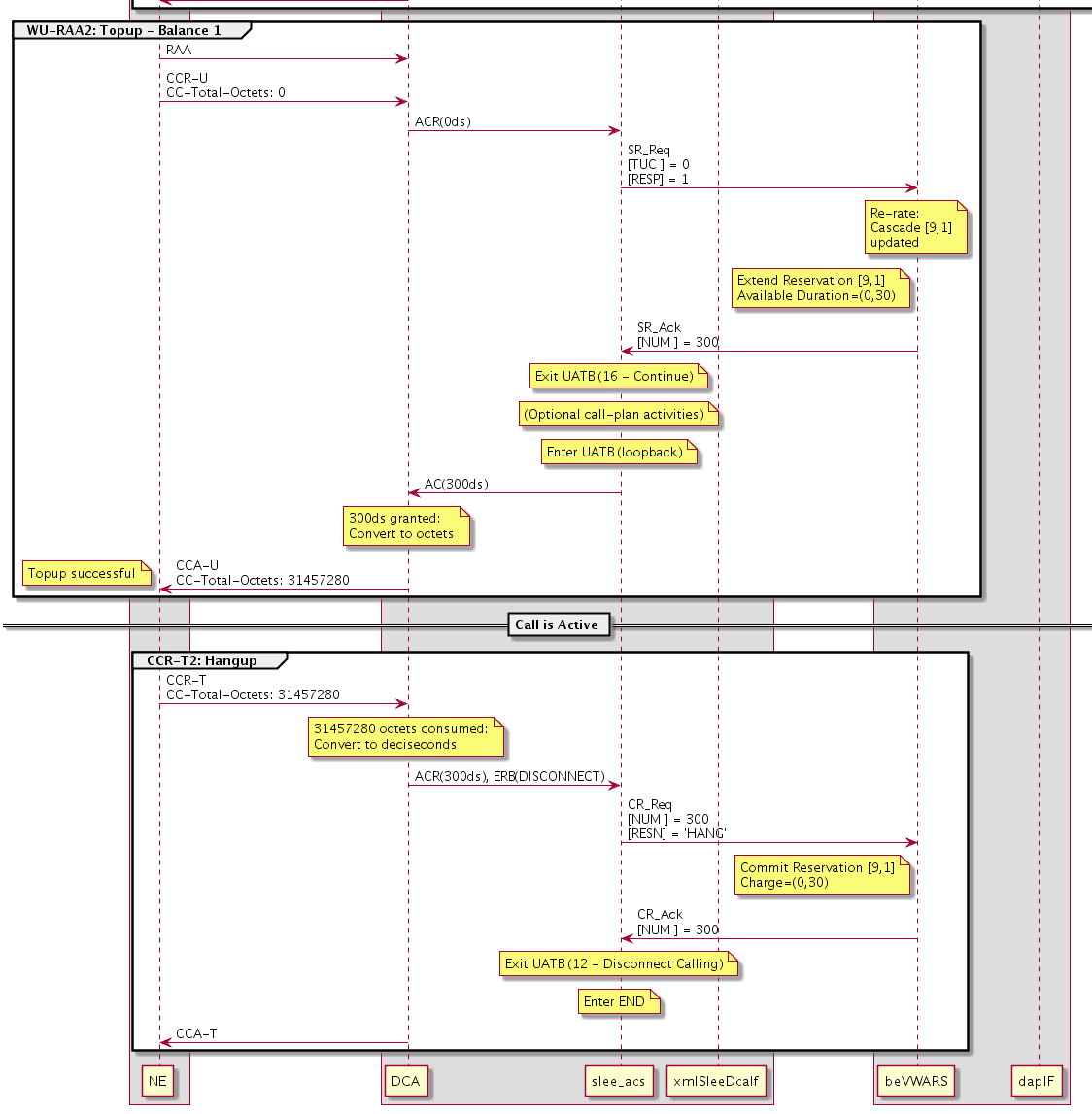
Redirect to top-up server with re-authorization
The following DAP template must be configured in SMS screens:
<RAR> <instance></instance>
<session></session>
<origin_host></origin_host></RAR>
The following must be set in the CCS, DIAMETER, and acsCharging sections of the
SLC eserv.config:acsCharging = { switchConfiguration = [ {
switchType = "internal" addDisconnectOrRelease = true extended = {
# extended IDP appContext {1,3,6,1,4,1,3512,10,100,2} oid = 2
allowZeroSecondsApplyCharge = true } } ]}CCS = { ccsMacroNodes = {
holdReservationOpen = true macronodeLoopbackBranch1 = true
macronodeLoopbackBranch15 = true }}DIAMETER = { DCAInstances = [ {
Services = [ { redirectOnZeroGrant = true redirectNumber =
"12345678" appContextExt = 2 } }}
Additionally, a number of AVP mappings must be configured for the DCA service. See DCA Technical Guide for more details.
The following must be set in the CCS and BE sections of the VWS eserv.config:
CCS = { dcaResPlugin = { dapOperationSet = "RAR" }}BE = {
plugins = [ # Final plugin: "dcaResPlugin.so" ]}
DIRECT_DEBITING
This control plan starts with two profile branching nodes to determine if this is a time-based direct debit (through INAP extension 502) with an Event-Timestamp AVP (INAP extension 504).
- If it is, a DUCR node is used with the
Debitoption selected to debit the account. - If it is not, a Named Event node is used with the
option selected to debit the account. The Named Event node reads its number of events from INAP extension 501 (Requested-Service-Units).Direct Event
Failure branches are connected to Disconnect nodes with appropriate cause values to produce the correct Diameter Result-Code values.
REFUND_ACCOUNT
This control plan determines if this is a time or volume based account refund (through extension 502) with an Event-Timestamp AVP (extension 504).
- If it is, a DUCR node is used to credit the account.
- If it is not, a Named Event node with the
option selected is used to credit the account. The cost of the selected event is negative. The Named Event node reads its number of events from extension 501 (Requested-Service-Units).Direct Event
Failure branches are connected to disconnect nodes with appropriate cause values to produce the correct Diameter Result-Code values.
CHECK_BALANCE
The Check Balance control plan determines if the user is able to reserve a specified number of units. It returns either a success or failure only; it does not return the number of units in the balance.
This control plan consists of a start node followed by two Named
Event nodes and a terminate unchanged node, with Disconnect nodes
as appropriate. The first Named Event node reserves an event type
(the Reserve Event option selected), appropriate for
this service. If the first Named Event node:
- Fails to reserve the event, it goes to a Disconnect node with the reason set to the configured no funds cause.
- Successfully reserves the event, the second Named Event node
cancels the reservation (the
Revoke Eventoption selected). Then, a Terminate Unchanged node sends an INAP Continue, which signals to diameterControlAgent that the balance check succeeded.
PRICE_ENQUIRY
This control plan has a Named Event node connected to:
- Disconnect nodes (for failures)
- An unconditional terminate node (for successes)
The Named Event node has the Cost of event option
selected and is configured to store the cost of the event under a
tag in the ACS temporary storage area. Then, the DCA service loader
plug-in picks up this tag and puts it in INAP extension 603 in the
Connect. The diameterControlAgent copies this into the
Cost-information AVP.
SCREENING
The Screening control plan denies service for voice but allows service for data, based on the bearer type received from DCA.
This consists of a Start node connected to a Transmission Type
Branch node. The Transmission Type Branch node exits for voice
(Exits 1 and 4) are connected to a Disconnect node with a release
cause of 50. The exits for non-voice are connected to
a Terminate Uncharged node.
Scenarios
Introduction
This topic explains how the flow through the software achieves Diameter server services and also gives more details on the mapping between INAP operations/parameters and Diameter messages/AVPs.
The following scenarios are based on (and named after) the relevant appendixes in RFC 4006.
For each scenario, a message sequence chart is given.
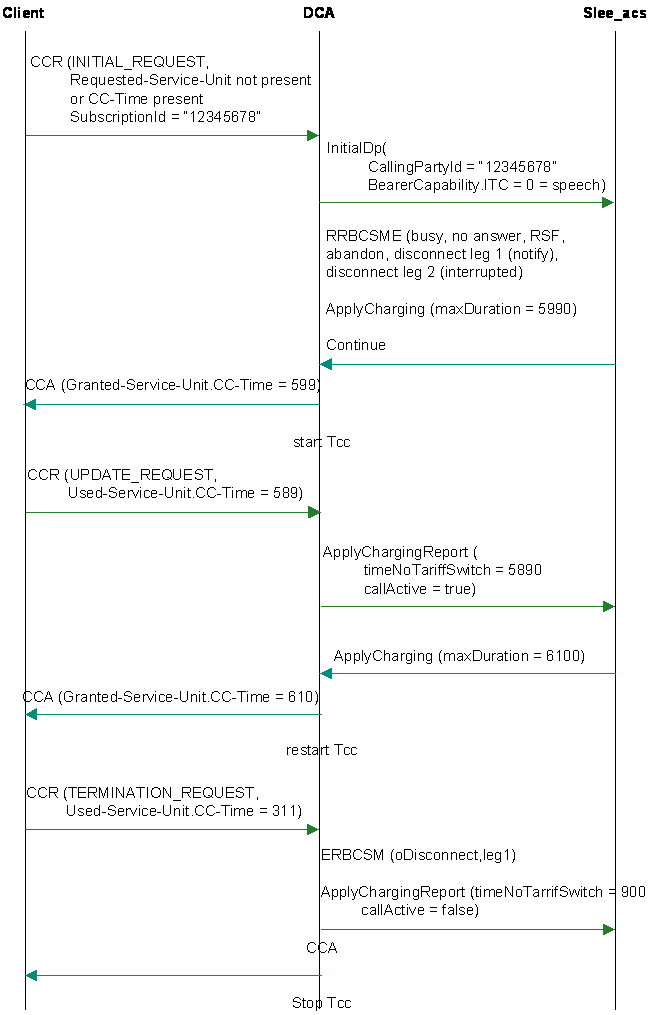
Successful session-based charging, client terminates session
Here is an example successful session-based charging, client terminates session.
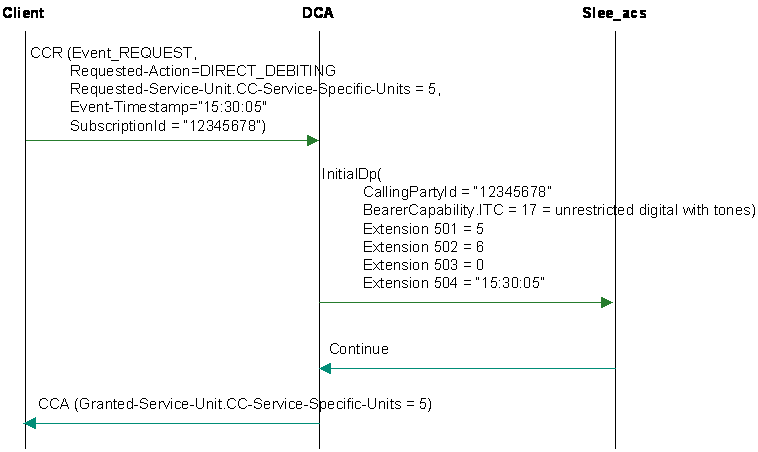
Multimedia messaging direct debit scenario
Here is an example multimedia messaging direct debit scenario.
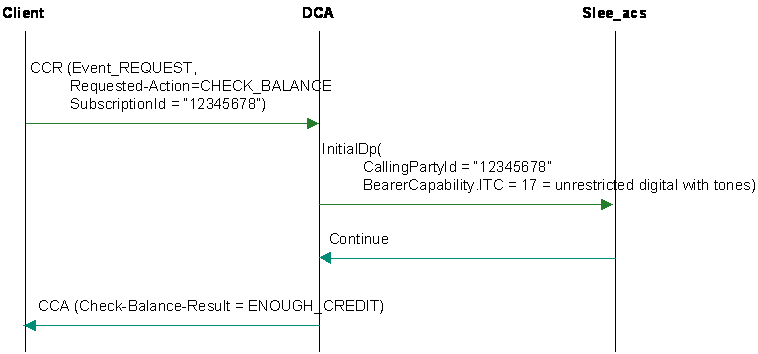
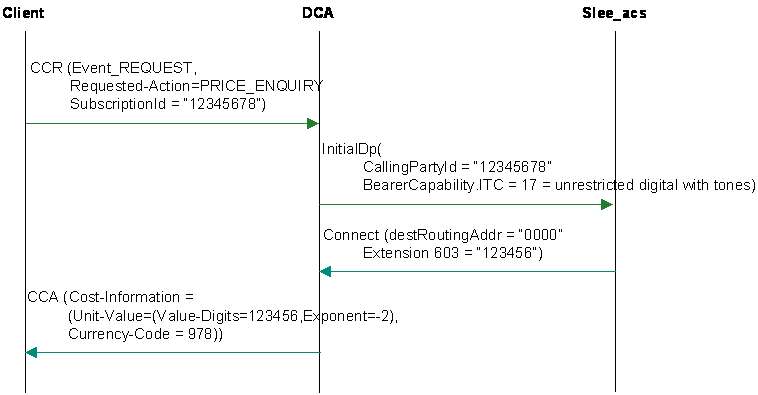
Check balance, with a result of enough credit
Here is an example check balance, with a result of enough credit.
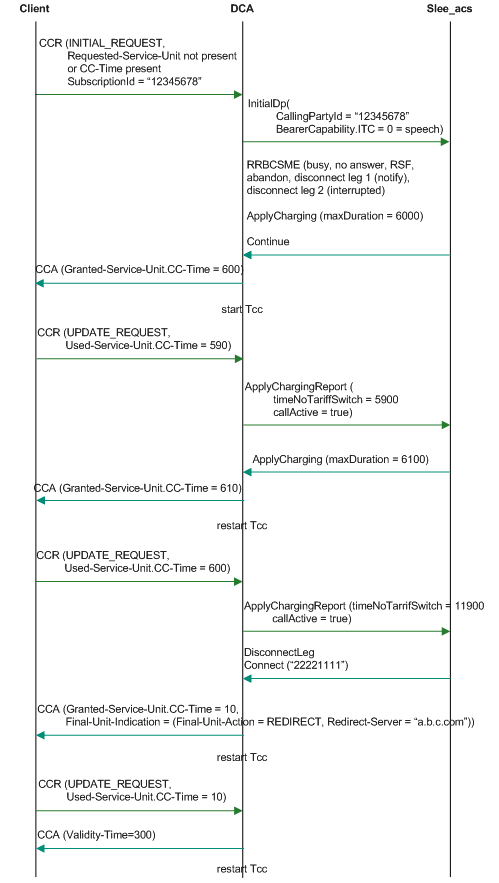
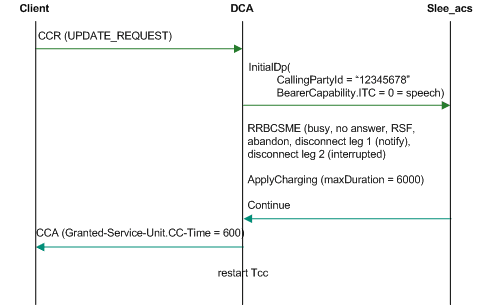
Funds expiry, redirect, top-up and reconnect
Here is an example funds expiry, redirect, top-up and reconnect.
Multiple services credit control scenario
Here is an example multiple services credit control scenario.