1 System Overview
This chapter provides a high-level overview of the application. It explains the basic functionality of the system and lists the main components.
This chapter does not advise on any specific Oracle Communications Convergent Charging Controller network or service implications of the product.
What is the Diameter Charging Driver
Diameter is a protocol that focuses on network access and accounting. The Diameter base protocol provides the minimum requirements needed for Authentication, Authorization, and Accounting (AAA) (RFC 3588). You can extend the base protocol by adding commands or AVPs. RFC 4006 specifies such an extension for applications that can be used to implement real-time credit-control.
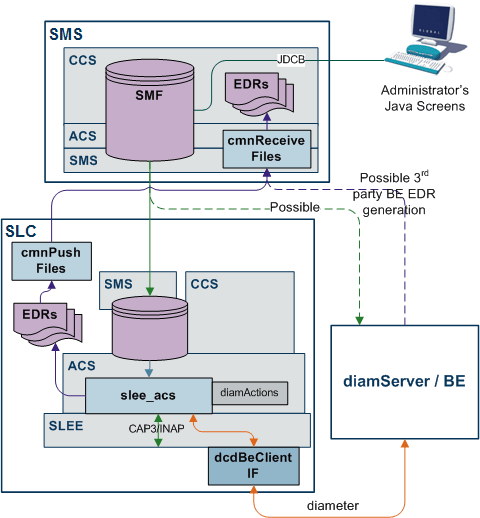
The Diameter Charging Driver (DCD) product provides functionality that allows the Prepaid Charging product to interface with applications using the RFC 3588 and RFC 4006 protocol. Typically it is expected that Prepaid Charging will interface with a third-party convergent real-time charging system.
DCD contains several components:
- Diameter protocol stack. Implements the RFC 3588/4006 protocol
- Dynamically loadable library (DLL), diamActions.so. Implements the required Prepaid Charging functionality
- Diameter client. Implements the network interface to the Diameter
Diameter Credit Control
The Prepaid Charging product uses the Universal-Attempt-Termination-with-Billing (UATB) node for credit-control of telephony (voice) calls. There are a number of other CCS nodes that also use Diameter credit control actions.
RFC 4006 defines credit-control in the following way:
- Credit-control is a process of checking whether credit is available, credit-reservation, deduction of credit from the end user account when service is completed and refunding of reserved credit that is not used.
The Diameter terminology defines an "interrogation" as the request/answer transaction between the client and server.
RFC 4006 defines session-based credit-control as:
- A credit-control process that makes use of several interrogations:
- The first: Used to reserve money from the user's account and to initiate the process.
- A possible intermediate: May be needed to request new quota while the service is being rendered.
- The final: Used to exit the process.
The credit-control server is required to maintain session state for session-based credit-control.
Telephony requires session-based credit-control. A new session is created when the CCS product detects that an end-user is trying to establish a new telephony call.
Other nodes may use the DCD to send event based (rather than session-based) credit control messages for one-time events, for example, SMS (text message).
Process
Prepaid Charging uses the dcdBeClient (Diameter Charging Driver) to send a first interrogation to the Diameter Server. The server rates the request, reserves a suitable amount of money from the user's account, and returns the corresponding amount of credit resources. Prepaid Charging connects the telephony call and monitors the usage of the granted resources.
Prepaid Charging may send an intermediate interrogation to request a new quota of resources when the granted resources have been consumed. When the telephony call ends, Prepaid Charging sends a final interrogation to inform the Diameter Server of the actual amount of resources used. At this point the session is terminated.
Credit Control Messages
RFC 4006 defines two commands used for credit-control encapsulated in the following messages:
- Credit-Control-Request (CCR). Used by the credit-control client to request credit authorization from the credit-control server.
- Credit-Control-Answer (CCA). Used by the credit-control server to acknowledge a CCR from the credit-control client.
AVPs
A detailed list of AVPs for the CCR and CCA messages is given in RFC 4006 and copied in the next section of this document. Note the CC-Request-Type – an enumeration with the following values:
- INITIAL_REQUEST: First interrogation
- UPDATE_REQUEST: Intermediate interrogation
- TERMINATION_REQUEST: Final interrogation
- EVENT_REQUEST: Event based (not session based)
Note:
DCD can be configured to support certain vendor specific applications that add AVPs to the accounting commands of Diameter base protocol. For more information, see the vendor-specific AVPs under DCD Parameters .
Attribute Value Pairs
In the Diameter protocol message, parameters are specified as Attribute-Value Pairs (AVPs).
An AVP consists of a Code, Flags, Length, optional Vendor-ID, and Data fields. The AVP Code, combined with the Vendor-ID field, identifies the attribute uniquely. The type (format) of the Data field is implied by the Code and Vendor-ID field combination. The following Data formats are specified:
- OctetString
- Integer32
- Integer64
- Unsigned32
- Unsigned64
- Float32
- Float64
- Address
- Time
- UTF8String
- DiameterIdentity
- DiameterURI
- Enumerated
- Grouped
- GroupedUnitValue
Additional EDR Tags
Resolved values for AVPs can be written to the Advanced Control Services Event Detail Record (ACS EDR) under a configured tag. These tags are not intended to be used to amend existing, predefined ACS tags. The feature is intended for situations where the customer wishes to add some new tag to the EDR.
Conditions can be attached to the writing of the EDR value:
- Replace it unconditionally, after removing any existing tags of same name.
- Append a new value instance unconditionally.
- Leave the EDR alone if the tag is present, and append the new instance if the tag is not present.
ccsConcepts
To match AVPs to variables in CCS, the DCD has ccsConcepts. These can be a specific parameter of the CCS action, a general CCS variable, some of the call's context, or even an ACS profile value.
The DCD provides functionality to scale values by a factor, and also allows a mapping of one set of integers to another while reading/writing to ccsConcepts. The specific formatting of the value field is configurable. See AVPs parameters for formatting details.
Note:
The availability of each concept depends upon the action involved, and the previous actions of the control plan.
List of ccsConcepts
This section includes the list of all ccsConcepts that can be used in the AVPs section of the eserv.config file.
ACS Action Handler
Here are the ccsConcepts from the ACS action handler.
Table 1-1 ACS Action Handler
| Concept Label | Available | Comments |
|---|---|---|
| cascade | After a setCascade Override. | Also can be set by previous responses. The integer ID of the cascade to apply. |
| chargeInfoBalanceSystemValue | After a chargeInfo response. | The balance Unit for the current item of the Charge structure. This is in units of the system currency. |
| chargeInfoBalanceType | After a chargeInfo response. | The CCS ID of the balance Type for the current balance of the Charge structure. |
| chargeInfoBalanceUnitType | After a chargeInfo response. | The CCS of the balance Unit for the current balance of the Charge structure. This is not necessary for a ChargeInfo in a response, it can be derived from the balance type. |
| chargeInfoBalanceUserValue | After a chargeInfo response. |
The balance Unit for the current item of the Charge structure. This is in units of the user's currency. Note that the system currency value is mandatory, while this entry is optional. |
| discountMaxCharge | After a setDiscount | Present after a setDiscount node or a response that has the discountMaxCharge present. |
| discountPeriod | After a setDiscount | Present after a setDiscount node or a response that has the discountPeriod present. |
| tariffCugName | After a setTariffPlan | The Closed User Group Name. |
| tariffPlan | After a setTariffPlan | Integer representing the tariff Plan. |
| terminationCause | After a call is terminated |
The esg values in the configuration for the ACS callEndReasons that map to specific termination cause values.
|
| walletInfoActivationDate | After a walletInfo response | time_t of the wallet's activation date. The DCD handles conversion from time_t to DIAMETER times. |
| walletInfoBalanceExpiry | After a walletInfo response | The expiry date (in time_t) of the current balance. The DCD handles conversion from time_t to DIAMETER times. |
| walletInfoBalanceExponent | After a walletInfo response | An exponent to apply to the balance system value. |
| walletInfoBalanceLimitType | After a walletInfo response | The balances limit type: An integer representing one of: limitedPostpaid, postpaid, prepaid, singleUsePrepaid |
| walletInfoBalanceMaxCredit | After a walletInfo response | The maximum amount of credit allowed for this subscriber. |
| walletInfoBalanceSystemValue | After a walletInfo response | The balance Unit for the current item of the balance structure. This is in units of the system currency. |
| walletInfoBalanceType | After a walletInfo response | The CCS ID of the balance Type for the current balance of the Wallet structure. |
| walletInfoBalanceUnitType | After a walletInfo response | The CCS ID of the balance Unit for the current balance item of the Wallet structure. This is not necessary for a balance in a response, it can be derived from the balance type. |
| walletInfoBalanceUserValue | After a walletInfo response |
The balance Unit for the current item of the Blance structure. This is in units of the user's currency. Note that the system currency value is mandatory, while this entry is optional. |
| walletInfoExpiry | After a walletInfo response | The expiry date (in time_t) of the wallet. The DCD handles conversion from time_t to DIAMETER times. |
| walletInfoLastAccess | After a walletInfo response | time_t of the wallet's last access. The DCD handles conversion from time_t to DIAMETER times. |
| walletInfoMaxConcurrent | After a walletInfo response | The maximum number of concurrent users allowed for this wallet. |
| walletInfoState | After a walletInfo response |
A single character representing the wallet's state. One of:
Note that conversion to different representations is possible. |
| walletInfoSystemCurrency | After a walletInfo response | The system currency. |
| walletInfoUserCurrency | After a walletInfo response | The CCS_ACCT.CURRENCY value for this wallet. |
ACS Service Context
Here are the ccsConcepts from the ACS service context.
| Concept Label | Available | Comments |
| acsCallID | always | The call ID from the SLEE |
| acsChargingDomain | always | The destined billing domain (logical collection of wallets) for this request. |
| acsProductType | always | The ACS product type ID |
| acsProfile | always | An ACS profile buffer from the Call plan. If the buffer is not set, then the AVP is not included. |
| acsServiceProvider | always | The ACS service provider ID |
| acsSubscriber | always | The CCS subscriber ID |
| acsSubscriberReference | always | The CCS subscriber number (ie their MSISDN) |
| acsTariffCode | After an initial reservation. | Tariff Code string returned in the Initial Reservation Response (if present). |
| acsUnnormalisedCalledNumber | always | The called party number digits from the IDP, without any attempt at normalization. |
| acsWallet | always | The CCS wallet ID (BE_WALLET.ID) |
| acsWalletReference | always | The CCS wallet Reference (the Billing System's reference to the wallet) |
| acsWalletType | always | The CCS wallet type. (CCS_WALLET_TYPE.ID) |
CCS Time Reservation
Here are the ccsConcepts from CCS time reservation.
| Concept Label | Available | Comments |
|---|---|---|
| callAnsweredTime | ConfirmTimeReservation | |
| callDurationDelta | Any Time Charging Action | |
| callDurationTotal | Any Time Charging Action | |
| callerTimeZone | After a DirectTimeCharge or InitialTimeReservation | |
| cli | After a DirectTimeCharge or InitialTimeReservation | |
| confirmTimeReservationStatus | After set from a response | Usually part of an confirmTimeReservationResponse. |
| destinationNumber | After a DirectTimeCharge or InitialTimeReservation | |
| discountPercentage | After a setDiscount or DirectNamedEvent or NamedEventReservation | Present after a setDiscount node or a response that has the discountPeriod present. |
| eventClass | NamedEvent Actions | A string representing the CCS event Class. |
| eventName | NamedEvent Actions | A string of the CCS event name. |
| eventType | NamedEvent Actions | An integer representing the type of CCS named event. |
| expectedReservationDelta | InitialTimeReservation and ExtendTimeReservation | |
| expectedReservationTotal | InitialTimeReservation and ExtendTimeReservation | |
| extraInformation | Usually call information for adding to Billing CDRs. Content varies for each action. | |
| freeCallDisposition | After set from a response | Usually part of an initialTimeReservationResponse. |
| ignoreBalanceLimit | DirectNamedEvent, DirectTimeCharge, NamedEventReservation | |
| initialLowBalanceAnnouncement | After set from a response | Usually part of an initialTimeReservationResponse. The Announcement ID of the announcement to play. |
| initialLowBalanceIndicator | After set from a response | Usually part of an initialTimeReservationResponse. If present and non zero the indicated pre call warning announcement should be played to the subscriber. |
| lowCreditBuffer | After set from a response | Usually part of an initialTimeReservationResponse. Number of seconds from the end of the last good reservation period until a low credit beep should be played |
| maxCallLength | After set from a response | Usually part of an initialTimeReservationResponse. |
| maxSeconds | After set from a response | Session Time left. Usually part of an xxxTimeReservationResponse. |
| maxUnitsRequested | NamedEvent Actions | |
| minUnitsRequested | NamedEvent Actions | |
| numUnitsGranted | After set from a response | |
| numUnitsUsed | ConfirmNamedEventReservation | |
| reservedLengthDelta | After set from a response | Usually part of an xxxTimeReservationResponse. |
| reservedLengthTotal | After set from a response | Usually part of an xxxTimeReservationResponse. |
| retrieveLCRNumbers | After set from a response | Usually part of an initialTimeReservationResponse. |
| revokeTimeReservationStatus | After set from a response | Usually part of an revokeTimeReservationResponse. |
| scpAction |
This AVP is an enumeration with the following known values:
|
|
| singleReservation | After set from a response | Usually part of an initialTimeReservationResponse. |
| timeReservationStatus | After set from a response | Usually part of an xxxTimeReservationResponse. |
| validityPeriod | After set from a response |
Charge Details
Here are the ccsConcepts from charge details.
| Concept Label | Available | Comments |
| balanceTypeFilter | WalletInfo | Request the Billing Engine to only return balances of this type. |
| balanceUnitFilter | WalletInfo | Request the Billing Engine to only return balances of this unit. |
Direct Time Charge
Here are the ccsConcepts from direct time charge.
| Concept Label | Available | Comments |
| callDate | DirectTimeCharge | |
| ratingPrecision | InitialTimeReservation | Integer representing seconds, tenths-of-a-second, or hundredths-of-a-second |
Others
Here are the ccsConcepts from others.
| Concept Label | Available | Comments |
|---|---|---|
| freeform | always | Uses/updates the concept previously defined by setFreeform. |
| setFreeform | always | The next AVP of concept “freeform” will instead use/update the concept indexed by the value of this AVP. |
Voucher Details
Here are the ccsConcepts from voucher details.
| Concept Label | Available | Comments | ||||||||||||||||||
|---|---|---|---|---|---|---|---|---|---|---|---|---|---|---|---|---|---|---|---|---|
| voucherInfoBalanceExpiryExtension | WalletInfoRequest | The expiry extension period for adjusting the balance expiry date of the voucher. | ||||||||||||||||||
| voucherInfoBalanceExpiryExtensionPolicy | WalletInfoRequest |
Indicates how to apply the balance expiry extension period to the balance expiry date. New Expiry Policies include the following:
voucherInfoBalanceExpiryExtensionPolicy returns the following values:
|
||||||||||||||||||
| voucherInfoBalanceExpiryExtensionType | WalletInfoRequest |
The unit of the extension value available for this balance (example: hours or months). voucherInfoBalanceExpiryExtensionType returns the following values:
|
||||||||||||||||||
| voucherInfoBalanceType | WalletInfoRequest | The CCS ID of the balance type for the current balance of the voucher structure. | ||||||||||||||||||
| voucherInfoBalanceValidityOffset | WalletInfoRequest | A relative offset from the current date when a given balance, charged with a voucher, becomes valid. | ||||||||||||||||||
| voucherInfoBalanceValidityStart | WalletInfoRequest | A fixed date in the future when a given balance, charged with a voucher, becomes valid. | ||||||||||||||||||
| voucherInfoBalanceValidityType | WalletInfoRequest |
The units of the relative offset from the current date when the balance becomes valid. voucherInfoBalanceValidityType returns the following values:
|
||||||||||||||||||
| voucherInfoMissingBalancePolicy | WalletInfoRequest |
Indicates what to do if the specified balance type is missing from the list of existing balances for the voucher. voucherInfoMissingBalancePolicy returns the following values:
|
||||||||||||||||||
| voucherInfoNewBucket | WalletInfoRequest | If this value is set to true, the voucher value will be added to the balance as a new bucket. | ||||||||||||||||||
| voucherInfoReplaceBalance | WalletInfoRequest | If this value is set to true, all existing buckets of the balance will removed, and a new bucket is created with the specified voucher value. | ||||||||||||||||||
| voucherInfoValue | WalletInfoRequest | The voucher balance recharge details. | ||||||||||||||||||
| voucherInfoVoucher | WalletInfoRequest | The database key of the voucher being redeemed. | ||||||||||||||||||
| voucherInfoVoucherNumber | WalletInfoRequest | The voucher number of the voucher being redeemed. | ||||||||||||||||||
| voucherInfoVoucherSerialNumber | WalletRechargeRequest | Populates the Voucher Serial Number in a DCD AVP, so that it may be used to audit and track the voucher redemption. | ||||||||||||||||||
| voucherInfoWalletExpiryExtension | WalletInfoRequest | The extension period to apply to the wallet expiry date of the recharged wallet. | ||||||||||||||||||
| voucherInfoWalletExpiryExtensionPolicy | WalletInfoRequest | Indicates how to apply the wallet expiry extension period to the wallet expiry date. | ||||||||||||||||||
| voucherInfoWalletExpiryExtensionType | WalletInfoRequest |
The unit of the expiry extension for the wallet that the voucher will recharge (example: hours or months). voucherInfoWalletExpiryExtensionType returns the following values:
|
||||||||||||||||||
| voucherRechargeFailureDateTime | WalletRechargeRequest | Returns the timestamp of any previous voucher recharge failure. If there has not been a previous voucher recharge failure, then zero (0) is returned. | ||||||||||||||||||
| voucherRechargeFailureFlag | WalletRechargeRequest |
Returns the value of one (1) if the voucher is not redeemed and a failed voucher redeem attempt has been made. Returns zero (0) for all other voucher states. For example, if a redeem attempt has never been made for the voucher or if the voucher has been redeemed successfully. |
||||||||||||||||||
| voucherTypeName | WalletInfoRequest |
Returns the name of the type of voucher being redeemed.
Note: Voucher type name is only available if a
positive value is defined for |