2 SMS Node Configuration for High Availability
Configuring High Availability on SMS
Introduction
This section describes the HA SMS configuration. HA SMS is provided by two SMS nodes that access the same SMF database instance remotely. The remote database uses Oracle RAC One Node to provide a single resilient SMF database instance to the SMS nodes. This design splits the NCC application layer from the database layer.
A network switch proxies client connections to the HA SMS nodes. See the architecture diagram.
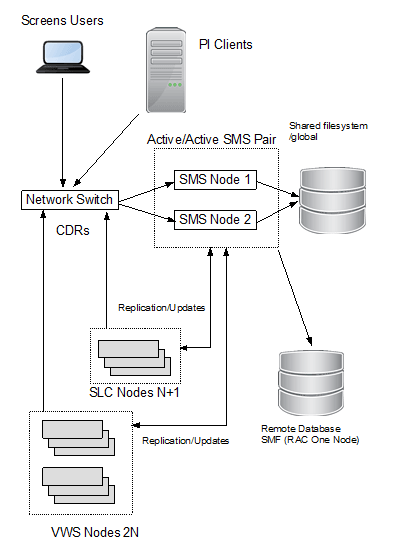
Active/Active SMS Node Configuration
Note:
- Currently, SMS cluster supports Active-Active configuration in a limited scope, such that only Primary node supports provisioning, whereas secondary node can only perform read/query operations. For provisioning workflow across both SMS, Active-Standby mode is supported, where the Secondary SMS master should update the database only if the Primary SMS is down.
- Wherever Active/Active is mentioned in this document, it means Active/Active configuration with limited scope.
On each SMS node in the active/active SMS configuration:
- Install Convergent Charging Controller specifying the same remote database instance (SMF) and same remote database host.
- When defining nodes in the OCNCC screens, define one SMS node as node id 1 and the other SMS node as node id 2.
- Ensure that Unix user IDs and group IDs are aligned across the SMS nodes (for example, user smf_oper should have the same numeric uid on each SMS node, and the group esg should have the same gid on each SMS node) as a pre-install task for Convergent Charging Controller.
- Install the SMF database instance remotely using RAC One Node. Each SMS node connects to the same SMF database instance.
About Configuring Active/Active SMS Nodes
Refer to the following guides to find more general information about active/active setup:
- Oracle Database High Availability Overview 12c Release 2 (12.2)
- Oracle Database High Availability Best Practices 12c Release 1 (12.1)
- Oracle Data Guard Concepts and Administration 12c Release 2 (12.2)
- Convergent Charging Controller Installation Guide
Synchronizing System Time
The local system time must be consistent on all SMS nodes. You can properly synchronize the time by enabling the Network Time Protocol (NTP) daemon on each node in the HA SMS. The NTP daemon configuration is in the /etc/ntp.conf file.
It is recommended that each SMS node be configured to refer to the other SMS node as its peer.
Configure redundant time services so the loss of any one time service does not affect time synchronization.
For more information, see the discussion about how to configure NTP in Oracle Linux Administrator's Guide for Release 7.
Shared Storage Configuration
Both SMS nodes should have access to a common filesystem for shared file data such as CDRs and process lockfiles. The shared volume should itself be resilient by utilizing technologies such as dual-ported disks and RAID.
As an example, each SMS node mounts the shared volume as /global/CDR and this location provides directories
| Directory | Description |
| /global/CDR | Common mountpoint |
| /global/CDR/CCS | CCS subdirectory |
| /global/CDR/CCS/logs | Logs subdirectory |
| /global/CDR/CCS/logs/CDR-in | Receive directory for VWS CDR files |
| /global/CDR/CCS/logs/CDR-store | CDR files after being processed by ccsCDRLoader |
| /global/CDR/CCS/logs/ccsNotificationRead | NotificationPlugin CDRs (VWS) |
| /global/CDR/CCS/logs/expiryMessage | Balance expiry messages (VWS) |
| /global/CDR/CCS/logs/wallet | Wallet expiry messages (VWS) |
| /global/CDR/UIS | UIS CDRs (SLC) |
| /global/CDR/cdr/received | ACS/PIN/LCR CDRs (SLC) |
Switch Configuration
Introduction
You perform the following tasks to configure the hardware network switch that interfaces between external clients and the HA SMS.
- Configure the hostname and IP of the network switch, e.g haswitch
- Configure the networks switch so that incoming connections to the OCNCC ports are forwarded to one of the SMS nodes
Configure Network Switch
Use the network switch name (for example, haswitch) when connecting to the HA SMS, and configure NCC components to use the network switch name to connect to the SMS.
See the following section for more port forwarding information.
| Step | Action |
|---|---|
| 1 |
On each SMS in the /IN/html/smsGui.bat and /IN/html/smsGui.sh, configure the jnlp.sms.host property to refer to the haswitch name: -Djnlp.sms.host” = ”haswitch” |
| 2 | On each OCNCC node add an entry to the /etc/hosts file for haswitch |
| 3 | On the replication nodes, in eserv.config configure the cmnPushFiles items to specify the haswitch when sending CDR files to the SMS (-h cmnPushFiles option) and configure the destination directory on the SMS to be a location on the common shared filesystem (-r cmnPushFiles option). |
Configure Network Switch Ports
This procedure shows a configuration list for the NCC network ports on the network switch for use by SMS clients. SMS clients do not connect to SMS directly. Instead, they connect to the network switch which then forwards the client connection onto one of the SMS nodes. For each HA SMS port that the switch is proxying for, configure the switch to periodically check which of the HA SMS back end ports supporting a service are available. If a back-end port ceases service, the switch can then direct new port connections to the back-end port on the other SMS node. Further, the switch can forward certain connections to one SMS node preferentially (provided it is available) or the switch can round-robin the clients connects over the available SMS nodes.
The following port configuration example uses the default NCC port numbers.
| Step | Description |
| 1 | Configure the SMS screens script download port 80 (HTTP) |
| 2 | Configure the SMS Task Agent port 6332 |
| 3 | Configure the SMS Naming Service port 5556 |
| 4 | Configure the CCS Be Orb port 6335 |
| 5 | Configure the SMS TrigDaemon port 6334 |
| 6 | Configure the SMS Reports Service port 6333 |
| 7 | Configure the UIS Receive Files port (SLC UIS CDRs) 2031 |
| 8 | Configure the VWS Push Files port 2027 |
| 9 | Configure the PI service port 2999. Configure additional ports if they are defined in the PI screens. Configure the HA switch as a PI Host in the PI screens. |
| 10 | Configure ACS Receive Files port (ACS CDRs) 2028 |
HA SMS Active/Active Process Configuration
Introduction
This section provides information about configuring OCNCC specific processes in an Active/Active deployment.
SmsMergeDaemon
This process is only required for non-HA SMS deployments and should not be run on a HA SMS.
To stop and disable smsMergeDaemon, on each SMS node:
1. Log in as the root user.
2. Stop and disable the smsMergeDaemon service
systemctl stop smsMergeDaemon.service systemctl disable smsMergeDaemon.service
3. Open the /IN/bin/OUI_systemctl.sh file in a text editor.
4. Comment out the entry for the smsMergeDaemon.service
5. Save and close the file.
Legacy SMS-based ccsPeriodicCharge
This section applies to the legacy SMS based ccsPeriodicCharge process, not the VWS based Periodic Charge that uses VWS wallets.
If the deployment does not require legacy ccsPeriodicCharge on the SMS, disable this service on each SMS node by commenting out the ccs_oper crontab line.
If legacy ccsPeriodicCharge is required, configure it on each node to use a common lock file that resides on shared storage. For example if shared storage is mounted on /global/CDR on each SMS node, and directory CCS/logs is present under this location, the lock file can be configured in eserv.config on each SMS node by doing the following:
1. Log in as the root user.
2. Edit /IN/service_packages/eserv.config and define the LockFile parameter in the CCS.ccsPeriodicCharge section to be placed on the shared disk volume
CCS = {… ccsPeriodicCharge = { LockFile =
“/global/CDR/CCS/logs/.ccsPeriodicCharge” … }
3. Save and close the file
SLC CDR Configuration
On each SLC, configure cmnPushFiles startup scripts to specify haswitch as the destination host (-h option) and specify a destination directory in the shared filesystem on the SMS nodes (-r option).
Following is an example:
| Step | Action |
|---|---|
| 1 |
Configure SMS/bin/cmnPushFilesSMSStartup.sh |
| 2 |
Configure ACS/bin/cmnPushFilesACSStartup.sh |
| 3 |
Configure UIS/bin/uisCdrPushStartup.sh |
| 4 |
Configure NP_SERVICE_PACK/bin/cmnPushFilesNPStartup.sh |
VWS CDR Configuration
On each VWS, configure the cmnPushFiles/CDR sections in the eserv.config file to specify the haswitch as the destination host (-h option) and specify a destination directory in the shared filesystem on the SMS nodes (-r option).
Following is an example:
| Step | Action |
|---|---|
| 1 |
Configure item cmnPushFiles in section CCS.ccsVWARSExpiry
|
| 2 |
Configure item cmnPushFiles in section CCS.notificationPlugin
|
| 3 |
Configure item cmnPushFiles in section CCS.ExpiryMessages
|
| 4 |
Configure item CDR in section BE.cmnPushFiles
|
CcsCDRLoader Configuration
In an active/active configration, instances of ccsCDRLoader can be run on each SMS node. CcsCDRLoaders co-operate using file locking to ensure that only one loader processes an incoming CDR file. It is also possible to dedicate ccsCDRLoader instances to certains VWARS numbers with the --vwars_range option. The --serverID option can be used to restrict a ccsCDRLoader to only handle CDR files produced by a specific VWARS served Id.
SMS Node Failure
In the Active/Active deployment, with two SMS nodes, if one node fails, then the switch will direct clients to the active node.
The following manual operations are also required:
1. Restart these services on the active node:
smsTaskAgent, smsReportsAgent, ccsBeOrb
Connected screens clients should clear their browser cache
2. Login to the screens.
SMS Geo Redudancy
Geographic redundancy is achieved by duplicating the SMS HA configuration at a second site.
Use Oracle Data Guard over a high speed link (for example, 100 GbE) to synchronize the remote SMS primary site remote database with the secondary site remote database.
Oracle Data Guard should be configured with the Max Performance option.