1 System Overview
What is Location Capabilities Pack?
Introduction
The Oracle Communications Convergent Charging Controller Location Capabilities Pack (LCP) is a set of software components used by other applications to look up the location of mobile devices.
Usage Scenarios
There are several current and future scenarios for using LCP.
Location-Based Billing
Through location-based billing, a subscriber can establish zones with special billing rates for different zones. Typical example zones are “home” or “work”.
A user or subscriber can set further zones to cover a subscriber’s particular preferences.
Differential billing can be the result of one of the following:
- A call made by a subscriber located in one of their zones
- A call made between subscribers when both are located in one of their zones
Emergency Services
With location-enhanced emergency services, the location information can be used in two different ways:
- To dispatch the closest appropriate authorities
- To relay accurate location information to emergency services
Both help with the speedy arrival to an accurate location.
Tracking
Tracking enables fleet applications (and service companies) to track vehicles so the owning company knows the location of a vehicle or operator.
Note: To provide this service, the operator must offer real-time and accurate tracking functionality.
Callback and Collect Call Locations
You can use LCP to locate a subscriber who is outside of the network. This enables a subscriber who is visiting a foreign network to use callback functionality to establish a roaming call.
To implement this feature, the LCP Store My Location node is used before the final billing node performs the charge.
For more information about callback and collect call features, see USSD GW Technical Guide.
Other Possible Scenarios
You can also use LCP for:
- Mobile blind dating (for example, two subscribers who have signed up for this service and are in the same area can arrange to meet up).
- Looking up the nearest service facility (for example, a pharmacy or restaurant).
Definitions
This table describes some important terms used by the LCP:
| Button | Function |
|---|---|
| Zone | A zone is collection of zone shapes. Currently it is used for billing purposes. |
| Zone Shape |
A zone shape is an area of a certain shape (for example: circular, rectangular, etc.). Currently, as these are defined by radius, they can only be circular. Example: A work zone could contain three shapes representing three separate offices or three zone shapes representing one single office with a more complex overall shape. |
| Zone Type | What the zone represents (for example: home, work). |
| Location | Position of a subscriber. |
| Location Server | A location server is the entity that the location services clients query to obtain location information (for example: HLR, GMLC). |
Components
The LCP consists of these components:
- Location Module (locApp)
- MAP ATI plug-in
- IS-41 POSREQ plug-in
- SRI-MSRN plug-in
- SRI-IMSI plug-in
- LCP ACS components (four feature nodes and one action handler)
- Database tables
- Management screens
Location Module
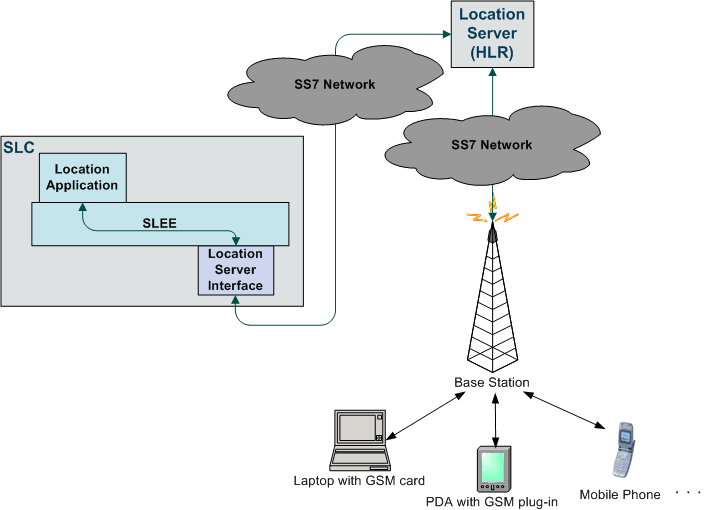
The key component of the LCP is the Location Module. The calling application passes the MSISDN of a mobile device to the Location Module. The Location Module looks up the current location of the mobile device and returns its locational reference to the calling application as a Cell ID/ Area ID or as a circle of uncertainty.
Plug-Ins
The Location Module uses modular communication plug-ins to communicate with Location Servers on customer networks. It provides the following plug-ins:
- MAP ATI
- IS-41 POSREQ
- SRI-MSRN
- SRI-IMSI
Provisioning and Management
Additional SMS management screens are delivered as part of the LCP to allow the provisioning and management of locational entities in the database (for example: converting data from Cell ID to circles of uncertainty in X,Y,R format).
Feature Nodes
The LCP also enables you to use the Location Module from ACS-based customer applications by providing the following additional feature nodes:
- Set My Zone sets a subscriber's Home and Work zones.
- In The Zone checks if a mobile device is currently in a pre-defined zone.
- Store My Location stores locational data for use by other nodes.
- Store My Network ID stores the IMSI retrieved for a supplied MSISDN.
For more information, see Feature Nodes Reference Guide.