2 Configuration
Configuration Overview
Introduction
This topic provides a high level overview of how the SIGTRAN TCAP Interfaces are configured.
sua_if/m3ua_if are configured using the following options set in the:
- Startup shell script and/or tcapif.def
- sigtran.config file
Configuration components
TCAP Interface is configured by the following components:
| Component | Locations | Description | Further Information |
| Environmental variables | any machine connected to a switch | Set in startup scripts. | Environmental variables . |
| Command line variables | any machine connected to a switch | Set in startup scripts or tcapif.def. | Configuring tcapif.def . |
| tcapif.def | any machine connected to a switch | Optional file that sets the configuration parameters which are shared with other types of TCAP Interface. | Configuring tcapif.def . |
| sigtran.config | any machine connected to a switch | This file sets the configuration parameters which are specific to SIGTRAN TCAP Interface. | Configuring sigtran.config . |
Configuration process overview
This table describes the steps involved in configuring the SIGTRAN TCAP Interface for the first time.
| Stage | Description |
|---|---|
| 1 |
The environment sua_if/m3ua_if will run in must be configured correctly. This includes:
For more information about configuring environmental variables, see Environmental variables. |
| 2 | Changing the default startup variables in the SLEE.cfg file, especially service keys. |
| 3 |
Any non-default command line parameters must be added to one of the following:
|
| 4 | Configuration data must be configured for sua_if/m3ua_if in sigtran.config. |
SCCP_LOG_FILE
| Syntax: |
SCCP_LOG_FILE=filename
|
| Description: | File name prefix, including path, of the optional SCCP log file. A timestamp and .log suffix is added. |
| Type: | String |
| Optionality: | Optional, default used if not set. |
| Allowed: | |
| Default: | /tmp/sccp |
| Notes: |
Using the default value for example, the resulting file name in the output of log files have names in the format /tmp/sccp_ yyyymmdd_hhmm .log. By default a new log file, with a different timestamp, is created every 10 minutes. Other intervals can be specified using the SCCP_LOG_TIME environment variable. |
| Example: |
SCCP_LOG_FILE=/var/tmp/sua_if_sccp
|
SCCP_LOG_TIME
| Syntax: |
SCCP_LOG_TIME = value
|
| Description: | The interval, in minutes, between starting an SCCP_LOG_FILE log file. |
| Type: | Integer |
| Optionality: | Optional (default used if not set). |
| Allowed: | |
| Default: | 10 (minutes) |
| Notes: |
If SCCP_LOG_TIME is defined as 20 then, if logging is enabled, new log files will be created every 20 minutes on the hour, 20 past and 40 past the hour with names like:
|
| Example: |
SCCP_LOG_TIME = 20
|
SLEE_ETC_DIR
| Syntax: |
SLEE_ETC_DIR=path
|
| Description: | Full path name of the SLEE's etc directory. |
| Type: | Integer |
| Optionality: | Optional, default used if not set. |
| Allowed: | |
| Default: | ../etc |
| Notes: | SLEE's etc directory is where tcapif.def resides. |
| Example: |
SLEE_ETC_DIR=../../SLEE/etc
|
TCAPIF_DEF
| Syntax: |
TCAPIF_DEF=filename
|
| Description: | Defines the name of configuration file which contains TCAP Interface parameters common to all TCAP Interfaces. |
| Type: | String |
| Optionality: | Optional, default used if not set. |
| Allowed: | |
| Default: | tcapif.def |
| Notes: | |
| Example: |
TCAPIF_DEF=sua_tcapif.def
|
ESERV_CONFIG_FILE
| Syntax: |
ESERV_CONFIG_FILE=filename
|
| Description: | Name of configuration file which contains SIGTRAN TCAP Interface-specific parameters. |
| Type: | String |
| Optionality: | Optional, default used if not set. |
| Allowed: | Any valid filename. |
| Default: | sigtran.config |
| Notes: | |
| Example: |
ESERV_CONFIG_FILE=sigtran.config
|
SIGTRAN_CONFIG_SECTION
| Syntax: |
SIGTRAN_CONFIG_SECTION=str
|
| Description: | The name of the section in the ESERV_CONFIG_FILE configuration file which holds the Sigtran Tcap Interface-specific configuration. |
| Type: | String |
| Optionality: | Optional (default used if not set). |
| Allowed: | ASCII text. |
| Default: |
For m3ua_if: M3UA. For sua_if: SUA |
| Notes: | |
| Example: |
SIGTRAN_CONFIG_SECTION=M3UA
|
Configuring tcapif.def
Setting parameters
Each parameter has a default that will be used if the parameter is not defined.
Parameters may be defined in two ways:
- The command line
- In the tcapif.def file
Note: If a parameter is set in both the command line and the tcapif.def file, the command line setting will be used.
Defining the parameters
For a parameter 'param val', the value may be set in the configuration file with a line such as:
PARAM VAL=
value
Note: Spaces can be inserted into the parameter name in tcapif.def without effect.
Or the parameter may be defined on the command line, for example:
-
sua_if -paramval value -
m3ua_if -paramval value
Note: Spaces can not be inserted into the parameter names on the command line, and command line parameter names are case sensitive.
Setting command line parameters
Since the executable is started by the SLEE, the only way to set the command line parameters is via an intermediate startup shell script. This shell script is pointed to in SLEE.cfg.
Example 1: Startup script:
#!/bin/shexec sua_if -ssns 123 -proto inap -tcap ccitt
Example 2: Startup script:
#!/bin/shexec sua_if -pc 160 -ssns 123 -proto inap -tcap
\ccitt
Note: To split over a line (as shown in Example 2), use "\" at the end of the line.
tcapif.def
The tcapif.def file can be used to define common configuration for all TCAP interfaces running on the same system.
Where different TCAP Interfaces require different configuration, the file-set configuration options can be overridden on the command line on a binary by binary basis. Command line options are set in the startup shell scripts. Every option in the tcap.def file can be overridden in this way.
Note: In the file, the options are all uppercase. On the command line, they are lowercase.
tcapif parameters
The generic configuration variables applicable to all TCAP interfaces are listed below:
Note: If any of the following parameters are set (all default to not set) then the TCAP Interface will use a default SCCP Origination Address in the first TC-CONTINUE that it sends out. By default the TCAP Interface will use the SCCP destination address of the first incoming message. This capability can be used to ensure any subsequent messages sent by the far end in the same dialog will be routed to this address. This can be useful when initial messages are sent to aliased addresses and round-robin routed by an STP to a series of SLCs.
alwayssendaddr
| Syntax: |
-alwayssendaddr true|false
|
||||
| Description: | Which messages to send the SCCP destination address in. | ||||
| Type: | Boolean | ||||
| Optionality: | |||||
| Allowed: |
|
||||
| Default: | false | ||||
| Notes: | If this parameter and sendorigaddr are both set to true, the TCAP Interface will send the destination and origination addresses. | ||||
| Example: |
-alwayssendaddr true
|
autoac
| Syntax: |
-autoac yes|no
|
||||
| Description: |
Whether to use the Application context of a CCITT white book TCAP message received in the response to the message if the SLEE application does not supply one. In addition, dialogs initiated by the interface will use the
default application context defined by the |
||||
| Type: | Boolean | ||||
| Optionality: | |||||
| Allowed: |
|
||||
| Default: | yes | ||||
| Notes: |
Setting to yes, effectively acknowledges the white book application context used. If defoutac is set, sua_if/m3ua_if will add the default application context if one is not set by the SLEE application or in the TCAP message. |
||||
| Example: |
-autoac no
|
defoutac
| Syntax: |
-defoutac value
|
||||
| Description: | The default application context to use if no application context is supplied by the SLEE application or set by autoac. | ||||
| Type: | String | ||||
| Optionality: | |||||
| Allowed: |
|
||||
| Default: | none | ||||
| Notes: | |||||
| Example: |
-defoutac 1,2,3
|
displaymonitors
| Syntax: |
-displaymonitors true|false
|
||||
| Description: | Whether to log CAPS. | ||||
| Type: | Boolean | ||||
| Optionality: | |||||
| Allowed: |
|
||||
| Default: | false | ||||
| Notes: | |||||
| Example: |
-displaymonitors true
|
dpause
| Syntax: |
-dpause seconds
|
| Description: | Number of seconds to sleep at startup. |
| Type: | Integer |
| Optionality: | |
| Allowed: | |
| Default: | 0 |
| Notes: | Allows a global session to be attached to the process. |
| Example: |
-dpause 7
|
fixedSleekey
| Syntax: |
-fixedSleekey true|false
|
| Description: |
When this parameter is set to true, use the following as sleekey for INAP operations: InitialDP > sleekey = 1 AssistRequestInstructions > sleekey = 2 CAMEL GPRS operation > sleekey = 3 InitialDPSMS > sleekey = 4 InitiateCallAttempt > sleekey = 5 |
| Type: | Boolean |
| Optionality: | Optional, default will be used if not set. |
| Allowed: | true | false |
| Default: | false |
| Notes: | When fixedSleekey is set to true, slee
service key supplied with sleekey option will not be used for INAP operations, rather
the fixed sleekeys will be used as described above. For more information about how
sleekey is used to construct the base key in the SLEE service key, see Routing
process.
|
| Example: |
-fixedSleekey true
|
inapssns
| Syntax: |
-inapssns value1,value2,...
|
| Description: | A comma-separated list of the SCCP subsystem numbers (SSNs) that
sua_if/m3ua_if will treat as INAP (regardless of the default
protocol defined by -proto).
|
| Type: | Integer |
| Optionality: | Mandatory |
| Allowed: | 0-255 |
| Default: | Empty set |
| Notes: | |
| Example: |
-inapssns 33,45,99
|
mapssns
| Syntax: |
-mapssns value1,value2,...
|
| Description: | A comma-separated list of the SCCP subsystem numbers (SSNs) that
sua_if/m3ua_if will treat as MAP (regardless of the default
protocol defined by –proto).
|
| Type: | Integer |
| Optionality: | Mandatory |
| Allowed: | 0-255 |
| Default: | Empty set |
| Notes: | |
| Example: |
-mapssns 22,26
|
monitorperiod
| Syntax: |
-monitorperiod milliseconds
|
| Description: | Period call rate rejection monitoring occurs in. |
| Type: | Integer (number of milli-seconds) |
| Optionality: | |
| Allowed: | |
| Default: | 1000 |
| Notes: | Default of 1 sec allows –rejectlevel to
represent CAPS.
|
| Example: |
-monitorperiod 1000
|
polltime
| Syntax: |
-polltime microseconds
|
| Description: | Interval between polling interface. |
| Type: | Integer (micro seconds) |
| Optionality: | |
| Allowed: | |
| Default: | 1000 |
| Notes: | |
| Example: |
-polltime 500
|
proto
| Syntax: |
-proto = protocol
|
| Description: | Defines the default protocol to use when the interface (sua_if/m3ua_if) constructs a SLEE service key. This parameter is used only when an incoming TCAP message SCCP Subsystem Number (SSN) is not mapped to a protocol. |
| Type: | String |
| Optionality: | Optional (default used if not set) |
| Allowed: |
|
| Default: | inap |
| Notes: | A combination of the incoming SSN, the interface's SSN/protocol
mapping, and its -sleekey value (default
0x1) are used to route incoming calls to a SLEE
service.
|
| Example: |
-proto = map
|
rejectlevel
| Syntax: |
-rejectlevel max number of calls
|
| Description: | If more than 0, this sets the maximum number of new call
attempts that will be processed within a given interval (as
determined by -monitorperiod).
|
| Type: | Integer |
| Optionality: | |
| Allowed: | |
| Default: | 0 |
| Notes: | In conjunction with –monitorperiod it
provides a call limiter for the interface.
|
| Example: |
-rejectlevel 4000
|
reportperiod
| Syntax: |
-reportperiod reject logging period
|
| Description: |
How often:
|
| Type: | Integer (seconds) |
| Optionality: | |
| Allowed: | |
| Default: | 30 |
| Notes: | |
| Example: |
-reportperiod 25
|
retgt
| Syntax: |
-retgt "str"
|
||||||||
| Description: | If set to something other than none, a default SCCP Origination Address will be used which will contain this Global Title. | ||||||||
| Type: | String | ||||||||
| Optionality: | |||||||||
| Allowed: |
none "1,noa,address_digits" "2,trans_type,address_digits" "3,trans_type,num_plan,address_digits" "4,trans_type,num_plan,noa,address_digits" |
||||||||
| Default: | none | ||||||||
| Notes: |
The variables used in the gt are:
|
||||||||
| Example: |
-retgt "1,1,123456789"
|
rethandover
| Syntax: |
-rethandover true|false
|
||||
| Description: | Sets whether to use the default SCCP originating address in TCAP handover messages. | ||||
| Type: | Boolean | ||||
| Optionality: | Optional (default used if not set) | ||||
| Allowed: |
|
||||
| Default: | true | ||||
| Notes: | If this is set to
true
and there is no
default address, the behavior is as if this was set to
false
.
|
||||
| Example: |
-rethandover false
|
retni
| Syntax: |
-retni = 0|1
|
||||
| Description: | Sets the National Indicator in a return address (an ANSI SCCP address rather than an ITU one), created using the retssn/ retpc/ retgt config parameters. | ||||
| Type: | Integer | ||||
| Optionality: | |||||
| Allowed: |
|
||||
| Default: | |||||
| Notes: | The National Indicator is the first bit of the return address (that is, the SCCP address). | ||||
| Example: |
-retni = 1
|
retpc
| Syntax: |
-retpc point code value
|
| Description: | If set to a non-zero value, a default SCCP Origination Address will be used which will contain this Point Code. |
| Type: | Hex or decimal integer |
| Optionality: | |
| Allowed: | |
| Default: | 0 |
| Notes: | |
| Example: |
-retpc 55
|
retri
| Syntax: |
-retri Routing Indicator
|
||||
| Description: | Default SCCP Origination Address’s routing indicator. | ||||
| Type: | Integer | ||||
| Optionality: | |||||
| Allowed: |
|
||||
| Default: | 0 | ||||
| Notes: | Used in conjunction with retssn, retpc
and retgt options.
|
||||
| Example: |
-retri 1
|
retssn
| Syntax: |
-retssn SSN
|
| Description: |
If set to a non-zero value, a default SCCP Origination Address will be used in the first outgoing TC-CONTINUE message which will contain this SSN. If set to -1, then outgoing SCCP origin address SSN is populated dynamically, & it is set as the incoming destination address SSN. i.e outgoing CgPA SSN will be set to incoming CdPA SSN' when retssn is set as -1. |
| Type: | Integer |
| Optionality: | |
| Allowed: | 0-255, -1 |
| Default: | 0 |
| Notes: | |
| Example: |
-retssn 20
|
sendorigaddr
| Syntax: |
-sendorigaddr true|false
|
||||
| Description: | Whether to send the SCCP origination address in addition to the destination address. | ||||
| Type: | Boolean | ||||
| Optionality: | |||||
| Allowed: |
|
||||
| Default: | false | ||||
| Notes: | If statsif is defined, sendorigaddr is
set to true regardless of the configuration value set here.
|
||||
| Example: |
-sendorigaddr true
|
sleekey
| Syntax: |
-sleekey SLEE_Service_Key
|
| Description: | Base SLEE service key value to use in base key (bytes 6-8) part of the SLEE service key created by sua_if/m3ua_if to enable the SLEE to route the message to the correct service. |
| Type: | Integer |
| Optionality: | Optional, default will be used if not set. |
| Allowed: | A single value or a range of values (in hex or decimal integers) |
| Default: | 0x1 |
| Notes: | For more information about how sleekey is used to construct the base key in the SLEE service key, see Routing process . |
| Examples: |
In this example, the base key in all SLEE service keys created by this sua_if/m3ua_if will be 0x89abcd.
In this example, the base key of SLEE service keys created by sua_if/m3ua_if will range between 0x1 and 0x5 picked in a round-robin. |
ssns
| Syntax: |
-ssns ssn1,ssn2,...
|
| Description: | A comma separated list of SCCP subsystem numbers (SSNs) that the TCAP Interface will register to. |
| Type: | Decimal integer |
| Optionality: | |
| Allowed: | 0 to 255 |
| Default: | 19 |
| Notes: | |
| Example: |
-ssns 12,33
|
statsif
| Syntax: |
-statsif none|slee_if_name
|
||||
| Description: | SLEE interface to which all initial messages in a TCAP dialog are copied to allow statistics monitoring. | ||||
| Type: | String | ||||
| Optionality: | |||||
| Allowed: |
|
||||
| Default: | none | ||||
| Notes: |
Currently this is only used with the SLEE Callmapping solution. If For more information about SLEE interfaces including the statistics interface, see Service Logic Execution Environment Technical Guide. |
||||
| Example: |
-statsif none
|
stderron
| Syntax: |
-stderron 0|1
|
||||
| Description: | Whether syslog messages generated by the interface class should be printed to stderr as well as the system log file. | ||||
| Type: | Boolean | ||||
| Optionality: | |||||
| Allowed: |
|
||||
| Default: | 0 | ||||
| Notes: | |||||
| Example: |
-stderron 1
|
stps
| Syntax: |
-stps pc1,pc2,...
|
||||
| Description: | Comma-separated list of STP point codes to which sua_if/m3ua_if should round-robin route outward messages. | ||||
| Type: | Decimal integer | ||||
| Optionality: | |||||
| Allowed: |
|
||||
| Default: | none | ||||
| Notes: | Each PC will be substituted into the MTP destination addresses. | ||||
| Example: |
-stps 2,5,7
|
Configuring sigtran.config
Introduction
This topic explains the configuration options and parameters for sua_if/m3ua_if in the sigtran.config file.
Note: Unlike the parameters set in tcapif.def. These parameter cannot be set on the command line.
sigtran.config example
SIGTRAN TCAP Interface is installed with two sigtran.config files:
| File | Description |
| sigtran.config.example | A full set of parameters showing example configuration with explanations. |
| sigtran.config.simple | Two very simple configurations. This file shows minimal configuration and does not include all available parameters. |
You can use either of these files as a source to create the sigtran.config file which will actually be used by sua_if/m3ua_if.
Note: Some specific parameters (for example host names) will need to be amended in sigtran.config to run sua_if/m3ua_if correctly.
Using eserv.config instead of sigtran.config
You can put the sigtran.config configuration into the main eserv.config file for the machine you are running sua_if/m3ua_if on. If you do this, you will need to change the ESERV_CONFIG_FILE environmental variable in the Interface's startup script. For more information about the ESERV_CONFIG_FILE environmental variable, see ESERV_CONFIG_FILE .
Editing the File
Open the configuration file on your system using a standard text editor. Do not use text editors, such as Microsoft Word, that attach control characters. These can be, for example, Microsoft DOS or Windows line termination characters (for example, ^M), which are not visible to the user, at the end of each row. This causes file errors when the application tries to read the configuration file.
Always keep a backup of your file before making any changes to it. This ensures you have a working copy to which you can return.
Loading configuration changes
If you change the configuration, you must send a SIGHUP to sua_if/m3ua_if to enable the new options to take effect.
sigtran.config structure
This text shows the structure of the sigtran.config file.
SUA = {ansi =true|
false maxSLS =
int maxDids =
int rejectTimeout =
secs invokeTimers =
true |
false log =
true |
false xudtHopCount =
int retAddrAll =
true |
false qos =
int opc =
dec int stpPCs = [
pc [,
pc , ...] ]statisticsInterval =
secs networkDebug =
true |
false connections = {
name = {remote_host = [ "
itp "[, "
itp "] ]][remote_port =
port ][local_host = [ "
host "[, "
host "] ]][local_port =
port ][remote_role = "
sg |
as |
as_only |
* "]routing_context =
int traffic_mode_type = "
mode "[message_priority =
int ][importance =
0 |
1 ][network_indicator =
0 |
1 ][network_appearance =
int ][asp_identifier =
int ][application_server = "
str "][transport = "
sctp |
tcp "][initiation = "
str "][rcvbuf =
bytes ][sndbuf =
bytes ][sctp_ostreams =
int ][sctp_istreams =
int ][sctp_hbinterval =
millisecs ][sctp_init_timeout =
secs][default_gt = "
gt "][activate = "
down |
up |
active "][segment_size =
bytes ][asp_identifier =
int ][use = "
name "][gtt_pc =
pc ][gtt_ssn =
ssn ][gtt_remove =
true |
false ][gtt_route_pc =
true |
false ][gtt_np =
int ]}[...]}routes = [{[first =
pc |
gt last =
pc |
gt ][peer =
pc ][priority =
int ][label = "
str "][use = "
str "][
connection parameters ][
connection parameters ]}[...]]classifiers = [{[routing_indicator =
int ][address_indicator =
int ][subsystem_number =
ssn ][point_code =
pc ][gti =
int ][trans_type =
int ][num_plan =
int ][nature_of_add =
noa ][source_routing_indicator =
int ][source_address_indicator =
int ][source_subsystem_number =
ssn ][source_point_code =
pc ][source_gti =
int ][source_trans_type =
int ][source_num_plan =
int ][source_nature_of_add =
noa ]label = "
str "}[...]]}M3UA = {
sigtran.config parameters japanese_sccp = true|falseconnections = {{
other connection parameters mtp3_dpc =
pc }[...]}routes = [
routes ][classifiers = [
class matches ]]}
sigtran.config parameters
The configuration variables available in sigtran.config for sua_if and m3ua_if are listed below.
ansi
| Syntax: |
ansi = true|false
|
||||
| Description: | Use ANSI or ITU addressing selection. | ||||
| Type: | Boolean | ||||
| Optionality: | |||||
| Allowed: |
|
||||
| Default: | false | ||||
| Notes: | This is only used when converting a SUA address in a received packet into an SCCP address. In all other cases, the national indicator field of the address is used for that purpose. | ||||
| Example: |
ansi = false
|
asn1_validate
| Syntax: |
asn1_validate = value
|
| Description: | How to validate incoming ASN.1 data. |
| Type: | Integer |
| Optionality: | Optional (default used if not set). |
| Allowed: | 0 to 3 |
| Default: | 3 |
| Notes: |
Options are: 0 = no validation. 1 = validate but silently discard broken packets. 2 = validate and short syslog message for broken packets. 3 = validate and syslog broken packet contents. |
| Example: |
asn1_validate = 2
|
classifiers
| Syntax: |
|
| Description: | Defines the classification match patterns. |
| Type: | Array |
| Optionality: | Optional (if not set, all matching done in Route section). |
| Allowed: | |
| Default: | None |
| Notes: | For more information about the configuration available for classifiers, see Classifier parameters . |
| Example: |
|
connections
| Syntax: |
|
| Description: | This section defines how packets are passed from sua_if to the destination ITP/STP. |
| Type: | Array |
| Optionality: | Mandatory |
| Allowed: | |
| Default: | None |
| Notes: |
The same connection can be used for multiple routes. This removes the need to configure the same connection information each time the connection is used by a route. Connections can inherit details from other connections using the 'use' parameter. If this is done, you can override inherited details by re-specifying a parameter within the inheriting connection. Routes use connections by inheriting the connection details using the 'use' parameter. Like connections, you can override inherited details by specifying them within the route. Only connections listed in the routes section are actually used. For details of the parameters which can be used to define a connection, see Connection parameters . |
| Example: |
|
default_retgt
| Syntax: |
default_retgt = "str"
|
||||||||
| Description: | Defines the default return Global Title which will be used when retgt_mapping is set and a match cannot be found for the return address. | ||||||||
| Type: | String | ||||||||
| Optionality: | Optional | ||||||||
| Allowed: |
none "1,noa,address_digits" "2,trans_type,address_digits" "3,trans_type,num_plan,address_digits" "4,trans_type,num_plan,noa,address_digits" |
||||||||
| Default: | none | ||||||||
| Notes: |
The variables used in the gt are:
|
||||||||
| Example: |
default_retgt = "4,0,1,2,44321456"
|
retgt_mapping
| Syntax: |
|
||||||||
| Description: | Used to map return addresses. The mapping will be applied to
every outgoing message. If there is no match for the return address
then the value defined for default_retgt will be
used.
|
||||||||
| Type: | Array | ||||||||
| Optionality: | Optional. | ||||||||
| Allowed: |
"str" can be replaced with: "1,noa,address_digits" "2,trans_type,address_digits" "3,trans_type,num_plan,address_digits" "4,trans_type,num_plan,noa,address_digits" |
||||||||
| Default: | Defaults to mapping set in default_retgt | ||||||||
| Notes: |
Variables used are:
|
||||||||
| Example: |
{ from="4,0,1,4,123", to = "4,0,1,4,441482255436"},{
from="4,0,1,4,4414782255436", to =
"4,0,1,4,441482255436"}, Note: In this example, the first entry maps the 123 address to the 441482255436 address. The second entry ensures this address is used in the future. Otherwise the setting from |
invokeTimers
| Syntax: |
invokeTimers = true|false
|
||||
| Description: | Whether to run invoke timers or not. | ||||
| Type: | Boolean | ||||
| Optionality: | |||||
| Allowed: |
|
||||
| Default: | true | ||||
| Notes: | For more information about invoke timers, see Q.774 3.2.1.1.3. | ||||
| Example: |
invokeTimers = true
|
invokeTimerOverride
| Syntax: |
invokeTimerOverride = seconds
|
| Description: | Override invoke timers with a default global value in seconds. |
| Type: | Integer |
| Optionality: | Optional (default used if not set). |
| Allowed: | Valid values are 0 - 3600. See Q.774 3.2.1.1.3. |
| Default: | 0 |
| Notes: |
0 = Do not override invoke timers. This configuration item is normally used for services that require interactions which last for >30 seconds (for example, some USSD services). |
| Example: |
invokeTimerOverride = 0
|
Warning: This configuration item is normally used for services that require interactions which last for >30 seconds (for example some USSD services).
Changing invoke timers will cause extremely non-standard TCAP behavior, and this should only be done in highly specialized circumstances after careful consideration of the consequences. Do not change invokeTimerOverride without detailed consultation with Oracle as to the resultant behavior.
log
| Syntax: |
log = true|false
|
||||
| Description: | Controls SCCP logging. | ||||
| Type: | Boolean | ||||
| Optionality: | |||||
| Allowed: |
|
||||
| Default: | false | ||||
| Notes: |
This may be toggled at run-time by sending a SIGUSR1 to the TCAP Interface. SCCP logging is done at the SCCP level for both SUA and M3UA. |
||||
| Example: |
log = false
|
maxDids
| Syntax: |
maxDids = int
|
| Description: | Maximum number of in-progress transactions. |
| Type: | Integer |
| Optionality: | Optional |
| Allowed: | Positive integer |
| Default: | 100000 |
| Notes: | This parameter is not reloaded on SIGHUP. |
| Example: |
maxDids = 100000
|
maxSLS
| Syntax: |
maxSLS = int
|
| Description: | Maximum Signalling Link Selection to use. |
| Type: | Integer |
| Optionality: | Optional |
| Allowed: | Positive integer |
| Default: | 255 |
| Notes: |
The SLS determines the:
|
| Example: |
maxSLS = 255
|
networkDebug
| Syntax: |
networkDebug = true|false
|
||||
| Description: | Whether or not to turn on the sigtran_network debug facility. | ||||
| Type: | Boolean | ||||
| Optionality: | Optional (if not specified, the sigtran_network setting from the DEBUG environment variable is used). | ||||
| Allowed: |
|
||||
| Default: | false | ||||
| Notes: | The debug produces is one line per packet of debug info and some per-connection stats approximately once per second. | ||||
| Example: |
networkDebug = true
|
opc
| Syntax: |
opc = dec int
|
||||
| Description: | Local point code for outgoing messages. | ||||
| Type: | Decimal integer | ||||
| Optionality: | Mandatory | ||||
| Allowed: |
|
||||
| Default: | |||||
| Notes: | Parameter is given as an integer. | ||||
| Example: |
An ITU point code of 1-1-1 is configured as:
|
qos
| Syntax: |
qos = int
|
||||||||
| Description: | SCCP/SUA protocol class. | ||||||||
| Type: | Decimal integer | ||||||||
| Optionality: | |||||||||
| Allowed: |
|
||||||||
| Default: | 1 | ||||||||
| Notes: | If you wish to have your packets randomly re-ordered, set to 0. Otherwise leave as the default 1. | ||||||||
| Example: |
qos = 1
|
rejectTimeout
| Syntax: |
rejectTimeout = secs
|
||||
| Description: | Reject timeout as specified in Q.774 3.2.1.1.3. | ||||
| Type: | Integer | ||||
| Optionality: | |||||
| Allowed: |
|
||||
| Default: | 1 | ||||
| Notes: | |||||
| Example: |
rejectTimeout = 10
|
retAddrAll
| Syntax: |
retAddrAll = true|false
|
||||
| Description: | Indicates how to change the return address on a received transaction. | ||||
| Type: | Boolean | ||||
| Optionality: | |||||
| Allowed: |
|
||||
| Default: | false | ||||
| Notes: | |||||
| Example: |
retAddrAll = true
|
routes
| Syntax: |
|
| Description: | Matches details in outgoing packets and sets the packets destination details. |
| Type: | Array |
| Optionality: | Mandatory |
| Allowed: | |
| Default: | None |
| Notes: |
Each route matches details in outgoing traffic and routes it to a specific destination (usually specified by the connection set by the use parameter). Matching details include one of the following:
If two (or more) routes have identical ranges, they are merged and all the end-points used. If one range is strictly contained within another, the narrower range overrides the larger. Outgoing traffic may also match details in the classifiers section, which will then use the route with the same label to define the destination. For more information about the configuration available for routes, see Route parameters . |
| Example: |
|
scmg_ssn
| Syntax: |
scmg_ssn = int
|
| Description: | The sub-system number for SCMG processing by the M3UA interface. |
| Type: | Integer |
| Optionality: | Optional (default used if not set). |
| Allowed: | Integer value between -1 and 255 |
| Default: | -1. No SCMG processing will take place. |
| Notes: | |
| Example: |
scmg_ssn = 1
|
statisticsInterval
| Syntax: |
statisticsInterval = secs
|
||||
| Description: | How often in seconds to notify statistics to syslog. | ||||
| Type: | Decimal integer | ||||
| Optionality: | |||||
| Allowed: |
|
||||
| Default: | 0 | ||||
| Notes: | |||||
| Example: |
statisticsInterval = 0
|
stpPCs
| Syntax: |
stpPCs = [ stp1[, stp2, ...] ]
|
| Description: | Failover routing to the routes configured in the routes = [] section. |
| Type: | Decimal integer |
| Optionality: | Optional |
| Allowed: | |
| Default: | |
| Notes: |
The routing logic follows these steps:
This gives two separate mechanisms for spreading traffic over multiple destinations. The stpPCs list is more limited (because it applies to all destinations) but it is integrated with TCAP dialogs (it ensures multiple packets on the same TCAP dialog use the same STP PC). The STP list can also be specified on the command line. The command line configuration will override any set here. The whitespace used within the square brackets does not affect the parsing of the STP references. For more information about TCAP dialogs, see Service Logic Execution Environment Technical Guide. |
| Example: |
stpPCs = [ 1234, 1235 ]
|
xudtHopCount
| Syntax: |
xudtHopCount = int
|
||||
| Description: | The hop count to send on protocols that support it. | ||||
| Type: | Decimal integer | ||||
| Optionality: | |||||
| Allowed: |
|
||||
| Default: | -1 | ||||
| Notes: | For SCCP over M3UA, we send UDTs if the hop count is -1, and XUDTs otherwise. | ||||
| Example: |
xudtHopCount = -1
|
Connection key configuration
These parameter values identify which connection a route uses.
- local_host
- local_port
- remote_host
- remote_port
- transport
Connection parameters
The connections subsection of the sigtran.config configuration supports these parameters.
connections = {name = {remote_host = [ "
itp "[, "
itp "] ]][remote_port =
port ][local_host = [ "
host "[, "
host "] ]][local_port =
port ][remote_role = "
sg |
as |
as_only |
* "]routing_context =
int traffic_mode_type = "
mode "[message_priority =
int ][importance =
0 |
1 ][network_indicator =
0 |
1 ][network_appearance =
int ][asp_identifier =
int ][application_server = "
str "][transport = "
sctp |
tcp "][initiation = "
str "][rcvbuf =
bytes ][sndbuf =
bytes ][sctp_ostreams =
int ][sctp_istreams =
int ][sctp_hbinterval =
millisecs ][sctp_init_timeout =
secs][default_gt = "
gt "][activate = "
down |
up |
active "][segment_size =
bytes ][asp_identifier =
int ][use = "
name "][gtt_pc =
pc ][gtt_ssn =
ssn ][gtt_remove =
true |
false ][gtt_route_pc =
true |
false ][gtt_np =
int ]}[...]}
The parameters in this subsection are described in detail below.
activate
| Syntax: |
activate =
"
down
|
up
|
active
"
|
||||||
| Description: | Set the target state for a connection. | ||||||
| Type: | String | ||||||
| Optionality: | Optional | ||||||
| Allowed: |
|
||||||
| Default: | active | ||||||
| Notes: | |||||||
| Example: |
activate = "active"
|
application_server
| Syntax: |
application_server = "str"
|
| Description: | The remote peers may be grouped into application servers for override handling. If the peers are override, then we try and maintain only one ASP active in each AS at any one time. |
| Type: | String |
| Optionality: | Optional |
| Allowed: | Any name for the AS to which the ASPs belong. |
| Default: | By default, the interface attempts to guess the ASP to AS groupings from the routing information. |
| Notes: | Override default by specifying a name for the AS to which some ASPs belong. |
| Example: |
application_server = "appserver1"
|
asp_identifier
| Syntax: |
asp_identifier = int
|
| Description: | The ASP Identifier sent to the SGP. |
| Type: | Decimal integer |
| Optionality: | Optional |
| Allowed: | |
| Default: | |
| Notes: | This is an arbitrary number expected by the remote entity. |
| Example: |
asp_identifier = 5
|
default_gt
| Syntax: |
default_gt = "gt"
|
| Description: |
Override outgoing calling party address with route on PC/SSN to one of the following:
|
| Type: | Numeric string |
| Optionality: | Optional |
| Allowed: | |
| Default: | The default is to not set this parameter (leave PC/SSN routing alone). |
| Notes: | For most purposes, the retgt command line parameter will provide more predictable behaviour. |
| Example: |
default_gt = "12345678"
|
gtt_pc
| Syntax: |
gtt_pc = pc
|
| Description: | Sets point code for Global Title Translation parameters used to set a PC on the destination address. |
| Type: | Decimal integer |
| Optionality: | Optional |
| Allowed: | |
| Default: | |
| Notes: |
Used for routing an outgoing packet on GT. The PC & SSN supplied by GTT only effect the packet content - it does not change where we send it. The GTT will not override a PC and SSN already on the address. The GTT parameters are ignored when routing on PC/SSN. |
| Example: |
gtt_pc = 1234
|
gtt_np
| Syntax: |
gtt_np = int
|
| Description: | Sets NP for Global Title Translation parameters used to set a PC and SSN on the destination address. |
| Type: | Integer |
| Optionality: | Optional |
| Allowed: | |
| Default: | |
| Notes: |
gtt_np has no effect if gtt_remove is set, or if the GT type does not have an NP. ITU GTI 3 and 4 have NP. ITU GTI 1 and 2 do not have NP. |
| Example: |
gtt_remove
| Syntax: |
gtt_remove = true|false
|
||||
| Description: | Defines GT details in outgoing message using GT routing. | ||||
| Type: | Boolean | ||||
| Optionality: | Optional | ||||
| Allowed: |
|
||||
| Default: | false | ||||
| Notes: | |||||
| Example: |
gtt_remove = true
|
gtt_route_pc
| Syntax: |
false
|
||||
| Description: | Whether or not to override routing indicator. | ||||
| Type: | Boolean | ||||
| Optionality: | Optional | ||||
| Allowed: |
|
||||
| Default: | false | ||||
| Notes: | |||||
| Example: |
gtt_route_pc =
true
|
gtt_ssn
| Syntax: |
gtt_ssn = ssn
|
| Description: | Sets Subsystem Number for Global Title Translation parameters used to set an SSN on the destination address. |
| Type: | Hex integer |
| Optionality: | Optional |
| Allowed: | |
| Default: | |
| Notes: |
Used for routing an outgoing packet on GT. The PC & SSN supplied by GTT only effect the packet content - it does not change where we send it. The GTT will not override a PC and SSN already on the address. The GTT parameters are ignored when routing on PC/SSN. |
| Example: |
gtt_ssn = 11
|
importance
| Syntax: |
importance = 0|1
|
||||
| Description: | Sets the SCCP XUDT/LUDT and SUA importance field. | ||||
| Type: | Boolean | ||||
| Optionality: | Optional | ||||
| Allowed: |
|
||||
| Default: | 0 | ||||
| Notes: | |||||
| Example: |
importance = 0
|
initiation
| Syntax: |
initiation = "str"
|
||||||||
| Description: | Overrides the default action for local and remote ports. | ||||||||
| Type: | String | ||||||||
| Optionality: | Optional | ||||||||
| Allowed: |
|
||||||||
| Default: | By default, if the local_port is specified, TCAP Interface listens for incoming connections, and if the remote_port is given, TCAP Interface attempts to connect. | ||||||||
| Notes: |
In some circumstances the default behavior may be undesirable. Examples:
|
||||||||
| Example: |
initiation = "connect"
|
local_host
| Syntax: |
Either:
|
| Description: | IP address or hostname of local host. |
| Type: | String |
| Optionality: | Optional |
| Allowed: |
Any valid:
|
| Default: | |
| Notes: |
Using an array of remote hosts provides control over the SCTP multi-home functionality. The local_host list is used to bind the local socket. If you leave the local_host unset, the SCTP will enable multi-homing over all addresses. The connections are identified internally by only the first remote_host. |
| Examples: |
|
local_port
| Syntax: |
local_port = port
|
| Description: | Local host port number. |
| Type: | Decimal integer |
| Optionality: | At least one of remote_port and local_port must be specified. If using SCTP, both may be specified. |
| Allowed: | |
| Default: | If not set, the Operating System will set a port for outgoing messages. |
| Notes: | |
| Example: |
local_port = 14001
|
message_priority
| Syntax: |
message_priority = int
|
| Description: | Sets the MTP3 message_priority field in outgoing M3UA packets. |
| Type: | Decimal integer |
| Optionality: | Optional |
| Allowed: | |
| Default: | 0 |
| Notes: | If not set, is set to zero in M3UA packets and omitted from SUA packets. |
| Example: |
message_priority = 0
|
network_appearance
| Syntax: |
network_appearance = int
|
| Description: | M3UA network appearance value sent in M3UA packets sent to the network. |
| Type: | Integer |
| Optionality: | Optional |
| Allowed: | |
| Default: | 0 |
| Notes: | If not set, this field is omitted from M3UA packets sent to the network. |
| Example: | network_appearance = 10 |
routing_context
| Syntax: |
routing_context = int
|
| Description: | The SIGTRAN routing context. |
| Type: | Decimal integer |
| Optionality: |
Generally mandatory for SUA. Generally optional for M3UA. |
| Allowed: | 32-bit integers |
| Default: | |
| Notes: | The context is derived from the ACTIVE handshake if possible. |
| Example: |
routing_context = 666
|
network_indicator
| Syntax: |
2
|
| Description: |
Sets the value of the MTP3 network indicator in outgoing messages.
|
| Type: | A 4-bit binary field |
| Optionality: | Mandatory |
| Allowed: | 0, 2 |
| Default: | 0 |
| Notes: | As defined by ANSI / ITU-T |
| Example: |
network_indicator =
0
|
rcvbuf
| Syntax: |
rcvbuf = bytes
|
||||
| Description: | Receive buffer size. | ||||
| Type: | Decimal integer | ||||
| Optionality: | Optional | ||||
| Allowed: |
|
||||
| Default: | 0 | ||||
| Notes: |
Important: This value needs to cover all outstanding unacknowledged SCTP data on the network. If you set these to a non-zero value, it is unlikely to work properly if set to less than 64000. Do not change this parameter from the default value without calculating the new value based on network conditions. The defaults should work fine in all but the highest traffic conditions. |
||||
| Example: |
rcvbuf = 131072
|
remote_host
| Syntax: |
Either:
|
| Description: | Location of the remote host(s). |
| Type: | String or array of comma-separated strings. |
| Optionality: | Mandatory |
| Allowed: |
Any valid:
|
| Default: | |
| Notes: |
Using an array of remote hosts provides control over the SCTP multi-home functionality. When connecting, remote_host gives the candidate peer addresses. When listening, and incoming connection matches if it's primary IP address matches any of the remote_hosts. The connections are identified internally by only the first remote_host. |
| Examples: |
|
remote_port
| Syntax: |
remote_port = port
|
| Description: | Port to connect to on remote_host. |
| Type: | Decimal integer |
| Optionality: | At least one of remote_port and local_port must be specified. If using SCTP, both may be specified. |
| Allowed: | |
| Default: | If not set, the operating system will accept connections from any remote port. |
| Notes: | |
| Example: |
remote_port = 26600
|
remote_role
| Syntax: |
as
|
as_only
|
*"
|
||||||||
| Description: | How UPs and ACTIVEs are expected to flow between TCAP Interface and peer. | ||||||||
| Type: | String | ||||||||
| Optionality: | Optional, default is used if not set. | ||||||||
| Allowed: |
|
||||||||
| Default: | "*" | ||||||||
| Notes: | "*" should work in most circumstances. | ||||||||
| Example: |
remote_role = "sg"
|
sctp_hbinterval
| Syntax: |
sctp_hbinterval = millisecs
|
||||
| Description: | SCTP heartbeat interval in milliseconds. | ||||
| Type: | Decimal integer | ||||
| Optionality: | Optional (default used if not set). | ||||
| Allowed: |
|
||||
| Default: | 1000 | ||||
| Notes: |
To speed up failover behavior, it may help to reduce some kernel-level parameters using the ndd command, including:
|
||||
| Example: |
sctp_hbinterval = 2500
|
sctp_init_timeout
| Syntax: |
sctp_init_timeout = secs
|
||||
| Description: | Gives the maximum time the SIGTRAN stack will allow for an SCTP association to form. If the association fails to form within this time, the attempt is abandoned and a new attempt is begun. | ||||
| Type: | Decimal integer | ||||
| Optionality: | Optional (default used if not set). | ||||
| Allowed: |
|
||||
| Default: | 5 | ||||
| Notes: |
Note that this interacts very heavily with the operating system's SCTP timeout values. Its purpose is to ensure that the SIGTRAN stack will attempt to form a connection at least every time the timeout fires. The default of five seconds means that no matter how the operating system is configured the SIGTRAN stack will attempt to connect every five seconds. This is very useful in case the operating system has not been configured or has been incorrectly configured. Setting sctp_rto_max to 1000 (the units are milliseconds) will ensure that the connection is retried every second thus giving us the fastest restart time. |
||||
| Example: |
sctp_init_timeout = 5
|
sctp_istreams
| Syntax: |
sctp_istreams = int
|
||||
| Description: | Number of SCTP input streams per connection. | ||||
| Type: | Decimal integer | ||||
| Optionality: | Optional (default used if not set). | ||||
| Allowed: |
|
||||
| Default: | 0 | ||||
| Notes: | |||||
| Example: | sctp_istreams = 10
|
sctp_ostreams
| Syntax: |
sctp_ostreams = int
|
||||
| Description: | Number of SCTP output streams per connection. | ||||
| Type: | Decimal integer | ||||
| Optionality: | Optional (default used if not set). | ||||
| Allowed: |
|
||||
| Default: | 0 | ||||
| Notes: | |||||
| Example: |
sctp_ostreams = 10
|
segment_size
| Syntax: |
segment_size = bytes
|
| Description: | The maximum number of bytes allowed in a segment in an SCCP payload. |
| Type: | Decimal integer |
| Optionality: | Optional |
| Allowed: | |
| Default: | If not set, segmentation will not be performed. |
| Notes: |
Over SCCP/M3UA, only used if xudtHopCount is set (so that XUDT packets are sent). If sudtHopCount is not set, then UDT packets are sent, and segment_size is ignored. If set, and network is SUA, segment_size is always applied. |
| Example: |
segment_size = 255
|
sndbuf
| Syntax: |
sndbuf = bytes
|
|||||
| Description: | Send butter size, in bytes. | |||||
| Type: | Decimal integer | |||||
| Optionality: | Optional | |||||
| Allowed: |
|
|||||
| Default: | 0 | |||||
| Notes: |
Important: This value needs to cover all outstanding unacknowledged SCTP data on the network. If you set these to a non-zero value, it is unlikely to work properly if set to less than 64000. Do not change this parameter from the default value without calculating the new value based on network conditions. The defaults should work fine in all but the highest traffic conditions. |
|||||
| Example: |
sndbuf = 131072
|
|||||
traffic_mode_type
| Syntax: |
traffic_mode_type = "mode"
|
||||||||
| Description: | Traffic mode type. | ||||||||
| Type: | String | ||||||||
| Optionality: | Optional. However, if not set, sua_if/m3ua_if will be using loadshare and peers may not be, which will result in ITPs failing. | ||||||||
| Allowed: |
|
||||||||
| Default: | If not specified or negotiated, loadshare is used. | ||||||||
| Notes: | |||||||||
| Example: |
traffic_mode_type = "loadshare"
|
transport
| Syntax: |
tcp"
|
||||
| Description: | The transport type for this connection. | ||||
| Type: | String | ||||
| Optionality: | Optional | ||||
| Allowed: |
|
||||
| Default: | sctp | ||||
| Notes: | In normal networks, SCTP is always used. | ||||
| Example: |
transport = "stcp"
|
use
| Syntax: |
use = "name"
|
| Description: | Base this connection configuration on the named connection. |
| Type: | String |
| Optionality: | Optional |
| Allowed: | Any already defined connection name. |
| Default: | |
| Notes: | This enables parameters to be redefined specifically for this connection without the need to repeat the unchanged ones. |
| Example: |
use = "PrimaryConnection"
|
Route parameters
The routes subsection of the sigtran.config configuration supports these parameters.
Notes:
- All routes have the same parameters available as listed for Connection parameters , plus those listed below for Route parameters.
- Routes can also use parameters from the Classifier parameters section,
though this is only recommended for simple routing
situations.
routes = [
 {
        [first = pc|gt last = pc|gt]
        [peer = pc]
        [priority = int]
        [label = "str"]
        [use = "str"]
        [connection parameters]
        [connection parameters]
  }
  [...]
 ]
The parameters in this subsection are described in detail below.
first
| Syntax: |
Either:
|
| Description: | The first number (Point Codes) or string (Global Title) in the range of destination addresses. |
| Type: | Decimal integer or Numeric string |
| Optionality: | Optional. Must be set if last is set. Must be set if peer is not set. Must not be set if peer is set. |
| Allowed: | |
| Default: | |
| Notes: | This number is inclusive. |
| Examples: |
|
label
| Syntax: |
label = "str"
|
| Description: | If a message has matched a classifier with the same label value as this parameter, the message can use this route. |
| Type: | String |
| Optionality: | Optional (not used if not set). |
| Allowed: | |
| Default: | None (no label). |
| Notes: |
If this route will be used by messages which have been matched in the Classifier parameters section, this string must match a label value exactly. If more than one route has the same label, qualifying messages will follow the usual routing match rules to determine which route to use. |
| Example: |
label = "itp-special"
|
last
| Syntax: |
Either:
|
| Description: | The last Point Code or Global Title prefix in the range of destination addresses. |
| Type: | Decimal integer or Numeric string |
| Optionality: | Optional. Must be set if first is set. Must be set if peer is not set. Must not be set if peer is set. |
| Allowed: | |
| Default: | |
| Notes: | This number is inclusive. |
| Examples: |
|
peer
| Syntax: |
|
| Description: | Point Code or Global Title prefix of the application server to connect to. Routes to a single point code instead of using the first and last parameters. |
| Type: |
Point codes are decimal integer. Global Title prefixes are string. |
| Optionality: | Optional. Must be set if first or last are not set. Must not be set if first or last are set. |
| Allowed: | |
| Default: | None. |
| Notes: |
peer = "all_pc" supplies a route covering all point codes. peer = "*" supplies a route covering all point codes and all global titles. |
| Examples: |
|
priority
| Syntax: |
priority = priority
|
| Description: | The route's priority. |
| Type: | Decimal integer |
| Optionality: | |
| Allowed: | |
| Default: | 0 |
| Notes: |
The usable routes with the highest priority will be used for a message. If multiple routes with the same priority are given, they are round-robined (unless a remote ASP specifically requests override mode). The priority is per route, not per-connection, so a priority 1 for a route is not shared with the other routes using the same connection (although an item in the 'connections' section above may be given a priority to be used unless overridden). |
| Example: |
priority = 1
|
use
| Syntax: |
use = "route_name"
|
| Description: | Base this route configuration on the named route. |
| Type: | String |
| Optionality: | Optional |
| Allowed: | Any already defined route name. |
| Default: | |
| Notes: | This enables parameters to be redefined specifically for this route without the need to repeat the unchanged ones. |
| Example: |
use = "PrimaryRoute"
|
Classifier parameters
The classifiers section is used to set up routing based on things other than the destination PC or global-tile digits. If one of the classifiers matches a message, then routes with the same 'label' as the classifier are used.
The classifiers are tested in order, and the first matching classifier is used. To match, a message must match all the conditions. If no classifiers match, then the routes with no label parameter are used.
classifiers = [
{
[routing_indicator = int]
[address_indicator = int]
[subsystem_number = ssn]
[point_code = pc]
[gti = int]
[trans_type = int]
[num_plan = int]
[nature_of_add = noa]
[source_routing_indicator = int]
[source_address_indicator = int]
[source_subsystem_number = ssn]
[source_point_code = pc]
[source_gti = int]
[source_trans_type = int]
[source_num_plan = int]
[source_nature_of_add = noa]
label = "str"
}
[...]
]
The parameters in this subsection are described in detail below.
address_indicator
| Syntax: |
address_indicator = int
|
| Description: |
For SUA, match against the address indicator field from the destination SUA address. For SCCP, match against the address indicator field from the destination SCCP address (the first byte of the SCCP address). |
| Type: | Integer |
| Optionality: | Optional, (if not set, no matching is done against address indicator). |
| Allowed: | |
| Default: | None. |
| Notes: | |
| Example: |
address_indicator = 2
|
gti
| Syntax: |
gti = int
|
| Description: |
For SUA, match against the GTI field from the destination SUA address. For SCCP, match against the GTI field from the destination SCCP address (the middle 4 bits of the address indicator byte). |
| Type: | Integer |
| Optionality: | Optional, (if not set, no matching is done against GTI). |
| Allowed: | For SCCP, only 0 through 4 are used. |
| Default: | None. |
| Notes: | |
| Example: |
gti = 2
|
label
| Syntax: |
label = "str"
|
| Description: | Traffic which matches a classifier with this label, will be routed to the route which also specified this label. |
| Type: | String |
| Optionality: | Mandatory |
| Allowed: | |
| Default: | None. |
| Notes: |
Must be set for each classifier entry. If this value is not set, the traffic will route down the default route. |
| Example: |
label = "itp-special"
|
nature_of_add
| Syntax: |
nature_of_add = noa
|
| Description: | Match against the NOA field from the destination SUA or SCCP address. |
| Type: | Integer |
| Optionality: | Optional, (if not set, no matching is done against NOA). |
| Allowed: | |
| Default: | None. |
| Notes: | |
| Example: |
nature_of_add = 1
|
num_plan
| Syntax: |
num_plan = int
|
| Description: |
For SUA, match against the Number Plan field from the destination SUA address. For SCCP, match against the Numbering Plan in the destination SCCP address (the top four bits of the GT numbering plan / encoding scheme byte). |
| Type: | Integer |
| Optionality: | Optional, (if not set, no matching is done against number plan). |
| Allowed: | For SCCP, 0 - 15 |
| Default: | None. |
| Notes: | |
| Example: |
num_plan = 2
|
point_code
| Syntax: |
point_code = pc
|
| Description: | Match against the PC field from the destination SUA/SCCP address. |
| Type: | Integer |
| Optionality: | Optional, (if not set, no matching is done against point code). |
| Allowed: | |
| Default: | None. |
| Notes: | |
| Example: |
point_code = 1234
|
routing_indicator
| Syntax: |
routing_indicator = int
|
||||
| Description: | What details in the destination SUA/SCCP address to match against. | ||||
| Type: | Integer | ||||
| Optionality: | Optional, (if not set, no matching is done against routing indicator). | ||||
| Allowed: |
|
||||
| Default: | None. | ||||
| Notes: | |||||
| Example: |
routing_indicator = 1
|
subsystem_number
| Syntax: |
subsystem_number = ssn
|
| Description: | Match against the SSN field from the destination SUA/SCCP address. |
| Type: | Integer |
| Optionality: | Optional, (if not set, no matching is done against SSN). |
| Allowed: | |
| Default: | None. |
| Notes: | |
| Example: |
subsystem_number = 8
|
trans_type
| Syntax: |
trans_type = int
|
| Description: | Match against the translation type field from the destination SUA/SCCP address. |
| Type: | Integer |
| Optionality: | Optional (if not set, no matching is done against translation type). |
| Allowed: | Any valid translation type. |
| Default: | None. |
| Notes: | |
| Example: |
trans_type = 9
|
M3UA route parameters
The M3UA configuration is almost identical to the SUA config. The only difference is the additional parameters listed here.
japanese_sccp
| Syntax: | japanese_sccp = true|false
|
| Description: | Japanese SCCP variant. Specifies whether SCCP addresses include a national-use (ANSI) bit. |
| Type: | Boolean |
| Optionality: | Optional |
| Allowed: |
True - SCCP addresses include an additional ANSI bit. The ANSI bit is ignored on incoming SCCP addresses and set on outgoing SCCP addresses. False - SCCP addresses do not include an additional ANSI bit. |
| Default: | False |
| Notes: | |
| Example: | japanese_sccp = true
|
The connections subsection of the sigtran.config configuration supports these parameters.
M3UA = {sigtran.config parametersjapanese_sccp = true|falseconnections = {{
other connection parameters mtp3_dpc =
pc }[...]}routes = [
routes ][classifiers = [
class matches ]]}
The parameters in this subsection are described in detail below.
Example Configuration Scenarios
Example - route 2 PCs
This is a small and simple eserv.config for the SUA stack. This example routes to 2 PCs. However, because they are configured as STP PCs, traffic is re-directed to STPs. All end-points have two IP addresses, so SCTP multi-homing is used.
SUA = {# Local point code.opc = 2057# Failover list for
failed traffic.stpPCs = [ 4101, 4102 ]connections = {itp1 = {#
multi-home to both nics.remote_host = [ "itp1-nicA", "itp1-nicB"
]remote_port = 14001local_host = [ "local-nicA", "local-nicB" ]#
specify routing context and loadshare for ITPs.routing_context =
666traffic_mode_type = "loadshare"}itp2 = {# multi-home to both
nics.remote_host = [ "itp2-nicA", "itp2-nicB" ]remote_port =
14001local_host = [ "local-nicA", "local-nicB" ]# specify routing
context and loadshare for ITPs.routing_context =
666traffic_mode_type = "loadshare"}}routes = [{peer = 4101 # Route
all traffic to peer 4101 touse = "itp1" # dest defined in
connection 'itp1'.}{peer = 4102 # Route all traffic to peer 4102
touse = "itp2" # dest defined in connection 'itp2'.}]}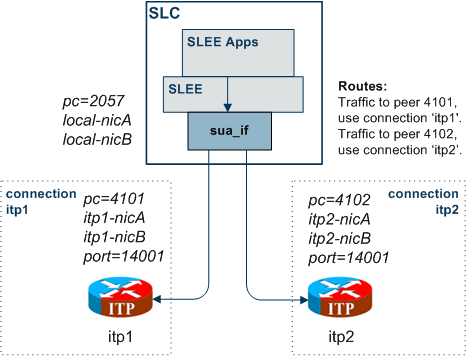
Example - route all to balanced ITPs
This example directly routes all PCs and all GTs to a pair of load-balanced ITPs (itp1 and itp2).
SUA = {opc = 2057connections = {multi-home = {# multi-home to
both itps.remote_host = [ "itp1", "itp2" ]remote_port =
14001local_host = [ "localhost" ]routing_context =
666traffic_mode_type = "loadshare"}}routes = [{peer = "*" # Route
all traffic touse = "multi-home" # destns in connection
'multi-home'.}]}
Note: The STP mechanism is not used, so the TCAP transactions are not tracked (as there is only one destination, that doesn't matter).
Diagram - route all to balanced ITPs
Here is a diagram which shows some of the features of the example.
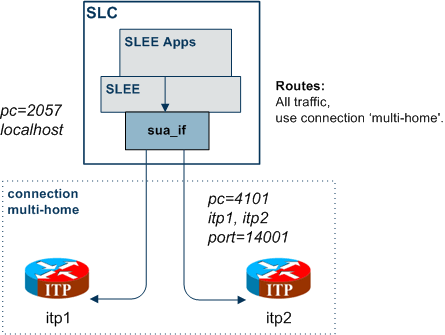
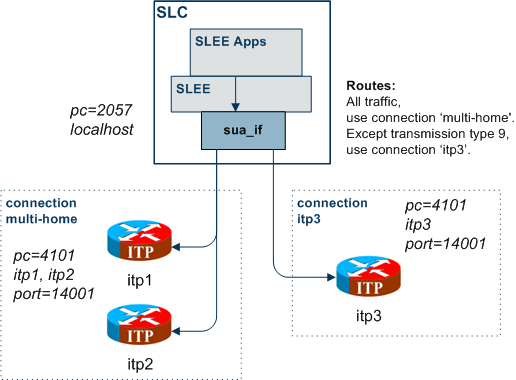
Example - route on transmission type
This example directly routes all PCs and all GTs to an ITP (itp1), except for traffic with transmission type 9 which goes to itp3.
SUA = {opc = 2057connections = {multi-home = {# multi-home to
both itps.remote_host = [ "itp1", "itp2" ]remote_port =
14001local_host = [ "localhost" ]routing_context =
666traffic_mode_type = "loadshare"}itp3 = {remote_host = "itp3" #
Send to itp3.use = "multi-home" # Use main config to set
defaults.}}routes = [{peer = "*" # Route all traffic touse =
"multi-home" # destns in connection 'multi-home'.}{label = "tt9" #
Class 'tt9' will useuse = "itp3" # dest defined in connection
'itp3'.}]classifiers = [{trans_type = 9 # Route all traffic with
transmission type 9label = "tt9" # to dest in route labelled
'tt9'}]}