5 Service Management System (SMS)
This chapter explains how and why the SMS is used.
Service Management System Overview
The SMS is responsible for setup and maintenance of many aspects of the platform and contains the web-based Java front-end for viewing and altering configuration.
Behind the scenes, the SMS receives EDRs from the SLC and VWS and processes them before archival, removal, or forwarding for further processing by external systems.
The SMS also runs a number of additional services, including the Provisioning Interface (PI), the alarm, statistics and replication subsystems, along with processes for billing interaction and Business Processing Logic (BPL).
Java Screens
The front end for configuring the Convergent Charging Controller runs through Java on the SMS. To access, please start smsGui.bat/smsGui.sh.
Oracle Listener
Connections to the database are handled by the Oracle Listener. If you are experiencing problems connecting to the Java screens, check the status of the listener by using lsnrctl.
To check the status of the listener, at the $ prompt, enter the following command as the oracle user:
$ lsnrctl statusThe following example is for the Oracle 11g database when the listener is configured correctly. It shows the listener running and the handlers for the service. You would see similar output reported for the Oracle 12c database when the listener is configured correctly.
LSNRCTL for Linux: Version 19.0.0.0.0 - Production on 05-MAR-2025 13:34:53
Copyright (c) 1991, 2024, Oracle. All rights reserved.
Connecting to (ADDRESS=(PROTOCOL=tcp)(HOST=)(PORT=1521))
STATUS of the LISTENER ------------------------
Alias
LISTENER
Version
Start Date
Uptime
Trace Level
Security
SNMP
TNSLSNR for Linux: Version 19.0.0.0.0 - Production
05-MAR-2025 06:04:33
0 days 7 hr. 30 min. 20 sec
off
ON: Local OS Authentication
OFF
Listener Log File /u01/app/oracle/product/19.0.0/network/log/listener.log
Listening Endpoints Summary...
(DESCRIPTION=(ADDRESS=(PROTOCOL=tcp)(HOST=host)(PORT=1521)))
Services Summary...
Service "SMF.host.SMF" has 1 instance(s).
Instance "SMF", status READY, has 1 handler(s) for this service...
The command completed successfully
If there are problems connecting to the Java screens because the listener is configured incorrectly, then the lsnrctl status output will appear differently; for example, the output could show that the listening port or hostname is incorrect, or that the listener is not running.
Note:
If you encounter a failure message, contact your system administrator.Starting and stopping Listener
You can start and stop the Listener by using the lsnrctl start command and the stop command. Enter at the $ prompt:
$ lsnrctl start
$ lsnrctl stop
Listener configuration
Configuration for the Listener is in the file $ORACLE_HOME/network/admin/listener.ora. Generally, this information will not need to change, unless an aspect (for example, hostname, or IP resolution) of the network changes.
Java packages
The front-end Java packages are contained in /IN/html/smsGui.bat and /IN/html/smsGui.sh calls SMS.sig.jar, which makes up the foundations of the screens.
Additional packages exist for the various products installed: for example, ACS (acs.sig.jar), CCS (ccs.sig.jar), and so on.
Control Plan Editor
The Control Plan Editor (CPE) is a front end for designing call handling logic. In general, every single event that triggers the Convergent Charging Controller platform will hit a control plan at some point.
The control plan used and nodes travelled by an event triggering the platform are written to the associated ACS EDR in the CPN and TFN tags.
Each event will have an Event Detail Record (EDR), the only real exception being when an engine error occurs and processing cannot continue. In this scenario, ACS would still write a call dump, so a record should still be available.
Tracing a Control Plan
If a problem can be traced to an ACS EDR, the CPE can be used to find the control plan used and to trace through each node to see exactly how the event traversed it.
Follow these steps to trace a control plan through the CPE.
- From the main SMS menu select Services -> ACS Service -> Control Plans.
- Select the appropriate customer from the top right-hand Customer box.
- Select Open.
- Select the appropriate control plan, based on the CPN tag.
- Press N to show node numbers.
- Using the contents of the TFN tag, follow the calls progress through the plan.
Tips:
- Clicking one time on a node will highlight and indicate all connected nodes and associated exits, along with tool-tip descriptions. Note that the connection highlighting does not occur if the Control Plan is opened with the structure read-only.
- Sub-Control Plan nodes (SCPN) can be opened in a view mode directly from the node edit screen.
- The Start and End node IDs are not reported when a SCPN node is triggered; as a result, it can sometimes be difficult to trace how a Sub-Control Plan ended.
acsCompilerDaemon
When a control plan is saved, the dialog box shown on screen is the output of the SMS process acsCompilerDaemon, which validates and compiles control plans.
If there is an issue compiling a control plan, and the CPE Save dialog box does not contain enough information to go forward, consider putting acsCompilerDaemon into DEBUG to get more information about why the compilation failed.
Tip: If the save, dialog box is completely blank, acsCompilerDaemon may not be running at all.
ccsBeOrb
When the CCS portion of the screens need to interact with the VWSs, this is done through ccsBeOrb.
The most common reason for the screens needing to query the VWS is when opening the Edit Subscriber screen. This displays all real-time Wallet information about a subscriber.
If both the VWSs are restarted and there is a complete billing outage, it can take a couple of minutes for ccsBeOrb to realize it has disconnected and reconnect. This process can be sped up by restarting ccsBeOrb.
The error message below is indicative of this problem:
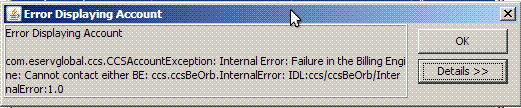
However, if the error message remains, there is a definite problem with the connection between the SMS and the VWSs.
Replication
The SMS is responsible for managing replication on the platform.
From the front-end, configuration is handled through the Java screens in Operator Functions -> Node Management, and then:
- Replication Nodes configures the node number and address.
- Table Replication contains tables to be replicated to sub-nodes.
- Replication Node Types allows the configuration of node types with pre-determined tables replicated.
Configuration completed
When configuration is complete (or has changed) a special file called replication.config is generated and put on all replication nodes in /IN/service_packages/ SMS/etc/. Any processes that use the smsMaster as a means of replication use this file to decide where to send replication updates to, and what to replicate (in the case of updateLoader).
Processes include:
- Alarm subsystem (smsAlarmDaemon)
- Statistics subsystem (smsStatsDaemon)
- Data replication (updateLoader)
- Upstream replication (replicationIF)
When the SLC or VWS needs to replicate a change (usually to the SMS), this is sent upstream through replicationIF.
Checking replication status
Replication can be checked using a few queries on the database on the SMS.
- REP_ORA_RENUMBERED
This table contains all the information that is yet to be replicated.
- REP_PENDING_QUEUE
This table contains the ID of the last event replicated.
- REP_CNF_NODE
This table contains a list of the configured replication nodes for reference.
Viewing backlog
To view the current backlog of changes waiting to be replicated, run the following SQL query as smf_oper on the SMS. This command will show how many values are yet to be replicated down to the nodes. The larger the number, the further behind replication currently is. Enter:
                           SQL> select count(*), node_number from
rep_ora_renumbered group by node_number;
COUNT(*) NODE_NUMBER
---------- -----------
162         301
129         302
122         351
116         352
6305218
Event Id checking
Another way to check the current status of replication is to use the following SQL query to list the the minimum and the maximum ID. Enter:
                              SQL> select min(event_id), max(event_id) from
rep_ora_renumbered
NODE_ID       ROE_EVENTID
----------    -----------
301           164432645
302           170738026
351           170738026
352           170738026
If the difference between Min and MAX is large as above, this indicates a clear problem with replication.
Problem node ID
Once you have determined that there is a problem with replication, it is important to determine if one particular node has fallen behind or if replication has completely failed. To do this, you must run the following SQL. Enter:
SQL> select * from rep_pending_queue;
NODE_ID ROE_EVENTID ---------- ----------- 301 164432645 302
170738026 351 170738026 352 170738026
The ROE_EVENTID is the current event ID that the node is processing. If the event ID is close to the maximum event ID (170738029), then the node is essentially in sync, but if the ROE_EVENTID is a long way off, that node is having issues receiving updates.
Problem node name
Once it is determined which NODE_ID is behind on replication, run the following SQL command to resolve the name of the node. Enter:
                           SQL> select description, node_number from
REP_CNF_NODE;
DESCRIPTION                           NODE_NUMBER
------------------------------------- -----------
UAS01                                         301
UAS02                                         302
UBE01                                         351
UBE02                                         352
In this example, we can see that the node_id that is behind (301) is connected to UAS01.
EDR Management
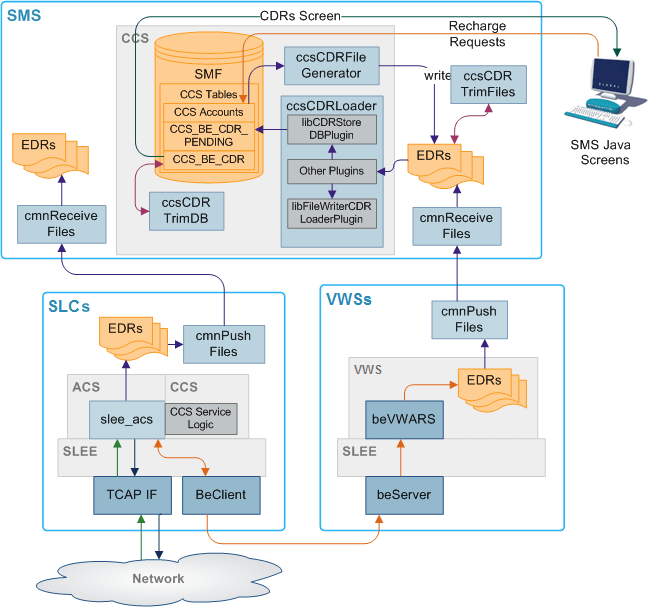
The SMS is generally responsible for receiving, processing and archiving EDRs received from the other nodes on the Convergent Charging Controller platform.
cmnPushFiles is responsible for "pushing" EDRs to the SMS, which receives them via cnmReceiveFiles.
Depending on the location they are received to, they are processed by other processes or scripts, before being archived.
Receiving files
Incoming EDRs are received by the network service cmnReceiveFiles. The destination of the EDR is controlled by the cmnPushFiles process on the sending machine.
EDR are generally separated into different directories for different EDRs. For example, an ACS EDR would be sent to /IN/service_packages/SMS/cdr/received, and BE EDRs would be sent to /IN/service_packages/CCS/logs/CDR-in.
This allows for more targeted troubleshooting when looking at EDR flow.
Processing EDRs
The processing of EDRs depends on their location.
Processing for CCS or BE EDRs is handled by ccsCDRLoader, which runs from inittab as a background process.
Under normal circumstances ACS EDRs are not processed at all, and are just archived.
ccsCDRLoader
Billing EDRs originating from the VWSs are processed in real-time by ccsCDRLoader.
As soon as an EDR is found in the incoming directory, it is picked up by the ccsCDRLoader process and run through the configured plug-ins.
Configured plug-ins
Configuration, such as incoming/outgoing directory, enabled plug-ins and plug-in settings are defined in /IN/service_packages/eserv.config. The results of the processing are dependent on the plug-ins that are running.
Plug-ins include:
- AcsCustIdPlugin
Ensures ACS Customer ID is present, if not it will look it up in the database
- VoucherRedeemPlugin
Ensures voucher redemption is updated in the CCS_VOUCHER_REFERENCE table in the SMS database
- AcctHistPlugin
Ensures the CCS Account History table is updated with subscriber changes
- CDRStoreDBPlugin
Writes the EDR details to the CCS_BE_EDR table in the SMS database
- FileWriterCDRLoaderPlugin
Writes the EDR details to file after ccsCDRLoader has finished processingIf configured, can also alter the timezone of the date fields
With this in mind, if the CCS Subscriber screens show no EDR history for a subscriber that has made calls, the ccsCDRLoader would be one place to check for issues.
Archiving
Similar to processing, the archiving of EDRs is dependent on the location of the files. After processing, billing EDRs are moved to a final location, for example, /IN/service_packages/CCS/logs/CDR-store.
The archival of EDRs is done by three scripts:
- ACS EDR
/IN/service_packages/SMS/bin/smsCdrProcess.sh
- BE EDR
/IN/service_packages/CCS/bin/ccsCDRTrimFilesStartup.sh
- Database EDR records
/IN/service_packages/CCS/bin/cdrDeletionStartup.sh
smsCdrProcess.sh
ACS EDR archiving is handled by the smsCdrProcess.sh script which is launched from crontab once per day (usually midnight GMT).
It contains a number of configurable parameters, but generally it will simply call the smsProcessCdr binary from /IN/service_packages/SMS/bin, move CDRs from SMS/cdr/received to SMS/cdr/processed, and delete files older than 31 days.
The script can be altered to perform some additional tasks, e.g. placing a suffix on the final filenames, but in general it is quite rudimentary.
ccsCDRTrimFilesStartup.sh
Billing EDR archiving is handled by the ccsCDRTrimFilesStartup.sh script which is launched from crontab once per day (usually midnight GMT).
The script calls the ccsCDRTrimFiles binary, which will remove EDR files from the specified directory that are older than the specified amount of days.
In general, this is /IN/service_packages/CCS/logs/CDR-store, and files older than 30 days.
cdrDeletionStartup.sh
Billing EDRs are also removed from the database after a set period of time.
This is controlled by the /IN/service_packages/CCS/bin/cdrDeletionStartup.sh script, which runs a simple cleanup script on the database once per day from crontab (usually 03:15 GMT).
The script itself can be found in /IN/service_packages/CCS/bin/cdrDeletion.sql.
In general, this will be configured to remove any EDRs older than seven days.
Customer Specific Processing
From time to time, a customer may have some more specific requirements for EDR files, rather than just storing on the Convergent Charging Controller SMS for a number of days before deleting.
Reasons for this include:
- ACS EDR reconciliation for billing
- BE EDR transfer to mediation server for processing to third party front-end
- More thorough archival flexibility:
- Splitting EDR into daily files
- Compression
- Longer retention
If a customer specific processor or archiver is in place, this is usually indicated by some of the following:
- smf_oper crontab has smsCdrProcessor entry commented or reading/writing to a different location.
- ccs_oper crontab has ccsCDRLoader reading/writing to a different location.
- New "cdrArchiver.sh options" in the *_oper crontabs and bin directories.
- Modified directory structure in CCS/logs or SMS/cdr.
- Separate mount point for EDR, for example,. /global/EDR or similar.
Provisioning Interface (PI)
The Provisioning Interface (PI) runs as a service on the SMS.
PI is primarily responsible for handling external requests for data on the Convergent Charging Controller platform. It will accept an external connection (supporting a number of protocols), provide authentication and respond to requests for subscriber information.
This includes simple interactions such as balance queries and performing recharges through to creating new subscribers and issuing commands that trigger through to a control plan to perform complex Business Processing Language (BPL) interactions.
Processes using PI
There are a number of processes responsible for running the PI. They are as follows:
- PImanager
Responsible for starting and stopping PIprocess instances, and the PIbeClient.
- PIprocess
Each listening port is run through a PIprocessHandles requests and runs commandsEach port has a defined protocol it is listening for:
- XML
- SOAP
- Standard.
- PIbeClient
Interacts with the billing engine.
- smsTrigDaemon
Used when the PI needs to trigger a control plan on the SLC, usually for a BPL command.
Command delivery
Each set of commands for the PI are delivered in a separate package for each product, for example, ccsPI for CCS and billing commands, ccsACS for ACS commands.
Commands are issued via the required protocol, based on the configuration shown in the SMS screens under Services > Provisioning > Administraton > Ports tab. Each defined port handles one protocol type only.
Command structure
The basic structure of a PI command is:
Command = Actions: Parameter1 = Value1 , Parameter2 = Value2 ,…;
Tip: The semi-colon terminates and runs the command.
Some example Command=Action combinations are:
- Subscriber query
- Add Subscriber
CCSCD1=CHG
- Change Subscriber
- Delete Subscriber
Note:
Each action has a specific set of expected parameters. See the relevant PI commands guide for more information.Command responses
Each request will receive either a positive or negative acknowledgment (ACK or NACK). The response will generally contain further information, although in some cases the response will just be an ACK.
Running a PI session
Use the following process to access the PI.
First, connect to the PI through telnet to a valid port, enter:
$ telnet server port
…
Tip: Escape character is '^]'.
There is no prompt, but the first interaction the PI expects is a username and password, terminated with a semi-colon:
user,password;
ACK;
This indicates the connection is successful, if not the response would be in the negative:
user,password;
NACK,72-INVALID LOGON - username,password;Connection to
localhost closed by foreign host.
Once successfully connected, commands can be run. See the relevant PI commands guide for more information on available commands.
Some example Native Oracle Syntax commands and responses are shown below:
Subscriber Query
This command runs a subscriber query, enter:
CCSCD1=QRY:MSISDN=12345;
Response:
CCSCD1=QRY:ACK:MSISDN=12345,ACCOUNT_NUMBER=1012345,PRODUCT=POSTPAID,SERVICE_PROVIDER=ORACLE,STATUS=A,CREATION_DATE=20100721044959,WALLET_EXPIRY_DATE=,BALANCE_EXPIRY_DATE=20111106040500,BALANCE_OFFSET_DATE=,BALANCE=500,INITIAL_BALANCE=0,LANGUAGE=english,LAST_RECHARGE_DATE=20101115160315,LAST_CC_RECHARGE_DATE=,LAST_USE_DATE=20101122044014,LAST_RECHARGE_AMOUNT=0,PREV_WALLET_EXPIRY_DATE=20100701022600,PREV_BALANCE_EXPIRY_DATE=20111106040500,PREV_BALANCE=8590,LAST_EXP_CREDIT=14950,TOTAL_EXP_CREDIT=26950,LAST_EXP_DATE=20101106023900,FIRST
ACTIVATION
DATE=20100726035409,LAST_STATE_CHANGE_DATE=20101011201347,LAST_STATE_CHANGE_REASON=,BYPASS_NUMBER=,WALLET_TYPE=Primary,CHARGING_DOMAIN=1,FFD=,FFN=,FDN=,CUG=,CURRENCY=NZD,FREE_SWAPS_REMAINING=0,LAST_SWAP_RESET_DATE=;
Balance Query - all balances
This command runs an all balance query, enter:
CCSCD1=QRY:MSISDN=12345,BALANCE_TYPE=ALL;
Response:
CCSCD1=QRY:ACK:MSISDN=12345,ACCOUNT_NUMBER=1012345,PRODUCT=POSTPAID,STATUS=A,WALLET_EXPIRY_DATE=,LANGUAGE=english,BALANCES=General
Cash:500:20111106040500|Free SMS:5:20101122173422;
Balance Query - specific balance
This command runs a specific balance query, enter:
CCSCD1=QRY:MSISDN=12345,BALANCE_TYPE=Free SMS,LIST_TYPE=BALANCE|BALANCE_EXPIRY_DATE;
Response:
CCSCD1=QRY:ACK:MSISDN=12345,ACCOUNT_NUMBER=1012345,BALANCE_EXPIRY_DATE=20101122173422,BALANCE=5;
General
CashFree SMS are configurable, so the output may vary from platform to platform.
Business Processing Language
More complex and advanced commands can be run by using Business Processing Language (BPL). A BPL command is configured through the SMS UI under Services > Prepaid Charging > Task Management.
For full details on configuring BPL, see the CCS User's Guide.
Example BPL configuration
In this example Edit Business Process Logic screen, a command name, parameters and control plan are defined:
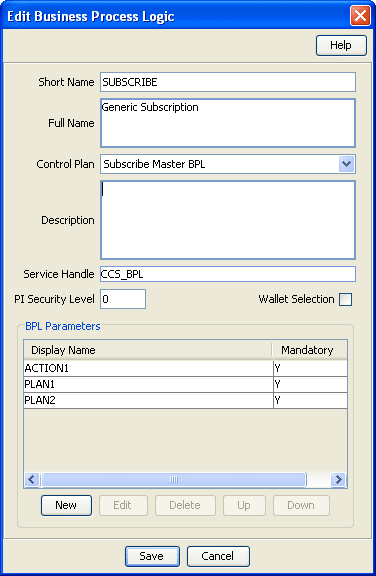
When the command is run via the PI, it will trigger the specified Service and Control Plan, which will handle the complicated interaction required, and set a response code using a Cause Value inside a Disconnect node in the associated Control Plan. Calling BPL is done using the command CCSBPL=EXE. For example:
CCSBPL=EXE:MSISDN=12345,BPL=SUBSCRIBE,EXT1=0,EXT2=1,EXT3=0;
CCSBPL=EXE:ACK:302-All actions completed OK;
Note: The extension parameters are defined in the BPL record and correspond to the extension parameters (4 to 8) defined in the acs.conf configuration file.
Example Disconnect Cause mappings
Mappings between Disconnect Cause and the message returned to the PI is also done through Services > Prepaid Charging > Task Management.
302 is the PI result code for a successful BPL command.
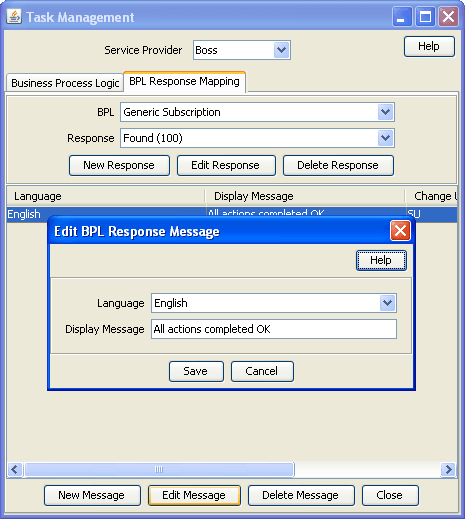
So in this example, the Control Plan exited with a Disconnect Cause of 100, which was mapped to the display message of "All actions completed OK".