How to Use the Devices Tab
You can use the Devices Tab of the Oracle Enterprise Communications Platform (Oracle ECP) Dashboard Page to display counts of the Devices in each life cycle state and connectivity state, and to check cellular connectivity service usage and counts of devices onboarded to Inventory.
The following information describes how to use the graphs, charts, and tables on the Devices Tab of the Dashboard Page.
Device Usage (last 30 days) Line Graph and Usage (last 30 days) Table
Note:
Metrics for MDM-enabled devices that you onboard with Cellular as the Connectivity Type are included in the device usage information on the Devices tab dashboard. For MDM-enabled devices that you onboard with other connectivity types, you can view state counts on the Devices managed by MDM card.Figure 13-1 Devices Tab
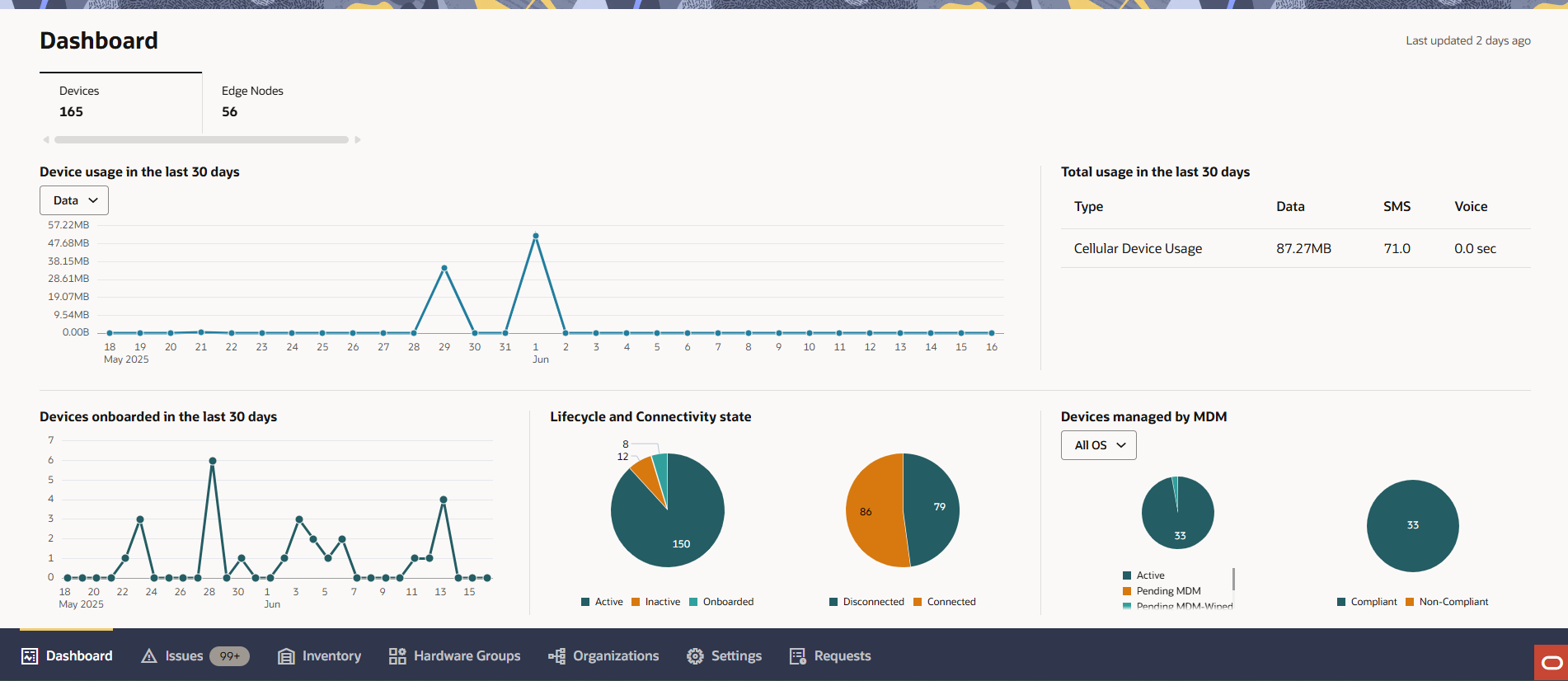
You can adjust the Device Usage line graph to see usage data for Data, SMS, and Voice within a thirty-day period using the context specifier drop-down list above the graph.
You can set the sort order for the "total usage in the last 30 days" table by clicking the arrows in a table heading to sort the rows by ascending or descending values in that column.
Devices Onboarded in the Last 30 Days
- Hover over or click data points on a line graph to see the onboarding count for Devices day-to-day.
Lifecycle and Connectivity State
You can view the states of Devices onboarded in the last thirty days.
- Hover over or click a segment of a pie chart to view the count of Devices in the corresponding state.
- Right-click a data segment of the Lifecycle State pie chart or the Connectivity State pie chart to navigate to the Inventory Page to see more detailed data.
- For customers onboarded to Oracle ECP as MDM tenants, the Devices managed by MDM card displays pie charts for the MDM-enabled device Connectivity States and the MDM Compliance States (between the Lifecycle State and Connectivity State pie charts). You can click the drop-down to change from the default All OS view to a view for the MDM-enabled device state information for devices that use the operating systems.