SIP REFER Method Call Transfer
You can configure how the Oracle Enterprise Session Border Controller handles SIP REFER requests for transferring calls by setting the refer-call-transfer parameter on a realm-config or session-agent.
You can choose from the following options:
- Proxy the REFER to the UA.
This is the default behavior. It occurs when you set refer-call-transfer to disabled.
- Terminate the REFER and issue an INVITE to the address in the Refer-To header. The INVITE message includes all of the unmodified information contained in the REFER message, and uses the previously negotiated codec. When the call transfer completes, the Enterprise SBC sends NOTIFY and BYE messages to the UA. If the REFER method does not contain a Referred-By header, the Enterprise SBC adds one.
This only works from a realm-config when the REFER request is from an end point that is not configured as a session-agent.
This behavior occurs when you set refer-call-transfer to enabled.
- Decide whether to proxy or terminate the REFER on a call-by-call basis, according to the dyn-refer-term configuration of the next hop egress realm:
- When dyn-refer-term is disabled (the default), the Enterprise SBC proxies the refer to the next hop UA.
- When dyn-refer-term is enabled, the Enterprise SBC terminates the REFER and issues an INVITE message to the referred party.
This behavior occurs when you set refer-call-transfer to dynamic.
Note:
If the configuration on the realm-config and session-agent differ, the session-agent takes precedence.You can also configure which realm the Enterprise SBC bases the policy lookup on when terminating a REFER and issuing an invite:
- The source realm of the calling party (the INVITE originator).
- The source realm of the referring party (the REFER originator).
You configure this by setting the refer-src-routing parameter in the sip-config configuration element to disabled (the default, use the source realm of the calling party) or enabled (the source realm of the referring party). Set it to enabled if you set refer-call-transfer to dynamic.
Supported Scenarios
The Enterprise SBC supports the following transfer scenarios:
- Unattended and attended call transfers
- Successful and unsuccessful call transfers
- Early media from the Referred-To party to the transferee
- REFER method transfer from different sources within the destination realm
- The REFER event package as defined in RFC 3515. This applies for situations where multiple REFER methods are used within a single dialog.
- Third party initiated REFER method signalling the transfer of a call by associating the REFER method to the dialogue via the REFER TargetDialog.
- The Referred-To party can be both in a different realm (and thus a different steering pool) from the referrer, and in the same realm
- The associated latching should not prohibit the Referred-To party from being latched to while the referee is still sending media.
Basic Scenario
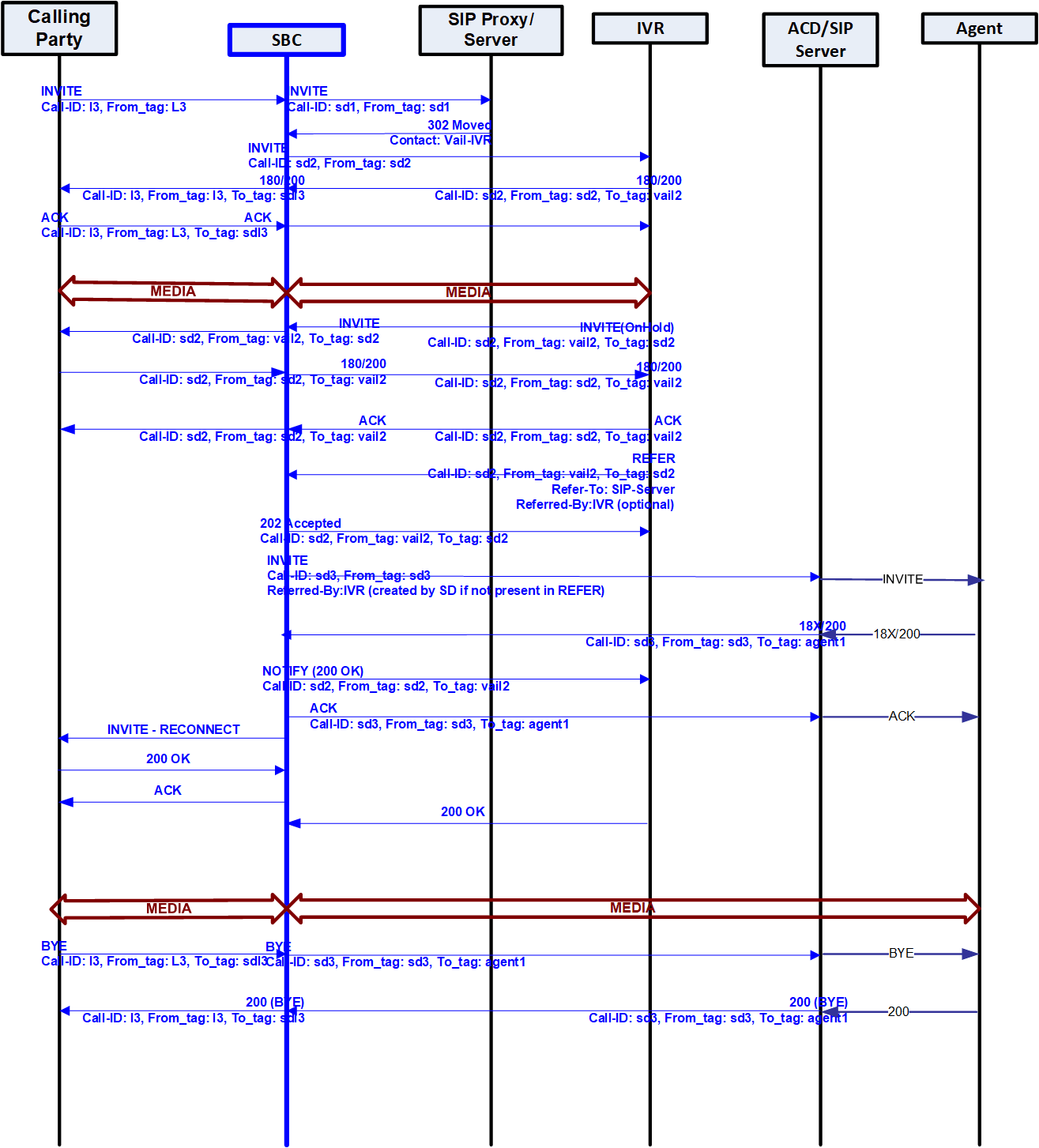
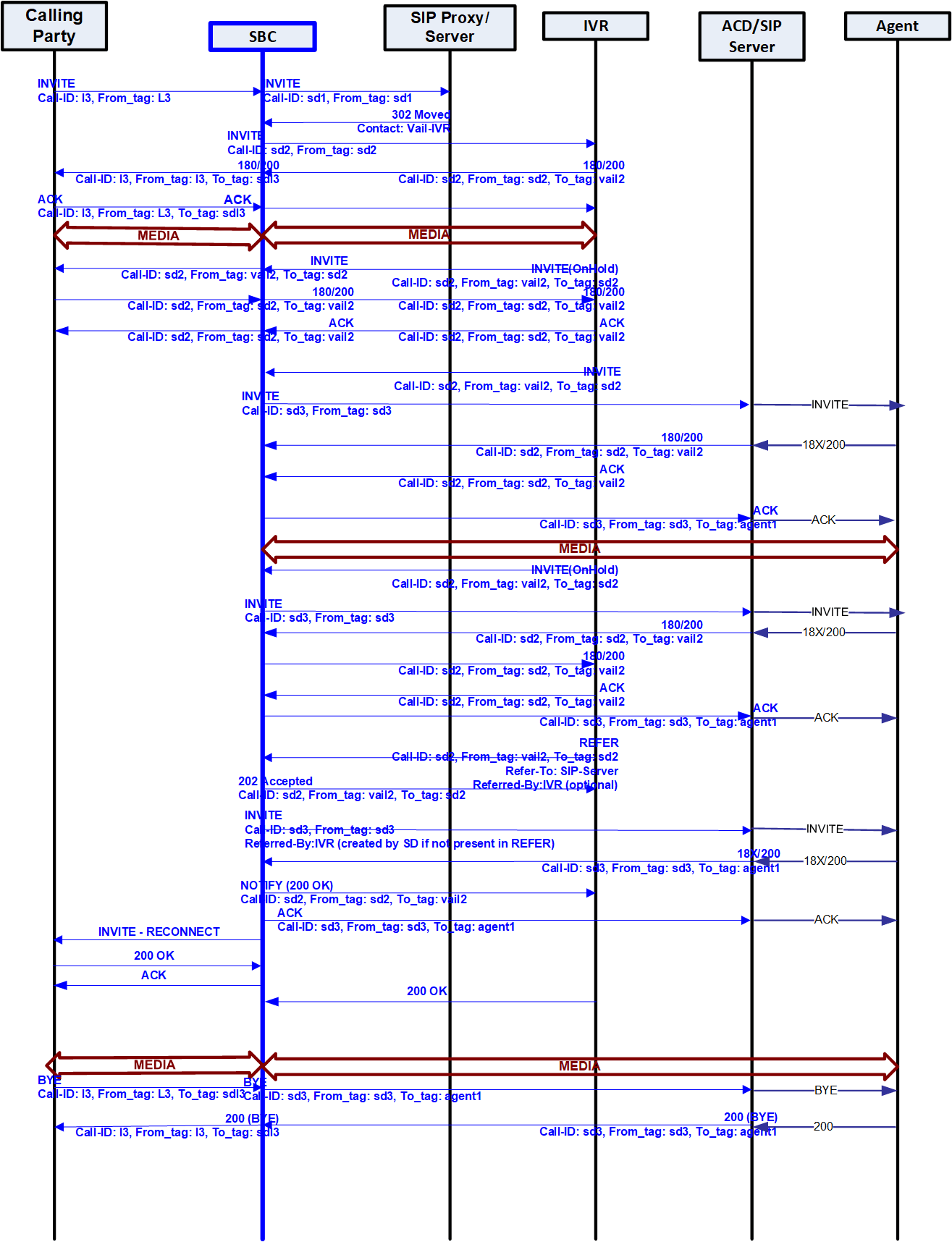
In the basic scenario for REFER initiated call transfer, a call is established between two User Agents (Alice and Bob). User Agent Bob then sends a REFER request to transfer the call to a third User Agent Eva. With dynamic call-transfer enabled, the Oracle Enterprise Session Border Controller (Enterprise SBC) prevents the REFER from being sent to Alice and generates the INVITE to Eva.
If the INVITE to Eva succeeds, the Enterprise SBC sends a re-INVITE to Alice modifying the SIP session as described in Section 14 of RFC 3261, SIP: Session Initiation Protocol. At this point the Enterprise SBC cancels the original dialog between the Enterprise SBC and Bob.
If the INVITE to Eva fails, call disposition depends on whether or not Bob issued a BYE after the REFER call transfer. If the Enterprise SBC did receive a BYE from Bob (for instance, a blind transfer), it proxies the BYE to Alice. Otherwise, the Enterprise SBC retains the original SIP session and media session, thus allowing Bob to re-establish the call with Alice by sending a re-INVITE. In this case, the Enterprise SBC sets a timer (32 seconds), after which it will send a BYE.
Unsuccessful Transfer Scenarios
The Enterprise SBC does not successfully handle the following failed, unusual, and unexpected transfer scenarios:
- The new INVITE to the Referred-To party gets challenged. The Enterprise SBC does not answer the challenge. It is treated with the 401/407 response just as any other unsuccessful final response.
- The header of the REFER message contains a method other than INVITE or contains URI-parameters or embedded headers not supported by the Enterprise SBC.
- The transferee indicated support for 100rel, and the original two parties agreed on using it, yet the Referred-To party does not support it.
- The original parties negotiated SRTP keys.
- The original parties agreed on a codec using a dynamic payload type, and the Referred-To party happens to use a different dynamic payload number for that codec.
- Allows the Referred-To URI to resolve to the same next-hop as the original INVITE.
- Ignores any MIME attachments within a REFER method.
- Recurses when the new INVITE sent to the Referred-To party receives a 3xx response.
Continuing Calls in Failed REFER Call Transfers
When a REFER call transfer fails, you can configure whether the Enterprise SBC ends the original call automatically, or lets it continue.
By default, when a REFER call transfer fails for unattended transfers or attended transfers where Enterprise SBC issues a new INVITE rather than a reINVITE, the Enterprise SBC waits 32 seconds, and then ends the original call.
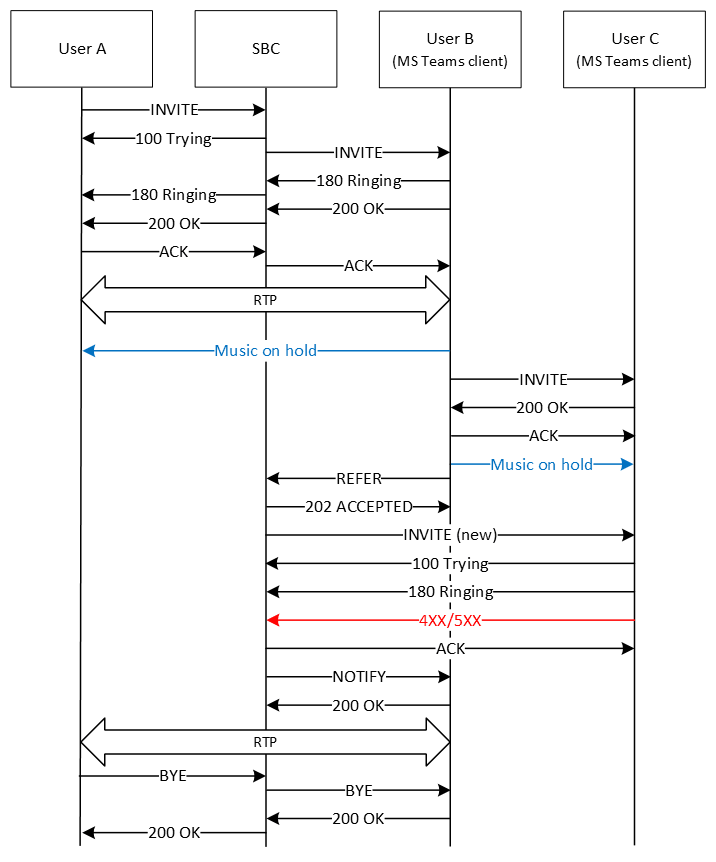
However, some Advanced Media Termination clients, such as Microsoft Teams, play music on hold (MoH) while transferring calls, during which no signaling updates are sent to the recipient or the Enterprise SBC (this is music sent directly from the client, different from the local media playback configuration for REFER on the Enterprise SBC). If the transfer fails, and the original caller resumes the call with the original recipient, the Enterprise SBC is not aware of any signaling updates or that the original call has resumed, and ends the call after 32 seconds.
To ignore the 32 second timer after a failed transfer and continue the original call, you can enable the refer-fail-resume parameter on the realm-config. Instead of automatically ending the original call after 32 seconds, the Enterprise SBC allows the call to continue and it ends as normal: when either side sends a BYE, when the session-timer for the original call elapses, or when the subsq-guard-timer for RTP configured for the realm elapses, whichever happens first.
Call Flows
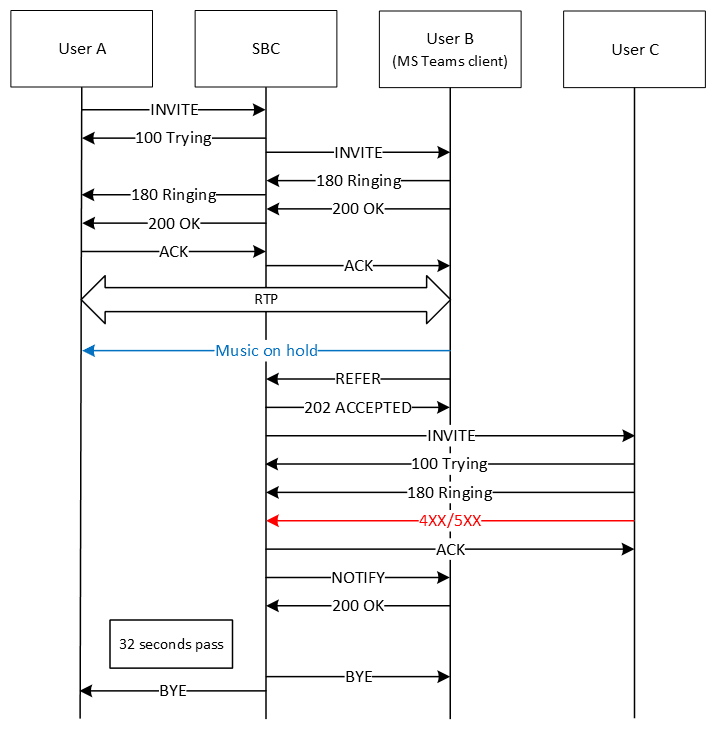
The following image shows the default unattended referral call flow, when refer-fail-resume is disabled, and the referring user is an Advanced Media Termination client. In this flow, a call between User A and User B is established, then User B plays music on hold for User A while referring the call to User C. The referral fails with a 4XX or 5XX response, and the Enterprise SBC notifies User B. Because the Enterprise SBC does not see any further signaling updates in 32 seconds, it ends the call.
The following image shows the same call flow as above, but with refer-fail-resume enabled. In this flow, after notifying User B of the failed referral, the Enterprise SBC does not end the original call between User A and User B.
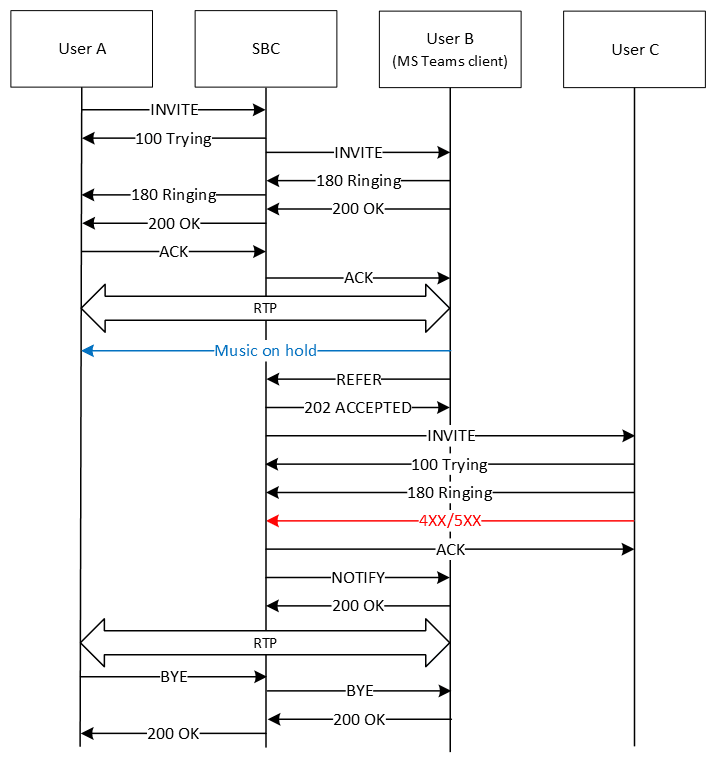
- After the initial referral fails, User B refers the call to User D. This also fails, and the original call between User A and User B resumes.
- User A refers the call to User C. This fails, and the original call between User A and User B resumes.
- SIPREC is enabled, and the initial INVITE is first sent to the SRS before establishing the call. The referral to User C fails, the original call between User A and User B resumes, and SIPREC recording continues.
- The initial referral fails with status 302 and the Enterprise SBC redirects the call to User D. This also fails, and the original call between User A and User B resumes.
- The initial referral succeeds, then User C refers the call to User D. This fails, and the second call between User A and User C resumes.
The following image shows the attended referral call flow, when refer-fail-resume is enabled, and the Enterprise SBC issues a new INVITE to begin the referral.
In this flow, a call between User A and User B is established, then User B makes an attended referral to User C, sending an INVITE and reINVITE for the hold directly to User C. These succeed, and User B sends the REFER to the Enterprise SBC. The Enterprise SBC issues a new INVITE (rather than a reINVITE) to User C to establish the referral, and this fails with a 4XX or 5XX response. The Enterprise SBC notifies User B, and the original call between User A and User B resumes.
If refer-fail-resume were disabled in the previous flow, the Enterprise SBC would end the call after 32 seconds.
In scenarios where the Enterprise SBC instead issues a reINVITE to establish the referral, and that fails, the Enterprise SBC does not end the call, regardless of the refer-fail-resume setting.
Maintaining RBT During Transfers
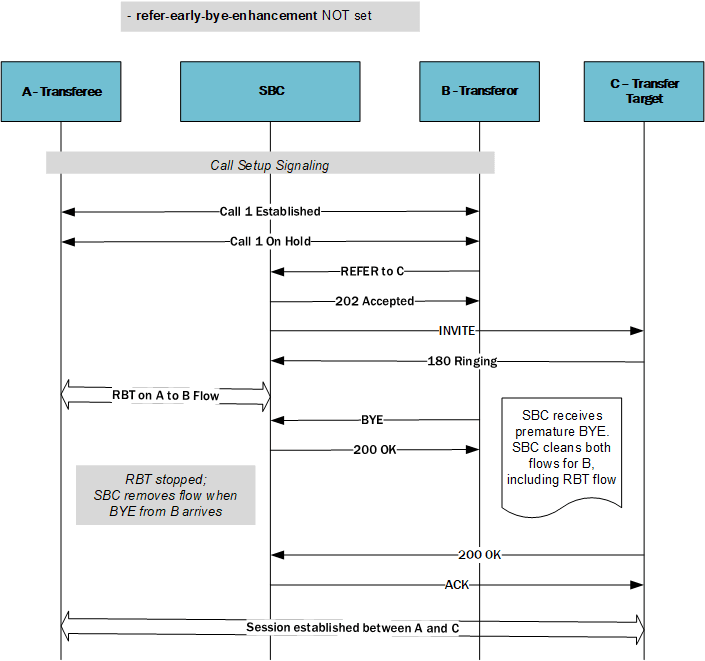
The Enterprise SBC may stop sending its configured ring back tone (RBT) to the caller when operating within some transfer scenarios. Applicable scenarios include the presence of network infrastructure that issues a BYE from the callee to the Enterprise SBC while the transfer is underway. You can configure the Enterprise SBC to persist with RBT for the duration of the transfer process so the caller does not unexpectedly lose RBT. By default, this configuration is not set, which provides for proper transfer behavior within most infrastructures.
Default refer handling processing includes referencing your refer-call-transfer configuration, which, when enabled, gives the system the ability to provision the handling of REFER methods as call transfers. When this parameter is enabled, the Enterprise SBC creates an INVITE message whenever it receives a REFER. It then sends this INVITE to the address in the Refer-To header. The Enterprise SBC includes all the unmodified information contained in the REFER message in this INVITE, and uses the previously negotiated codec. The Enterprise SBC sends NOTIFY and BYE messages to the UA upon call transfer completion. This behavior is interrupted if the tranferor sends a BYE because the Enterprise SBC then tears down the flows between itself and both the caller, which carries the RBT, and the transferor.
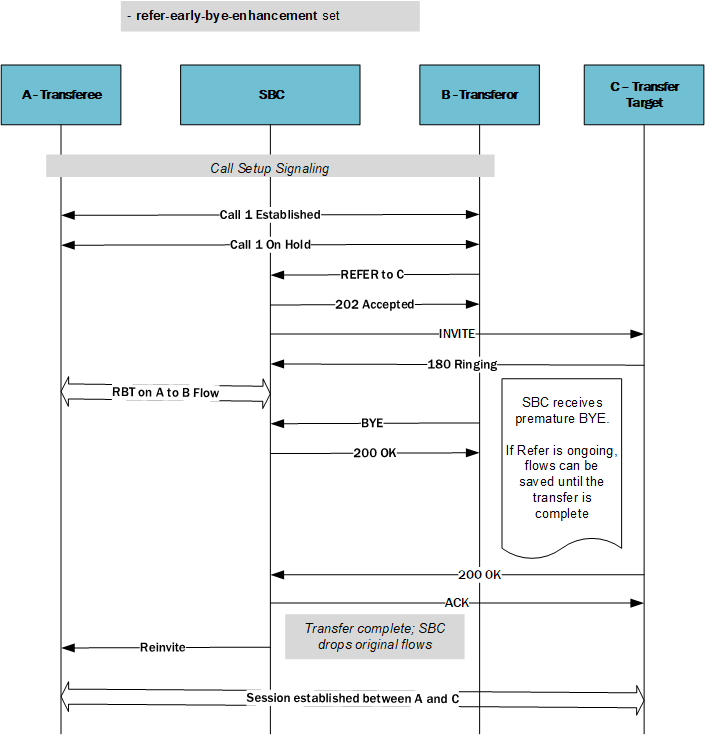
For transcoding-based RBT, you can configure the Enterprise SBC to avoid interruptions to this local RBT being played towards the ingress side (A party) for call transfer scenarios wherein the Enterprise SBC receives a BYE from the transferor before a 200 OK from the transferee during the call transfer process. To enable this behavior, you set the refer-early-bye-enhancement option in the sip-config, as shown below.
ORACLE(sip-config)# options +refer-early-bye-enhancementWhen you include the "+" sign in this syntax, the system allows previously configured options field values to remain operational. If you do not use the "+" sign, the system removes any other configured options leaving only this option operational.
Note:
If you have set this option and then downgrade to a version that does not support it, the system ignores the option setting.The option also does not apply for SPL-based RBT.
The Enterprise SBC supports this behavior for HA deployments:
- If the callee triggers the transfer after the switchover, the Enterprise SBC transfers media using new flows.
- If the HA switchover happens while RBT is ongoing, the Enterprise SBC does not continue sending RBT on the new active. If the new active receives a refresh REFER/INVITE, it restarts RBT per its normal behavior.
This feature interacts with the following related features:
- refer-call-transfer Required—This feature is applicable only when the REFER is handled locally by the Enterprise SBC. You must enable refer-call-transfer on the realm or session agent that receives the REFER.
- refer-reinvite
- Enabled—When enabled, this option enables the Refer with Replaces feature on the Enterprise SBC. This feature is not applicable to scenarios wherein the Enterprise SBC uses a reINVITE in the existing dialog to complete an attended call transfer. Therefore, this feature requires that you do not enable refer-reinvite. These configurations are actually intended to disable RBT on the applicable flows.
- Disabled—During an attended call transfer scenario with
the refer-reinvite option
disabled, the Enterprise SBC handles and preserves the media flows
towards the transferee side, which allows
uninterrupted RBT even if the transferor sends a
premature BYE before the Transfer Agent accepts the
(200 OK from C party).
Ultimately, the Enterprise SBC terminates the flows preserved for RBT whether the attended transfer completed successfully or unsuccessfully.
- refer-reinvite-no-sdp—If you enable refer-reinvite-no-sdp within the sip-config, then the system plays RBT because the SipMedia is retained in SipDialog. In this case, the system does not handle the Premature BYE, instead passing the BYE on to the targets and terminating the calls.
Call Flows
The following call flows depict the Enterprise SBC attempting to handle RBT during refer scenarios. These images include two scenarios wherein the system does not support, and then does support RBT through the refer processing.
This first scenario is a simple transfer scenarios. Upon receiving a BYE from user agent, the Enterprise SBC performs its default behavior, which includes the system stopping the RBT and clearing the flow on both sides. This drops the flow from the Enterprise SBC to A even though it is busy supporting an RBT media flow.
When you set the refer-early-bye-enhancement option, the Enterprise SBC does not tear down the flow during this blind/attended (Invite) transfer because it detects a pending REFER. Instead, the Enterprise SBC maintains the flow until the transfer is complete or it receives a 200OK from B.
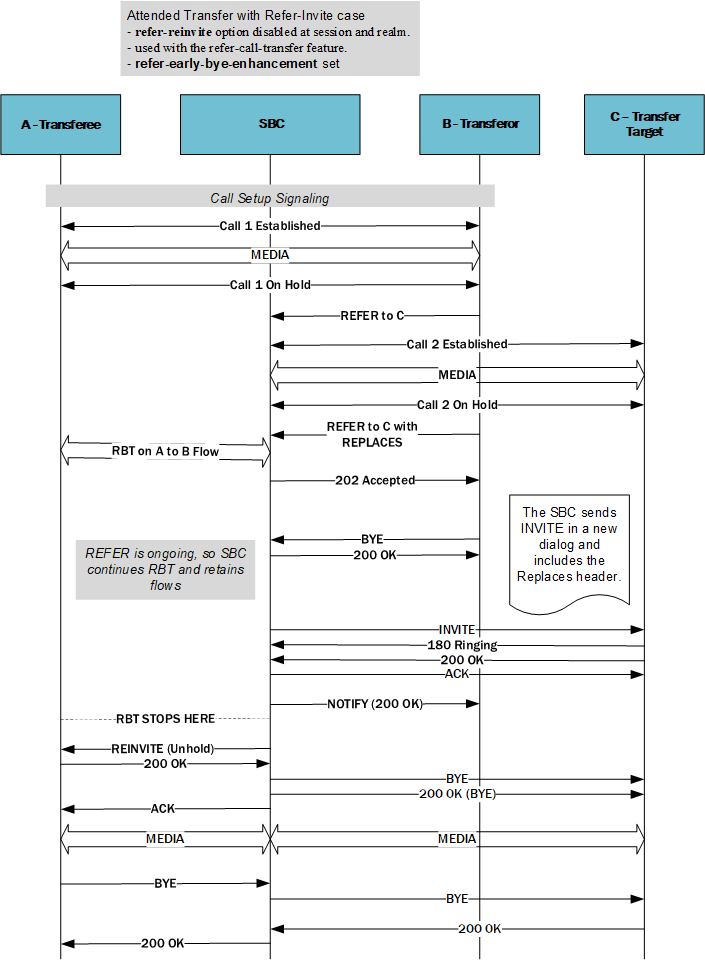
This scenario depicts the Enterprise SBC supporting an attended Transfer with Refer-Invite case. You have left the refer-reinvite option disabled at the session and realm. Here, the Enterprise SBC sends an INVITE in a new dialog and includes the Replaces header. This is used in conjunction with the refer-call-transfer feature
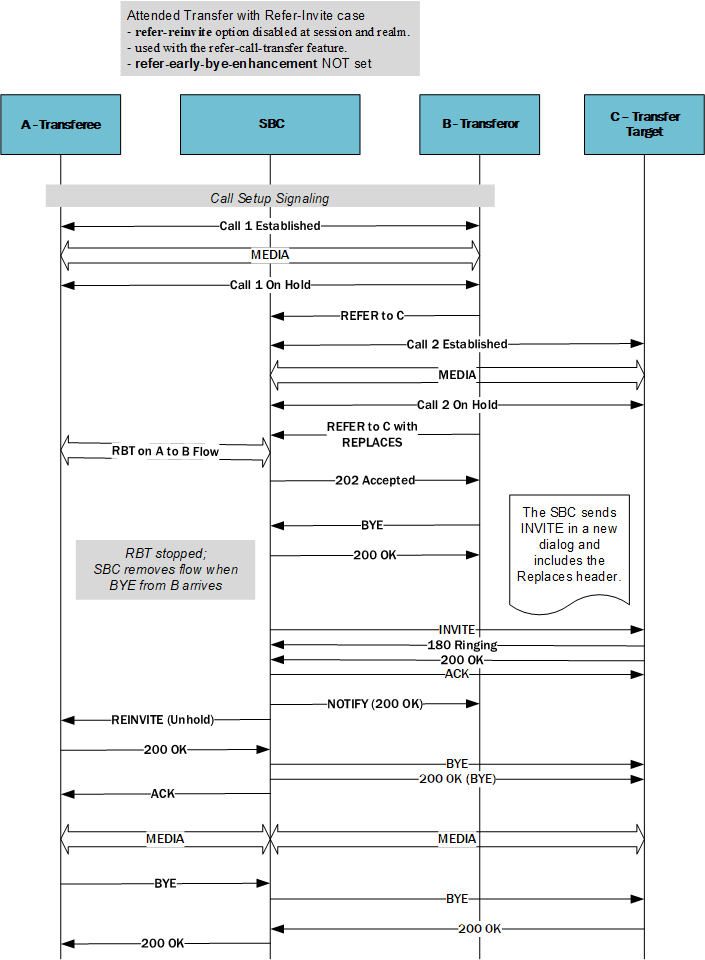
Again, because you have set the refer-early-bye-enhancement option, the Enterprise SBC does not tear down the flow during this attended Transfer with Refer-Invite case because it detects a pending REFER. Instead, the Enterprise SBC maintains the flow until after it sends a NOTIFY (200 OK) to B confirming the transfer is complete.
Applicable Logging
The Enterprise SBC provides debug-level log messages for troubleshooting this feature. DEBUG logs are available to monitor proper processing of the feature. NOTICE logs are also available to track unrecoverable errors. The system captures logs in the log.sipd file, assuming you have enabled DEBUG mode.
Examples of applicable log messages include the following, showing the system recognizing a trigger that results in invoking the feature:
Feb 9 11:30:22.121 [CONFIG] (0) earlyByeEnhancement: true
Feb 9 11:30:25.349 [SESSION] (2) Sipd_is_refer_early_bye_enhancement is ON is_pending true
Feb 9 11:30:25.349 [SESSION] (2) is_pending true
Other examples of applicable log messages include the following, showing the system processing the feature:
Feb 9 11:30:25.349 [SESSION] (2) <sipRefer.cpp:1837> ReferCall::complete_transfer setting the pdialog->dropFlowFlag to true.
Feb 9 11:30:25.349 [SESSION] (2) <sipTrans.cpp:17268> SipClientTrans::drop_media_for_bye dropFlowFlag is true.
Feb 9 11:30:30.365 [TRANS] (2) <sipRefer.cpp:1887> ReferCall::complete_transfer dropFlowFlag is true, dropping the pending flows.
180 & 100 NOTIFY in REFER Call Transfers
The Enterprise SBC can optionally send NOTIFY messages after sending either a 202 Accepted or a 180 Ringing message in REFER call transfer scenarios.
Networks elements that comply with RFC 5589 expect a NOTIFY message after a 202 Accepted and each provisional 180 Ringing. To send these expected messages, set the refer-notify-provisional parameter to initial or all.
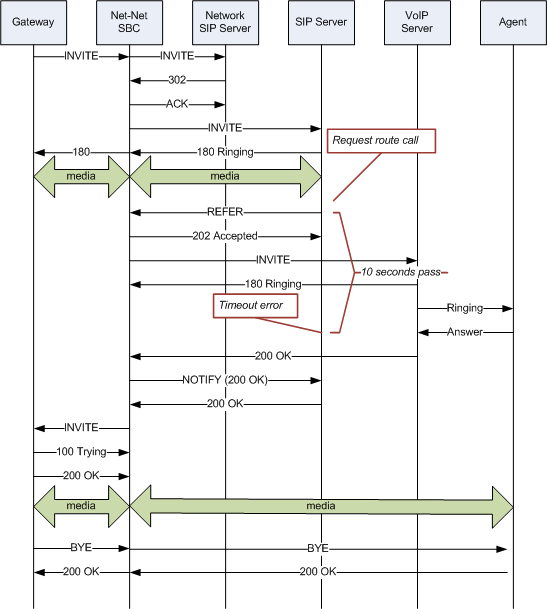
When you retain the default setting for this parameter (none), the Enterprise SBC does not send the NOTIFY until it receives the 200 OK response from the agent being called. If the time between the REFER and the NOTIFY exceeds time limits, the NOTIFY from the Enterprise SBC may go undetected by devices compliant with RFC 5589, resulting in failures during the routing process.
The following image shows a sample call flow when refer-notify-provisional is set to none.
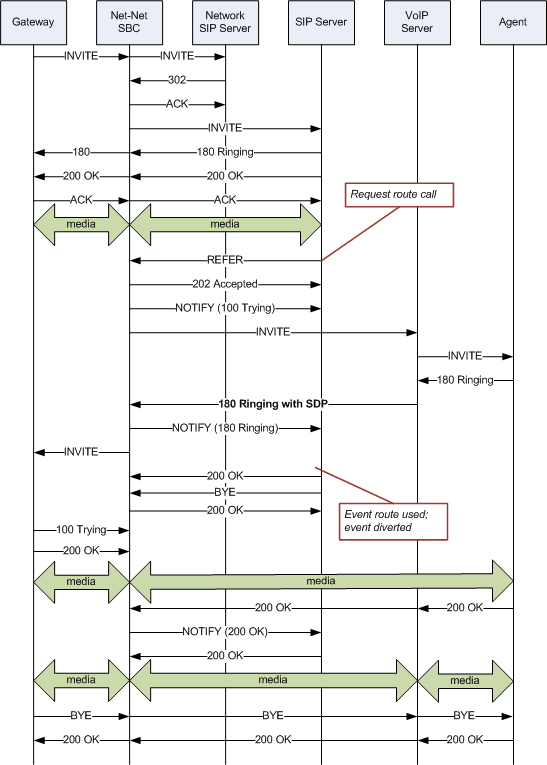
In contrast, the following image shows the call flow when refer-notify-provisional is set to all. In this flow, the Enterprise SBC now sends a NOTIFY in response to the 202 Accepted, and another after the 180 Ringing. This causes the event to be diverted successfully.
Sample Messages
In compliance with RFC 5589, the NOTIFY message with 100 Trying as the message body looks like the sample below. Note that the expires value in the subscription state header is populated with a value that equals 2* TIMER C, where the default value of TIMER C is 180000 milliseconds.
NOTIFY sips:4889445d8kjtk3@atlanta.example.com;gr=723jd2d SIP/2.0
Via: SIP/2.0/TLS 192.0.2.4;branch=z9hG4bKnas432
Max-Forwards: 70
To: <sips:transferor@atlanta.example.com>;tag=1928301774
From: <sips:3ld812adkjw@biloxi.example.com;gr=3413kj2ha>;tag=a6c85cf
Call-ID: a84b4c76e66710
CSeq: 73 NOTIFY
Contact: <sips:3ld812adkjw@biloxi.example.com;gr=3413kj2ha>
Allow: INVITE, ACK, CANCEL, OPTIONS, BYE, REFER, NOTIFY
Supported: replaces, tdialog
Event: refer
Subscription-State: active;expires=360
Content-Type: message/sipfrag
Content-Length: ...
SIP/2.0 100 Trying
Also in compliance with RFC 5589, the NOTIFY message with 180 Ringing as the message body looks like the sample below. Again, the expires value in the subscription state header is populated with a value that equals 2* TIMER C, where the default value of TIMER C is 180000 milliseconds.
NOTIFY sips:4889445d8kjtk3@atlanta.example.com;gr=723jd2d SIP/2.0
Via: SIP/2.0/TLS 192.0.2.4;branch=z9hG4bKnas432
Max-Forwards: 70
To: <sips:transferor@atlanta.example.com>;tag=1928301774
From: <sips:3ld812adkjw@biloxi.example.com;gr=3413kj2ha>;tag=a6c85cf
Call-ID: a84b4c76e66710
CSeq: 73 NOTIFY
Contact: <sips:3ld812adkjw@biloxi.example.com;gr=3413kj2ha>
Allow: INVITE, ACK, CANCEL, OPTIONS, BYE, REFER, NOTIFY
Supported: replaces, tdialog
Event: refer
Subscription-State: active;expires=360
Content-Type: message/sipfrag
Content-Length: ...
SIP/2.0 180 Ringing
Also in compliance with RFC 5589, the NOTIFY message with 200 OK as the message body looks like the sample below.
NOTIFY sips:4889445d8kjtk3@atlanta.example.com;gr=723jd2d SIP/2.0
Via: SIP/2.0/TLS 192.0.2.4;branch=z9hG4bKnas432
Max-Forwards: 70
To: <sips:transferor@atlanta.example.com>;tag=1928301774
From: <sips:3ld812adkjw@biloxi.example.com;gr=3413kj2ha>;tag=a6c85cf
Call-ID: a84b4c76e66710
CSeq: 74 NOTIFY
Contact: <sips:3ld812adkjw@biloxi.example.com;gr=3413kj2ha>
Allow: INVITE, ACK, CANCEL, OPTIONS, BYE, REFER, NOTIFY
Supported: replaces, tdialog
Event: refer
Subscription-State: terminated;reason=noresource
Content-Type: message/sipfrag
Content-Length: ...
SIP/2.0 200 OK