5 Configuring Listener Endpoints for Third‑Party Catalogs
Launch enables you to integrate external and internal catalogs such as partner, OTT, and other CSP catalogs by configuring a Listener flow. The Listener configuration follows an event-driven architecture where you create a listener endpoint in Launch, and the third-party catalog invokes that endpoint. When the endpoint is invoked with an appropriate payload, you can define data transformations and ingestion logic in the listener flow’s mapping file, similar to Migration and Publish flows. The diagram below illustrates an overview of the Listener flow.
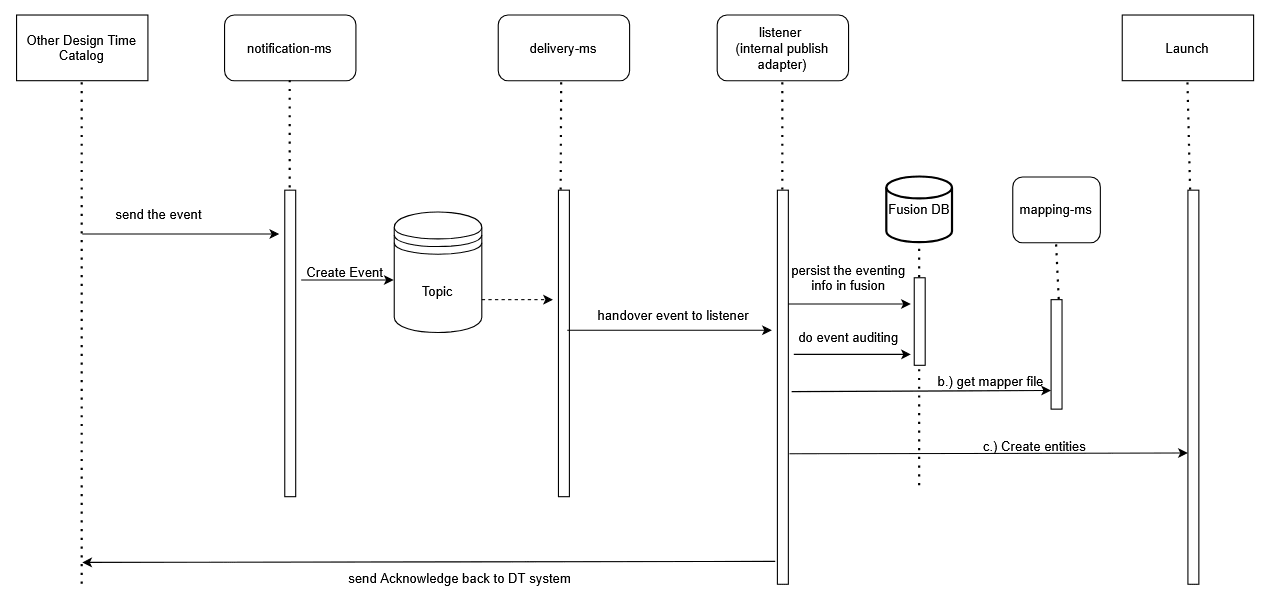
Description of the illustration listener-flow-architechture.png
Set Up the Integration
Before creating the Listener mapping file, ensure that the spoke systems are registered and the integration between the applications has been validated. Once verified, proceed with the steps below:
- Log in to Launch and navigate to Administration, select Catalog Sync, and then click Create.
- Select Type as Listener and enter the Source name.
- Upload the Source Grammar file. This file is required to understand the API capabilities and schema of the source environment.
- (Optional) Upload the Target Grammar file if there are Launch-side extensions.
- Click Save to complete the first checkpoint of the Listener mapping file creation.
- Once saved, click Add Listener API to move to the next checkpoint.
- Under General Information, enter a name for the Listener API. This is the endpoint that third-party catalogs will call to trigger the listener flow.
- Depending on the event payload contract, choose one of the following approaches:
- If the payload contains only references to the entities that need to be synchronized, define API mappings to call the source system and retrieve the data.
- If the payload contains the full details of the entities to be synchronized, you do not need to call the source API. Proceed directly to the Target API invocation and data transformations.
- Refer Productized Integration Mapping: Functions and Mapping Rules for details on configuring API Mapping and Data Mapping.
- After the Listener API is defined, save this checkpoint to proceed to Target API definitions.
- Add a Target API for each call to the target system. Provide the API details and specify data mappings/transformations in the data mapping table. Refer Productized Integration Mapping: Functions and Mapping Rules for more details.
- Once saved, the mapping file is ready to be used by the listener flow.
- When a third-party catalog triggers the event defined in step 7 with the contractual payload, the listener flow will read the mapping file and run the logic defined by the customer.