3.7.6 Procedure 17 Start LSMS Services
Table 3-22 Procedure 17 - Start LSMS services
| S T EP # | This procedure starts the LSMS services.Estimated time: 10 minutes | |
|---|---|---|
|
☐1. |
MPS A: Log in to the server as the user “root”. |
|
|
☐2. |
MPS A : Check hastatus |
Run below command to check lsms status is UNINITIALIZED "INHIBITED" before running If status is UNINITIALIZED and not UNINITIALIZED "INHIBITED" run hafailover else continue with Step 3. |
|
☐3. |
MPS A: Start lsmsmgr |
# su - lsmsmgr |
|
☐4. |
MPS A: Start Node - This will make node active and start application |
On the “Main Menu”, select Maintenance and press [ENTER]. 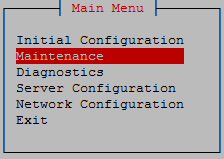 Select Start Node and press [ENTER]. 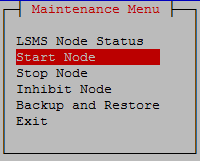 Select Yes to confirm node startup press [Enter] |
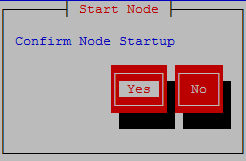 Press Enter once the node is uninhibited successfully. 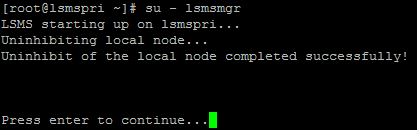 Select Exit and press [Enter] to return to Main Menu. 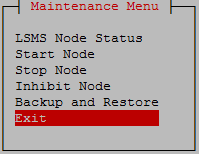 Select Exit and press [Enter] to exit the lsmsmgr menu. 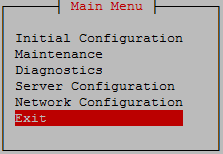 |
||
|
☐5. |
MPS A: Switch to mate |
#ssh mate |
|
☐6. |
MPS B: Log in to the server as the user “root”. |
|
|
☐7. |
MPS B: Start lsmsmgr |
# su - lsmsmgr |
|
☐8. |
MPS B: Start Node - This will make node standby and start application |
On the “Main Menu”, select Maintenance and press [ENTER]. Select Start Node and press [ENTER]. Select Yes to confirm node startup press [Enter] Press Enter once the node is uninhibited successfully. 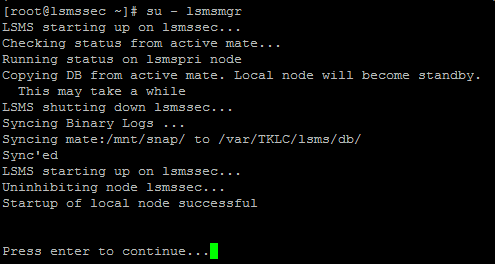 Select Exit and press [Enter] to return to Main Menu. Select Exit and press [Enter] to exit the lsmsmgr menu. |
|
This procedure is complete! |
||