Hiding Session Updates
You can configure the SBC to simplify call flows by hiding session updates that do not impact the ongoing call flow. Instead of sharing renegotiations with the opposite leg, the SBC responds locally with 200 OK for reINVITE and UPDATE renegotiations. This also ensures that SDP versions are handled properly.
By default, the SBC transparently conveys reINVITE and UPDATE requests. The following image shows a typical call flow, where the call is established between the UAC and UAS endpoints. When the UAC side puts the call on hold and then later resumes it, the SBC exposes the reINVITE and ACK messages on both sides.
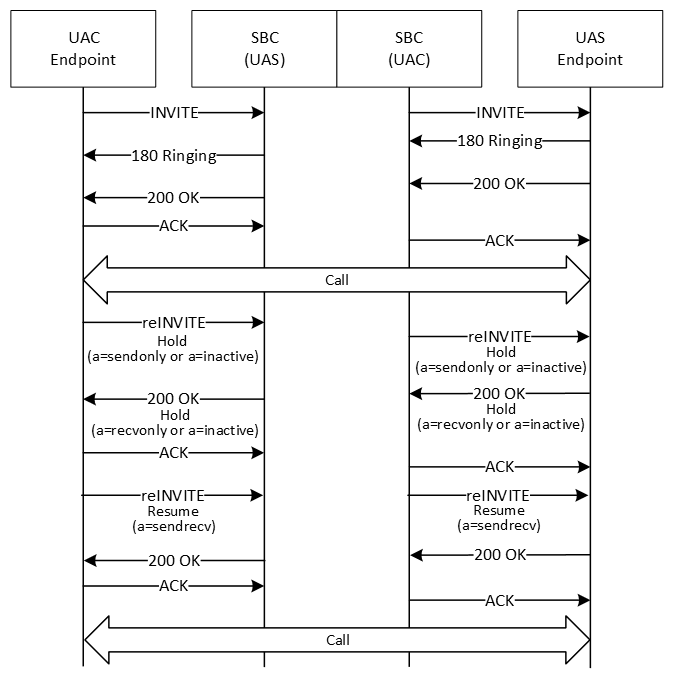
In some cases, such as with older equipment that does not handle renegotiation requests well, you may not want this level of transparency for messages that do not impact the ongoing call flow.
In these cases, you can configure an hsu-policy on the egress-side session-router element, and apply the policy to a sip-interface, realm-config, or session-agent. The policy on the configuration element with the highest precedence (session-agent, then realm-config, sip-interface) is used.
For example, the following image shows a call flow where an hsu-policy on the SBC hides session updates for hold and resume messages. The call is established as in the default flow, but when the UAC puts the call on hold and resumes it, the SBC does not pass the reINVITE and ACK messages on to the UAS. In this situation, SBC responds to all renegotiations with 200 OK, hiding the sequence number and SDP version number changes.
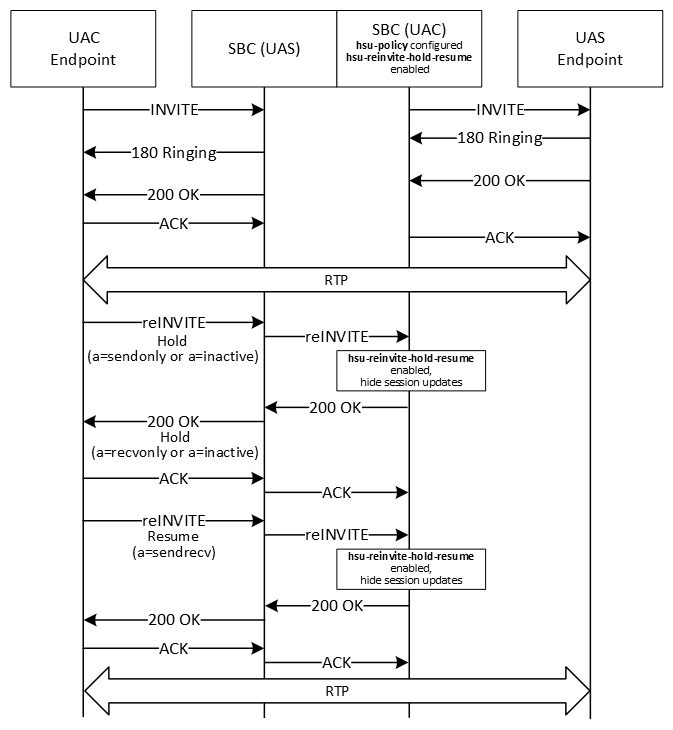
See Call Flows for Hiding Session Updates for more call flow examples.
Note:
Session Router and Subscriber Aware Load Balancer do not support hiding session updates. You cannot configure the hsu-policy element for them.How the SBC Determines Whether to Hide Session Updates
When you have configured and applied an hsu-policy on a sip-interface, realm, or session-agent, after receiving a reliable response (200 OK to the INVITE or PRACK), the SBC determines whether to hide session updates for reINVITE or UPDATE messages as follows:
- Compare headers: If hsu-headers are configured on the hsu-policy, the SBC stores the string values of that type of header on an INVITE or UPDATE request and their respective reliable responses. The SBC compares those string values to the values in the new reINVITE and UPDATE request.
If the header value has not changed, the SBC proceeds to the SDP comparisons.
If the header value has changed, the SBC does not hide session updates. It passes the reINVITE or UPDATE on, regardless of any other hsu-policy configuration.
If the header did not previously appear or the order of the headers has changed, this is considered a changed header, and the message is passed on.
- Compare SDP: The SBC compares the SDP in the reINVITE or UPDATE to the last SDP received on a reliable response, then checks for transcoding and transrating hsu-policy configurations.
If the SDP matches, the SBC hides the session updates from the opposite leg. Instead, the SBC replies with 200 OK that includes the last SDP sent on that side, without incrementing the SDP version number.
Negotiations comply with the Offer/Answer model as specified in RFC 3264. If a media flow change is needed, the internal media flows are modified accordingly.
If the SDP has changed in any of the following ways, the SBC does not hide session updates, and instead passes the reINVITE or UPDATE on to the receiving side:
- The renegotiation request includes another m-line, in additional to the m=audio from the INVITE. (m=audio | text | image <port> (S)RTP/(S)AVP PT1 PT2)
- The renegotiation request includes any m-line other than m=audio
- The port number within the m-line is zero.
- The connection IP version (c=IN IP4 X.X.X.X (or IPv6)) has changed. If multiple connection IPs appear, the one in m-line takes precedence. (If the IP is different, but the version is the same, the SBC hides session updates.)
- The dynamic PT definition (a=rtpmap:PT) has changed.
- The SDP direction (a=<direction>) has changed. If no direction appears, the SBC assumes it is sendrecv. If the direction has not changed, the SBC hides session updates, unless it would create a double hold case.
- For SRTP:
- In end-to-end SRTP (both endpoints using SRTP) when pass-through is enabled, the key material in the SRTP attribute has changed.
- In single-ended SRTP (only one endpoint using SRTP), or in end-to-end SRTP when pass-through is not enabled, the SBC hides session updates.
- hsu-force-ptime is disabled and the packetization interval (a=ptime:XX ) has changed, or transrating is unsuccessful.
- The RTCP attribute (a=rtcp) has changed. If this attribute is not present, the SBC assumes the RTCP port has incremented by one, and hides session updates.
- Check transcoding configurations: After comparing the SDP, while negotiating the codecs, the SBC checks whether the hsu-force-xcode is enabled on the hsu-policy.
- When hsu-force-xcode is enabled, the SBC initiates transcoding with the topmost codec.
If transcoding is successful, the SBC does not pass on the updates to the receiving side, instead responding with 200 OK.
If transcoding is unsuccessful, the SDP comparison fails, and the SBC passes on the updates.
- When hsu-force-xcode is disabled, the default transcoding behavior applies, with the SBC attempting to negotiate a common codec and only transcoding if necessary.
If a common codec is found, or transcoding is successful, the SBC does not pass on the updates to the receiving side. Instead, the SBC responds with 200 OK.
If no common codec is found and transcoding is unsuccessful, the SDP comparison fails, and the SBC passes on the updates.
- When hsu-force-xcode is enabled, the SBC initiates transcoding with the topmost codec.
- Compare ptime: After checking the transcoding configurations, for non-transcoded calls, the SBC compares the p-time in the SDP in the reINVITE or UPDATE to the last received SDP.
If the p-time is the same, the SBC hides the session updates from the opposite leg, replying with 200 OK.
If the p-time is different, the SBC checks whether hsu-force-ptime is enabled:- hsu-force-ptime is enabled, the SBC initiates transrating.
If transrating is successful, the SBC hides the session updates from the opposite leg, replying with 200 OK, and initiates transrating.
If transrating is unsuccessful, the SBC passes on the updates.
- hsu-force-ptime is disabled, the SBC passes on the updates.
- hsu-force-ptime is enabled, the SBC initiates transrating.
After the SBC hides a session update and sends the 200 OK, it also hides the subsequent ACK.
Note:
The SBC does not change the Allow header in requests and responses when it applies an hsu-policy.See Configuring the SBC to Hide Session Updates for descriptions of the hsu-profile parameters.
Applying the Ingress Side Policy
Normally, the SBC applies the hsu-policy configured on the egress side of the reINVITE or UPDATE request. However, if the initial INVITE includes the SBC-specific P-Acme-Hsu-Ingress header, typically added by Session Router, the SBC applies the hsu-policy as follows:
- For all reINVITEs or UPDATEs from the same direction as the initial P-Acme-Hsu-Ingress (the caller), the SBC applies the hsu-policy from the ingress side
- For all reINVITE or UPDATEs from the other direction (the callee), the SBC applies hsu-policy from the egress side, as is the default.
Call Flows for Hiding Session Updates includes an example of this scenario.
Hiding Session Updates in Hold Scenarios
The following points apply in hold scenarios:
- If the hsu-policy does not apply in a hold scenario, for example, if the reINVITE included a change to a header specified in hsu-headers, the SBC does not hide any session updates until the resume request completes on both legs. The SBC only hides resume-related updates if it also hid the hold update.
- If the hold-initiating side sends an offerless reINVITE, and the hold reINVITE was hidden, this offerless reINVITE is considered the resume request.
- Even if the SBC is hiding updates sent by the side that initiated the hold, renegotiation requests from the opposite side are not hidden, unless an hsu-policy is configured for that side as well. For example, in the hold-resume call flow illustrated earlier, if the RF Server sends a reINVITE while the call is on hold, that reINVITE is passed on to the UAC, because there is no hsu-policy configured on the SBC acting as UAS.
- When one side puts the call on hold, the SBC relays any RTP/RTCP from call-hold initiating side towards the other side. If the hold-initiating side is not sending RTP, and hsu-silent-rtp-on-hold is enabled, the SBC sends blank RTP packets, to avoid RTP silence. This uses DSP resources.
You must configure the disable-guard-timer-sendonly media manager option to disable the media inactivity timers for hold calls so that the SBC does not drop the call when there is no RTP from the other side.
Scenarios where Session Updates Are Not Hidden
The SBC does not apply the hsu-policy to hide session updates in the following scenarios:
- Requests with another body (for example, XML or NG eCall), with or without an SDP body
- Hold and resume requests with media other than audio
- In SRVCC call scenarios, for any UPDATE and reINVITEs generated by the SBC
- Any UPDATE reINVITE with multiple m-lines
- Multiple Early Dialogs (MED) and preconditions, serial forking, and recursion: The SBC does not apply the hsu-policy until the final 200 OK is received.
- When reINVITEs or UPDATES are already being suppressed according to other
configurations:
- suppress-hold-resume-reinvite, suppress-reinvite, or session-timer-profile are enabled on either ingress or egress side of the SBC, reINVITEs are suppressed regardless of any configured hsu-policy.
- In PRACK (100rel-interworking) or LMSD interworking (lmsd-interworking) scenarios
- For SRTP calls, when srtp-rekey-on-reinvite is enabled
- When UPDATEs are received in early established states when p-early-media-header is configured on either interface
- In UPDATE interworking scenarios
- In pooled transcoding scenarios
Reporting and Logging
- show sipd hsu by-realm: Shows statistics for all hidden session updates applied to realms. Optionally, specify a realm ID to show statistics for that realm only.
- show sipd hsu by-sipif: Shows statistics for all hidden session updates applied to interfaces. Optionally, specify an interface ID to show statistics for that interface only.
- show sipd hsu by-sa: Shows statistics for all hidden session updates applied to session agents. Optionally, specify a session agent ID to show statistics for that session agent only.
The following example shows sample output of the show sipd hsu by-realm command:
HSU Statistics for realm: aggregated (<datetime>)

                                                 ---- Lifetime ----

                                          Recent      Total  PerMax

INVITE

  Offerless Suppressed                           0          0       0

  Hold Resume Suppressed                         0          6       6

  Sdp Except Hold Resume Suppressed              0          0       0

  Resume E2E as Hold E2E                         0          0       0

  HSU Codec Optimized                            0          0       0

  HSU Transcoded                                 0          0       0

  HSU Transrated                                 0          0       0

  HSU Skipped                                    0          0       0

UPDATE

  Offerless Suppressed                           0          0       0

  Hold Resume Suppressed                         0          0       0

  Sdp Except Hold Resume Suppressed              0          0       0

  Resume E2E as Hold E2E                         0          0       0

  HSU Codec Optimized                            0          0       0

  HSU Transcoded                                 0          0       0

  HSU Transrated                                 0          0       0

  HSU Skipped                                    0          0       0
You can reset this data back to zero using the reset sipd hsu command. Using reset sipd also resets this data, along with all other sipd stats.
You can also review the sipmsg.log, log.sipd, and log.ebmd logs for debugging information related to hiding session updates.
High Availability
In high availability deployments, the following elements are synchronized to the standy-by SBC:
- hsu-policy
- Call hold and resume state stored while hiding session updates
- If any headers are specified in hsu-headers, the stored values of any headers of that type received