Pooled Transcoding
Pooled transcoding refers to a deployment model involving two or more Oracle Communications Session Border Controllers (SBC). The first SBC is an access SBC (referred to as an A-SBC) acting as the P-CSCF, and the others are one or more SBCs equipped with transcoding hardware (referred to as a T-SBC). The T-SBC provides transcoding resources—a pool—that the A-SBC can invoke on-demand.
In the pooled transcoding model, the A-SBC sits between realms or between user endpoints that require transcoding between their preferred codecs. This deployment model conserves resources on both the A-SBC and the T-SBC. While the A-SBC serves as the access function with encryption support, the T-SBC supports transcoding in a tunneling gateway (TG) configuration to meet high-density transcoding requirements.
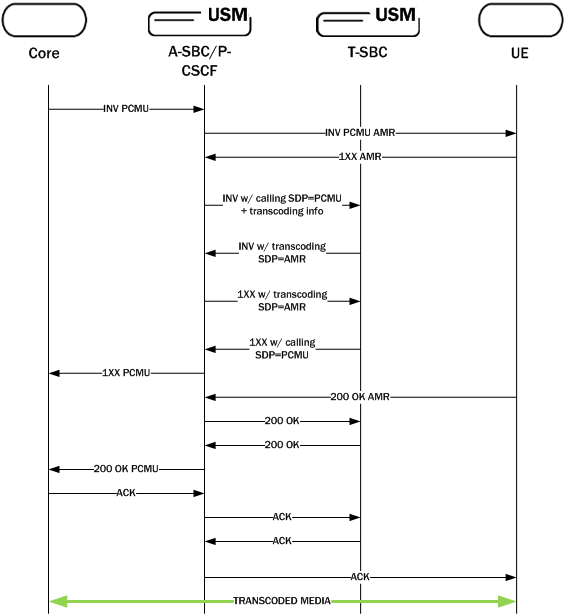
The following diagram shows an A-SBC positioned between an access UE and the IMS core. The A-SBC compares SDP offers and answers from the elements it sits between, and uses the results to determine whether or not a given session requires transcoding. When a session requires transcoding, the A-SBC invokes the services of the T-SBC. Acting as a B2BUA, the T-SBC uses information from the A-SBC's SIP message to transcode the applicable codecs and then to route SIP signaling back to the A-SBC on the egress.
When a call comes in, the system temporarily creates two ports for the caller and callee realms respectively. When the call requires pooled transcoding, the SBC creates four ports on the pooled transcoding realm and two additional ports on the caller realm. The system removes the added ports at the end of the call.
The following example shows the ports before, during, and after for a call between the realms net172 (Offer) and net145 (Answer):
| Before pooled transcoding | During pooled transcoding | After pooled transcoding |
|---|---|---|
|
Net172 -> 2 Ports Net145 -> 2 Ports Net192 (Transcoding Realm) -> 0 Ports |
Net172 -> 4 Ports Net145 -> 2 Ports Net192 (Transcoding Realm) -> 4 Ports |
Net172 -> 2 Ports Net145 -> 2 Ports Net192 (Transcoding Realm) -> 0 Ports |
In the preceding example, the SBC uses four ports on Net192 for communicating with the transcoding SBC. The SBC uses the two newly created ports on Net172 for RTP communication, while the original two ports are not used.
The following diagram shows what a call flow between entities in such a deployment model looks like:
Note:
The A-SBC and the T-SBC do not need to be on the same version of the hardware and the software.Supported Codecs for Pooled Transcoding
The Oracle Communications Session Border Controller (SBC) supports the following codecs for pooled transcoding. Note that some platforms and software releases may not support all of the codecs in the list, and some codecs must be enabled.
- PCMU
- PCMA
- G722
- G723
- G726-16
- G726-24
- G726-32
- G726-40
- G728
- G729
- GSM
- AMR
- AMR-WB
- EVRC
- EVRC0
- EVRC1
- EVRCB
- EVRCB0
- EVRCB1
- EVS
- Opus
- SILK
- T.38
- T.140
- Baudot
Hardware and Software Requirements
Pooled transcoding deployments have specific hardware and software requirements. See the Coproduct Support section in the Release Notes for more information.
Implementation Details
To the Access SBC (A-SBC), the Transcoding SBC (T-SBC) is a transcoding agent that offers services that the A-SBC can invoke on-demand when an offer-answer exchange requires transcoding. The A-SBC uses its public SIP interface and a corresponding realm reserved for communication with a T-SBC, which you configure as a transcoding agent on the A-SBC. You can configure multiple transcoding agents, which can be IP addresses, session agents, and session agent groups (SAG).
In a deployment with multiple transcoding agents, the A-SBC initiates communication in the order in which the transcoding agents were entered on the list. The A-SBC tries to communicate with each transcoding agent listed one-by-one until it:
- Receives a 2xx response from a transcoding agent
- The list is exhausted
- The original transaction times out
When a transcoding agent is a session agent with hostnames, the A-SBC uses DNS to resolve the hostname and tries the hosts in order. When transcoding agents are session agent groups (SAG), the A-SBC selects the session agent according to the selection strategy configured for the SAG. When you enable recursing, the A-SBC recurses through all members of the SAG. When session agents and SAGs do not have ports or transport protocols specified, the defaults are 5060 and UDP respectively.
When the A-SBC identifies a transcoding agent, the A-SBC sends an INVITE to which the T-SBC responds with a 2xx message. Configuring the A-SBC as a session agent and disabling dialog transparency (in global SIP configuration) on the T-SBC allows the T-SBC to accept SIP messages from the A-SBC. Then the T-SBC acts as a B2BUA, using the information received in the INVITE from the A-SBC to invoke transcoding and to route SIP signaling back to the A-SBC on egress.
Scenario 1 INVITE with SDP
When the Access Session Border Controller (A-SBC) receives an INVITE with SDP, the A-SBC creates a SIP session and an associated media session with two flows for audio. The A-SBC applies the appropriate codec policy (with add-on-egress configured), so that the egress INVITE contains the necessary codec.
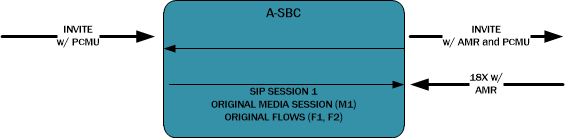
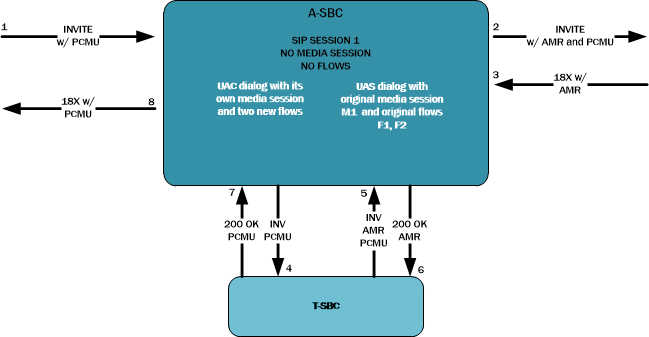
The A-SBC receives an answer to the INVITE, and when the answer contains the added codec the A-SBC invokes the Transcoding Session Border Controller (T-SBC) using an INVITE with the same SDP as the INVITE received on ingress. The communication between the A-SBC and the T-SBC is a separate dialog associated with a new media session.
The following code block shows and example of the INVITE the A-SBC sends to the T-SBC.
INVITE sip:192.168.101.78:5060 SIP/2.0
Via: SIP/2.0/UDP 192.168.101.18:5060;branch=z9hG4bK10dspa3058b1io4rk721
Max-Forwards: 70
Call-ID: 9fc71d79b43b4b95de41acefd71a8bc4@192.168.101.78
To: sip:192.168.101.78:5060
Contact: sip:172.16.101.18
From: sip:172.16.101.18;tag=bcf80756721880b7996ccb488b6a1b2f
CSeq: 1 INVITE
Target-Dialog: 1-16881@172.16.18.5;local-tag=1;remote-tag=16880SIPpTag011;realm=net192
Acme-Codec-Policy: ;ingress;name="in-2833";allow-codecs="* ";add-codecs-on-egress="";force-ptime="disabled";packetization-time="20";dtmf-in-audio="disabled";order-codecs=""
Acme-Codec-Policy: ;egress;name="out-2833";allow-codecs="* ";add-codecs-on-egress="AMR ";force-ptime="disabled";packetization-time="20";dtmf-in-audio="disabled";order-codecs=""
Content-Type: application/sdp
Content-Length: 196^M
P-Visited-Network-ID: open-ims.test
Route: <sip:192.168.101.18:5060;lr;transport=UDP>
v=0
o=user1 53655765 2353687637 IN IP4 192.168.101.18
s=-
c=IN IP4 192.168.101.18
t=0 0
m=audio 20002 RTP/AVP 96 0
a=rtpmap: 96 AMR/8000
a=rtpmap:0 PCMU/8000
Note that the Target Dialog and Acme-Codec-Policy headers communicate operational parameters for pooled transcoding. Using such information, the T-SBC applies two codec policies and returns the INVITE to the A-SBC. The A-SBC moves the media session to itself, but the SIP session does not have a media session at this time.
Scenario 2 INVITE without SDP
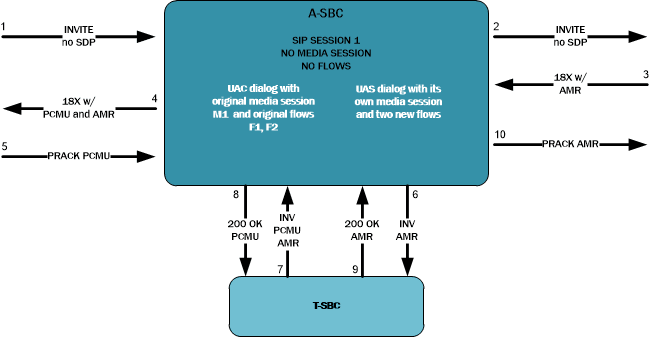
For an offerless call flow, the system creates a media session when the offer comes in a reliable provisional or final response. The Access Session Border Controller (A-SBC) applies the codec policy and sends the egress offer to the calling UE.
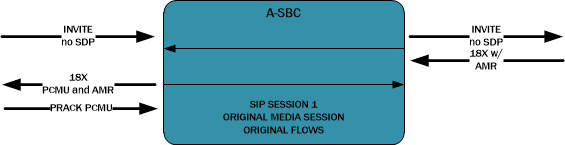
When the A-SBC receives an answer in either a PRACK or ACK message, the A-SBC compares the offer and answer. An answer containing the codec added in the egress offer causes the A-SBC to invoke the Transcoding Session Border Controller (T-SBC) and create a standalone UAC dialog, just as in Scenario 1.
Because the A-SBC advertised its media address in the egress offer to the calling UE, the UAC dialog uses the original media session.
Re-INVITES and Updates with SDP
When a specific session on the Access Session Border Controller (A-SBC) invokes the resources of the Transcoding Session Border Controller (T-SBC), the A-SBC continues to use the same T-SBC for the duration of the session. Anytime when the A-SBC receives a SIP message containing modified SDP, the A-SBC communicates the modification to the T-SBC.
RFC 2833 Considerations
For legacy RFC 2833 inter-working to function properly, the Access Session Border Controller (A-SBC) communicates the RFC 2833 configuration to the Transcoding Session Border Controller (T-SBC) in the UAC dialog.
The following example shows an INVITE with RFC 2833 information sent from the A-SBC to the T-SBC.
INVITE sip:192.168.101.78:5060 SIP/2.0
Via: SIP/2.0/UDP 192.168.101.18:5060;branch=z9hG4bK10dspa3058b1io4rk721
Max-Forwards: 70
Call-ID: 9fc71d79b43b4b95de41acefd71a8bc4@192.168.101.78
To: sip:192.168.101.78:5060
Contact: sip:172.16.101.18
From: sip:172.16.101.18;tag=bcf80756721880b7996ccb488b6a1b2f
CSeq: 1 INVITE
Target-Dialog: 1-16881@172.16.18.5;local-tag=1;remote-tag=16880SIPpTag011;realm=net192
Acme-Codec-Policy: ;ingress;name="in-2833";allow-codecs="* ";add-codecs-on-egress="";force-ptime="disabled";packetization-time="20";dtmf-in-audio="disabled";order-codecs=""
Acme-Codec-Policy: ;egress;name="out-2833";allow-codecs="* ";add-codecs-on-egress="PCMA ";force-ptime="disabled";packetization-time="20";dtmf-in-audio="disabled";order-codecs=""
Acme-Rfc2833: ;ingress;Digit-Mode=0;PtTo=101;PtFrom=0;TransNon2833=disabled;TransNonInband=disabled
Acme-Rfc2833: ;egress;Digit-Mode=1;PtTo=101;PtFrom=0
Content-Type: application/sdp
Content-Length: 196
P-Visited-Network-ID: open-ims.test
Route: <sip:192.168.101.18:5060;lr;transport=UDP>
v=0
o=user1 53655765 2353687637 IN IP4 192.168.101.18
s=-
c=IN IP4 192.168.101.18
t=0 0
m=audio 20002 RTP/AVP 0 101
a=rtpmap:0 PCMU/8000
eSRVCC Support
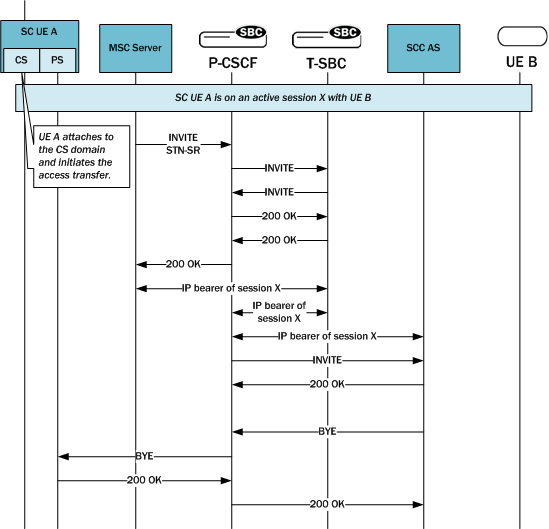
For enhanced Signal Radio Voice Call Continuity (eSRVCC), the pooled transcoding deployment model supports instances when:
- Original call is not transcoded, but the handover call is
- Original call is transcoded, but the handover call is not
- Original call is transcoded, and so is handover call
Configuration Requirements and Verification
Pooled transcoding requires specific configuration of the Access Session Border Controller (A-SBC) and the Transcoding Session Border Controller (T-SBC). Note that the Oracle Communications Session Border Controller, the A-SBC, does not enforce the requirements. Oracle recommends that you configure your pooled transcoding deployment with care, and verify the configuration to help to identify any potential issues.
A-SBC Configuration Requirements
The Access Session Border Controller (A-SBC) configuration must include the following:
- A public SIP interface the A-SBC can use for communication with the Transcoding Session Border Controller (T-SBC).
- A transcoding realm, which is a separate realm for the public SIP interface used only for communication with the T-SBC.
- Appropriate codec policies, including ones set up to add SDP on the egress leg of the session.
- A global SIP configuration, with
transcoding-realm set to the name where valid transcoding agents reside, and a
transcoding-agents list configured with one or any combination of
- A DNS hostname for a single session agent that can resolve to one or more IP addresses
- An IPv4 or IPv6 address with or without the port specified (when not specified, the system defaults to port 5060).
- The name of a session agent group.
T-SBC Requirements
A valid Transcoding Session Border Controller (T-SBC) configuration must include the following:
- A global SIP configuration, with dialog-transparency set to disabled. You must disable Dialog transparency on the T-SBC, so that the INVITE from the T-SBC contains a different call ID and From tag.
- A public realm with codec-manip-in-realm set to enabled because the system uses the same realm for transcoding. You must also enable the mm-in-realm parameter.
Configuration Verification
You can verify the configuration by using the ACLI verify-config command. When verifying the configuration on the Access Session Border Controller (A-SBC), the system displays errors messages when:
- The transcoding-realm value configured is not a valid realm.
- Either one of the transcoding-realm or transcoding-agents parameters is not configured.
- One or more session agent names defined in the transcoding-agents list is not a valid session agent.
- The IP address version for a agent in the transcoding-agents list is not supported in the transcoding realm you identify. For example, if you list an IPv6 agent in the list and the transcoding realm does not support IPv6.
- The transcoding agent is a hostname and not a valid session agent.
Configure Pooled Transcoding
You must configure a transcoding realm and transcoding agents on your Access Session Border Controller (A-SBC), when used in a pooled transcoding deployment model. Set the parameters as part of the global SIP configuration.
Monitor Dialogs Between the A-SBC and the T-SBC
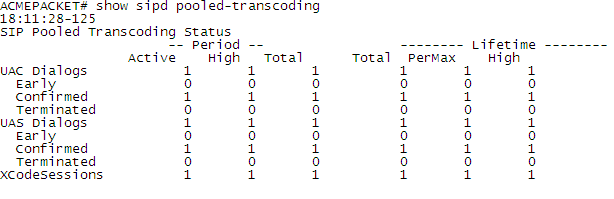
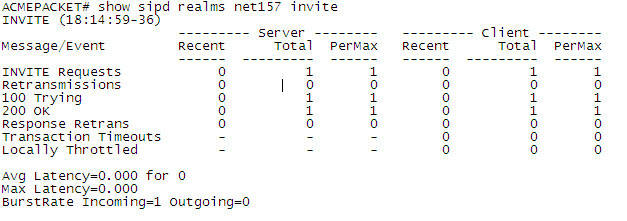
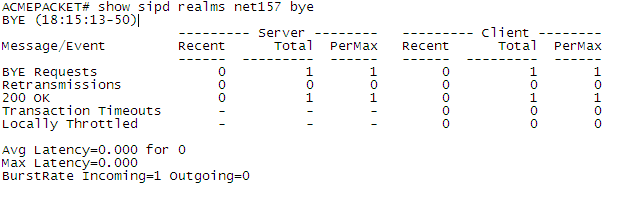
You can monitor pooled transcoding communications between the Access Session Border Controller (A-SBC) and the Transcoding Session Border Controller (T-SBC) by using the show sipd pooled-transcoding ACLI command. The display shows you information for the client and server User Agents on the A-SBC.
- UAC Dialogs—shows the number of UAC dialogs the A-SBC initiated with the T-SBC. The count is cumulative, and not for any specific session.
- UAS Dialogs—shows the number of UAS dialogs the A-SBC created upon receipt of an INVITE from the T-SBC. The count is cumulative, and not for any specific session.
- XCodeSessions—counts the number of transcoded sessions on the A-SBC.
Pooled Transcoding and MS Teams
The SBC supports pooled transcoding for most call flows, including incoming calls, outgoing calls, call forwarding and call transfers within MS Teams environments.
To support pooled transcoding for MS Teams environments, you augment the SBC elements and the environment described previously with the following configurations on both the A-SBC and T-SBC devices with the following parameters in the realms connecting each SBC:
- codec-policy—Create a policy with a
name and default parameters on the T-SBC and apply it to
the realm that connects to the A-SBC. The T-SBC needs a
codec-policy to support the
rtcp-policy.
You may also define a codec policy on the A-SBC based on your transcoding requirements.
- rtcp-policy—Create a policy by configuring a name and setting the rtcp-generate parameter to all-calls. Apply this policy on the A-SBC on the realm facing your MS Teams infrastructure. Configure an equivalent policy on your T-SBC and apply it to the realm that connects to the A-SBC.
- rtcp-mux —Enable this parameter on the realms of
both devices that connect the A-SBC and the T-SBC.
Note:
Standard MS Teams support also requires that you enable rtcp-mux on the realm facing the MS Teams environment.
Configure Pooled Transcoding for MS Teams
If you are using Pooled Transcoding within MS Teams environments, you must perform the following configuration steps in addition to the generic pooled transcoding configurations. You perform equivalent procedures below on both the A-SBC and the T-SBC. You create two policies and enable an additional parameter on the realms as listed in the procedure.
Notes on the DIAMETER Rx Interface
DIAMETER Rx support for external bandwidth management is specialized for pooled transcoding.
For pooled transcoding, the identifier appears in this altered format: <policy server name>;<policy server realm>;<dns suffix>. Because there are two dialogs (one for the server UA and one for the client UA), there are two separate media sessions. This situation requires the Oracle Communications Session Border Controller to generate two different DIAMETER session identifiers. At the same time, the Oracle Communications Session Border Controller needs to maintain the AAR and STR associations with the original SIP session. To keep this relationship clear, the Oracle Communications Session Border Controller keeps the DIAMETER session identifier between the two media sessions the same for the two UAs.
The MBCD session identifier associated with the media session for the original SIP session is retained for the DIAMETER session identifier for the duration of the SIP session.
Accounting and Transcoding
An Access Control Record (ACR) record for a typical SIP session looks the same as one for a transcoded session, except that the forward codec (Acme-FlowType_FS1__F) differs from the reverse codec (Acme-FlowType_FS1__R), due to transcoding.
For the RADIUS and Diameter protocols, the ACR record shows only the IP address and port number of the two original endpoints. The record shows no details about the Transcoding Session Border Controller (T-SBC) because the system does not support transcoding for RADIUS and Diameter.
Additional Call Flows for Pooled Transcoding
Generally, pooled transcoding is not support for fax, SRTP, RTCP, and RFC 2833 interworking scenarios. However, a subset of call flows for these scenarios have been verified as supported.
- Fax: Transcoding between T.38 and G.711 PCMU or PCMA
- SRTP: SRTP with PCMA, PCMU, G729, SILK, and OPUS codecs
- RTCP: RTCP generation with PCMA, PCMU, G729, SILK, and OPUS codecs
- RFC 2833 interworking: Supported with PCMA, PCMU, G729, SILK, and OPUS codecs for:
- Inband tone to RFC 2833
- RFC 2833 to inband tone
- SIP INFO to RFC 2833
- RFC 2833 to SIP INFO
KPML to RFC 2833 interworking is not supported.
The following sections illustrate the verified call flows. See the pooled transcoding caveats in SBC Known Issues and Caveats for information about unsupported scenarios.
Fax with Pooled Transcoding
Basic fax transcoding between a T.38 fax leg and a G.711 PCMU fax-audio leg is supported.
The same call flow has also been verified with the G.711 PCMA codec.
The following table shows the codec policies for this call flow.
| Setting | Ingress policy | Egress policy |
|---|---|---|
| allow-codecs | * | *; T.38:no |
| add-codecs-on-egress | N/A | G711FB |
| order-codecs | N/A | N/A |
| force-ptime | disabled/default | disabled/default |
| packetization-time | 20 | 20 |
The following image shows the call flow.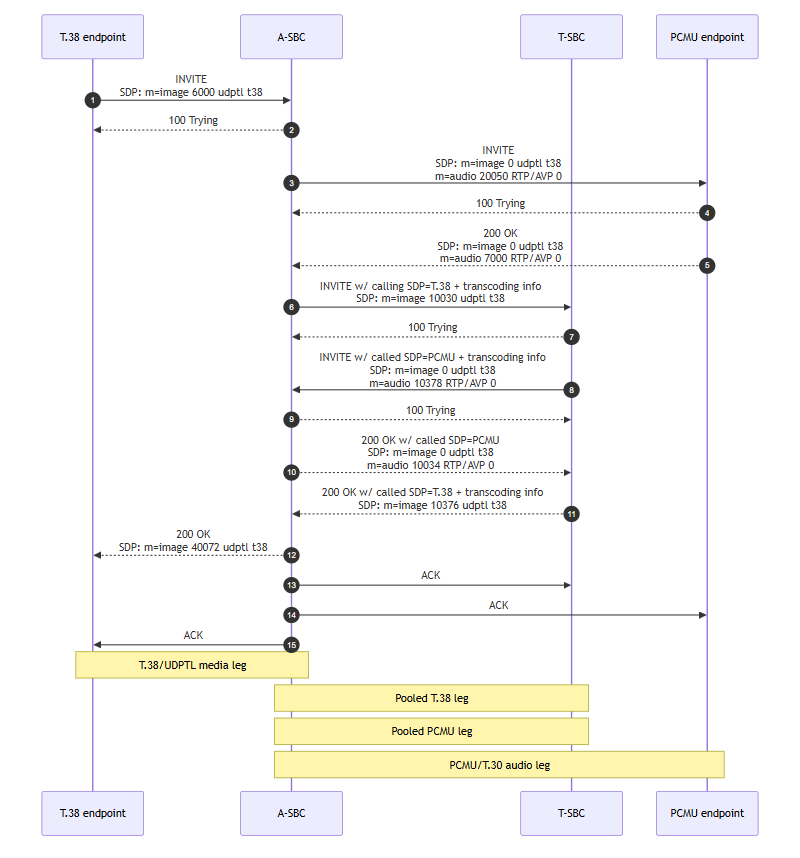
SRTP with Pooled Transcoding
Pooled transcoding supports SRTP on the same call.
In the verified call flow, G729 over SRTP is advertised on the caller side and PCMA over SRTP on the called side.
The A-SBC invokes the T-SBC pooled transcoding resource for G729 to PCMA transcoding. The signaling carries RTP/SAVP and SDES crypto attributes. Configure media-security policies and SDES profiles on the realms where SRTP is terminated.
This call flow has been verified for PCMA, PCMU, G729, SILK, and OPUS codecs.
The following table shows the codec policies for this call flow.
| Setting | Ingress policy | Egress policy |
|---|---|---|
| allow-codecs | * | * |
| add-codecs-on-egress | PCMA, PCMU, telephone-event | PCMA |
| order-codecs | N/A | N/A |
| force-ptime | disabled/default | disabled/default |
| packetization-time | 20 | 20 |
The following image shows the call flow.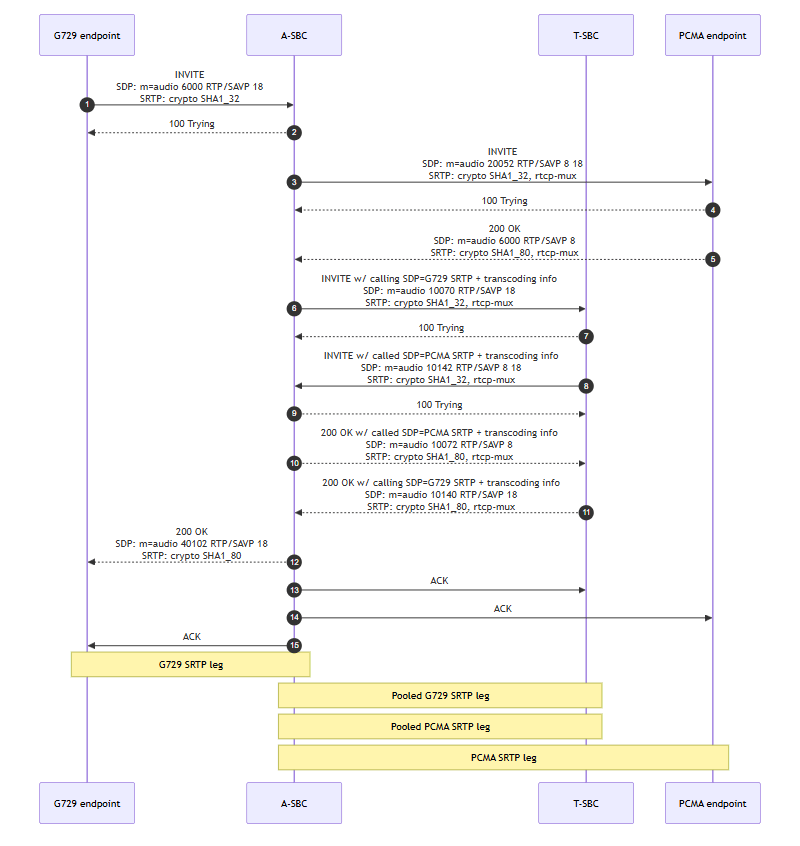
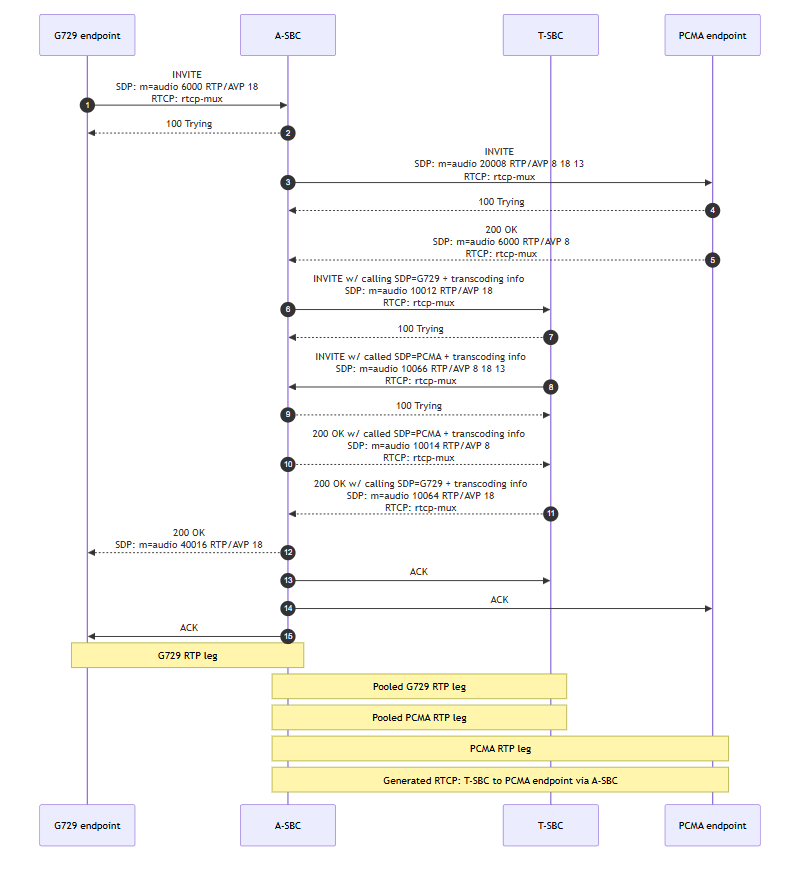
RTCP Generation with Pooled Transcoding
Understand pooled transcoding when RTCP generation is enabled.
Pooled transcoding is supported with RTCP generation enabled. In the verified flow, the caller side uses G729 and the called side uses PCMA. The A-SBC invokes the T-SBC pooled transcoding resource, and the T-SBC performs G729 to PCMA transcoding while RTCP generation is enabled for the transcoded flow.
This call flow has been verified for PCMA, PCMU, G729, SILK, and OPUS codecs. RTCP generation is enabled toward the PCMA called endpoint by the RTCP policy on the A-SBC called-facing realm.
The following table shows the codec policies for this call flow.
| Setting | Ingress policy | Egress policy |
|---|---|---|
| allow-codecs | * | * |
| add-codecs-on-egress | PCMA, PCMU, telephone-event | CN, PCMA |
| order-codecs | N/A | N/A |
| force-ptime | disabled/default | disabled/default |
| packetization-time | 20 | 20 |
The following image shows the call flow.
RFC 2833 Interworking with Pooled Transcoding
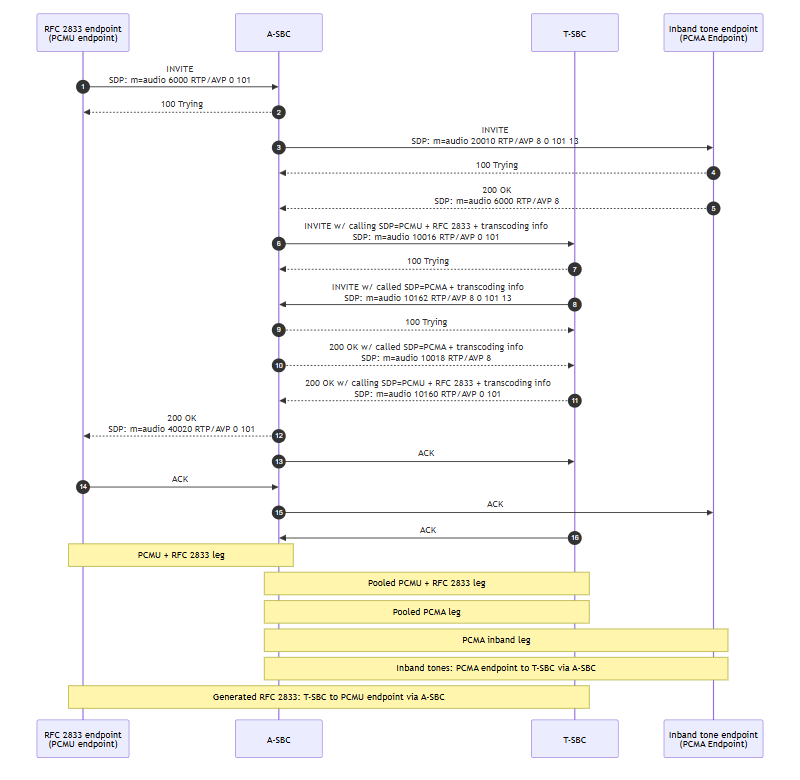
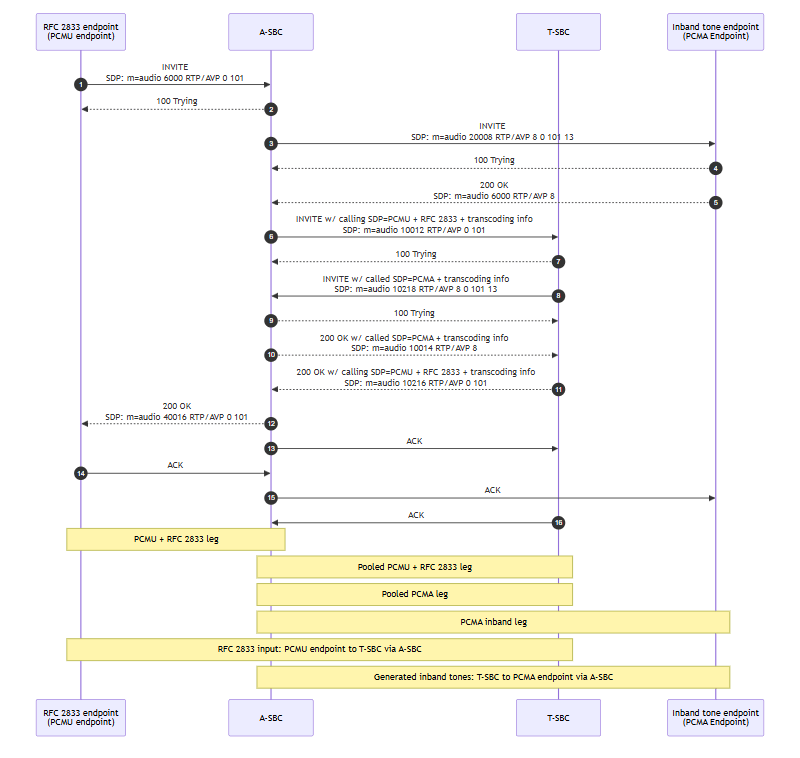
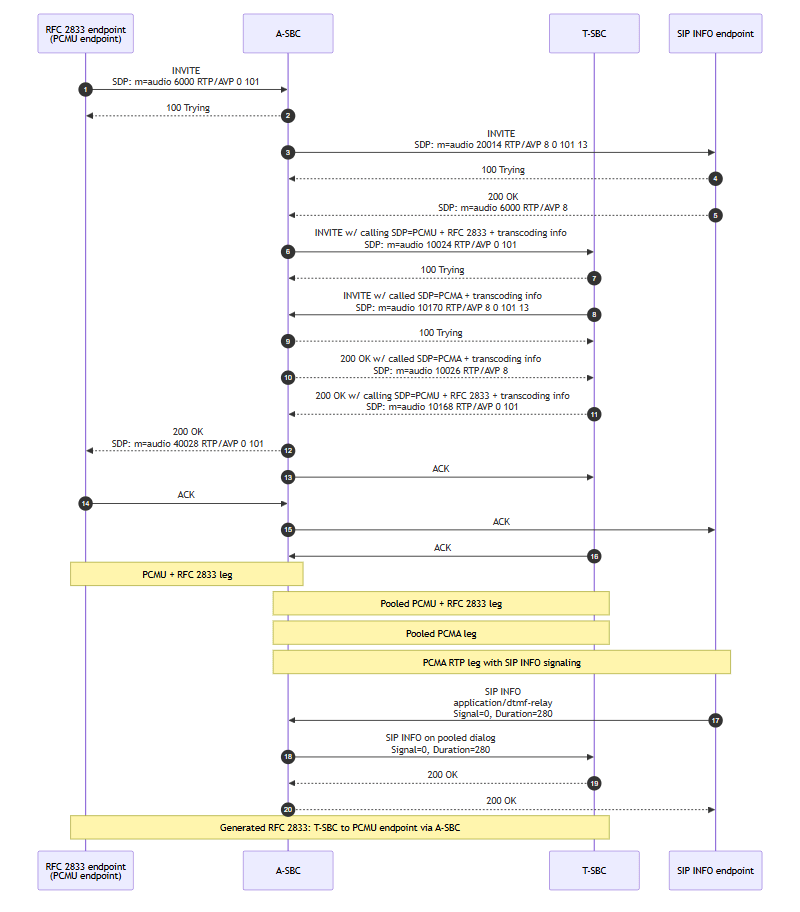
Pooled transcoding supports DTMF interworking from inband tone to RFC 2833, RFC 2833 to inband tone, SIP INFO to RFC 2833, and RFC 2833 to SIP INFO. KPML to RFC 2833 interworking is not supported.
The verified flows use PCMU with RFC 2833 telephone-event on the caller side and PCMA on the called side. The A-SBC invokes the T-SBC pooled transcoding resource for audio transcoding and DTMF interworking. These call flows have been verified with PCMA, PCMU, G729, SILK, and OPUS codecs.
The following table shows the codec policies for this call flow.
| Setting | Ingress policy | Egress policy |
|---|---|---|
| allow-codecs | * | * |
| add-codecs-on-egress | PCMA, PCMU, telephone-event | CN, PCMA |
| order-codecs | N/A | N/A |
| force-ptime | disabled | disabled |
| packetization-time | 20 | 20 |
| secure-dtmf-cancellation | disabled | disabled |
The following table shows the dtmf-in-audio codec-policy settings for each call flow.
| Flow | Ingress policy | Egress policy |
|---|---|---|
| Inband tone to RFC 2833 | disabled | preferred |
| RFC 2833 to inband tone | disabled | preferred |
| SIP INFO to RFC 2833 | disabled | preferred |
| RFC 2833 to SIP INFO | disabled | disabled |
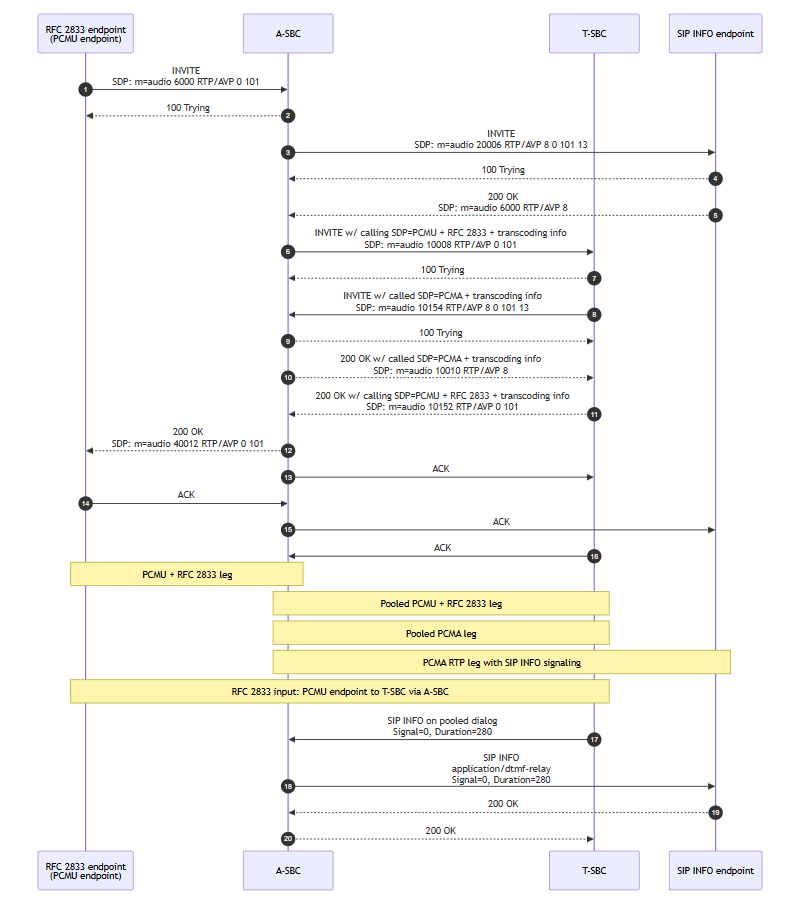
In all four flows, payload 0 is PCMU, 8 is PCMA, 101 is the negotiated RFC 2833 telephone-event payload, and 13 is CN. Media between either endpoint and T-SBC passes through A-SBC.
Inband Tone to RFC 2833
The PCMA called endpoint sends inband DTMF tones. T-SBC detects the tones and generates RFC 2833 telephone-event toward the PCMU caller endpoint through A-SBC.
The following image shows the call flow.
RFC 2833 to Inband Tone
The PCMU caller endpoint sends RFC 2833 telephone-event. T-SBC detects the events and generates inband DTMF tones toward the PCMA called endpoint through A-SBC.
The following image shows the call flow.
SIP INFO to RFC 2833
The PCMA called endpoint sends SIP INFO with application/dtmf-relay. A-SBC forwards the INFO on the pooled dialog to T-SBC, which generates RFC 2833 telephone-event toward the PCMU caller endpoint through A-SBC.
The following image shows the call flow.
RFC 2833 to SIP INFO
The PCMU caller endpoint sends RFC 2833 telephone-event. T-SBC detects the events and generates SIP INFO with application/dtmf-relay on the pooled dialog. A-SBC forwards the INFO to the PCMA called endpoint.
The following image shows the call flow.