PreviousNext
JavaScript must be enabled to correctly display this content
Viewing
Last Login Information
To
view the last login information for a user:
In the top-right corner of the
Operations Monitor web interface, select admin and then
select My Profile.
The Edit own user information dialog box
opens, as shown:
Figure 2-1 Edit Own User Information
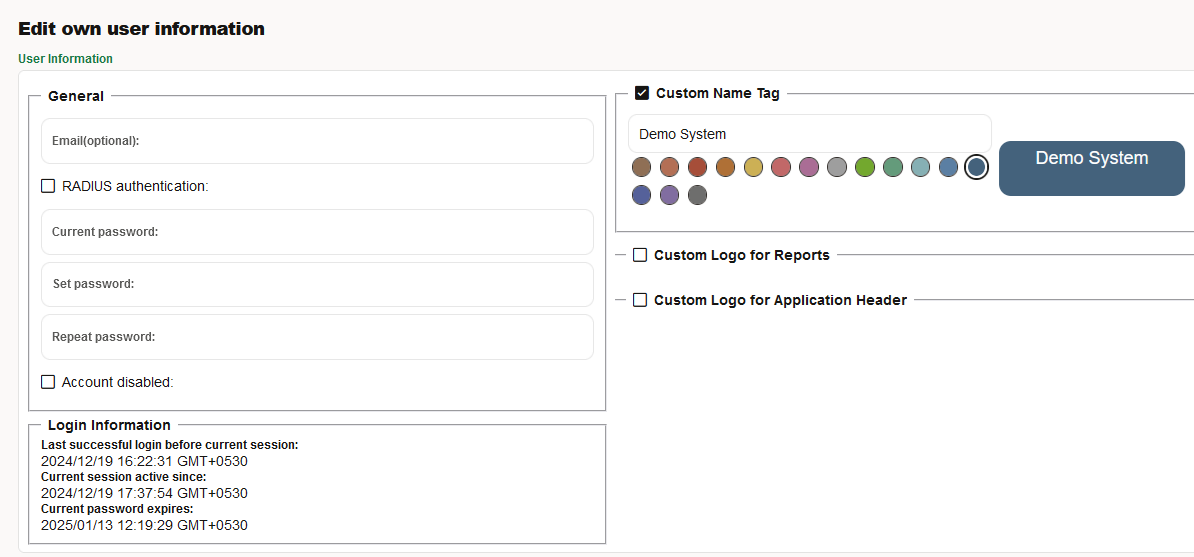
The User Information page has
two sections, General and Login
Information.
The Login
Information area displays the user's last successful login date
and time before the current session, date and time since the current session has
been active, and the date and time when the current password is expired.
The value of the current password expires is displayed as
"never, if the "Force users to change their password regularly" is not selected
in the Password settings. For more information, see the Password Settings
section.
Note:
The time zone
displayed is the configured time zone for the server.