Edit Route Set Information
Note:
You can update the description and notes for a route set only.- In the Route sets page,
select the route set and click Lock. The lock state toggles from unlocked, indicated by
 , to locked, indicated by
  . The name of the user who locked the route set is listed.
- In the
Edit Route
Set dialog box, complete the following fields:
Figure 4-2 Edit Rout Set
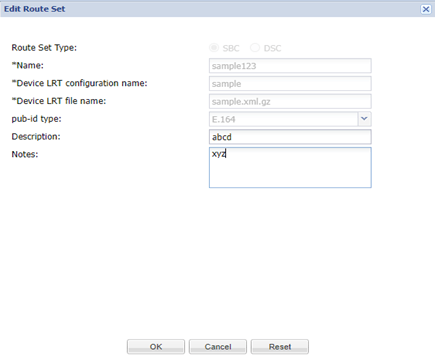
Route Set Type The SBC radio button is selected by default for the Session Border Controller (SBC) route set type. The DSC option is deprecated. Name The name for the route set using alphanumeric characters without spaces. Notes field (Optional) Enter a note for this route set. Device LRT configuration name field The configuration name of the local route table (LRT) associated with the route set. This value must match the configured name on the device. Device LRT file name The name used for this LRT file, which must match the LRT file name in the device configuration and select its extension. The default file extension is .xml.gz. When you are adding a new Route Set, the LRT file mentioned in the device configuration can contain the object “user” of type E164 or String, or Range. pub-id Type In the pub-id type you can see the options listed. - Range
Note:
Range is supported from SDM Release 9.0.2 onwards. - E.164
- String
Description field (Optional) Enter a description for this route set. - Range