Navigation Overview
The Home page of Construction and Engineering Intelligence displays the following menu and options.
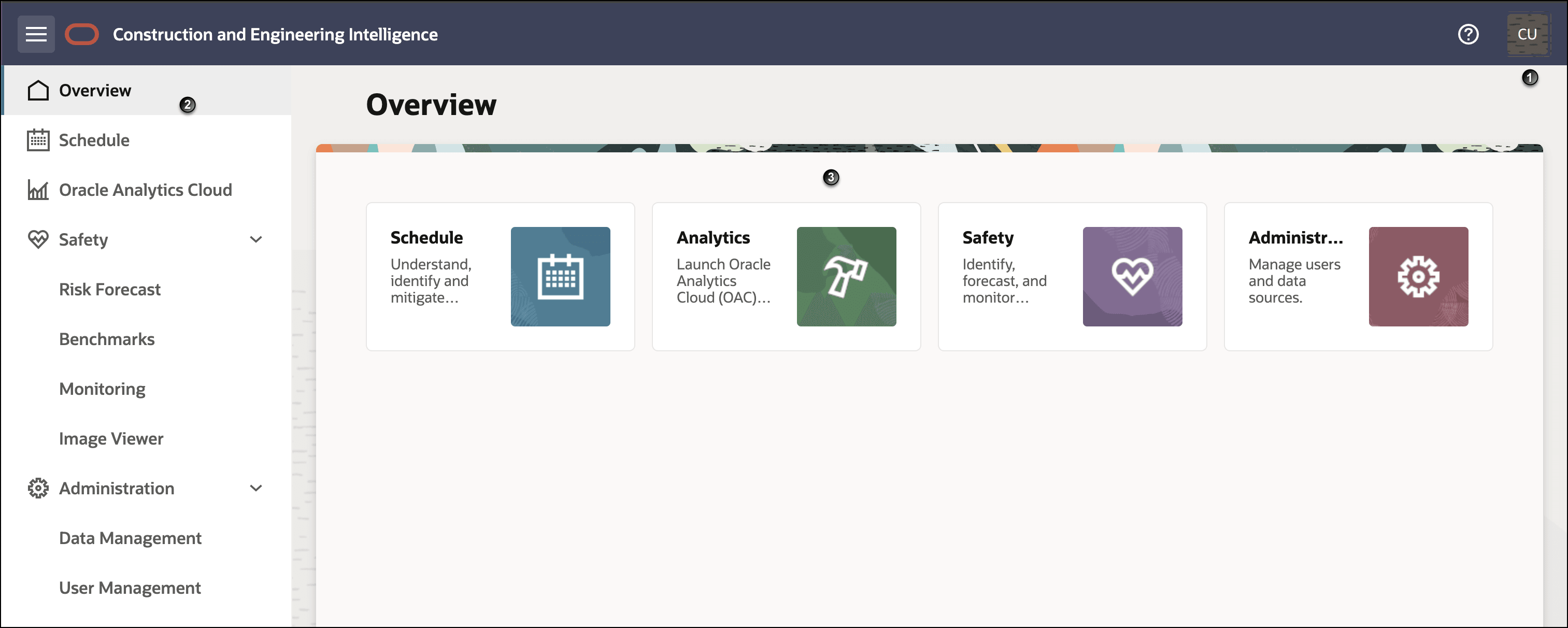
| Menu / Option | Description |
|---|---|
 Navigation Menu Navigation Menu |
Select to expand or collapse the Navigator pane. |
 Help Help |
The Help menu displays the following options:
|
| 1 |
Displays the initials of the signed-in user. Select this option to sign out of the application. |
| 2 |
Navigator The Navigator displays the modules you can access based on your role and the modules your organization has purchased.
|
| 3 | The selected module page is displayed. You can select the tiles displayed on the page to navigate within the selected module. |
Navigating within the Application
You can navigate within the application using either the Navigator or the tiles on the page.
Using the Navigator:
- Click the Navigation Menu to display the Navigator pane.
- In the Navigator pane, select a module.
Examples:
- To access the Administration module: From the Navigation Menu, select Administration.
- To access the Analytics module: From the Navigation Menu, select Analytics. A new tab opens with Oracle Analytics Cloud.
- To access the Benchmarks dashboard in the Safety module: From the Navigation Menu pane, select Safety, then select Benchmarks.
Using tiles
From the Overview page or from any of the module pages, select the tiles displayed on the pane.
Examples:
- To select the Administration module: From the Overview page, select the Administration tile.
- To select the Analytics module: From the Overview page, select the Analytics tile. A new tab opens with Oracle Analytics Cloud .
- To access the Benchmarks dashboard in the Safety module: From the Overview page, select the Safety tile, then select the Benchmarks tile.