Working with the OBS
Use the OBS page to assign projects to responsible managers in your enterprise.
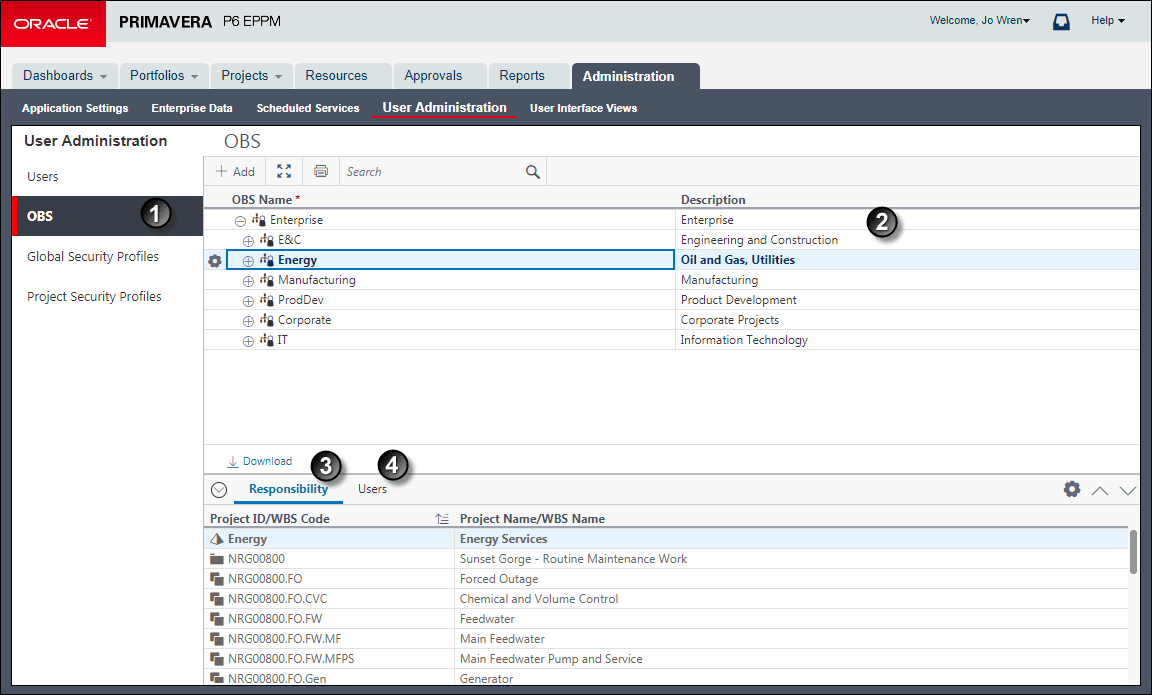
Table of OBS Page
| Item | Description |
|---|---|

|
OBS page: Use the OBS page to assign responsible managers to a project. |

|
Description column: Use this column to add a description about the OBS. To add a description, you will double-click in the Description field on the OBS page and type in a description. |

|
Responsibility tab: Use this tab to view an OBS' Project ID/WBS Code and Project Name/WBS Name. You can associate the responsible managers with their areas of the EPS—either nodes or individual projects. When you associate a responsible manager with an EPS node, any projects you add to that branch of the EPS are assigned that manager by default. |

|
Users tab: Use this tab to give users specific access to an OBS. To access a project, a user must have access permissions for an OBS element within the project. This provides user access to WBS information for which the specified OBS element is responsible, as well as limits user access to WBS information that might lie beyond the user's scope. |