Navigating Submittal Exchange Menus and Tabs
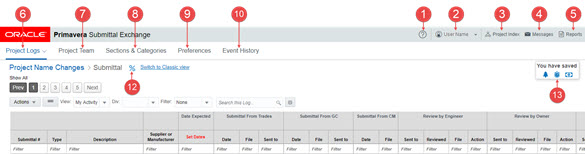
The top of each Submittal Exchange page has tabs and links for navigating the system.
Note:
Not all users will see all menus, tabs, or options. Access to some features depends on which role or team you are on.- Help Menu - Use the options under the Help icon to learn about Submittal Exchange and reach out for help.
- Account Menu - Use the options under your name to review account information.
- Project Index - Use the Project Index to select a project.
- Message Center - Use the Message Center to see emails you receive from the system.
- Reports Menu - Use the options under the Reports menu to generate reports or API keys.
- Project Logs Tab - Use the Project Logs to select a log.
- Project Team Tab - Use the Project Team tab to view and manage team members who have access to the project on the system.
- Sections & Categories Tab - Use the Sections & Categories tab to edit the expected items for submittals and closeouts.
- Preferences - Use the Preferences to view and edit project preferences.
- Event History - Use the Event History to review previous events on your project.
- Alert Icon (not shown) - Use the Alert icon to access alerts on the system.
- Log Progress - Use the Log Progress to see the percentage of items that have been submitted and reviewed.
- Savings Calculators - Use the Savings Calculators to see what your organization has saved by using the system.