Editing the CSV File
Each row in a CSV file corresponds to a new record, and each column is a field that you populate on the form.
To edit the CSV file:
- Open the CSV file in Microsoft Excel or a compatible application, such as a text editor or Notepad.
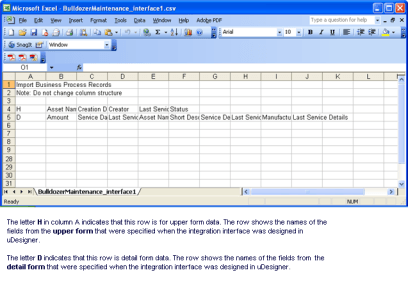
- To add header (upper form) data to the file:
- Move to an empty line, and type H in column A.
- Press the Tab key to move to the next column, and enter the value that you want to import for that field.
- Repeat the previous step for each field in the row.
- To add detail form data to the file:
- Move to an empty line, and type a D in column A.
- Press the Tab key to move to the next column, and enter the value that you want to import for that field.
- Repeat the previous step for each field in the row.
- If additional line item data needs to be imported, repeat the detail form steps until you enter all the line items.
- Save the file.