Dynamic Data Sets
Dynamic data sets (DDSs) are a way of narrowing the number of choices a user can make on a form field. By narrowing a user's choices, they can enter data faster and more efficiently. You can also use sets as a way of eliminating fields that are not necessary for specific situations. For example, instead of asking a user to choose one city among hundreds in a list, you can narrow the list of cities by state. Or, instead of asking the user to fill in every field in a form, you can "disable" those fields that are not necessary.
DDSs are governed by a master element (field) that dictates what some fields in the set will show and how others will behave. Data sets are considered "dynamic" because the values of the elements in the set change, depending on what the user chooses in the master element field. For example, on a form that requires a state and city designation, the list of cities changes, depending on the state the user chooses. The state and city elements become a dynamic data set, and the master element (state) dictates what cities will appear in the list.
DDSs use pull-down lists and radio buttons for the master element and for data elements (DEs) in a value set. In addition, a behavior set can include the SOV Line Picker (uuu_sovlinum) on Change Commit detail forms for classic Payment Application and General Spends business processes (BPs). The SOV Line Picker cannot be used as a master element or value-set element, and it is not supported for Summary Payment Application (SPA) Change Commit BPs. In Unifier, the administrator populates pull-down-list values and specifies the behavior of behavior-set elements, including Required, Disabled, and Disabled and Clear.
For example, a form might require both national and international addresses. Some countries or states within a country require a postal code with a mail stop extension; others do not. The country, state, and postal code fields become the dynamic data set. In this dynamic data set, the country is the master element; it dictates which states the user can choose from and whether the user must enter a mailstop extension.
Note:
Before you create the DDS, be sure you have designed all the data elements you need for the set.Sets are composed of the following:
- Master Element: Controls the content or behavior of the other data elements (fields) in the set.
- Value Set: Data elements (fields) whose values are controlled by the master element. For example, if the master element is "Country," a value set may be a pull-down list of states.
- Behavior Set": Data elements (fields) whose behavior is controlled by the master element. The master element determines if the fields are Required (makes the data element a required field), Disabled (the data element is read-only), or Disabled and Clear (the data element is disabled and any previously entered text is cleared). For example, if the master field is an "Attachments" radio button, the behavior set may include "Web files" and "Emails." Both are disabled until you select the "Attachments" radio button. Behavior sets must be editable.
Note:
In addition to supported editable DEs, the SOV Line Picker (uuu_sovlinum) can be included in a behavior set. This option is available only for detail forms in classic Payment Application Change Commit and General Spends Change Commit BPs. It is not supported for Summary Payment Application (SPA) Change Commit BPs. The SOV Line Picker can be configured as Required, Disabled, or Disabled and Clear.
The value set and behavior set are independent of each other. However, the elements you select for a value set cannot be used as part of a behavior set. The master element controls the value of one field(s) and the behavior of another (or others). You must have a master element for a dynamic data set, but you do not need both a value set and a behavior set.
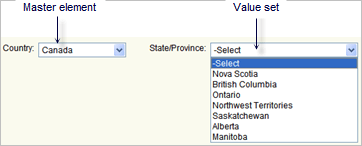
For example, you could use the master element and only a value set to create a country and state/province dynamic set.
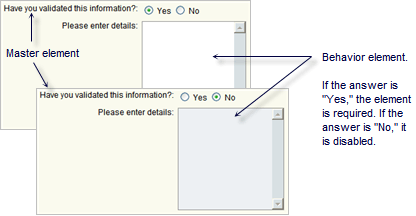
Or, you can create a data set using the master element and only a behavior set to show or disable a field.
Using Multiple Dynamic Data Sets
You can include multiple dynamic data sets on a form so long as any single data element is used for only one dynamic data set. Multiple dynamic data sets can use the same master element, but the data elements in the value sets and behavior sets must be different from those in any other dynamic set on the form.