1 About This Accelerator
Use this accelerator to integrate Oracle Primavera Cloud resource and project data with Primavera P6 EPPM.
Note:
This accelerator is available as Oracle Primavera Cloud — Primavera P6 EPPM | Integrate Resource and Project Data in the Integration store.Introduction
The integrations delivered in this accelerator are helpful for customers who are migrating and transitioning from Primavera P6 EPPM to Oracle Primavera Cloud. Using these integrations, customers can synchronize their data in stages, by migrating portions of their teams, data, projects, and/or processes, instead of migrating everything all at once. This allows customers to phase in the use of Oracle Primavera Cloud. This is especially helpful for navigating change management and acclimating an organization to Oracle Primavera Cloud - particularly for organizations that have been using Primavera P6 EPPM for many years.
In addition, customers may choose to use Primavera P6 EPPM and Oracle Primavera Cloud together as a single, cohesive, and highly integrated best-of-breed solution for different use cases, and these integrations help to facilitate this approach. For example, customers may continue to perform their organization's scheduling in Primavera P6 EPPM, but they onboard their vendors for consuming vendor schedule updates in Oracle Primavera Cloud and/or performing task management with their vendors in Oracle Primavera Cloud. Organizations might also perform risk management in Oracle Primavera Cloud with schedule data from Primavera P6 EPPM, and/or they might perform their portfolio capital planning in Oracle Primavera Cloud along with schedule data from Primavera P6 EPPM.
Functional Integration Flows
The integration between Oracle Primavera Cloud and Primavera P6 EPPM, managed through Oracle Integration, synchronizes key project management elements across both platforms. Customers enhance standard objects with custom metadata — codes or configured fields in Oracle Primavera Cloud/user defined fields (UDFs) in Primavera P6 EPPM — to capture organization-specific information across projects, activities, WBS, resources, assignments, and risks. Incorporating these fields is vital for supporting advanced reporting, process customization, and unique business workflows.
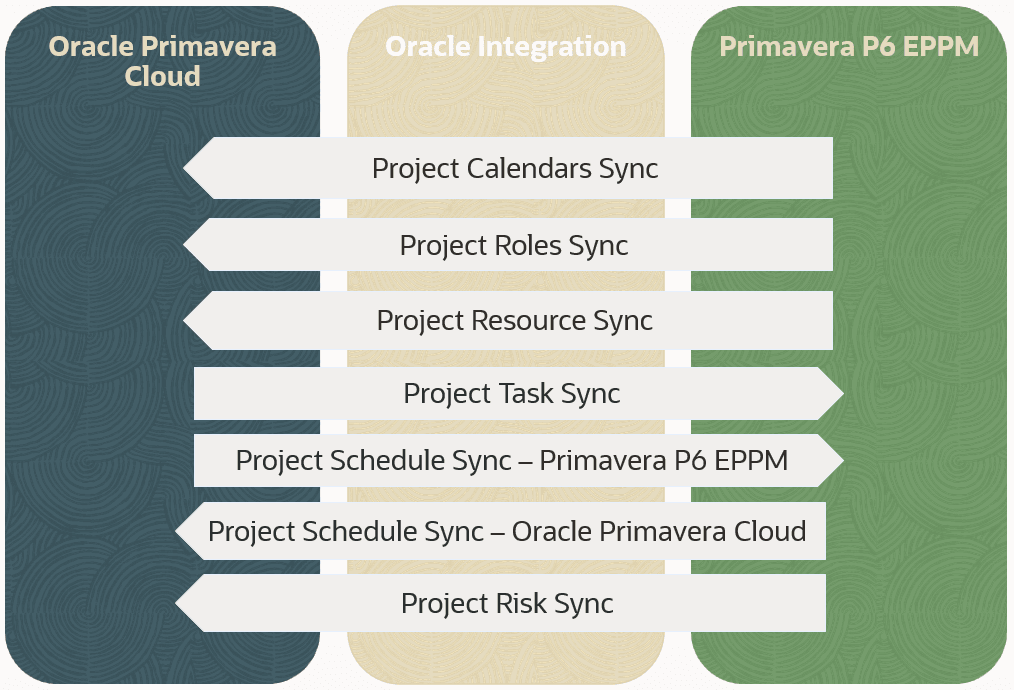
1. Project Calendars Sync
- Synchronizes calendar definitions such as work patterns and exceptions from Primavera P6 EPPM to Oracle Primavera Cloud.
- Ensures that schedule calculations and resource allocation rules remain consistent.
- Changes in the source system are reflected in the target system through synced integrations.
2. Project Roles Sync
- Transfers role definitions and attributes, enabling consistent role-based planning and costing.
- Updates triggered upon creation or modification of roles in Primavera P6 EPPM; propagated changes ensure accurate project staffing and reporting in Oracle Primavera Cloud.
- Handles custom field mappings as required by business rules.
3. Project Resources Sync
- Maintains an up-to-date, centralized resource pool by synchronizing updates made in Primavera P6 EPPM with Oracle Primavera Cloud.
- Ensures resource definitions, attributes, and availability are consistent for assignment and budgeting.
- Validation and error management handled by Oracle Integration promotes data integrity.
4. Project Task Sync
- Pushes lean construction and field task definitions from Oracle Primavera Cloud into Primavera P6 EPPM.
- Ensures alignment of collaborative, field-driven work planning with master project schedules.
- Integration triggers and validations ensure tasks are consistently mapped and reflected.
5. Project Schedule Sync
- Synchronizes schedules, including WBS, activities, logic, and dates, between the two systems.
- Oracle Integration manages custom scheduling attributes and error handling.
6. Project Risk Sync
- Transfers risk registers and associated data from Primavera P6 EPPM into Oracle Primavera Cloud.
- Aligns risk tracking, reporting, and mitigation planning between platforms.
- Custom mappings and validations ensure accurate representation of risk data in Oracle Primavera Cloud.
Note:
Changes to resource or role availability and pricing made at the workspace level are not automatically propagated to projects within that workspace or to child workspaces. These updates can be applied manually from the Resource List or Role List pages, or by enabling the application setting that synchronizes all resource and role availability and pricing from the workspace level to all associated projects. Please note that synchronizing resources and roles at the workspace level will not immediately update this information at the project level in Oracle Primavera Cloud.Delivered Integrations
This accelerator delivers a project that includes several integrations.
Each integration is designed to be run independently of the others, so you can run whichever integrations you need.
Global level integrations:
- P6 to Oracle Primavera Cloud Resource Sync: Used to sync an Oracle Primavera Cloud workspace with resource and calendar data from Primavera P6 EPPM.
- P6 to Oracle Primavera Cloud Role Sync: Used to sync an Oracle Primavera Cloud workspace with role data from Primavera P6 EPPM.
- P6 to Oracle Primavera Cloud Resource Role Sync: Used to sync an Oracle Primavera Cloud workspace with resource, role, and calendar data from Primavera P6 EPPM.
Project level integrations:
- P6 to Oracle Primavera Cloud Project Schedule Sync: Used to sync a project from Primavera P6 EPPM to Oracle Primavera Cloud with project schedule data, UDFs, and codes.
- Oracle Primavera Cloud to P6 Project Schedule Sync: Used to sync a project from Oracle Primavera Cloud to Primavera P6 EPPM with project schedule data, UDFs, and codes.
- Oracle Primavera Cloud to P6 Project Task Sync: Used to sync a project from Oracle Primavera Cloud to Primavera P6 EPPM with WBS, activity, task, UDFs, and codes.
- P6 to Oracle Primavera Cloud Project Risk Sync: Used to sync a project from Primavera P6 EPPM to Oracle Primavera Cloud with risk data, such as risk matrices, risk thresholds, and activity risks.
To use these integrations, you need to install the accelerator and configure the connections, then activate the integrations you want to use, update the integration properties for those integrations, and finally run the integrations.
Data Mapping
Data mapping spreadsheets describe which fields in Oracle Primavera Cloud map to which fields in Primavera P6 EPPM.
Click the link below to download a zip file that contains the data mapping sheets for these integrations:
The zip file includes the following data mapping sheets:
OPC_P6_Project_Schedule_Sync.xlsxOPC_P6_Project_Task_Sync.xlsxP6_OPC_Project_Risk_Sync.xlsxP6_OPC_Project_Schedule_Sync.xlsxP6_OPC_Resource_Role_Sync.xlsxP6_OPC_Resource_Sync.xlsxP6_OPC_Role_Sync.xlsx