Review AI Performance reporting
Use AI Performance to examine GenAI activity reported by your journeys. The tab brings together operational outcomes, provider-reported usage, participant handling, and received quality assessments. Read each section separately: producing a candidate, accepting it, and assessing its quality are different observations.
Review provider attempts and logical invocations
- Open your dashboard, select a period, and select AI Performance.
- Check Report range and Data as of at the top of the tab.
- Read Provider attempts and its outcome rows.
- Read Logical invocations and its outcome rows.
- Compare Count with Timed before interpreting Median, p75, or p95.
A provider attempt is an individual call attempt to a GenAI provider. A logical invocation is the complete application request, which can involve more than one attempt. These totals are not expected to match one-for-one. The period counts finished attempts and resolved invocations reported during that period; it is not a count of every invocation still in flight.
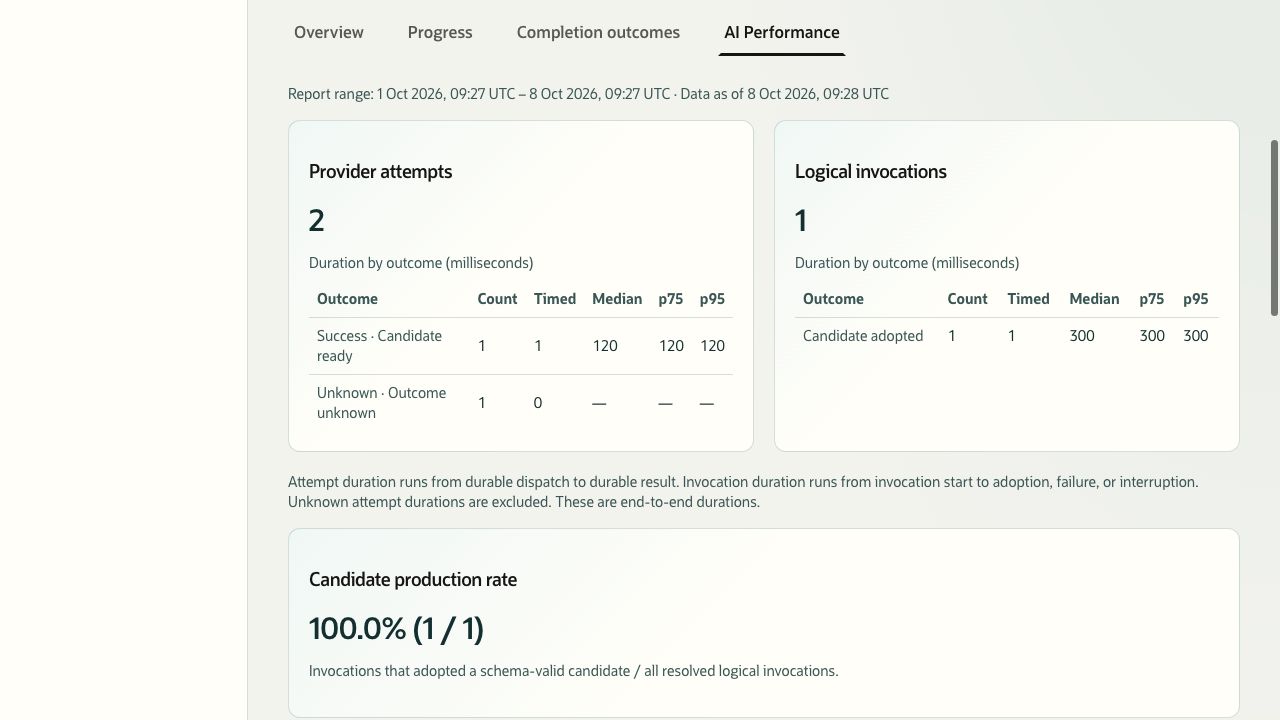
Description of the illustration genai-outcomes.jpg
Figure 14. AI Performance shows provider-attempt and logical-invocation outcomes and their duration distributions. Sample reporting data.
| Item | Interpretation |
|---|---|
| Count | Number of observations in the outcome row. |
| Timed | Number of those observations with a measured duration. |
| Median, p75, p95 | Duration percentiles for the timed observations, in milliseconds. A dash means no timed observations. |
| Attempt duration | Time from recorded provider dispatch to recorded result. Unknown attempt durations are excluded. |
| Invocation duration | Time from invocation start to adoption, failure, or interruption. |
These durations include application processing around the provider request. They are not measurements of model execution alone. An unknown outcome must not be interpreted as a confirmed success or failure.
Interpret candidate production and usage
Candidate production rate is the proportion of resolved logical invocations that adopted a schema-valid candidate. The displayed numerator and denominator make the calculation explicit. Schema validity means the result met the required structure; this rate does not assess correctness, usefulness, or user acceptance. With no resolved invocations, the rate has no denominator.
- Read Provider-reported usage for the recorded input and output token totals.
- Review Usage availability to see how much usage information is present or unavailable.
- Review Model revision observation for the reported revision categories.
- Expand Reporting details if you need freshness and report-version information.
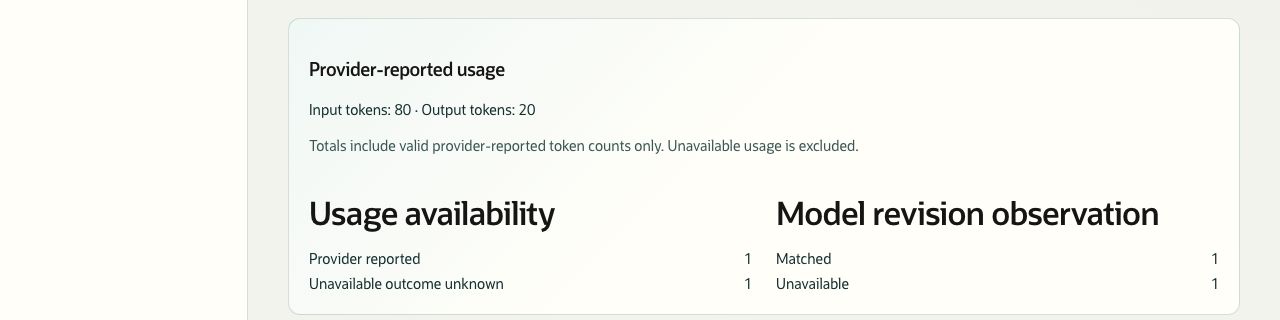
Description of the illustration genai-usage.jpg
Figure 15. Usage totals include valid provider-reported token counts only. Sample reporting data.
Unavailable usage is excluded from token totals, so a total may not represent all activity. These figures are not a billing statement or a cost estimate. A matched or unavailable revision observation is evidence about the reported model revision, not a quality score.
Review participant handling
- Scroll to Participant handling of presented candidates.
- Check that section’s report range, data timestamp, and Review horizon.
- Compare Presented and Reviewed, then examine the acceptance and rejection counts.
- Read Candidate coverage and the unit-level handling counts beneath the cards.
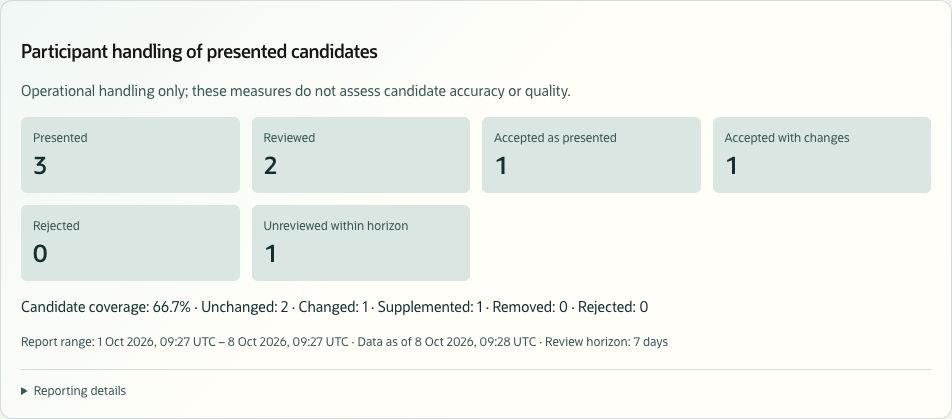
Description of the illustration genai-participant-handling.jpg
Figure 16. Participant handling records how presented candidates were handled. Sample reporting data.
| Measure | Meaning |
|---|---|
| Presented | Candidate presentations that occurred in the selected period. Presentations are not necessarily unique candidates or people. |
| Reviewed | Presentations with a matching recorded review within the seven-day horizon. |
| Accepted as presented | Reviewed presentations accepted without changes. |
| Accepted with changes | Reviewed presentations accepted with changes. |
| Rejected | Reviewed presentations rejected by the participant. |
| Unreviewed within horizon | Presentations whose review horizon has elapsed without a matching review. A recent presentation still awaiting review need not appear here. |
| Candidate coverage | Candidate-present evaluation units divided by all evaluation units associated with the presentations, expressed as a percentage. It is not the proportion of candidates accepted. |
| Unchanged, Changed, Supplemented, Removed, Rejected | Counts of evaluation units in the matching reviews. These are unit-level observations, not additional presentation totals. |
An evaluation unit is an item compared during review according to the journey’s comparison profile, such as a field or a structured item. A review can contain several units. The sample shows 66.7% coverage because four of six evaluation units had candidate content.
Handling measures describe recorded behavior. Acceptance does not by itself establish that a candidate is accurate. Recent or excluded records can also prevent simple totals such as Reviewed plus Unreviewed within horizon from equalling Presented.
Review received quality assessments
- Scroll to Received quality assessments.
- Check the number of assessments and the section’s report range and data timestamp.
- Read Factor categories by rubric and evaluator. Keep the Rubric version and Evaluator kind with every comparison.
- Examine Correctness, Relevance, and Completeness categories where reported.
- Review Not assessable reasons for assessments that could not produce factor categories.
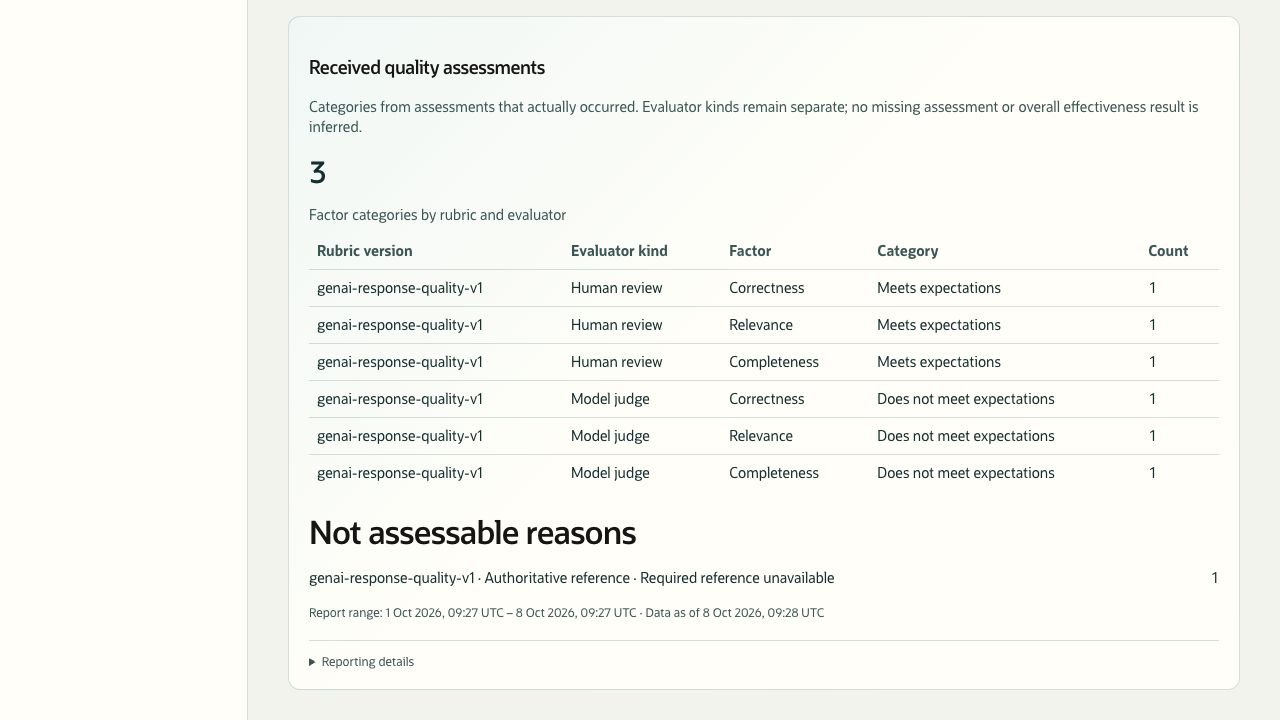
Description of the illustration genai-quality-assessments.jpg
Figure 17. Quality assessments remain separated by rubric and evaluator. Sample reporting data.
Only assessments that actually occurred and were received are shown. Human review, model judging, and authoritative-reference evaluation remain separate evidence sources. Do not combine their rows into an overall accuracy score or assume that every candidate has been assessed.
An assessment can contribute several factor rows. Adding the factor counts therefore does not give the assessment count. Not assessable indicates a reason an assessment could not be made, such as a required reference being unavailable; it is not a failed-quality category.
No quality assessments were received in this range means no assessments were returned for that selection. It does not establish that the underlying candidates met expectations.