Review journey progress and outcomes
A run is one execution of a journey. A start cohort is the group of runs that began within a selected period. Progress and Completion outcomes follow that group, allowing you to examine how journeys advance and how they end.
Review milestone progress
- Open Government Leadership Dashboard or Journey Events and choose a reporting period.
- Select Progress.
- Check the Data as of, Report range, and observation message.
- Expand the journey and version that you want to review. A single returned group opens automatically.
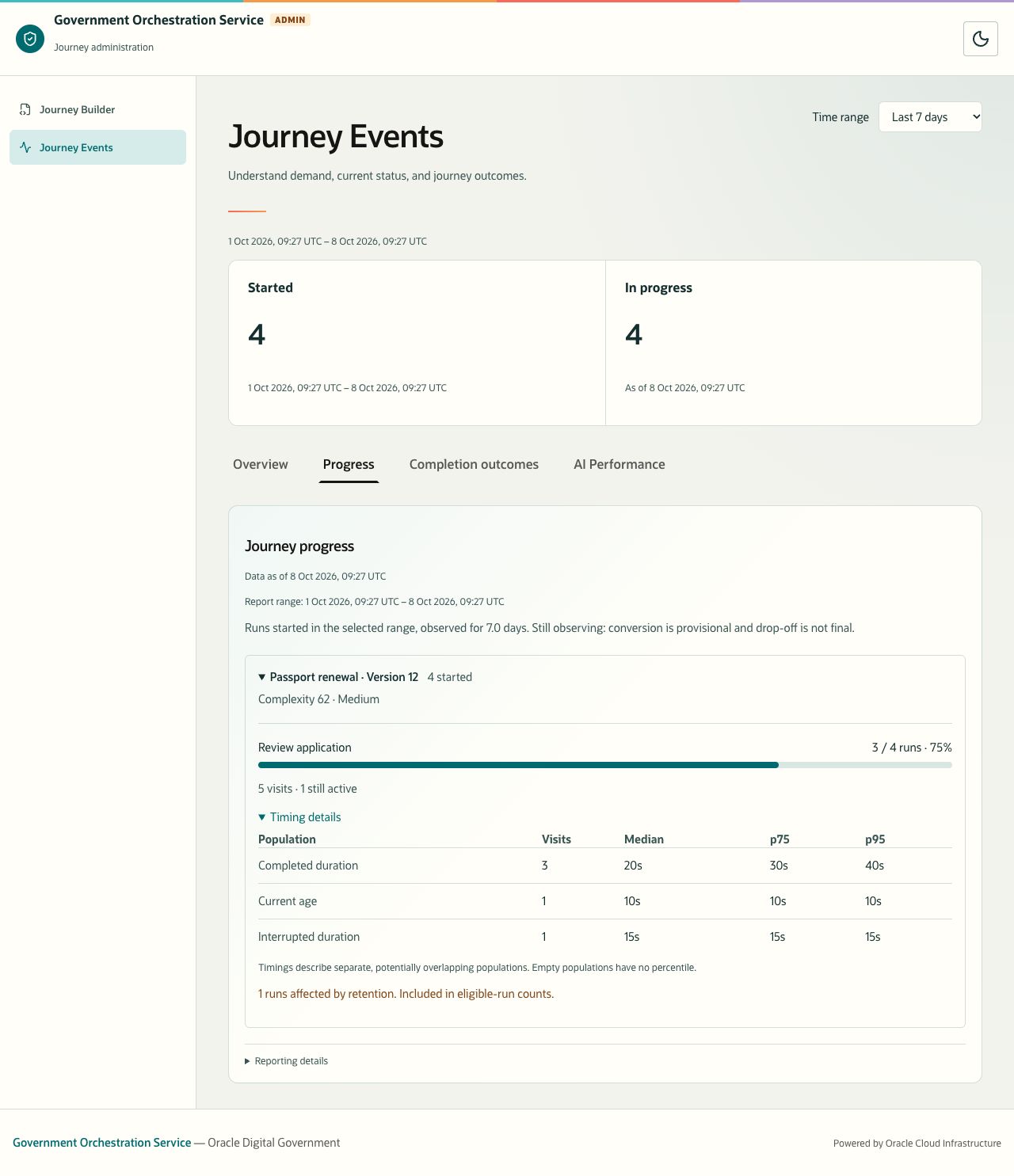
- Read each milestone’s reached-run count, eligible-run count, conversion percentage, visits, and still-active count.
- Expand Timing details for a milestone to examine its timing populations.
Description of the illustration progress-timing.jpg
Figure 11. Progress combines distinct-run reach with separate visit timing populations. Sample reporting data.
| Measure | How to read it |
|---|---|
| Reached / eligible runs | Distinct runs that reached this milestone divided by the eligible start-cohort population. |
| Conversion percentage | Reached runs divided by eligible runs, expressed as a percentage. It is not the conversion from the immediately preceding milestone. |
| Visits | Recorded visits to the milestone. A run may visit more than once, so visits may exceed reached runs. |
| Still active | Reached runs that remain active at the milestone in the report’s observation. |
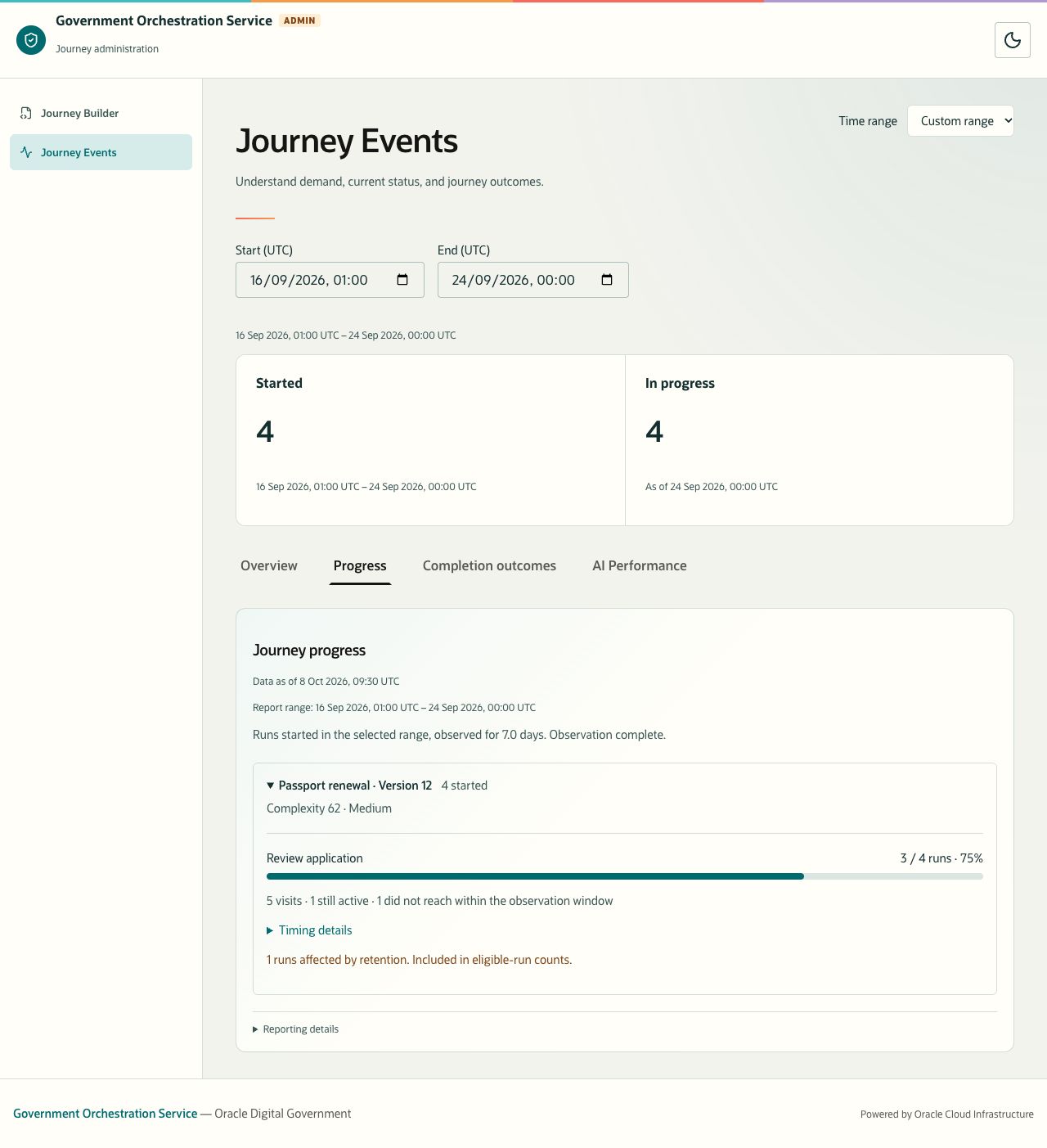
| Did not reach within the observation window | Eligible runs that did not reach this milestone within the window. Shown when observation is complete. It is not proof that a user abandoned a journey. |
| Complexity | The journey version’s recorded score and band. This is context for comparison, not a dashboard quality or performance score. Complexity unavailable means no score is available. |
If the report says No milestones configured for this journey version, there is no milestone breakdown for that version. Ask the journey owner to review its reporting configuration.
Interpret milestone timings
| Timing population | Meaning |
|---|---|
| Completed duration | Duration of visits that completed at this milestone. |
| Current age | Age of visits that are still open in the observation. |
| Interrupted duration | Duration of visits that were interrupted. |
| Terminal result availability | At a terminal milestone, the duration for which the terminal result remained available, for completed terminal visits. |
Median is the middle of the measured distribution; p75 and p95 describe its 75th and 95th percentiles. Read them with the Visits count and displayed unit. A dash means the population has no measured observations, rather than a duration of zero.
These populations describe visits. A run can contribute to more than one population through separate visits. Do not add their counts to calculate unique runs or average their percentiles together.
Check observation maturity and retention
The current reports use a seven-day observation horizon. Still observing means the cohort is provisional. New observations may change conversion and outcomes; drop-off is not final. Observation complete means the reporting time has reached the end of the start-cohort period plus the horizon. It does not mean all runs have finished.
To review a fully observed cohort, select a custom period whose end is at least seven days before the report’s Data as of time, then check the observation message.
Description of the illustration progress-observation-complete.jpg
Figure 12. A fully observed cohort exposes the did-not-reach count. Sample reporting data.
A retention note states how many runs were affected and whether they are included in eligible-run counts. Read that note before comparing conversion percentages across reports. Retention limits the available observation; it is not automatically an unsuccessful outcome.
Review completion outcomes
- Select Completion outcomes for the period you want to review.
- Check the report timestamp, range, and observation message.
- Find the journey and version of interest.
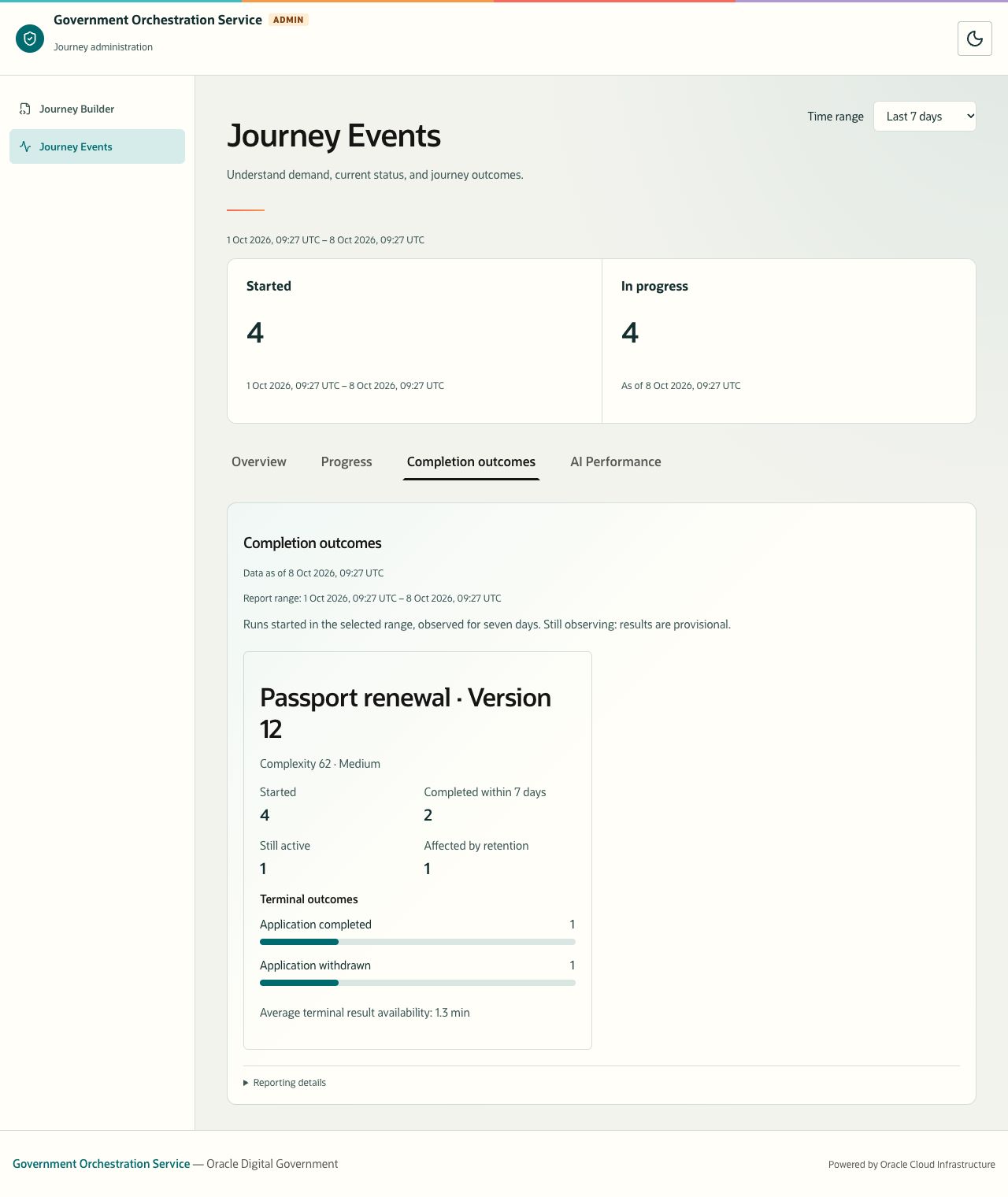
- Read Started, Completed within 7 days, Still active, and Affected by retention.
- Examine Terminal outcomes to understand the kind of ending.
- Review the availability measure and any data-quality indicators.
Description of the illustration completion-outcomes.jpg
Figure 13. Completion reporting follows the start cohort and includes different terminal outcomes. Sample reporting data.
Completed within 7 days counts runs reaching a terminal outcome no later than seven days after their own start. It includes endings such as withdrawal, cancellation, and failure. It is not a count of successful service decisions or approvals.
Terminal outcomes shows the recorded endings for the cohort. Outcome bar lengths use the group’s Started count. Still active counts cohort runs without a terminal outcome or a retention-censored result. Affected by retention identifies runs whose observation was cut short by retention before a terminal outcome was observed.
The outcome breakdown and still-active count can change after seven days, even when the cohort is marked Observation complete. A run ending on day ten can appear under Terminal outcomes without contributing to Completed within 7 days.
Average terminal result availability is the average duration of completed terminal-result visits. It measures how long the terminal result remained available before that visit ended through retention processing. It does not measure the time from journey start to completion. No completed visits means no completed terminal-result visit is available for this calculation.
If there are no returned groups, the page says No completion outcomes for this selection. No terminal outcomes yet refers to a returned group that has starts but no recorded endings. Read these messages together with freshness and the selected range.