Savings Hub Call-to-Action
The Savings Hub Call-to-Action module for quarterly alerts is meant to inspire customers to take action towards finding financial assistance through the Savings Hub survey.
On this page:
Requirements
The requirements for this module are the same requirements listed in Requirements and Limitations.
User Experience
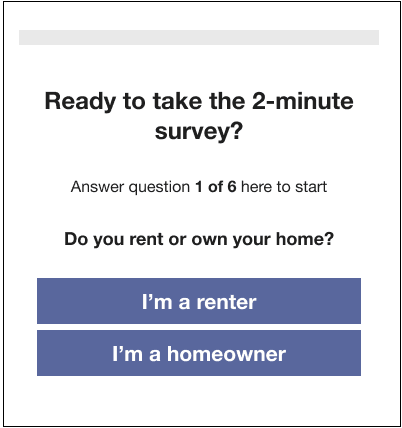
The information displayed in the Savings Hub Call-to-Action module is based on whether the customer has not started, has started, or has completed the Savings Hub survey. The module includes a header, some body text, and call-to-action buttons that differ depending on the state of the survey. If the buttons are configured to use Magic Link, then clicking the buttons will take customers directly to the survey. If the buttons are not configured with Magic Link, then the customer will be prompted to sign in to their account before they can access the survey.
The following is an example of the Savings Hub Call-to-Action module for a customer who has not started the Savings Hub survey:
User Experience Variations
The following table describes the user experience variations of the Savings Hub Call-to-Action.
| Data State | Variation Text |
|---|---|
| Survey Started |
Header: Complete the 2-minute survey to see what help you're eligible for. Body Copy: You've answered X of X questions. Call-to-Action Button: Complete the survey. Note: When customers click the button, the survey opens to where they left off answering questions. If the button is configured to use Magic Link, the customer will be taken directly to the survey. If it is not configured, they will be prompted to sign in to their account before they can continue the survey. |
| Survey Completed |
Header: Your Savings Hub shows assistance you qualify for. Body Copy: There are programs waiting on you based on your survey answers. Call-to-Action Button: View your programs. Note: When customers click the button they are taken to a list of available programs based on their survey answers. If the button is configured to use Magic Link, the customer will be taken directly to the survey. If it is not configured, they will be prompted to sign in to their account before they can continue the survey. |