Enrollment
Customers are automatically enrolled in the Behavioral Demand Response Cloud Service if they meet the eligibility and selection criteria. Customers may opt themselves in to the Behavioral Demand Response events and messages for some communications directly or by contacting the Oracle Utilities Opower Customer Service Interface.
On this page:
Opting Out of Communications
Customers can opt out of communications in a few ways. Their options will depend on the utility's setup and program design.
- From the web: It is recommended that customers use the Account and Preferences section in the Digital Self-Service Energy Management Web Portal to change their preferences. If a customer unsubscribes, then this method allows them to subscribe again in the future.
Note: If the utility chooses to host their own account services, they may not offer the Digital Self-Service Energy Management Web Portal. In that case, customers will need to contact the utility for more information about account management.
- From an email: Customers can click the unsubscribe link at the bottom of the email and follow the instructions to opt out of emails.
Warning: If the customer clicks Unsubscribe in the email and then clicks unsubscribe from all emails, they will not be able to subscribe again; this action is permanent. However, if they only opt out of Behavioral Demand Response emails, then they can subscribe again to these emails at a later time.
- From text: Customers can reply with STOP to opt out of SMS messages, which will opt the customer out of all messages sent from the SMS channel.
- From voice: Customers can opt out of future communications by selecting the cancel future phone notifications option provided in the prompt.
Opting In to Communications
Customers can opt themselves in to text messages through their voice channel communications. To opt in, the customer selects the opt in option provided at the end of the voice message.
For example: To opt in for text notifications about future peak days, press 6.
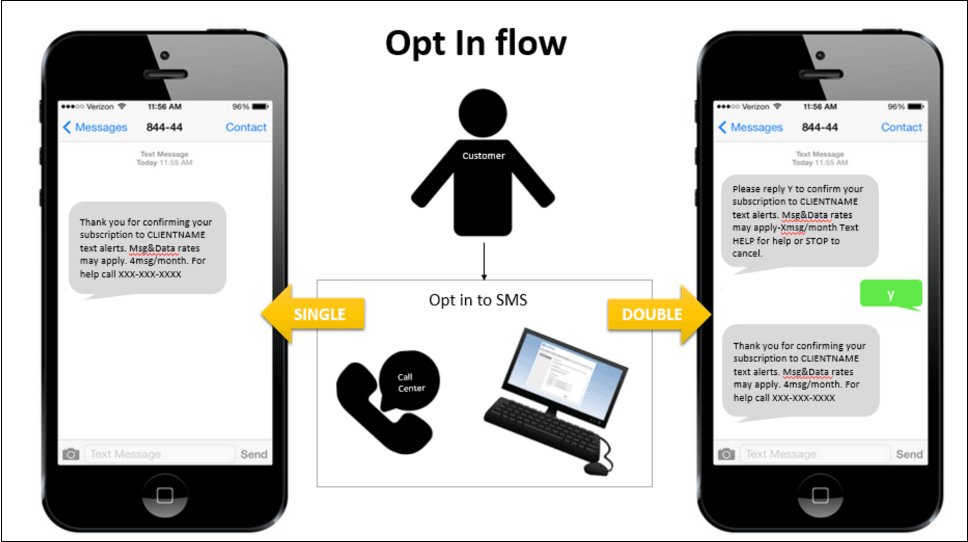
Utilities can be set up for either single, or double opt-in to text notifications. If the utility is set up for single opt-in, the customer will receive a text message confirming their enrollment with no further action required. If the utility is set up for double opt-in, the customer will receive a text message asking them to confirm their enrollment.
Note: Behavioral Demand Response supports multiple languages for the SMS opt-in confirmation. Work with your Delivery team to set your language preferences.
The following is an illustration of the opt-in flow for text notifications.