Installation Steps
To install the integration:
1. Download the CCB-EBS.zip file from Oracle Software Delivery Cloud (http://edelivery.oracle.com/) or My Oracle Support.
Note: For specific instructions about installing this integration on non-Windows/Linux platforms, refer to the knowledge article ID 1349320.1 on My Oracle Support.
2. Extract the CCB-EBS.zip file to get the installation folder.
This folder includes the subfolders such as bin, config, install, MDS-Artifacts, and services. 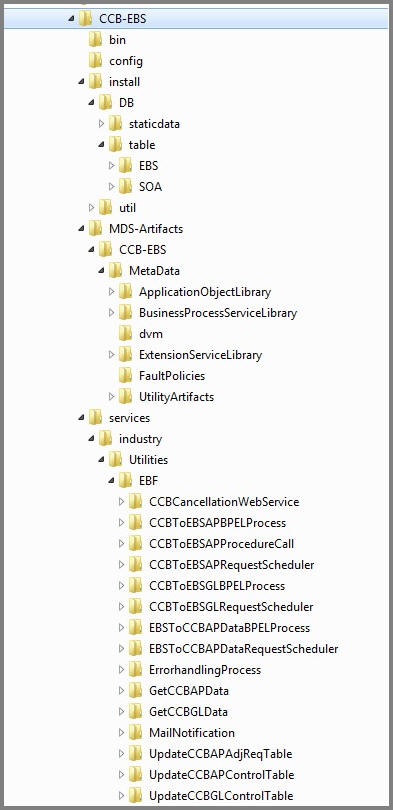
3. Export the following environmental variables:
export ORACLE_HOME=/scratch/gbuora/SOA14c/Oracle_Home
export SOA_HOME=$ORACLE_HOME/soa
export MW_HOME=$ORACLE_HOME # If you want to keep MW_HOME for compatibility
# Source the WebLogic environment setup script from new location
source $ORACLE_HOME/wlserver/server/bin/setWLSEnv.sh
# Set product home and cd into its bin
export PRODUCT_HOME=/scratch/gbuora/SOA14c/product_homes/C2M-EBS
# expor class path of ant-contrib.jar
export CLASSPATH=/scratch/gbuora/ant-contrib.jar:$CLASSPATH
cd $PRODUCT_HOME/bin
Refer to the Installation Properties section for information about individual properties.
a. Set the following environment variables for Linux and Windows operating systems:
Variable | Example |
|---|---|
Linux and Windows OS | |
MW_HOME | XXX/Middleware |
SOA_HOME | XXX/Middleware/soa |
PRODUCT_HOME | The product installation folder. Example: PRODUCT_HOME=/scratch/PRODUCT_HOMES/CCB-EBS |
b. The commands indicated in the readme file (setWLSEnv.sh on Linux and setWLSEnv.bat on Windows) set the environment variables used for executing the installation scripts.
Below is an example to set up environment variables in a typical installation:
Linux
export MW_HOME=/Oracle/Middleware/soa
export SOA_HOME=$MW_HOME/soa
export PRODUCT_HOME=/Product_Homes/CCB-EBS
source $MW_HOME/wlserver/server/bin/setWLSEnv.sh
Windows
SET MW_HOME=C:\Oracle\Middleware\soa
SET SOA_HOME=%MW_HOME%\soa
SET PRODUCT_HOME=C:\Product_Homes\CCB-EBS
cd %MW_HOME%/wlserver/server/bin/
setWLSEnv.cmd
Also note the following:
• PRODUCT_HOME/install/util/ant folder contains all the ant build scripts.
• PRODUCT_HOME/bin/InstallBuild.xml is used to install CCB-EBS integration code.
• PRODUCT_HOME/bin/UnInstallBuild.xml is used to uninstall CCB-EBS integration code.
• PRODUCT_HOME/bin/DeployUndeployUtility.xml is used to deploy/ undeploy individual composite/ MDS folder and then restart the managed server.
Note: The installation process may take several minutes to complete.