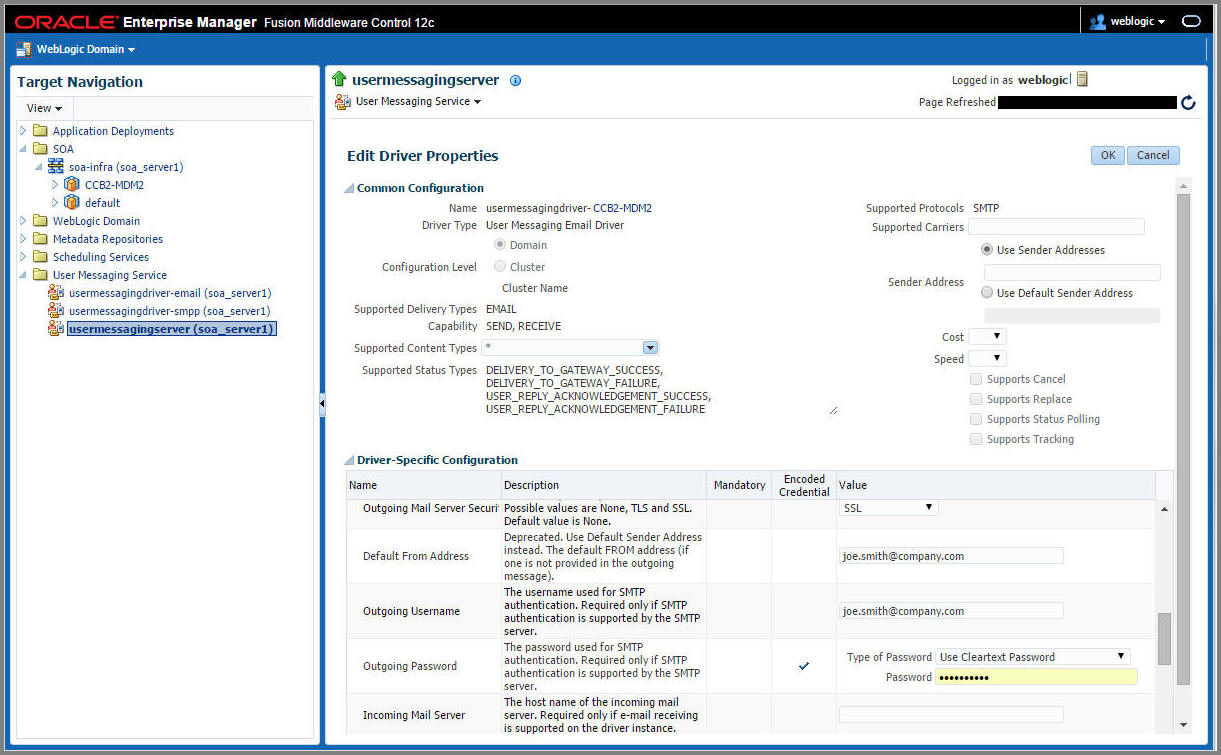
Verify the User Messaging Service List
To verify the user messaging service list, follow these steps:
1. In the WebLogic Administration console, navigate to Deployments.
2. Verify that the usermessagingdriver-email email driver is Active.
3. If not, click usermessagingdriver-email > Targets > <managed server>.
Example: soa_server1
4. Select Yes and click Activate Changes.
5. In the WebLogic Enterprise Manager console, navigate to soa-infra [managed server].
6. Right-click the soa-infra [managed server] node, select SOA Administration, and then select Workflow Properties.
7. Verify that the Notification Mode under Workflow Properties is set to “Email”.
8. Navigate to the User Messaging Service node, and select the usermessagingserver [managed server] entry.
Example: usermessagingserver (soa_server1)
Notice that the email driver is already enabled.
9. Click Configure Driver to check the e-mail driver properties and view the specific configuration details as shown below.