Applications
An application must be configured to communicate with Oracle Utilities Work and Asset Cloud Service via Oracle Integration Cloud. It can also be set up for Oracle Cloud Infrastructure Object Storage.
Application for Oracle Integration Cloud
Oracle Field Service communicates with Oracle Utilities Work and Asset Cloud Service through Oracle Integration Cloud. To support this, an application in Oracle Field Service must be configured for Oracle Integration Cloud.
To add an application:
1. Navigate to the Configuration page > Subsystems > Applications icon.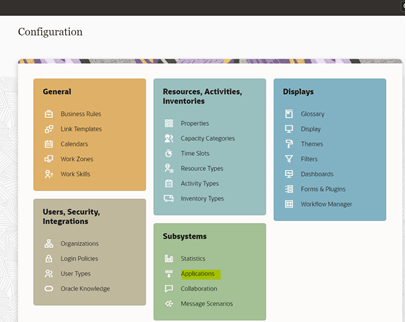
2. Click Add Application. Enter the required details and click OK.
Application Name: Name of your choice (Ex: OIC)
Host: your OIC host name
User Name: OIC user name
Password: OIC password
Confirm Password: OIC password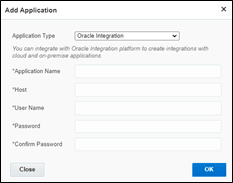
Please note that starting Oracle Field Service 22D, the Basic Authentication support is no longer available for adding new applications to handshake with Oracle Integration Cloud. Create the application with OAuth 2.0 compliance. If you are an existing customer, the current application will work fine with Basic Auth after the upgrade.
If you are a new customer:
1. Select the Oracle Integration as the Application Type.
2. Enter the following details:
• Application Name: Name of your choice
• OIC Host: OIC host
• User Name: OIC user
• IDCS URL: OIC IDCS URL
• Client ID: OIC Client ID from the application created
• Client Secret: OIC Client Secret from the application created.
• Key ID: This is certificate alias, which is imported in OIC IDCS application.
• Scope: Scope of the client application you created in IDCS.
• Private Key File: Drag and drop the private key file.
3. Click Test Connection, and then click Add.
For more information, refer to the Oracle Field Service and Oracle Integration Cloud documentation.
Application for Oracle Cloud Infrastructure Object Storage
Oracle Field Service is used to communicate with Oracle Cloud Infrastructure Object Storage. To set up this application, you may need help from your tenancy administrator to get some of the required details related to your Oracle Cloud Infrastructure tenancy.
1. Select “Oracle Cloud Infrastructure Object Storage” as the Application Type.
2. Enter the following details:
• Application Name: WAM_OCI_OBJECT_STORAGE
• OCI tenancy OCID: Your tenancy’s OCID.
Sample format: ocid1.tenancy.oc1..sampletenantocid
• User OCID: OCID of the API user.
Sample format: ocid1.user.oc1..sampleuserocid
• OCI Region: ID of the OCI region.
Sample format: us-ashburn-1
• Key Fingerprint: Fingerprint associated with the private key
• Namespace: Namespace associated with the bucket
• Bucket Name: OCI bucket assigned for storing image data
• API signing key: An API key is an RSA key pair in PEM format used for signing API requests. You can generate the key pair in Oracle Cloud Infrastructure and upload the private key here. Maximum file size is 32KB.
Please note that starting Oracle Field Service 25C, this application type is supported and is required for V25.10.