Overview of the Integration
This release enhances the integration between Oracle Utilities Work and Asset Cloud Service and Oracle Supply Chain Management to support seamless data synchronization between the two systems. The integration is designed for utility customers who use Oracle Supply Chain Management as the source system for inventory master data and inventory transactions, while using Oracle Utilities Work and Asset Cloud Service for work and asset management.
The integration supports the following synchronization flows:
• From Oracle Supply Chain Management to Oracle Utilities Work and Asset Cloud Service:
• Storeroom synchronization
• Stock Item Details synchronization
• Material Issue synchronization
• From Oracle Utilities Work and Asset Cloud Service to Oracle Supply Chain Management:
• Material Request synchronization
• Material Reservations synchronization
• Material Demand synchronization
• Lead time changes are supported for the following flows:
• Storeroom SID
• Stock Item Bulk Load
• Stock Item Incremental
Please note that the Oracle Fusion Cloud Product Hub integration to Oracle Utilities Work and Asset Cloud Service, release 25.4 or later, is a prerequisite as specified in the Supported Source Applications section.
For more information about the functionality, refer to the Oracle Utilities Work and Asset Cloud Service Integration to Oracle Supply Chain Management documentation available on the Integrations page on Oracle Help Center.
The following diagram illustrates the high-level features of this integration: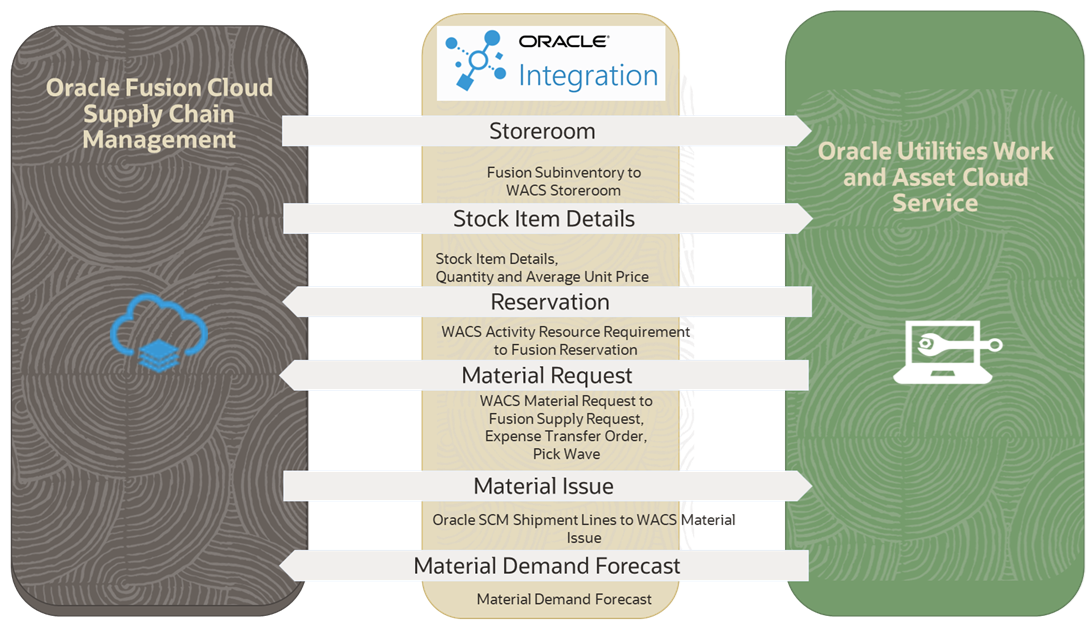
This integration supports the following flows:
• Storeroom Integration
• Stock Item Details Integration
• Material Reservation Integration
• Material Request Integration
• Material Issue
• Material Demand Forecast
The bulk and incremental updates of the Stock Item Details integration flow have dependency on the Oracle ERP Product Hub Cloud Integration to Oracle Utilities Work and Asset Cloud Service.
The following actions are required during implementation of the integration:
• Stock Item Detail Bulk Load
Before executing the Stock Item Detail bulk/initial synchronization, ensure the Stock Item Bulk Load has been completed successfully. For specific instructions, refer to the Oracle ERP Product Hub Cloud Integration to Oracle Utilities Work and Asset Cloud Service Release Notes for release 24A.
After the Stock Item Bulk Load is completed, set the following properties before starting the Stock Item Detail Bulk Load work flow:
• The “execute.stockitem.bulk” property in the ERPWACS_ConfigProps lookup within the OU WACS ERPPIM project deployed in Oracle Integration Cloud to “no”.
• The “execute.sid.bulk” property in the OUTL-BRT-WACS_ERPSCM_ConfigProps lookup to “yes”.
• Incremental Update
Set the “invoke.sid.inc.sync” property in the ERPWACS_ConfigProps lookup within the OU WACS ERPPIM Project deployed in Oracle Integration Cloud to “yes”, to continue with the Stock Item Details incremental synchronization after the stock item create/update.