Configure Custom Buckets - Customer
Facts and dimension attributes in the dimensional data model provided by Oracle Utilities Data Intelligence may contain numerical attributes that become more useful when grouping them into categories that represent specific number intervals. This process is often referred to as "binning" or "bucketing." For example, an age attribute value may be assigned to an age bucket such as 0-1 days, 1-2 days, 2-3 days, 3-4 days, or >=5 days.
Utilities business applications support a set of predefined bucket business objects that are used in Device Analytics. Intervals representing each bucket must be defined before the analytics solution can use bucket columns.
Supported Buckets
Buckets must be configured in the Customer Cloud Service application by an administrator before they can be used by Data Intelligence. The following fact and dimension buckets are currently supported. In Oracle Utilities analytics products, a fact represents a measurable event or value (such as energy consumption or charges), while a dimension provides descriptive context (such as customer, time, or location) used to categorize and analyze those facts.
Supported Dimension Buckets
| Dimension | Importance | Bucket Value Ranges (Examples) | Column with Value to Be Bucketed | Column Details |
|---|---|---|---|---|
|
Dimension: Completed in Billing Day Window Bucket Attributes:
|
Identify the period in a bill cycle window when a bill was completed (for example, early in the bill cycle window). |
Provides a meaningful illustration to users about when a bill was completed within its bill cycle window. Example:
|
DAYS_COMPLETED_AFTER_WIN_STARTDays Completed After Window Started |
Bucket Column: Description Business Object Name: Billing Day In Window Configuration Business Object Code: C1-BillingDayInWindow |
|
Dimension: Days Before Bill Window Closes Bucket Attributes:
|
Identifies how much time is left in an open bill cycle window for a bill to be completed. |
Provides a meaningful illustration to users about the time remaining in an open bill cycle window for a bill to be completed. Example:
|
DAYS_BEFORE_BILL_WIN_CLOSESDays Before Bill Window Closes |
Bucket Column: Description Business Object Name: Days Before Bill Window Closes Configuration Business Object Code: C1-DaysBeforeBillWindowCloses |
Supported Fact Buckets
| Fact and Attributes | Importance | Bucket Value Ranges (Examples) | Column with Value to Be Bucketed | Column Details |
|---|---|---|---|---|
| Fact: Payment Arrangement
Attribute: Future Payment Amount Buckets (1-10) |
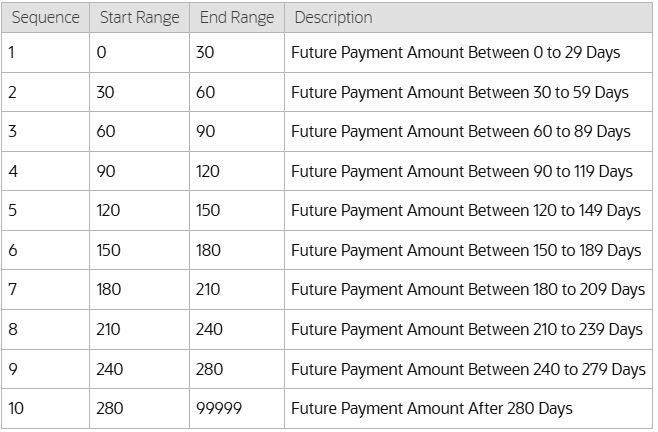
Future amount buckets segment expected collections into time periods (for example, 0-30 or 31-60 days), enabling clear forecasting of when outstanding payments are likely to be received and supporting cash flow planning. | Defines configurable day ranges indicating the age of future scheduled payments for payment arrangements.
Example:
|
A1_PA_FUTURE_PAY_AMT1 A1_PA_FUTURE_PAY_AMT2 ... A1_PA_FUTURE_PAY_AMT10 |
Bucket Column: Description Business Object Name: PA Future Payment Age Configuration Business Object Code: C1-PAFuturePaymentAge |
|
Fact: Payment Arrangement Attribute: Total Number of Installments |
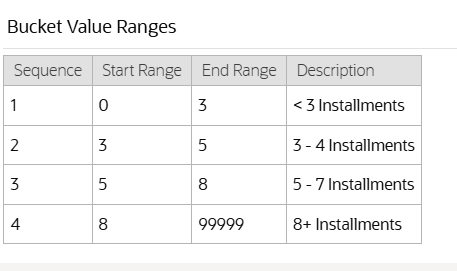
The installment count bucket groups payment arrangements by the number of payments required allowing analysis of success rates or risks based on agreement length. | Defines configurable ranges for number of installments.
Example:
|
A1_INSTALLMENT_CNT |
Bucket Column: Description Business Object Name: PA Number of Installments Configuration Business Object Code: C1-PANumberOfInstallments |
| Fact: Payment Arrangement
Attribute: Total Scheduled Payment Amount |
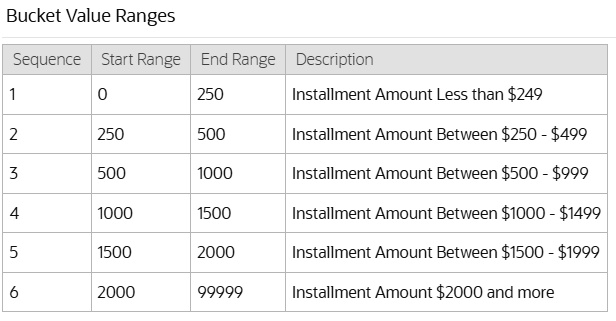
The recurring charge bucket categorizes arrangements by their scheduled installment amount, enabling the business to assess performance and risk for different payment sizes. | Defines configurable recurring charge amount ranges.
Example:
|
A1_REC_CHARGE_AMT |
Bucket Column: Description Business Object Name: PA Future Payment Age Configuration Business Object Code: C1-PAFuturePaymentAge |
| Fact: Payment Plan
Attribute: Future Payment Amount Buckets (0-10) |
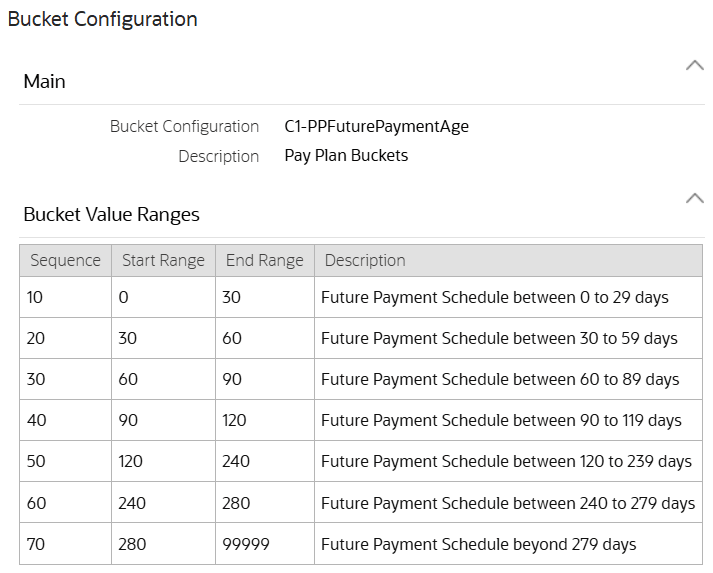
Future amount buckets segment expected collections into time periods (for example, 0-30, 31-60 days), enabling clear forecasting of when outstanding payments are likely to be received and supporting cash flow planning. |
Defines configurable day ranges indicating the age of future scheduled payments for payment arrangements.
Example:
|
A1_PP_FUTURE_PAY_AMT01 A1_PP_FUTURE_PAY_AMT02 .... A1_PP_FUTURE_PAY_AMT10 |
Bucket Column: Description Business Object Name: PP Future Payment Age Configuration Business Object Code: C1-PPFuturePaymentAge |
Configure Custom Buckets
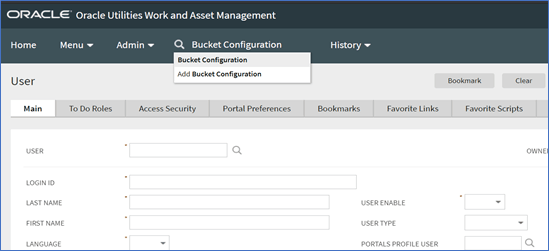
- In the search bar at the top of the screen, search for the "Bucket Configuration" menu and open it.
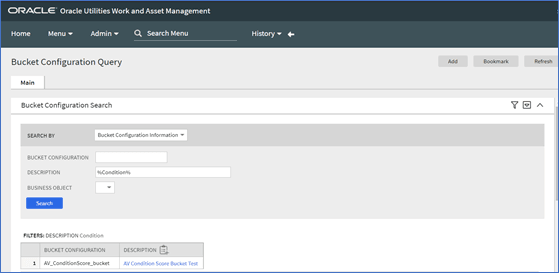
- In the Description field, enter the percent symbol (%) to search for any predefined buckets.
Note:
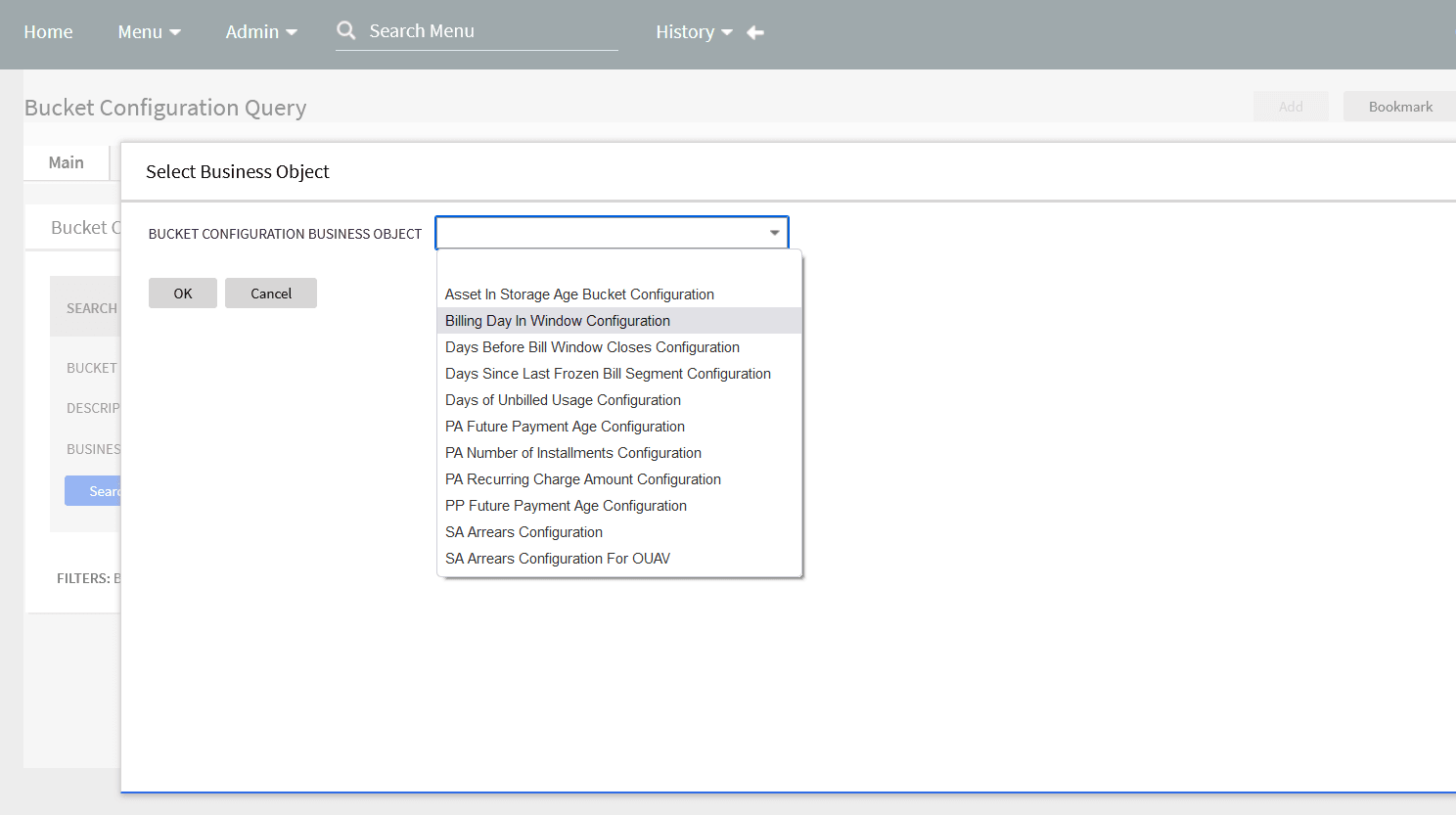
A newly installed application will not have any default configurations. If there are any records available, results will be displayed based on the search criteria. Select any of the bucket configuration records returned from search results to navigate and view the configuration. - Select an option from the Bucket Configuration Business Objects menu. These options represent the placeholder for the bucket definition.
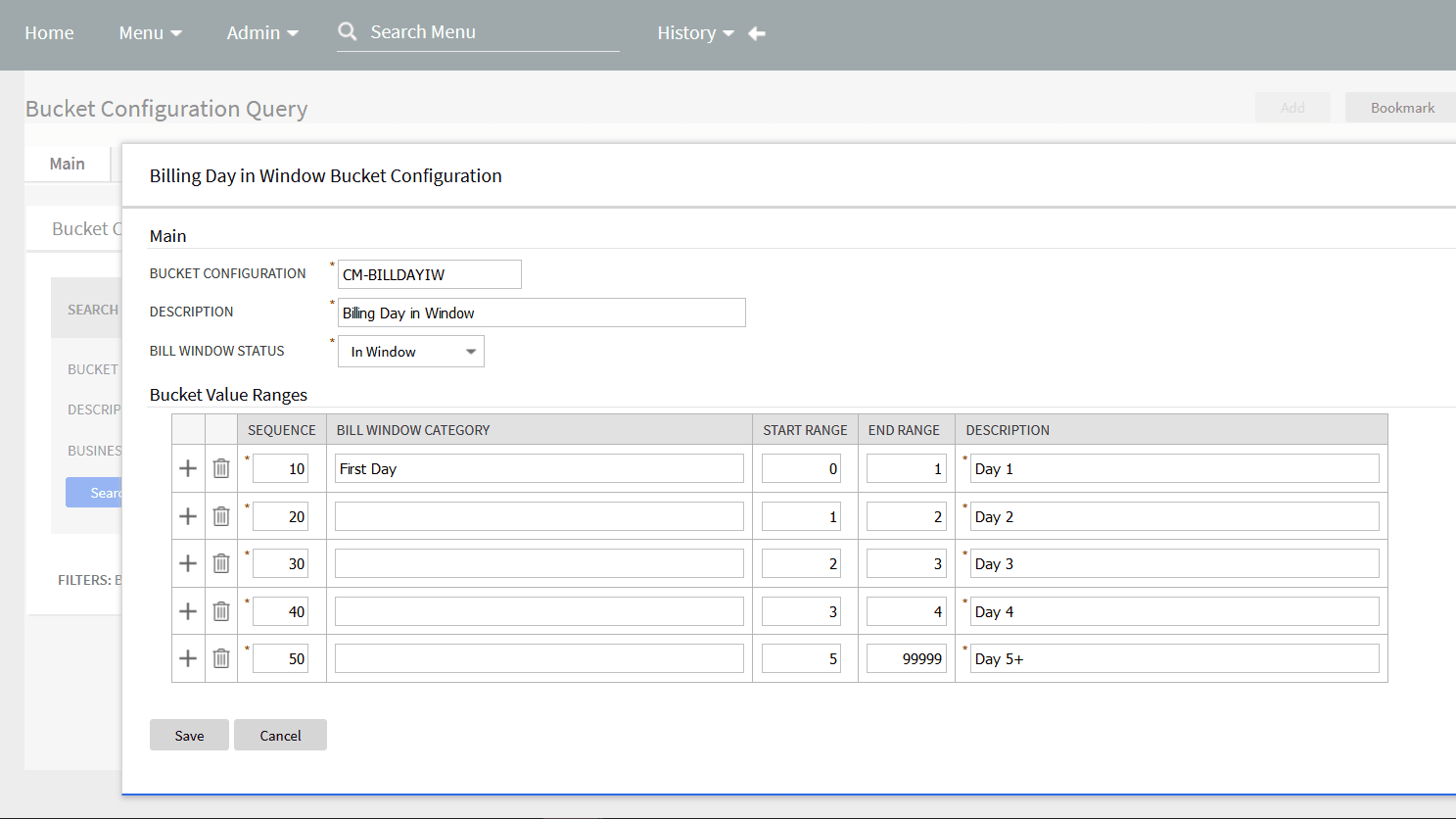
- In the Bucket Value Ranges section, define a sequence of intervals for the start and end ranges that represents how the data should be grouped or binned. In most cases, the ranges must be continuous, and the start range must be the end range of the previous interval. The existing functionality will assign the attribute being binned into a range using the formula: Start Range <= x < End Range, where x is the numerical attribute being binned. The intervals must include all possible values of the underlying attribute that is binned into buckets. It is best practice to use a high value for the last end range to ensure that a large value is included in the interval defining the default bucket.
Important Constraints: Follow these guidelines to avoid incorrect behavior of buckets.
- Only one bucket configuration for each Bucket Business Object is supported by Analytics Visualization. Otherwise the application will return incorrect values and may double-count measures.
- The bucket definition must have intervals that do not overlap and must cover all possible values. Otherwise, the application will return incorrect values and may under- or double-count measures.