Notifications Configuration Options
Use the tables below to review all feature configuration options alerts and notifications features, including the alerts and notifications highlighted on the Overview Dashboard which can be submitted as a request using My Oracle Support.
Note: You can use the Opower Configuration Tool to implement certain configurations for Digital Self Service - Transactions. This can include user experience configurations, interface messages and formats, branding configurations, and other configurations relevant to Digital Self Service - Transactions. To review if any configurations listed below are available with the Opower Configuration Tool, access the tool at https://configuration.opower.com/ and review the available options for the pages and widgets included in your Digital Self Service - Transactions web portal.
Alerts and Notifications
Customers are presented with all active alerts and notifications for their account.
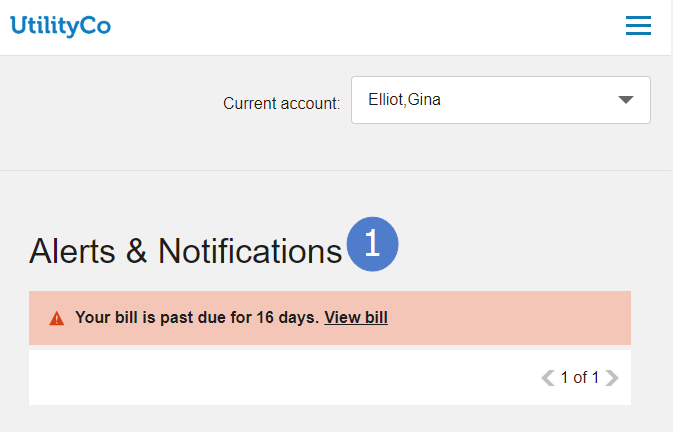
Use the table below to review all available configuration options.
| Image Number | Configuration Option |
|---|---|
| 1 |
Title Default: Alerts & Notifications |
| Not Depicted |
Error Message Title An error message is displayed when errors prevent the display alerts and notifications Default: We’re sorry, but something went wrong. |
| Not Depicted |
Error Message Details Default: We’re unable to retrieve your information right now. |
| Not Depicted |
Error Message Additional Details Default: Please try again later. |
| Not Depicted |
No Alerts Title A message is displayed for customers that have no active alerts or notifications. Default: You don’t have any alerts or notifications right now. |
| Not Depicted |
No Alerts Details Default: When you receive alerts or notifications, you’ll see them here. |
| Not Depicted |
No Alerts Additional Details Default: Return to overview. |
User Experience Variations
The user experience varies for customers depending upon their service types, available data, costs, and locale. Note that the following list indicates the primary user experience variations, not all possible variations.
-
Customers Enrolled in Payment Extensions: Alerts related to the due date of a customer's bill are impacted when a customer enrolls in payment extensions. When a customer enrolls in payment extensions, past due notifications are hidden for the customer. Alerts that relate to the due date such as Bill due today and Bill due in future are modified to reflect the due date of the payment extension.
Alerts and Notifications on the Overview Dashboard
Critical alerts that are defined with high severity are displayed at the top of the Overview Dashboard, along with a single non-critical notification or a summary of all non-critical notifications.
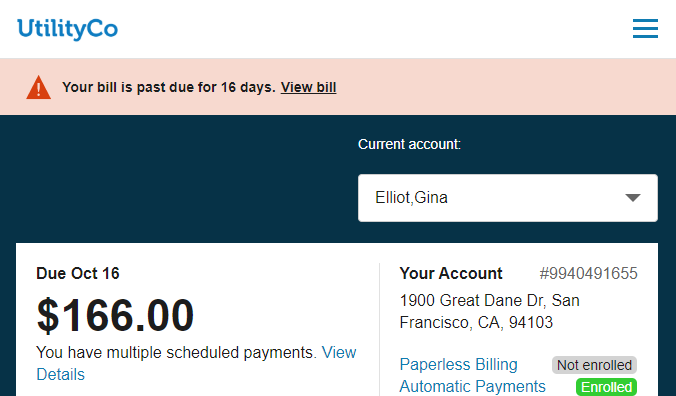
Use the table below to review all available configuration options.
| Image Number | Configuration Option |
|---|---|
| Not Depicted |
Loading Message Default: Loading notifications |
| Not Depicted |
Multiple Notifications Customers with more than one non-critical notification see a summary notification on the Overview Dashboard with the total number of non-critical alerts, along with a link to the Notification Center to view all alerts and notifications. Default: You have |
Account Notifications Configuration Options
The following image shows a standard example of Account Notifications and indicates the primary configuration option.
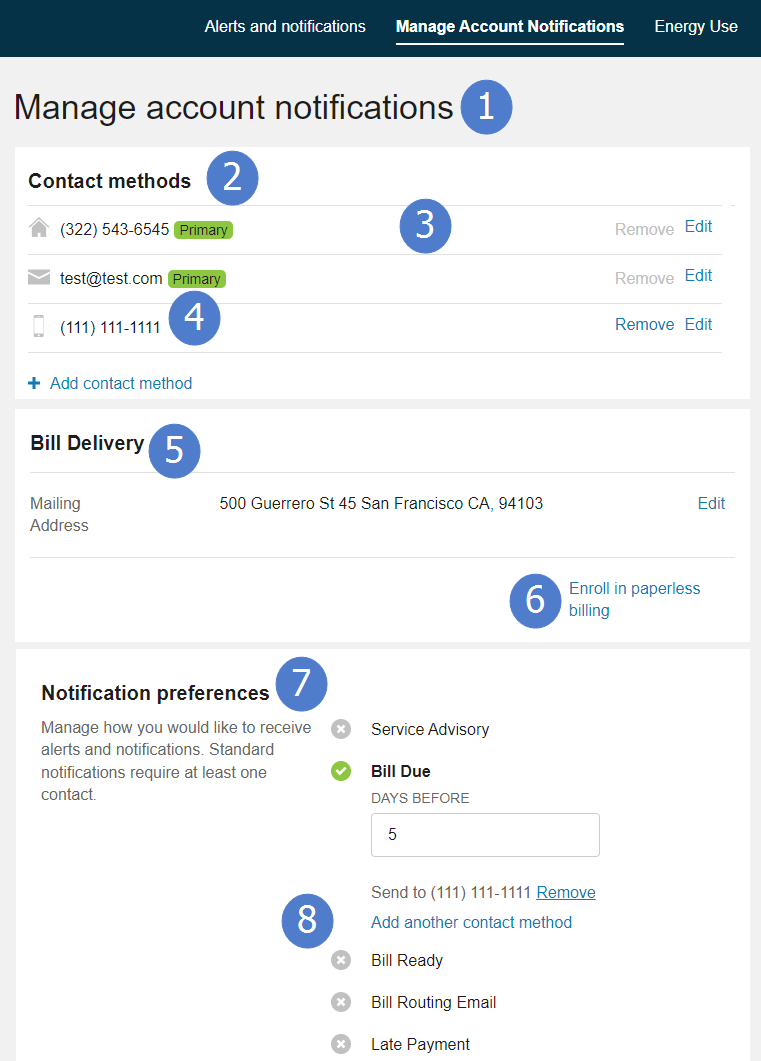
Use the table below to review all available configuration options.
| Image Number | Configuration Option |
|---|---|
| 1 |
Title Default: Manage account notifications |
| 2 |
Contacts Section Title Default: Contact methods |
| 3 |
Add Contact Method Message Default: Add contact method |
| Not Depicted |
Create Contact Method Section Title A section is displayed to customers when they select to add a contact method. Default: Create a new contact method |
| Not Depicted |
Edit Contact Method Section Title A section is displayed to customers when they select to edit a contact method. Default: Edit contact method |
| 4 |
Phone Format Locale format used to display customer telephone numbers. Default: United States format (XXX) XXX-XXXX |
| 5 |
Bill Delivery Section Title Default: Bill Delivery |
| 6 |
Paperless Billing Enrollment Message A link is displayed for customers who are not enrolled in paperless billing. Customers enrolled in paperless billing are presented with the applicable paperless contact method listed for their bill delivery. Default: Enroll in Paperless Billing |
| 7 |
Preferences Section Title Default: Notification preferences |
| 7 |
Alerts Section Explanation Default: Manage how you would like to receive alerts and notifications. Standard notifications require at least one contact. |
| 8 |
Notification Types Default: Bill Due, Bill Ready, Bill Routing, Late Payment |
Energy Use Communications Configuration Options
The following image shows a standard example of Energy Use Communications.
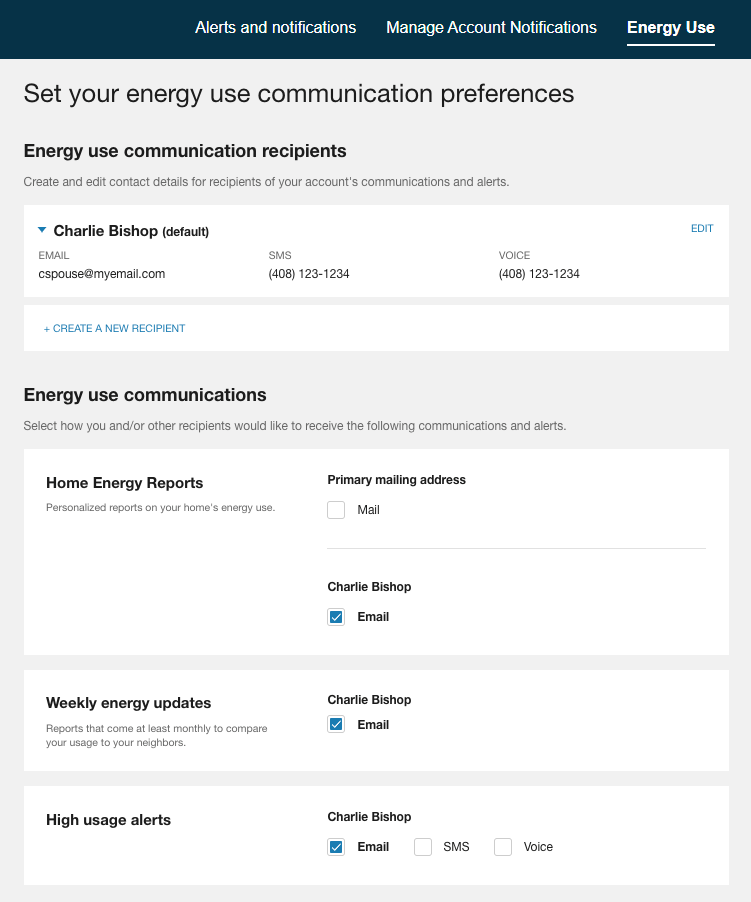
Energy Use Communications options are available through the Digital Self Service - Energy Management Cloud Service. For more information on configuring Digital Self Service - Energy Management, see the Oracle Utilities Opower Digital Self Service - Energy Management Configuration Guide.
User Experience Variations
The user experience varies for customers depending upon their service types, available data, costs, and locale. Note that the following list indicates the primary user experience variations, not all possible variations.
- Energy Use Communications: Communications and alerts are displayed or hidden for all customers based on the utility level support for a product. This means that if a utility does not have a product, such as Peak Time Rebates, all communications and alerts for that product are hidden from all customers. Additionally, Home Energy Reports are only shown to customers that are recipients of Home Energy Reports.
Outage Configuration Options
The following image shows a standard example of Outage notifications and indicates the primary configuration options.
Notification Types
The notification types shown below are available when integrating with Customer Care and Billing notification preferences to support outage notifications.
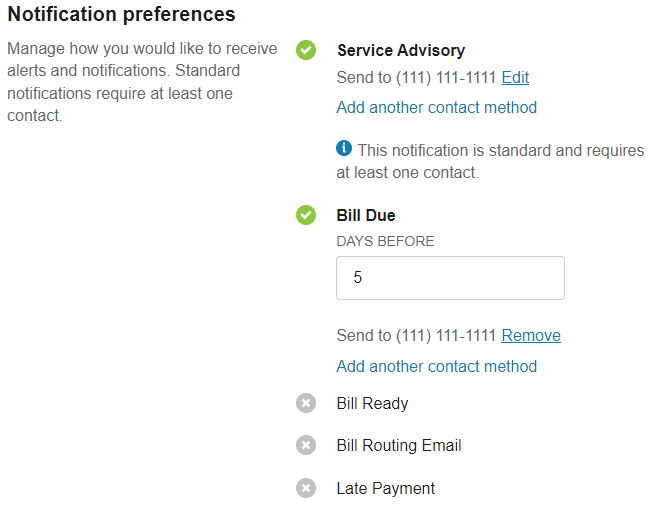
Use the table below to review all available configuration options.
| Image Number | Configuration Option |
|---|---|
| 1 |
Notification Types Default: Bill Due, Bill Ready, Bill Routing, Late Payment Refer to Account Notifications Configuration Options for information on configuring notification types for outage notifications. |
Kubra Integration Features
The experience shown below is available when integrating your Kubra Notifi Alerts and Preferences Management solution with your applicable Oracle Utilities product to support outage notifications, such as Oracle Utilities Customer Care and Billing. Refer to the applicable third-party Kubra documentation for steps to integrate your Kubra system with Oracle Utilities. Additionally, you must work with your Implementation Team to provide applicable security keys and URL paths for your Kubra system.

Use the table below to review all available configuration options.
| Image Number | Configuration Option |
|---|---|
| 1 |
Title Default: Outage Alert Preferences |
| 1 |
Subtitle Default: Powered by Kubra |
| 2 |
Sign-up Section Title Default: Get Outage Alerts Sent to Your Mobile Phone |
| 2 |
Sign-up Section Explanation Default: Sign up to get outage alerts on your mobile phone or device. After you register, you can update your Alert Preferences here. |
| 3 |
Set Your Preferences Section Title Default: Set Your Alert Preferences |
| 3 |
Set Your Preferences Section Explanation Default: Outage Alert Preferences settings allow you to add or remove additional contacts and set up "Do Not Disturb" during the hours you designate. |
| 4 |
Errors Section Title Default: Seeing an Error Message? |
| 4 |
Errors Section Explanation Default: If you are waiting to start electric service at a new address, you can sign up to get outage alerts after the start-of-service date. |
| Not Depicted |
Sign-up Link A link can be provided to allow customers to sign up for outage notifications. Default: None |
| Not Depicted |
Errors Link A link can be provided to allow customers to learn about errors related to outage notifications. Default: None |