Introduction Module
The Introduction module provides a projection of how much the customer could spend on their utility bill if they continue their spending behavior through the end of the billing period.
Requirements
There are no module-specific requirements. See Requirements and Limitations for the High Bill Alerts (AMI) feature for more information.
Limitations HBA AMI v3 Introduction
This section lists the limitations:
-
Multiple Accounts: The personalized threshold experience varies depending on what kind of accounts the customer has.
- If a customer has budget billing and another non-budget billing account, they will receive the budget billing user experience.
- The combined usage or cost of all fuel/resource types included in the alert must meet the threshold to trigger the alert. For example, if the customer has electric and gas service, and has set a threshold of $100, the combined cost for electric and gas must be $100 or greater to trigger the alert.
- The utility-wide default threshold is not allowed.
- Utility customers with water service must opt in to receive HBAs and must set a personal cost threshold.
- Customers in a budget billing program must set a usage personal threshold.
-
Water Customers: For utilities that are including water data in their HBAs:
- The utility-wide default threshold is not allowed.
- Utility customers with water service must opt in to receive alerts and must set a personal cost threshold.
- Customers in a budget billing program must set a usage personal threshold.
User Experience
If rates are not modeled, the email includes a usage forecast instead of a cost forecast. It is possible for some customers at a utility to see cost information in their forecast, while others see usage information. For example, some customers at a utility may be on budget billing, which typically means they will see a usage forecast. Other customers at the same utility who are not on budget billing will typically see a cost forecast.
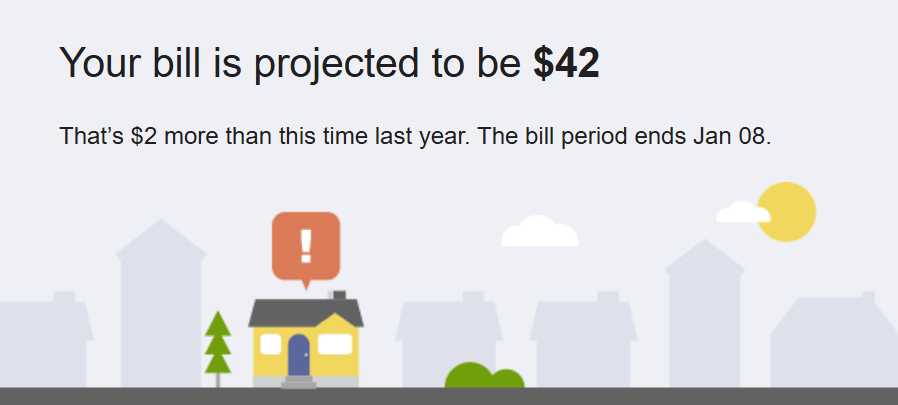
Forecast Statement: The forecast amount is an estimate, not an exact amount, and is based on the estimated length of the bill. By default the cost values are rounded to the nearest whole dollar. For example, "Your bill is projected to be $[XX]."
Insight Statement: Below the forecast is an insight about how much more the projected bill could cost compared to historical bills. "That's $2 more than this time last year. The bill period ends Jan 08."
For utilities that do not include water in their messages, and have implemented the personal threshold, the threshold defaults to the utility-set threshold until the customer sets their personal threshold. When a threshold is set, the alert triggers only when cost or usage is greater than the set threshold. Utilities can also implement their own preference center, and provide access to customers using APIs. For additional information, see Oracle Utilities REST API for Digital Self Service - Energy Management
For utilities that include water in their HBAs, there is no utility-wide threshold. Customers only receive the alert if they have opted-in and set up a personal threshold.
This image shows an example of the Bill Forecast module:
User Experience Variations
This section describes the user experience variations in the Introduction module.
Personal Threshold Not Available
If the utility does not implement the personal threshold, all language regarding the customer's personal threshold are removed from the message.
Budget Billing
Budget billing customers receive a usage experience, which means their bill forecast statement uses percentage rather than dollar amounts. Additionally, a statement is added to the message telling the customer that if their usage is high, it could impact their future bills.
Energy Use
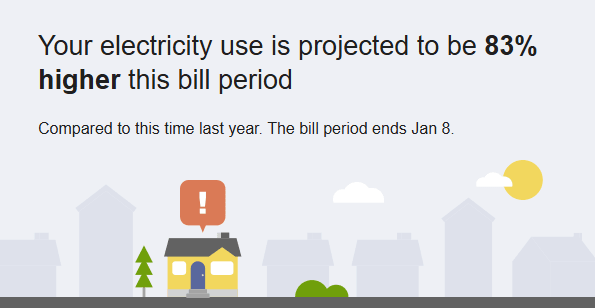
The message can provide an energy use forecast rather than a cost forecast. The energy use forecast is shown as a percentage. For example, "Your electricity use is projected to be 10% higher this billing period".
Projected Range
Utilities can display a forecast cost range rather than a specific cost value for the projected bill. If you choose to display a range, you do so by specify the range percentage. By default, the range is set to 0 (zero), and therefore, a range is not displayed. If you set the range to 15%, for example, and a customer's projected bill is $100, the range would display as $100-$115.
Calculations
At a high level, the bill forecast calculation involves the following steps:
- Calculate the baseline cost and energy values using the customer's bills from the previous year.
- Estimate the customer's billing period end date.
- Calculate how much energy the customer has used to date.
- Take the customer's energy use and project it forward to the estimated billing period end date.
- Convert the resulting energy use values to cost values, based on the customer's rate plan. The output is an actual cost value (to date) and a projected cost value (going forward). Note that the projected cost can also be displayed as a cost range, depending on the module configuration.