Multi Service Comparison Module
The Multi-Service Comparison module is included in the Email High Bill Alert AMI for customers who have multiple services, such as water and electric or gas and electric. The module includes two bar graphs. Each graph compares projected costs to costs from the same billing period of the previous year, or compares projected energy use to energy use from the same billing period of the previous year. One graph shows electricity and the other shows the additional service, either water or gas. A dollar amount is displayed above each graph bar, or the applicable energy use unit for the given service it is referencing displays above each graph bar.
Note:
Data for the water portion of the module can include standard water service, wastewater, and sprinklers.Requirements
This topic lists the utility and customer requirements.
Utility Requirements
There are no module-specific requirements. See Requirements and Limitations for the High Bill Alerts (AMI) feature for more information.
Customer Requirements
In addition to the Requirements and Limitations for the High Bill Alerts (AMI) feature, customers must have the following in order for this module to generate:
- One of the following service point combinations:
- One electric and one gas service point.
- One electric and one water service point.
- Bill forecast information available for both services.
Limitations
Water can include standard water service, wastewater, and sprinklers. Customers must have standard water service to generate an electricity and water comparison. This comparison is not valid for wastewater-only or sprinkler-only customers.
User Experience
This section describes the common user experience with the module.
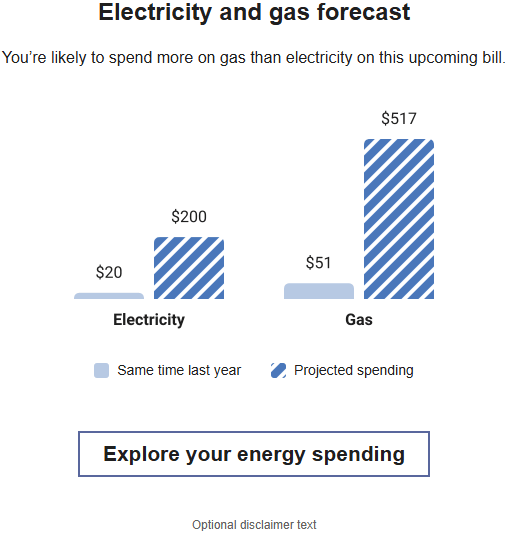
Heading: The module heading tells the customer that they are viewing a breakdown of both electricity and gas data, or electricity and water data. By default, the heading reads, "Electricity and gas forecast" or "Electricity and water forecast".
Subheading: The subheading tells the customer whether they are projected to spend more than they did during the same time period last year. The message varies depending on how much more or less they spend this billing period compared to the same period last year. For example, "You’re likely to spend more on gas than electricity on this upcoming bill." or "You’re likely to spend more on electricity than water on this upcoming bill."
Bar Chart: Two graphs are displayed side-by-side. The graph on the left displays projected electricity costs for the current period compared to the same period last year. The graph on the right displays projected gas costs or water costs for the current period compared to the same period last year. The dollar values for each are displayed above the bars.
Bar Chart Labels: If a disclaimer is included in the module, an asterisk (*) can be included on one or both of the bar chart labels to direct the customer's attention to the disclaimer statement, and identify which part of the graph the disclaimer is referring to. For example, if the disclaimer discusses only how water projections are calculated, the label under the water graph should read "Water*".
Legend: Below the chart, a legend displays the color and shading used for the projected bill, and for the same time last year.
Disclaimer: Below the legend, a disclaimer statement includes information that explains how the projections are calculated. For example, "*Projections are based on current water use for this period, and may include wastewater and sprinkler usage." This statement should begin with an asterisk to tie it back to the appropriate bar chart label, if needed.
Electricity and Gas Example
Electricity and Water Example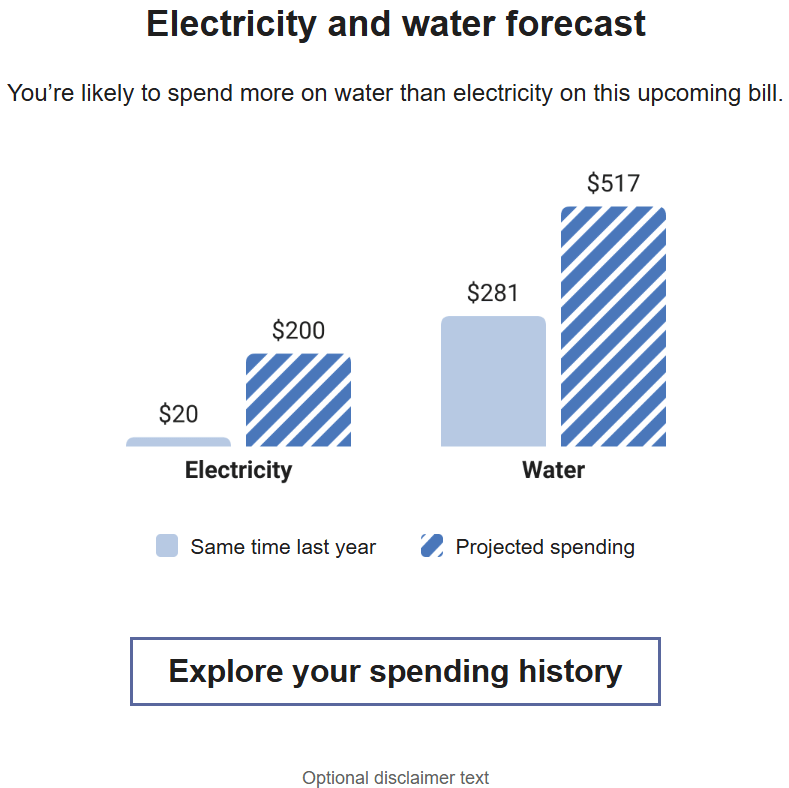
Usage Experience Variations
This section discusses the user experience variations in the Ways to Save module.
Energy Use Version - Electricity and Gas
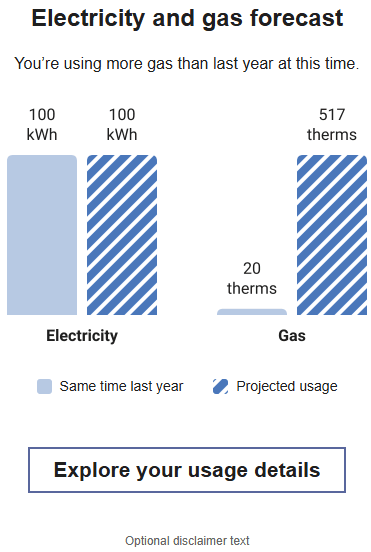
If the customer receives an energy use version of the email, this module shows energy use instead of costs. Electricity is displayed in kWh, and gas is displayed in therms.
Budget Billing - Electricity and Gas
Budget billing customers see a usage experience for this module. The bar chart labels display units rather than dollar amounts. For example, kWh for electricity and gal for water.
Projections Only/No Baselines
If baseline amounts are not available for one or both of the resources in the chart, the subheader statement refers to the comparison between the projected bill amounts of the resources shown in the chart. For example, if the customer is expected to spend the same amount on electricity and water during this period, the statement reads "You're projected to spend the same amount on electricity and water on this upcoming bill." Alternatively, the subheading could read:
- "You're projected to spend more on electricity than water on this upcoming bill."
- "You're projected to spend more on water than electricity on this upcoming bill."
If baselines for both resource types are not available, the module eliminates the previous year bars and the "Same time last year" from the legend. If a baseline is available for one of the resource types, the module displays "N/A" as the label for the resource without a baseline.
Subheading Variations
The subheader changes based on whether a customer spends more or less than they did during the same period last year. The customer must have spent at least 10% more than the previous year to be considered "spending more" during the current bill period. This 10% threshold for the comparison states is not configurable. These subheader variations are possible:
- Customers spends 10% more on both fuel types: The subheader is hidden as the main header provides relevant messaging for this scenario.
- Customer spends 10% more on one fuel/resource type, but not the other: "You're using more on <fuel/resource type> than last year at this time." Note that there must be a correlated higher fuel or resource type use, increases due to rate changes only do not trigger this scenario.
- If no data or partial data exists from last year, and there is a cost threshold: "You're likely to spend more on <fuel type 1> than <fuel type 2> on this upcoming bill."
- Customer spends about the same:The subheader is hidden. Note that this occurs only when the customer's bill forecast exceeds their personal cost threshold, even though they did not spend more.