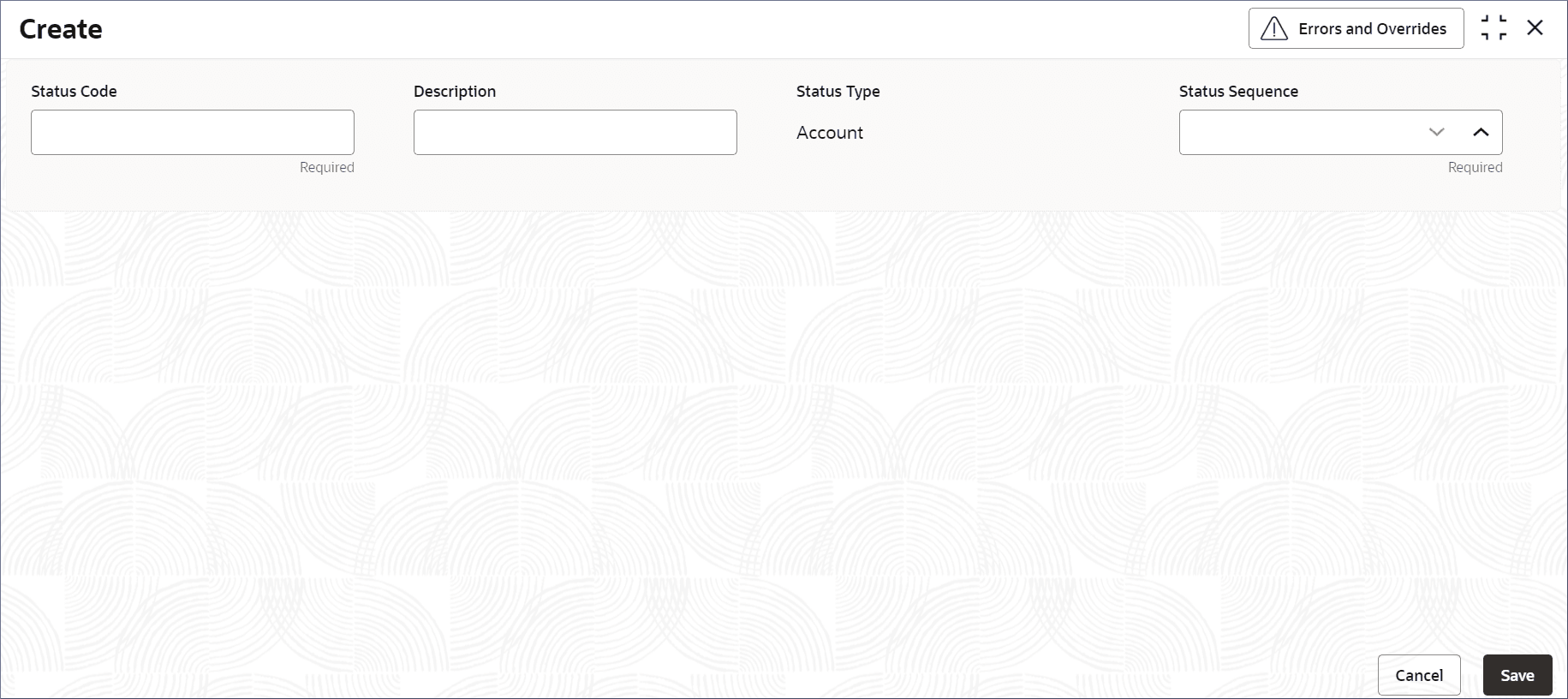
A status code is a predefined alphanumeric label that indicates the state of an account. Creating a status code is a process in which administrators assign status codes and their sequence numbers to the different states in an account's lifecycle. This topic describes the systematic instructions to create status code.
Note:
The fields marked as Required are Mandatory.Table 11-1 Create Status Code - Field Description
| Field | Description |
|---|---|
| Status Code | Specify the status code of alphanumeric characters. The maximum length of code is four. For example, SUSP to indicate the
account is suspended and NORM to indicate a normal account.
Note: This field is mandatory. |
| Description | Provide additional information about the Status Code. |
| Status Type | This is a read-only field and is auto-populated with the value Account.
Note: The status codes are currently supported only for accounts. |
| Status Sequence | Specify the sequence of the status code which is unique. A sequence number of a status code determines its position in the
predefined order in the lifecycle of an Account. User can assign a value between 1 and 9999. This field is mandatory.
For example, consider the following states of an account activation lifecycle: 12. INA (INACTIVE), 13. ACT (Active) 14. VRF(Verified). Here, we have given the sequence numbers 12, 13, and 14 to the states of the account in the account activation phase. |
Note:
At this point, the status of the Status Code is Unauthorized. A user with a supervisor role has to approve the Status Code. After approval, the status changes to Authorized, and the Status Code is available for use by another process.Note:
As a maker of this configuration, User cannot approve it. It has to be approved by another user with a Supervisor role.