10.2 Process to View Insolvency Block Details
Provision to maintain the balance threshold and hold percentage at the account class level for Current and Savings Accounts, and Deposits account classes for the purpose of FDIC provisional holds. This topic describes the systematic instructions to view the list of insolvency block details created.
- Under Insolvency Block Details Maintenance, click
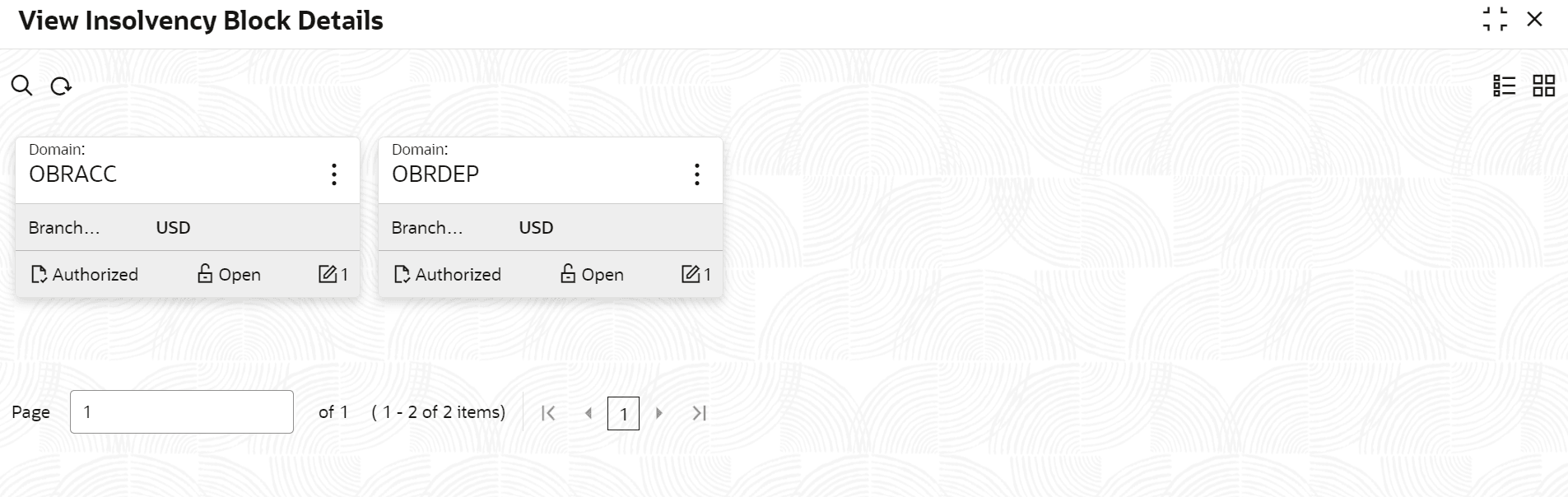
View Insolvency Block Details.The View Insolvency Block Details page displays.
Tip:
Click or
or  to switch between the Tile view and the List view.
Table 10-2 Insolvency Block Details Tile - Field Description
Field Description Domain Displays the domain name Branch Currency Displays the branch currency. Authorization Displays the authorization status of the record. The available Options are: - Authorized
- Rejected
- Unauthorized
Status Displays the status of the record. The available Options are: - Open
- Closed
The following table describes the action items in the More Options (
 ) menu and the action items on the page.
Table 10-3 Action Items Description
Action Item Description Unlock Unlock a record and make amendments. Close Close a record to prevent it from being unlocked and amended. View View the details of a record. Delete Delete a record. Note:Once deleted, the component can no longer be used to define an entity. But entities already defined using the component can continue to use it.
Reopen Reopen a closed record. Authorize Authorize a record to make it active and available to define entities. Note:Creator of a record cannot authorize the component. Another user with authorize permissions can.
Audit Select to view the Maker, Checker, Status, and Modification Number of a record. Errors and Overrides Select to view all existing errors or warnings on the page. Note:
The actions you can perform depend on your role and the record status.
Parent topic: About Insolvency Block Details Maintenance