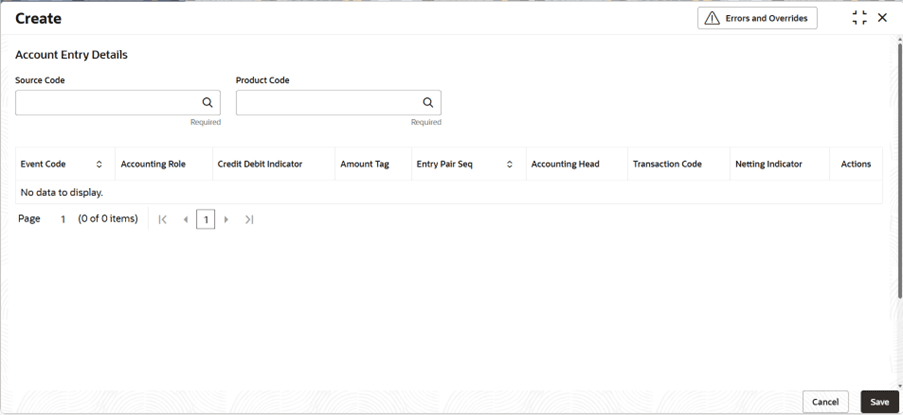
This topic describes the systematic instructions to configure the accounting entries details.
Note:
The fields marked as Required are mandatory.- On Home screen, click Corporate Account Configurations. Under Corporate Account Configurations, click Interest and Charges.
- On Home screen, click Retail Account Configurations. Under Retail Account Configurations, click Interest and Charges.
- On Home screen, click Retail Deposits. Under Retail Deposits, click Configurations. Under Configurations, click Interest and Charges.
- Under Interest and Charges, click Accounting
Entries. Under Accounting Entries, click
Create.The Create screen displays.
- Specify the fields on the screen.
For more information on fields, refer to the field description table.
Table 6-1 Create Accounting Entries - Field Description
Field Description Source Code Click Search icon to view and select the source code of the source system. The Source System maintained in the ECA System screen is available in the LOV list. Product Code Click Search icon to view and select the code of the product for which user are maintaining the accounting entries. The Interest Product maintained in the Interest Product screen is available in the LOV list.
Event Code The Event Code applicable to the Interest product will be listed. The following is a list of events that can take place during Interest calculation.
- IACR - Interest Accrual
- ILIQ - Interest Liquidation
The following is the event that can take place during Charge calculation.
- CLIQ - Charge Liquidation
Accounting Role The Accounting Role applicable to the Interest product based on the mapped rule will be listed.
Accounting Roles are tags that identify the type of accounting entry that is posted to an accounting head.
The following list contains the accounting roles which are applicable to IC.
- <FORMULA NAME>-BOOK-<FORMULA No>
- <FORMULA NAME>-ACCR-<FORMULA No>
- <FORMULA NAME>-PNL-<FORMULA No>
- <FORMULA NAME>-TPBL-<FORMULA No>
- CHG_INCOME
- CHG_BOOK
Debit Credit Indicator The Indicator applicable to the entry based on the mapped role will be listed. The values are: - Debit
- Credit
Amount Tag The Amount Tag applicable to the entry based on the mapped role will be listed. The following amount tags are hard coded.
- CHARGE - Charges
- IACQUIRED - Acquired Interest Amount
- IACR - Interest Accrual
- IACR_ADJ - Interest Accrual Adjustments
- ILIQ - Interest Liquidation
- TAX - Tax
- TAX_ADJ - Tax Adjustments
- INT_PADJ - Back valued interest adding to the normal interest
- INT_NADJ - Back valued interest reducing the normal interest
- TAX_PADJ - Back valued tax adding to the normal tax
- TAX_NADJ - Back valued tax reducing the normal tax
Entry Pair Seq Displays the sequence number of the debit and credit pair entry. Accounting Head Click search icon to view and select the different GLs maintained in Chart of Accounts. . Transaction Code Click search icon to view and select the transaction code. It is used identify the nature of the accounting entries posted. The code selected here is used to track the accounting entries resulting from the movement of the account to the status being maintained.
Netting Indicator Select the toggle to display the netting type. - Click Save to save the details.
Note:
1. When modifying Rule parameters such as Book Flag, Accrual, or Formula Type, the maintained Accounting Entries must be modified using the 'Unlock' action.2. When modifying the back value dated parameter in the Interest Product screen, the maintained Accounting Entries must be modified using the 'Unlock' action.
3. On choosing Unlock action, the accounting entries relevant to the changes made in Rule/Product, will be populated and displayed on the screen.
4. Transaction Code and Accounting Head for these must be mapped.
5. The changes must be saved and authorized.