14.1 View Generic Maintenance
This topic describes the systematic instructions to view the list of configured generic maintenances.
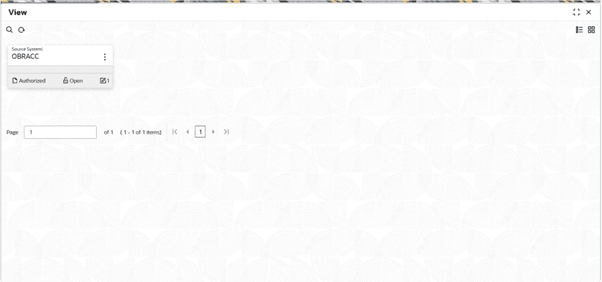
- Under Interest and Charges, click Generic Maintenance. Under Generic Maintenance, click View.The View screen displays.For more information on fields, refer to the field description table.
Table 14-1 View Generic Maintenance - Field Description
Field Description Source System Displays the system to which Generic Maintenance belongs. For Example: FCUBS etc.
Authorization Status Displays the authorization status of the Generic Maintenance.. The available options are:
- Authorized
- Rejected
- Unauthorized
Record Status Displays the record status of the Generic Maintenance. . The available options are:- Open
- Closed
- In Progress
Modification Number Displays the number of modification performed on the record. - To Unlock and update Generic Maintenance follow the steps below:
- Click

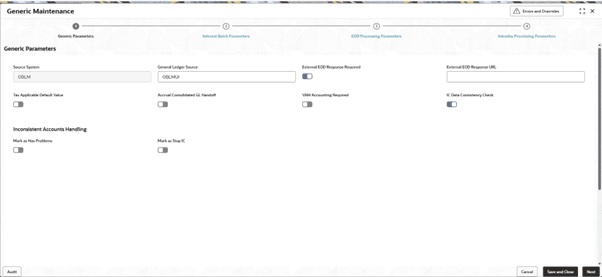
and select Unlock.The Generic Parameter screen in the Generic Maintenance page displays.For more information on fields, refer to the field description table.
Table 14-2 Generic Parameters - Field Description
Field Name Description Source System Displays the Source system of the product processor. General Ledger Source Displays the General Ledger source of the product processor. External EOD Response Required Enable this field to parameterize to call any other endpoint, if EOD status is not completed/aborted. External EOD Response URL The URL to be used to call to check the EOD response. Tax Applicable Default Value The value in this field determines the default Federal Tax applicability value if the TAX_APPLICABLE value is not passed during account creation/modification. During account creation or on account modification if TAX_APPLICABLE is not passed, the value from ictb_param for the param name TAX_APPLICABLE_DEFAULT_VALUE is considered. The toggle can be used to enable or disable this default value. If its enabled, Federal Tax will be applicable.
Accrual Consolidated GL Handoff Enable this for accrual entries to be consolidated for GL handoff. VAM Accounting Required Enable this for VAM accounting to be done after EOD is completed. IC Data Consistency Check Enable this to perform data consistency check done for all the IC maintenances and verify the incorrect maintenances. The inconsistent maintenances can be identified, and the processing of related accounts can be halted. The details of such maintenances will be available in the log CONSDATACHK Inconsistent Accounts Handling- Mark as Has Problems When 'IC Data Consistency Check' is enabled, if this field is enabled, it will mark all the associated accounts as problematic accounts (has_problems = Y). During subsequent EOD, processing of these accounts will be retried and will be processed if the maintenances are corrected. Inconsistent Accounts Handling- Mark as Stop IC When 'IC Data Consistency Check' is enabled, if this field is enabled, it will stop the IC processing of all the associated accounts (stop_ic = Y) i.e. IC processing will be disabled henceforth - Click Next to move to the next data entry screen.The Interest Batch Parameters screen displays.
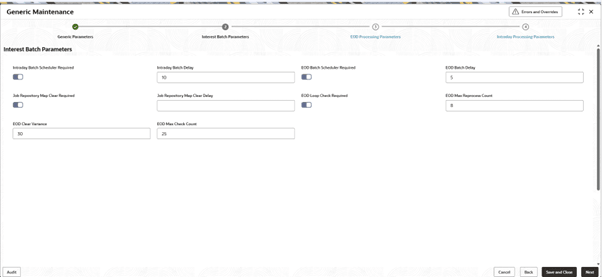
Displays all the Interest batch processing parameters related to Intraday batch and EOD batch.
For more information on fields, refer to the field description table.Table 14-3 Interest Batch Parameters
Field Name Description Intraday Batch Scheduler Required Enable the toggle to turn the scheduler on for intraday batch i.e to automatically schedule the running of the intraday IC batch. Intraday Batch Delay Displays the Intraday Batch Delay. This field denotes the delay between each invoking of the intraday IC batch by the scheduler.
EOD Batch Scheduler Required Enable the toggle to turn the scheduler on for EOD batch i.e to automatically schedule the running of the EOD IC batch EOD Batch Delay Displays the EOD Batch Delay. This field denotes the delay between each invoking of the EOD IC batch by the scheduler
Job Repository Map Clear Required Enabling this will enable the scheduler that will clear the heap getting increased during EOD Job Repository Map Clear Delay This field denotes the time by which the scheduler delays the clearing of heap EOD Loop Check Required Enable this for EOD loop check EOD Max Reprocess Count Displays the EOD Max Reprocess Count. Indicates how many times reallocation is done when EOD is stuck and eodLoopCode is activated. After it breaches this count, STOP_PROCESS is marked and accounts still processing are marked hasProb Y
EOD Clear Variance Displays the EOD Clear Variance. Indicates the Buffer time for the service to be processed in addition to the average timetaken for a service
EOD Max Check Count Displays the EOD Max Check Count. Indicates the maximum number of times upto which it can be processed by comparing the current pending count and past pending, when the variance is breached
- Click Next to move to the next data entry screen.The EOD Processing Parameters screen displays.
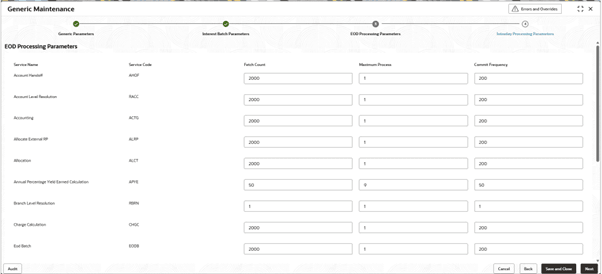
Displays all the fetch count, maximum process and commit frequency maintained for each of the services related to End Of Day processing.
For more information on fields, refer to the field description table.
Table 14-4 EOD Processing Parameters - Field Description
Field Name Description Service Name Displays the Service Name. Service Code Displays the Service Code. Fetch Count Displays the Fetch Count. Maximum Process Displays the Maximum Process. Commit Frequency Displays the Commit Frequency. - Click Next to move to the next data entry screen.The Intraday Processing Parameters screen displays.
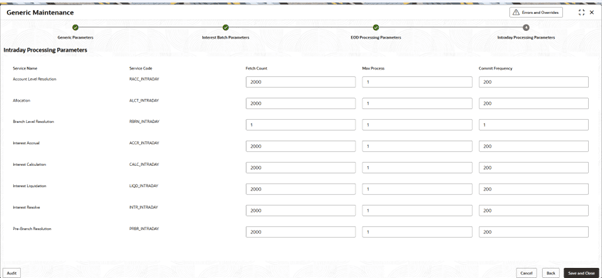
Displays all the fetch count, maximum process and commit frequency maintained for each of the services related to Intraday processing
Figure 14-5 Intraday Processing Parameters
For more information on fields, refer to the field description table.
Table 14-5 Intraday Processing Parameters
Field Name Description Service Name Displays the Service Name. Service Code Displays the Service Code. Fetch Count Displays the Fetch Count. Maximum Process Displays the Maximum Process. Commit Frequency Displays the Commit Frequency.
- Click
- Click
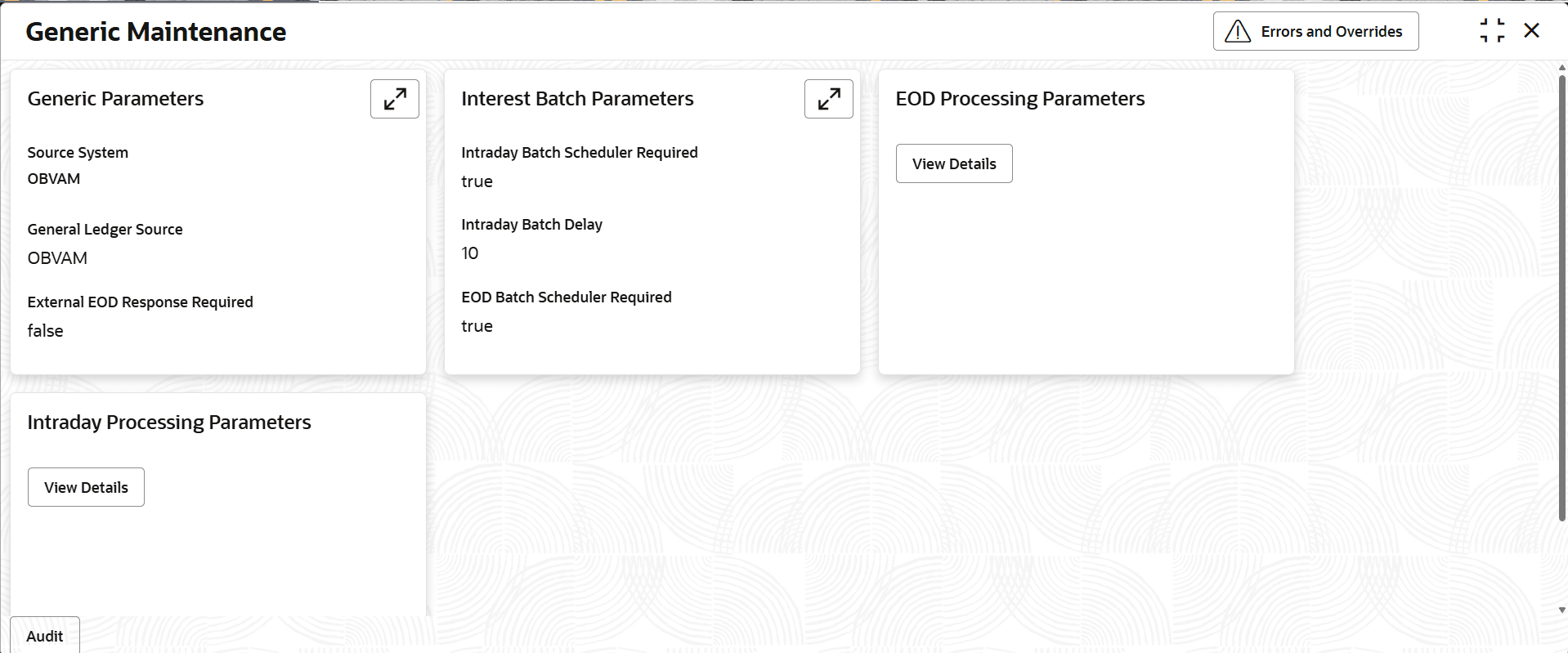
and select View.The Generic Maintenance - View screen displays.For more information on fields, refer to the field description table.
Table 14-6 Generic Maintenance - View
Field Name Description Generic Parameters Displays the Generic Parameters. Interest Batch Parameters Displays the Interest Batch Parameters EOD Processing Parameters Displays the EOD Processing Parameters Intraday Processing Parameter Displays the Intraday Processing Parameter.
Parent topic: Generic Maintenance