1.16.1 Amount Block Inquiry

This topic explains the systematic instructions to inquire Amount Block details.

  1. 1. On Home screen, under Menu, click Retail Account Inquiries. Under Retail Account Inquiries, click Amount Block Inquiry.
    The Amount Block Inquiry screen is displayed.
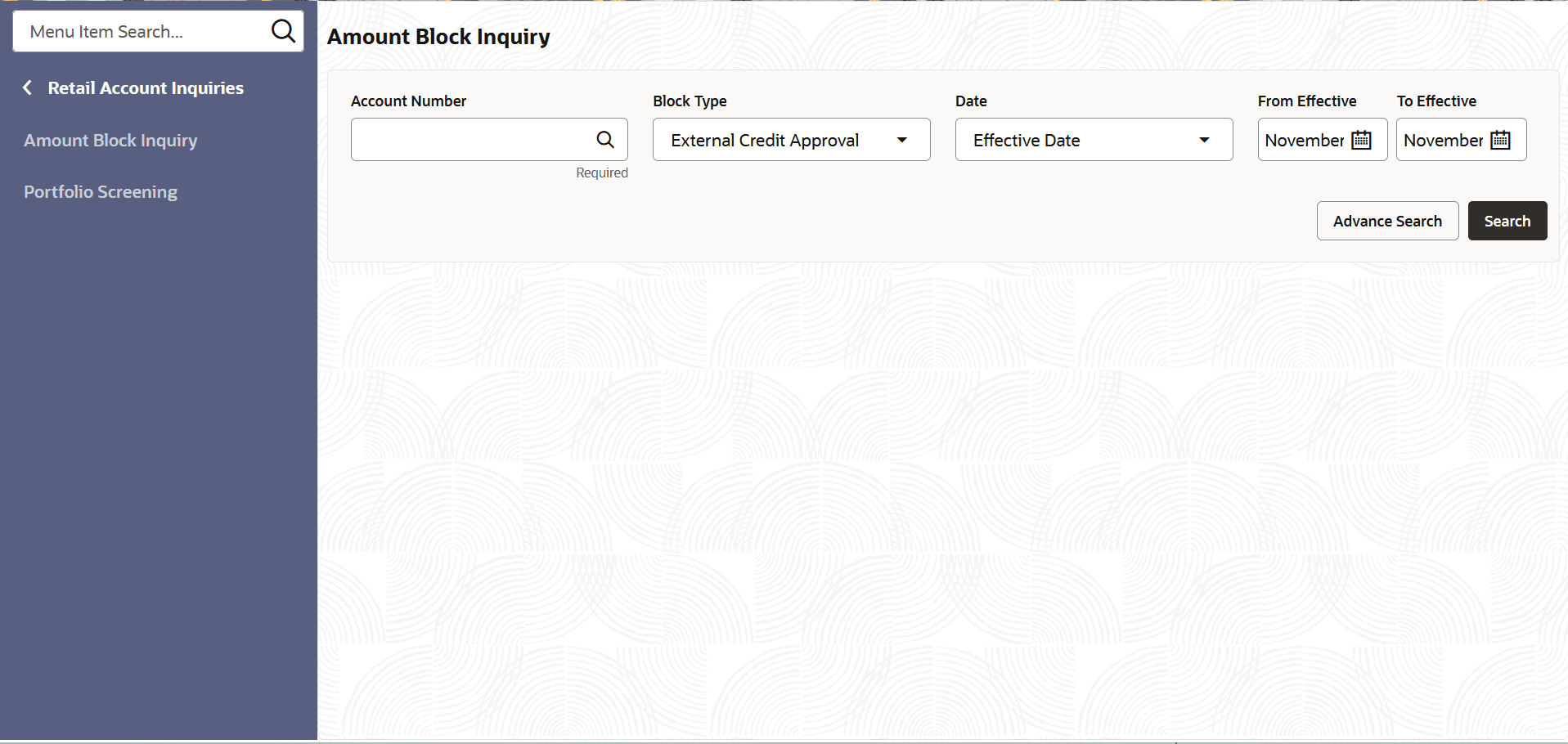
    Figure 1-80 Amount Block Inquiry


  2. Specify the fields on Amount Block Inquiry screen.

    For more information on fields, refer to the field description table below.

    Table 1-78 Amount Block Inquiry - Field Description

    Field Description
    Account Number Click Search icon to view and select the required account number.
    Block Type Select the type of the block from the drop-down list.

    The available Options are:

    • External Credit Approval
    • Legal
    Date Select the date type from the drop-down list.

    The available Options are:

    • Effective Date
    • Expiry Date
    • No Expiry Date
    From Effective Date Specify the from date to arrive at the date range.
    To Effective Date Specify the to date to arrive at the date range.
  3. Click Search icon to search the Amount Block Inquiry.
  4. By invoking the Advanced Search button, users can retrieve block details filtered by Customer Number, Transaction Reference Number, Source Code, and Amount as criteria.