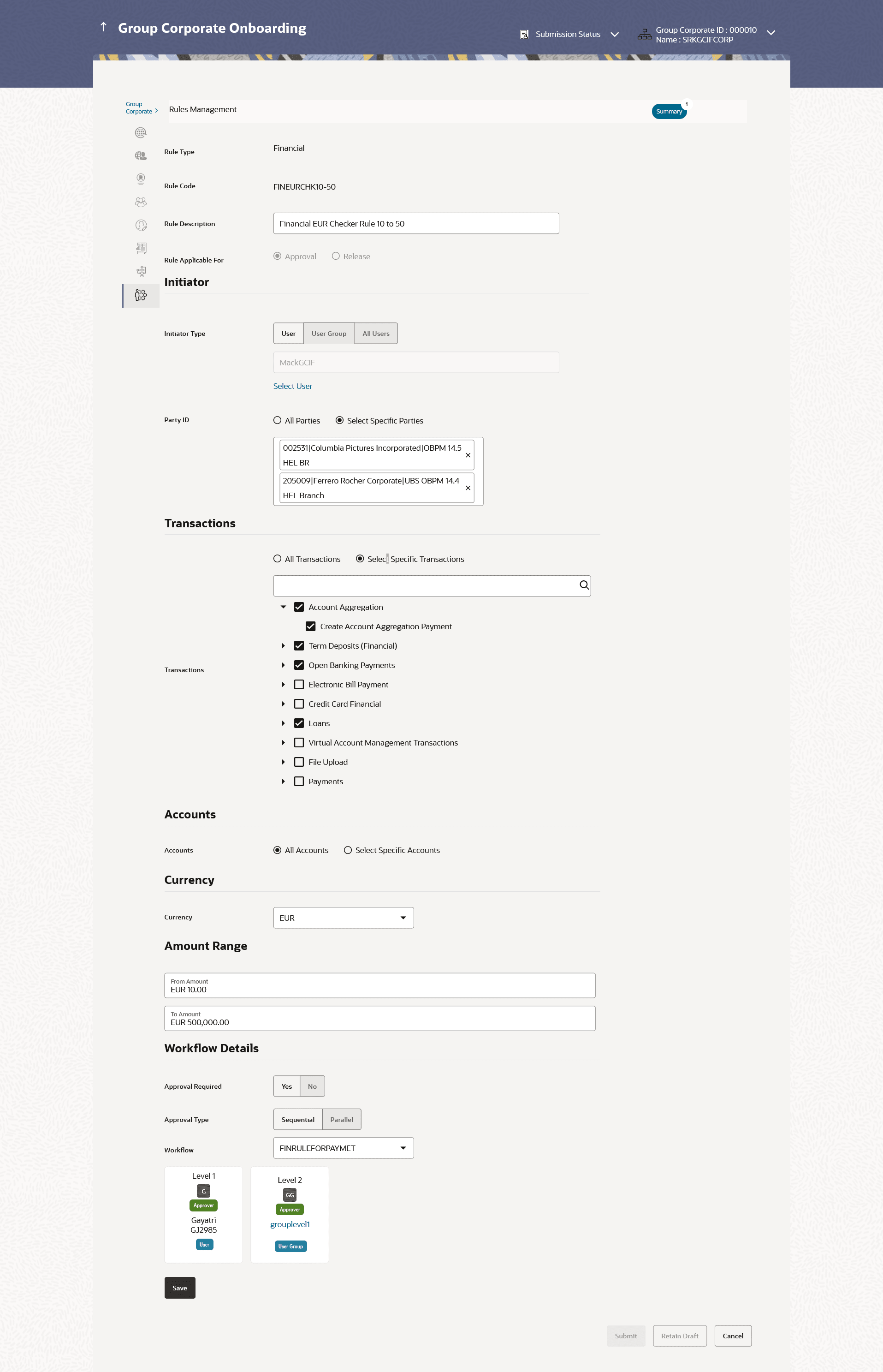
This topic describes the systematic instruction to Approval Rule - Edit feature.
Edited rules are applicable for new transactions initiated post rule update. Previously initiated transactions which are pending approval will follow a rule which was applied at the time of transaction initiation.
To edit an approval workflow:
- Click Edit to edit the approval rule.The Approval Rule - Edit screen with values in editable form appears.
Note:
The fields which are marked as Required are mandatory.For more information on fields, refer to the field description table.
Table 14-37 Approval Rules - Edit - Field Description
Field Name Description Edit Information specified in below fields are related to edit. Rule Type Transaction rule type for which the approval rule is set up will be displayed. The rule type cannot be modified. The transaction rule for corporate user are:- Financial
- Non Financial
- Maintenance
- Non Account Financial
- Administration
- Service Request
Rule Code Approval rule code provided by the user. Rule Description Approval rule description provided by the user in editable form. Rule Applicable For The rule applicable for Release or Approval in editable form. The rule applicable for cannot be modified
Initiator Information specified in below fields are related to initiator. Initiator Type Initiator type who initiates the transaction will be displayed in editable form. Note:
If All Users is selected, then the rule being created is applicable for all users of Corporate PartyUser Name / User Groups Name of the user or user group as initiator will be displayed in editable form. If initiator is selected as User, then all the users belonging to the party will be listed for selection.
If initiator is selected as User Group, then all the user groups belonging to the party will be listed for selection.
Party ID The one or multiple Party IDs mapped to the selected Group Corporate ID will be displayed in editable form. Transactions The transactions to set the approval rules will be displayed in editable form. The options are:- All Transactions
- Select Specific Transactions
- All Service Request – rule will be applicable for all the service requests available in the form builder
- Select Specific Category – all the service request categories available in the form builder will be listed for selection where one category can be selected
- Select Specific Service Request - all the service requests available in the form builder will be listed for selection where one service requests can be checked
Type of transactions available depends on the selection of rule type.
The option All Service Requests, Specific Service Request or Specific Category is enabled only if the Service Request option is selected in Rule Type field.
Accounts Type of accounts based on the Party ID selection will be displayed in editable form. The options are:- All Accounts – If selected, the rule can be setup for all accounts within the selected Party IDs
- Select Specific Accounts – Specific accounts can be selected for which the rule is applicable. The Party ID, Account Type and Account Numbers along with their names are listed for selection
This field appears if you select Financial and Non Account Financial in the Rule Level field.
Currency Currency type in which the financial approval rule for a corporate is defined. Amount Range Information specified in below fields are related to amount raange. From Amount/ To Amount Transactions allowed for the user between the defined amounts ranges will be displayed in editable form. This field appears if you select Financial and Non Account Financial in the Rule Level field.
Workflow Details Approval Required Whether approval is required will be displayed in editable form. The options are:- Yes
- No
Approval Type Define the Approval workflow type. Possible value will be - Sequential
- Parallel
This field is enabled if Yes option is selected in Approval Required field and when workflow preference is set at Rule Level in Group Corporate Profiling setup.
Workflow Details of the approval workflow within which different levels are available for approver and checker will be displayed in editable form. For release, the release workflow can be selected.
This field appears if you select Yes in the Approval Required field.