This topic describes the information about Dashboard Overview.
Dashboard Builder provides an ability to the Bank to build custom dashboards.
Dashboard Builder is an administrative maintenance that allows the System Administrator to create and configure dashboard templates for Retail & Business, Corporate and Administrator users.
For the Retail & Business type of user, the Bank administrator can map brands and dashboards at the Party Type level. Thus while accessing Retail Party and Business Party details, the user will be able to see relevant dashboards and brands.
The administrator can further assign the Dashboards at the party level (Retail or Business)/user level, however only the transactions and widgets mapped at the party level will be accessible by the user post login.
System Administrator can configure new dashboards by dragging and dropping the desired widget at desired location in template. System administrator can define the dashboard for a user segment, application role, module and for a user type. Facility is provided to search, view, edit and delete the configured dashboards.
These dashboards are responsive and can adapt to any type of device i.e. desktop, mobile and tablet. System allows the user to design new template and preview it for different types of devices before enabling it. The user can also change the size of the widget (expand and compress) and can remove the widget from the template if desired. The widgets on the dashboard auto adjust itself according to the place available on the dashboard.
The administrator can define multiple dashboards with the various attributes/ widgets. Further these templates can be mapped to the roles, party or even to a specific user.
Prerequisites
- Transaction access is provided to System Administrator
- Approval rule set up for System Administrator to perform the actions
- Application roles are maintained in application and widgets are mapped to application roles
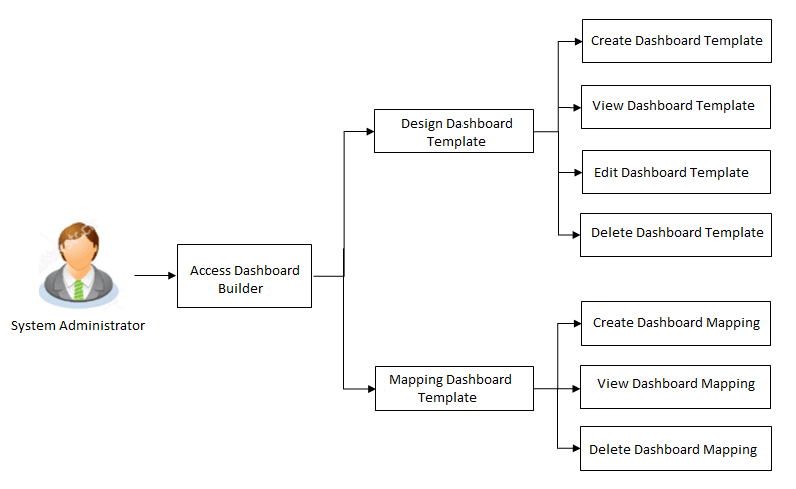
Features supported in application
- View Dashboard Mapping
- Create Dashboard Mapping
- Delete Dashboard Mapping
Navigation Path: Perform anyone of the following navigation to access Dashboard Overview.
- From System/ Bank Administrator Dashboard, under Templates widget, click Dashboard Builder.
- From System Administrator Dashboard, click Toggle Menu , then click Menu and then click User Experience. Under User Experience , click Dashboard Overview.
