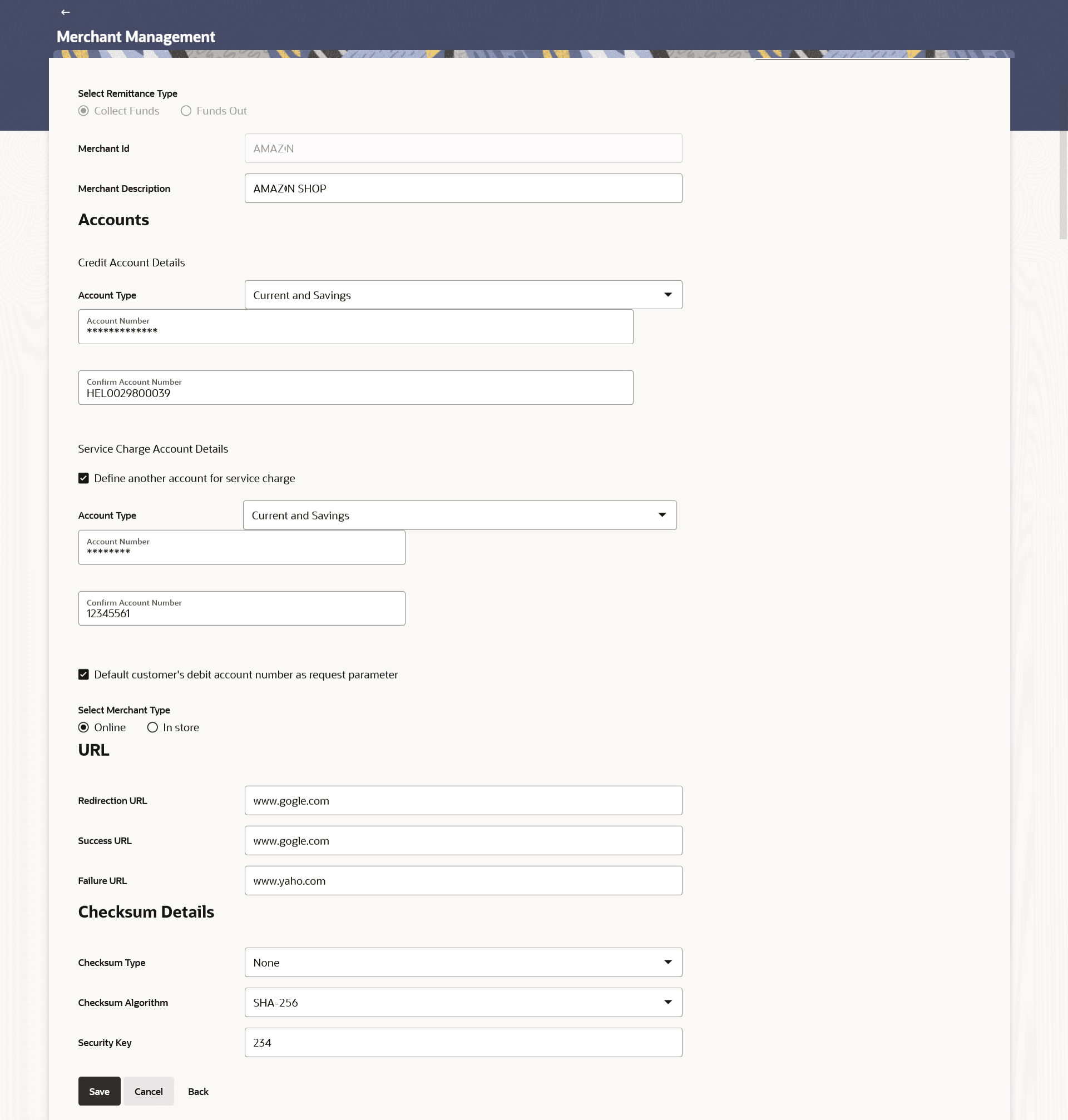
This topic describes the systematic instruction to Merchant Management – Collect Funds – Edit option.
The system administrator can edit the details of any Collect Funds
remittance merchant maintained in the application. In order to edit the details of any
merchant, the user must select the Edit option provided on Merchant Management – View
(details) page of the specific merchant.
To edit a merchant:
- Click the Edit option available on the
Merchant Management– View screen to edit merchant
details. The administrator is directed to the Merchant Management - Edit screen.
Figure 4-11 Merchant Management – Collect Funds – Edit
Note:
The fields which are marked as Required are mandatory.For more information on fields, refer to the field description table.
Table 4-8 Merchant Management – Collect Funds – Edit - Field Description
Field Name Description Select Remittance Type The type or remittance to be mapped to the merchant. The remittance type can be:- Funds Out
- Collect Funds
Merchant Id The unique ID assigned to the merchant by the bank. This field cannot be edited.
Merchant Description The description of the merchant. This field is editable.
Accounts Information specified in below fields are related to accounts. Credit Account Details Information specified in below fields are related to credit account details.. Account Type The type of account associated with the merchant, Only CASA type of accounts are supported. This field is editable. Account Number The merchant’s credit account number. This field is editable.
Confirm Account Number Re-enter the merchant’s account number to confirm the same if the account number has been changed. Service Charge Account Details Information specified in below fields are related to service charge account details. Define another account for service charge This checkbox is selected if the merchant has another account defined for service charge. Account Type The service charge account type associated with the merchant e.g. CASA account. This field appears if Define Account number for service charge check box is selected.
Account Number The merchant’s account number. This field appears if Define Account number for service charge check box is selected.
Confirm Account Number Re-enter the merchant’s account number to confirm the same if the account number has been changed. Default customer’s debit account number as request parameter This check box is selected if the customer’s debit account number is defaulted as request parameter. Select Merchant Type Specify the merchant type. The options are:
- Online
- In store
URL This section is displayed only for the Online type of merchant. Redirection URL The URL for sending the response of the transaction for redirection. Success URL The URL for sending the response of the transaction if it is a successful transaction. Failure URL The URL for sending the response of the transaction if it is a failed transaction. Checksum Details This section is displayed only for the Online type of merchant. Checksum Type The checksum type. This field is editable. Checksum Algorithm The checksum algorithm. This field is editable. Security Key Enter the security key. This field is editable. This field appears if a value is selected in Checksum Algorithm drop-down list.