10.22 Charge Decision Inquiry
The Charge Decision Inquiry screen is used to inquire about the details of charge definition and charge pricing for the specified search criteria.
- On the Homepage, from Teller mega menu, under Branch Maintenance, click Charge Decision Inquiry or specify Charge Decision Inquiry in the search icon bar and select the screen.The Charge Decision Inquiry summary screen is displayed.
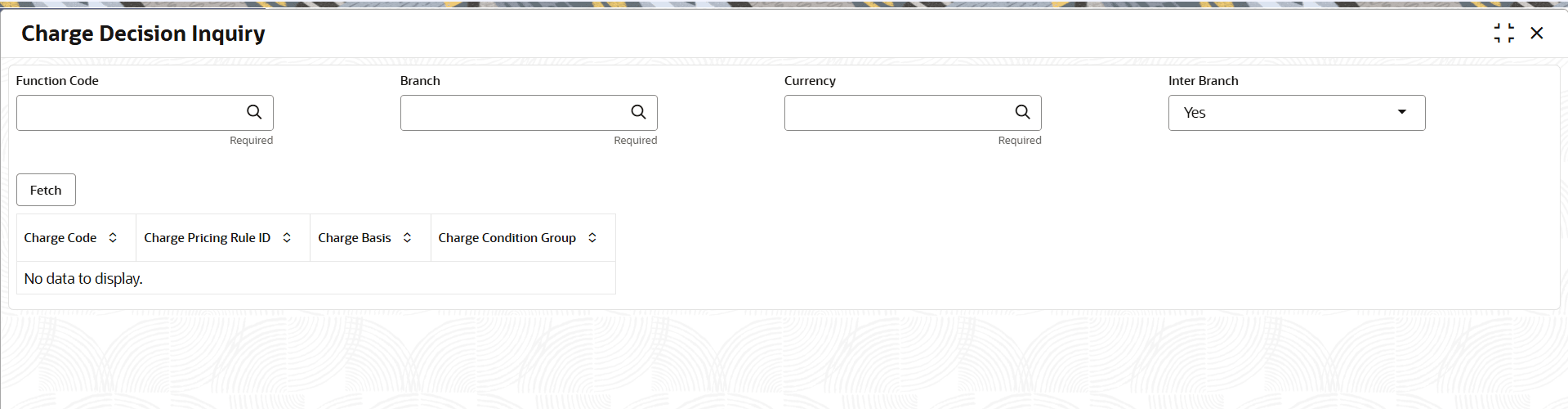
- On the Charge Decision Inquiry screen, specify the fields. For more information on fields, refer to the field description
table.
Note:
The fields marked as Required are mandatoryTable 10-27 Charge Decision Inquiry - Field Description
Field Description Function Code
Click the Search icon and select function code from the list of values.
Branch
Click the Search icon and select branch code from the list of values.
Currency
Click the Search icon and select currency code from the list of values.
Inter Branch
Select the value for inter-branch from the drop-down list.
Fetch
Click Fetch to fetch the details based on the specified search criteria.
Charge Code
Displays the charge code.
Charge Pricing Rule ID
Displays the charge pricing rule ID.
Charge Basis
Displays the charge basis.
Charge Condition Group
Displays the charge condition group.
Parent topic: Branch Maintenance
