2.1 TC Denomination Inquiry

The TC Denomination Inquiry screen is used to inquire the currency-wise details of the TCs in the branch vault.

The currency-wise details include:

  • Denomination

  • Count

  • Series

  • Serial Number

  • Amount

To inquire the TC denomination:
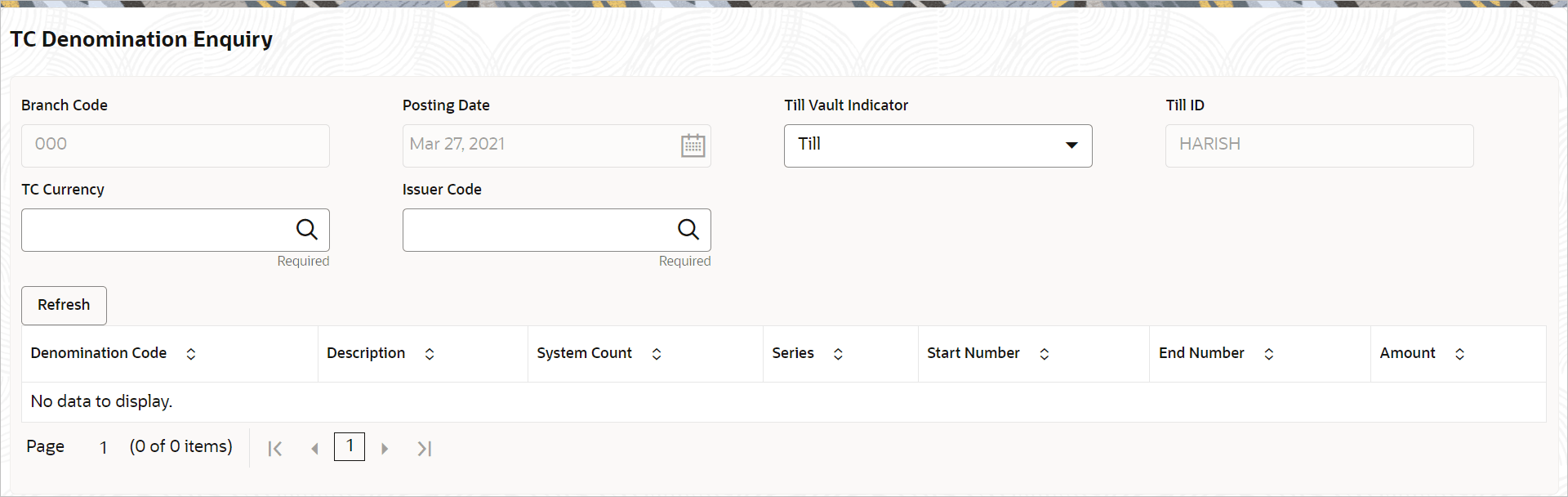
  1. On the Homepage, from Teller mega menu, under Branch Operations, click TC Denomination Inquiry or specify TC Denomination Inquiry in the search icon bar and select the screen.
    The TC Denomination Inquiry screen is displayed.

    Figure 2-1 TC Denomination Inquiry


  2. On the TC Denomination Inquiry screen, specify the fields. For more information on fields, refer to the field description table.

    Note:

    The fields marked as Required are mandatory.

    Table 2-1 TC Denomination Inquiry - Field Description

    Field Description

    Branch Code

    Displays the logged-in branch code.

    Posting Date

    Displays the current posting date of the branch.

    Till Vault Indicator

    Select the Till Vault Indicator from the drop-down values (Till or Vault).

    Till ID

    Displays the Till ID.

    TC Currency

    Click the search icon, and select the TC currency from the list of values.

    Issuer Code

    Click the search icon, and select the issuer code from the list of values.

    Refresh

    After you specify the TC Currency and Issuer Code fields, click Refresh to fetch and display the details of the TC.

    Denomination Code

    Displays the denomination code of the TC.

    Description

    Displays the description of the denomination code.

    System Count

    Displays the system count.

    Series

    Displays the series.

    Start Number

    Displays the start number.

    End Number

    Displays the end number.

    Amount

    Displays the amount.