2.10.1.10 Payment Details
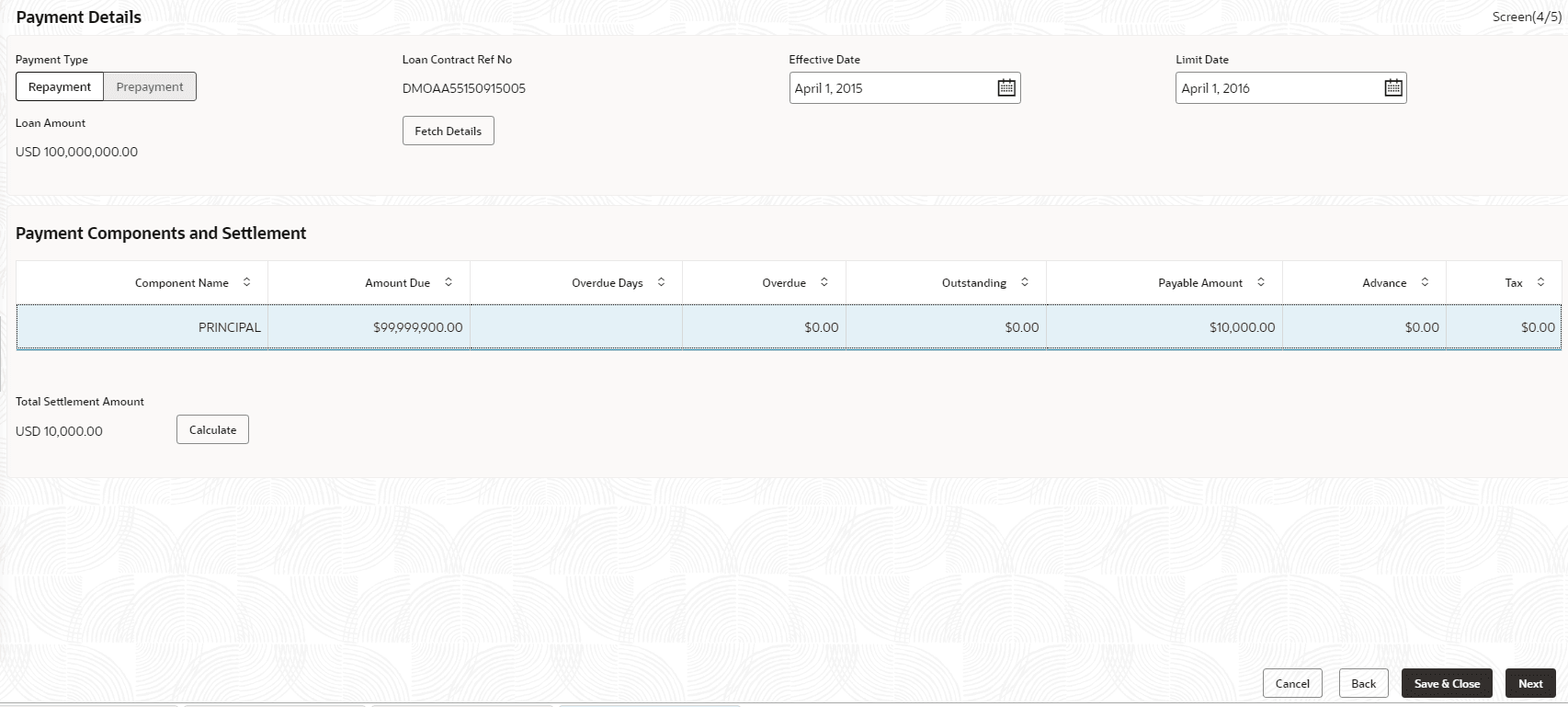
This topic describes the systematic instructions to Payment Details screen. This screen is used to capture payment details for the loan.
Allows users to capture the settlement details for Payment processing.
- From Loan Servicing, click Payment
Details tab provide the required details.The Payment Details screen displays.
Table 2-24 Payment Details - Field Description
Field Description Payment Type Select the payment type - Repayment or Prepayment. Effective Date Select the value date of the payment. Limit Date System will default the loan maturity date for Prepayment type and Effective date for Repayment type. User will be allowed to modify. Loan Contract Ref No Displays the loan contract reference number for which the payment is initiated. Loan Amount Displays the loan amount of the loan contract reference. Note:
On click Fetch Details, system displays the component wise (Principal, Interest, or Penalty) dues applicable for the loan contract.Table 2-25 Payment Details - Field Description
Field Description Component Name Displays the list of all component names for the selected loan contract reference. Amount Due Displays the component wise amount due for the selected loan contract reference. Over Due Displays the overdue accrued for the component of the selected loan contract reference. Outstanding Amount Displays the total outstanding amount for the component of the loan contract reference. Payable Amount Default the total payable amount for the component that is due for the contract. Users can modify the required amount. Advance Enter the advance amount applicable for the loan. Prepayment Penalty Enter the prepayment penalty amount applicable for the loan. Total Settlement amount Displays the sum of all the amount that needs to be settled by the customer.
Parent topic: Cash Flow